 The Boring Project
Best Auto Apply Tools by Use Case
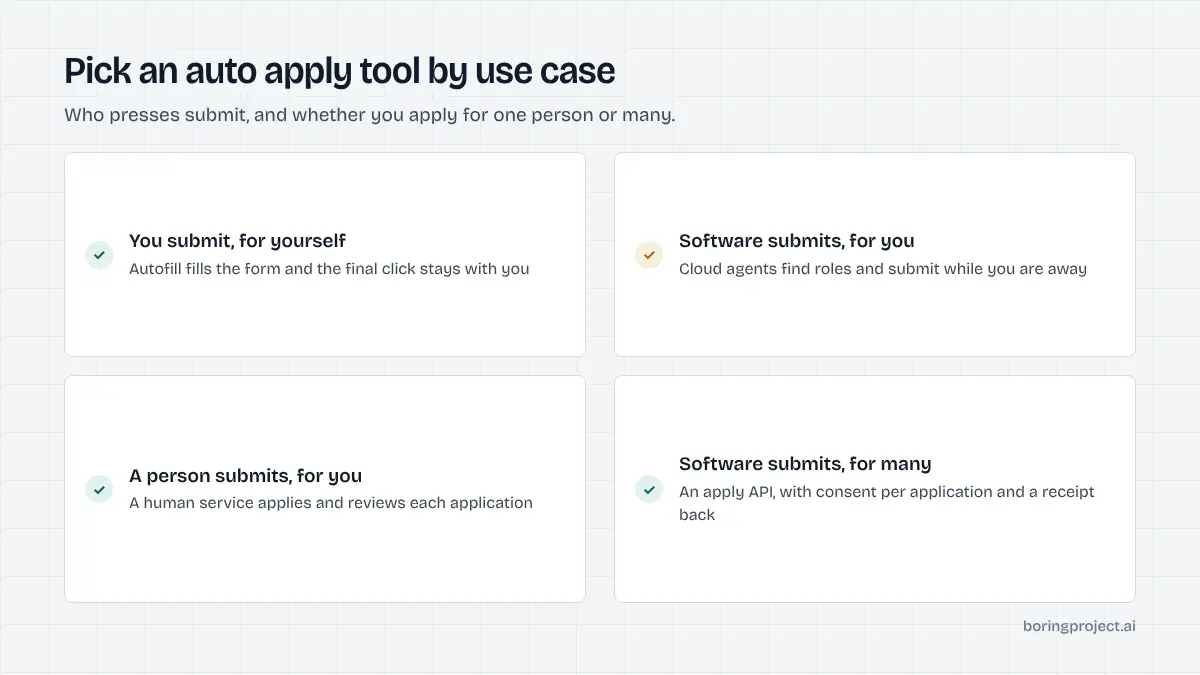
The best auto apply tool depends on whether you want to keep the submit button, hand it to software, hand it to a person, or embed applying into your own product. This hub sorts the main AI auto apply tools by use case and links to our full review of each.
How this list is organised
Ranking the best auto apply tools in one ordered list is misleading, because a free autofill extension and a human application service are not competing for the same buyer. We sort by use case instead, then by apply model within each. Every entry links to a standalone review with more detail, and the full side-by-side grid is in our auto apply tools comparison table.
The three apply models
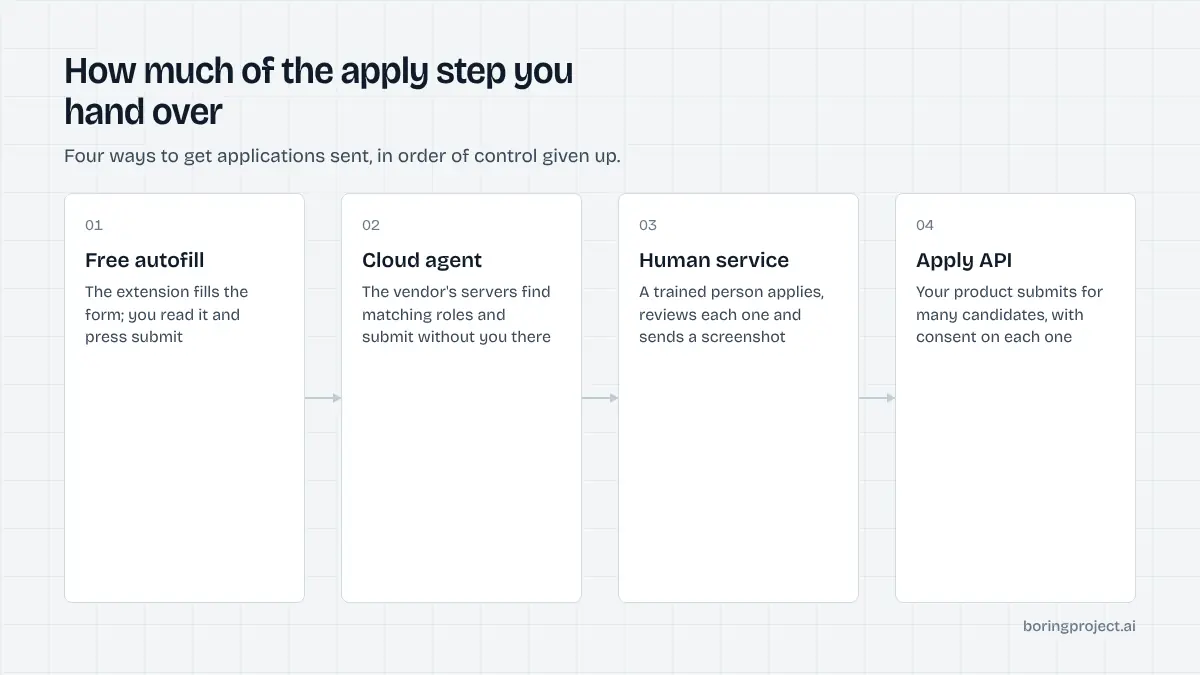
Autofill fills the form and waits for you. Cloud auto-submit finds roles and submits from the vendor's servers. Human service means a trained person applies for you. If those distinctions are new, our explainer on auto apply vs autofill covers them in depth, and the model matters more than any feature.
What we did not do
We did not assign scores, star ratings or user counts, and we have not quoted anyone. Facts reflect each vendor's site as of 2026, and plan structures change often enough that we describe them rather than price them. Treat this page as a map, and the linked reviews as the detail.
Who this is for
Job seekers researching tools, and teams at job boards, staffing agencies and career platforms who need application volume for other people. The last use case below is for the second group, and the answer there is a different category of product.
The tools, by use case
Each entry gives the apply model, who it suits and a link to the review. Table links go to the review posts; descriptions are kept short on purpose.
Read the "Apply model" column first. Two tools in the same row category can look identical on a feature list and behave completely differently on the submit step, and that difference decides both how much time you save and how much risk you take on.
| Use case | Tool | Apply model | Review |
|---|---|---|---|
| Free autofill, you submit | Simplify Copilot | Autofill extension | Simplify Copilot review |
| Free autofill, you submit | Careerflow | Autofill extension plus LinkedIn tools | Careerflow review |
| Free autofill, you submit | JobWizard | Autofill extension, 30-day passes | JobWizard review |
| Matching first, autofill second | Jobright | Matching plus autofill; agent product referenced | Jobright review |
| Careful applicant, drafted answers | Jobscan Auto Apply | Autofill with approval, credits | Jobscan Auto Apply review |
| Volume from company career pages | JobCopilot | Cloud auto-submit | JobCopilot review |
| Volume with an approve-first option | LoopCV | Cloud auto-submit or manual approve | LoopCV review |
| Volume with a toolkit | AIApply | Cloud auto-submit, credit packs | AIApply review |
| Volume across job boards | FastApply | Extension plus cloud "Apply for Me" | FastApply review |
| Volume, hands-off | LifeShack | Cloud auto-submit, no per-application approval | LifeShack review |
| Volume, US roles | JobHire.AI | Cloud auto-submit | JobHire.AI review |
| Volume, continuous | Sonara | Cloud auto-submit | Sonara AI review |
| Volume, previewed materials | Massive | Cloud auto-submit | Massive review |
| Software engineers, volume | ApplyPass | Automated submission on company sites | ApplyPass review |
| Done for you, proof per application | Scale.jobs | Human assistants, credits | Scale.jobs review |
| Done for you, recruiter hours | Careerify | Human recruiter, monthly hour tiers | Careerify review |
| Done for you, fixed package | ApplyAll | Humans verify and submit, one-time payment | ApplyAll review |
Best for keeping control: autofill extensions
Simplify Copilot, Careerflow and JobWizard all fill the employer's form in your browser and leave the submit button to you, with free tiers as of their sites in 2026. Jobright adds a strong matching feed in front of its autofill. Jobscan Auto Apply goes a step further by drafting answers to custom questions while still requiring your approval before anything is sent. These suit anyone applying to a moderate number of roles where a specific answer matters.
Best for volume: cloud agents
JobCopilot, LoopCV, AIApply, FastApply, LifeShack, JobHire.AI, Sonara and Massive all submit applications from their own systems. They differ on job sources (company career pages versus job boards), on whether you can approve a match first (LoopCV offers it; LifeShack explicitly does not), and on pricing structure (monthly caps versus credit packs). ApplyPass is a specialist in this group, focused on software engineering roles. Volume tools suit standardised roles where hours are the real constraint.
Best for judgement: human services
Scale.jobs assigns a human assistant and states that a proof screenshot accompanies every application. Careerify assigns a human recruiter and sells monthly tiers of recruiter hours with a dashboard log per application. ApplyAll uses people to verify and fill a fixed number of applications for a one-time payment, with an interview-based refund guarantee on its standard tiers. These suit career changers, senior candidates and anyone whose forms involve judgement calls.
The use case the consumer tools do not cover
If you are reading this on behalf of a company rather than for your own search, none of the tools above is designed for you. They are built around one person's account, one resume and one inbox.
Applying for many candidates is a different problem
A staffing agency placing fifty candidates a week, a job board adding one-click apply, or a career service running searches for a cohort needs applications submitted for other people, each with that person's consent, each tracked, and each with evidence that it went in. Consumer tools have no concept of a client, a candidate pool or a webhook.
What infrastructure looks like
The infrastructure answer is a job application API: POST a job URL and a candidate profile, and the service fills and submits the employer's ATS form, returns submitted, needs_input or failed by webhook, and attaches a screenshot receipt. It should require candidate consent on every application, refuse to fabricate screening answers, and enforce per-employer rate limits so no client floods a company. Pricing is per successful application rather than per seat.
Build, buy or send a CSV
Teams with engineers integrate the API directly. Teams without them use a managed service: upload a CSV of candidates and jobs, receive receipts. Either way, the decision is about owning the ATS integration library or renting it, and our build-versus-buy reasoning is linked from the comparison table above. For most teams the answer is to rent it and spend engineering time on the product instead.
One more distinction worth making: some consumer vendors also sell to organisations, LoopCV among them as of its site in 2026. That is a legitimate route for a bootcamp or career coach that wants seats for its candidates. It is a different thing from an API your own product calls, and the two should be evaluated on different criteria.
Frequently asked questions
What is the best auto apply tool overall?
Asked that way the question has no answer, because the best auto apply tools for one use case are the wrong ones for another. A free autofill extension is best for someone who wants speed but keeps control; a cloud agent is best for volume; a human service is best when every application needs judgement; an API is best for a company applying on behalf of many candidates. Pick by use case, not by headline.
Are free auto apply tools good enough?
For autofill, often yes. Simplify Copilot, Careerflow's basic tier and JobWizard's free tier all fill forms at no cost as of their sites in 2026, and LoopCV has a free plan. Free tiers are usually limited by weekly usage or daily application caps. If you only need to remove the typing, start free and upgrade only when a cap becomes the bottleneck.
Do auto apply tools actually submit, or just fill the form?
Both kinds exist and vendors blur the line. Autofill tools fill fields and wait for you to submit. Cloud agents submit on their own from the vendor's servers. Some tools offer a review mode in between. The table on this page states the apply model for each tool, and the linked reviews go into detail on what each one does on the submit step.
Which tools are safest for screening questions?
Tools that stop before submission are safest, because you see every answer. Jobscan Auto Apply states that nothing submits without approval, and autofill extensions leave the submit button to you. Among cloud agents, prefer those with an approve-first mode or at least pause and block controls, and ask the vendor what happens on a question it cannot answer.
What should a staffing agency or job board use?
Consumer tools are licensed to individuals and are not built to run applications for a pool of candidates. Businesses use a job application API or a managed service that captures candidate consent on every application, enforces per-employer rate limits, refuses to fabricate answers and returns a webhook with a screenshot receipt, priced per successful application.
How often does this list change?
The category moves quickly: tools add agent products, change pricing structures and occasionally shut down. The entries here reflect vendor sites as of 2026 and are reviewed when we update the linked review posts. Always confirm a tool's current apply model and plan structure on its own site before paying for an annual plan.
Next step
If you are building a product or running a team that applies on behalf of candidates, the Apply API submits to 40+ ATS platforms and returns a screenshot receipt with every webhook, priced per successful application. Start with the job application API overview, or ask about Managed Applies if you would rather send a CSV than write code.