 The Boring Project
Jobright Review: Matching, Autofill, and Limits
Jobright is a matching-first job search copilot with one-click autofill, tailored resumes and an AI assistant called Orion; this review covers how it works, what jobright ai pricing is published, and where it fits.
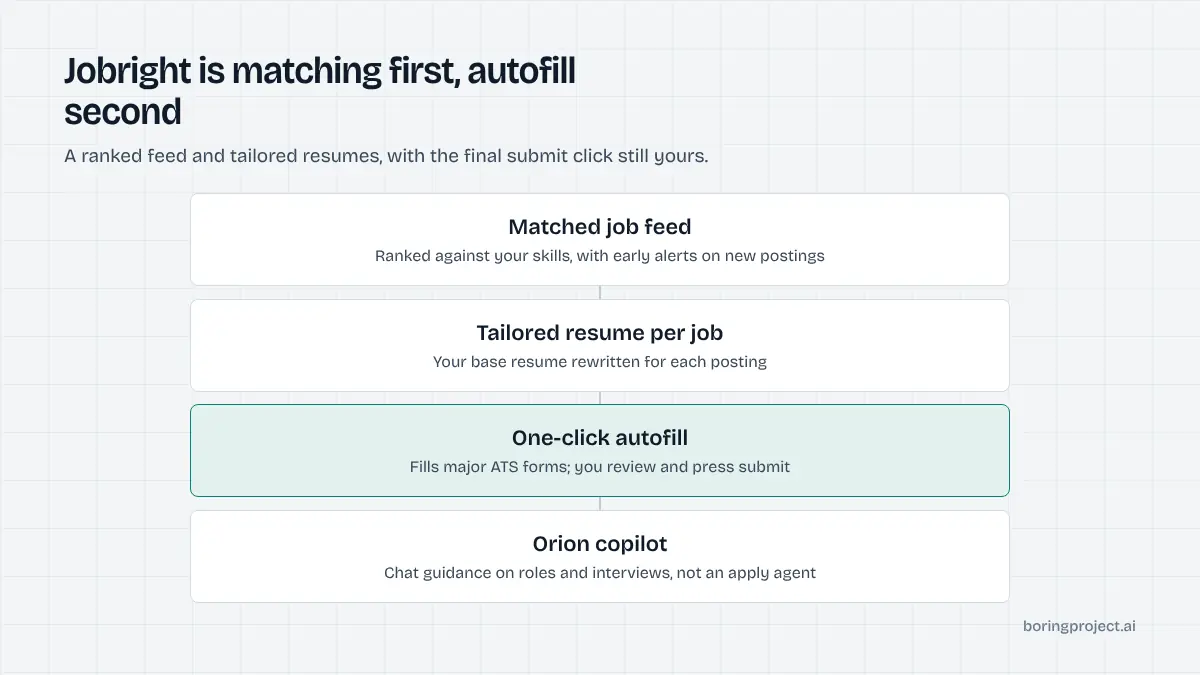
What Jobright is and how the apply model works
Matching is the core product
Jobright calls itself an AI job search copilot. The central feature is a personalised feed: postings matched against what it reads as your real skills, with early alerts for new openings and a promise of no fake listings. The site presents itself as a very large job hub, quoting millions of total listings and hundreds of thousands of new ones each day.
Around the feed sit three supporting features. A job-specific tailored resume rewrites your base document for each posting. An "insider connections" tool surfaces alumni and hiring managers at target companies for referrals. And Orion, a chat-style career copilot, offers guidance on finding roles and preparing for interviews.
Autofill, not unattended auto-apply
This is the most important distinction in this Jobright review. The homepage describes a "1-Click Application Autofill" that works across major ATS platforms. That is autofill: you open the posting, trigger the tool, and it populates the form so you can review and submit.
Nothing on the homepage says Jobright submits applications while you are away, and Orion is not described as an application agent. If you expect a cloud bot that applies to dozens of roles overnight, this is not that. The autofill-versus-auto-apply difference changes what you can expect from any tool, and we have written up the trade-offs in auto apply vs autofill.
Where it applies
Because the application step is autofill, "where it applies" really means "where the autofill works". The site says major ATS platforms, without listing them, and the job feed is described as covering millions of postings without naming sources. For a job seeker that is usually fine, since you can see each posting before you act on it. For anyone evaluating coverage systematically, the lack of a published ATS list is a gap.
Jobright AI pricing as stated on their site
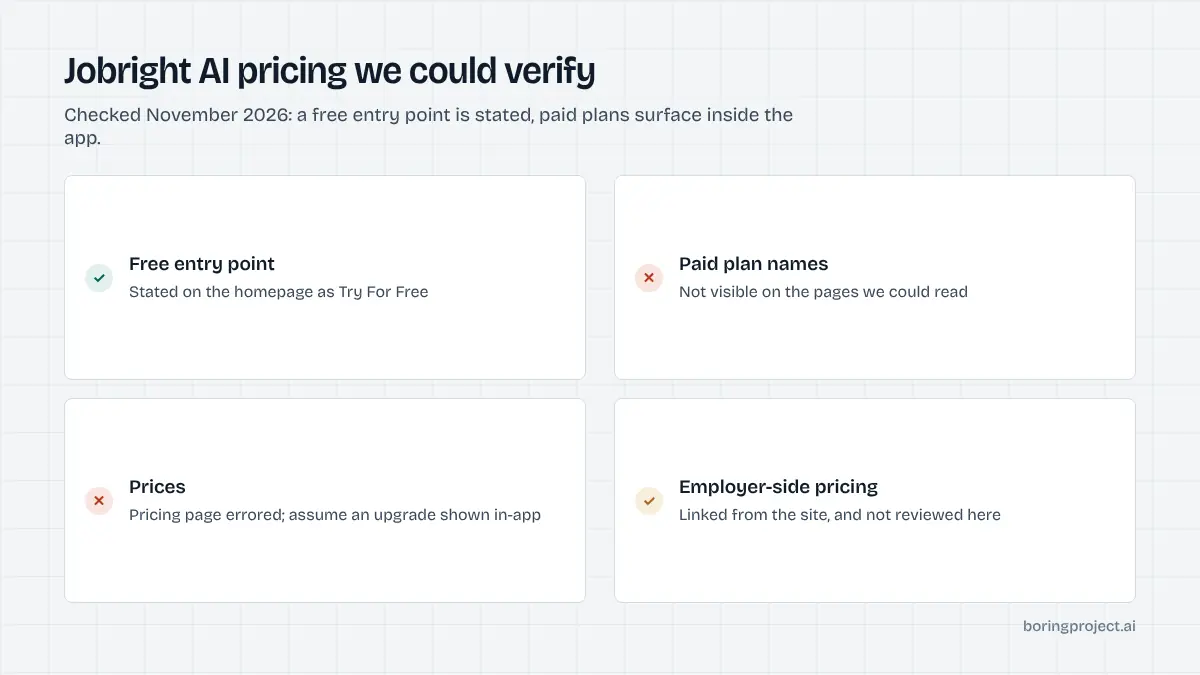
What is published
As of November 2026, the Jobright homepage offers a "Try For Free" button and an FAQ entry titled "Is Jobright free to use?". The pricing page returned an error when we attempted to read it, and no plan names or dollar figures appeared on the pages we could access. The only pricing link visible pointed to a separate page for employers.
| What we could verify | Status |
|---|---|
| Free entry point | Stated ("Try For Free") |
| Paid plan names | Not visible on pages we could read |
| Prices | Not visible on pages we could read |
| Employer-side pricing | Linked but not reviewed |
We are therefore not quoting any price. Assume a free tier with limits and a paid upgrade surfaced inside the app, and verify before you commit.
How to read a free tier like this
Matching-first tools typically keep the feed free and charge for the features that consume compute: tailored resumes, unlimited autofill, or copilot access. Before upgrading, note which action triggered the paywall for you. If it was tailored resumes, compare the cost against a standalone resume tool. If it was autofill volume, compare against tools with a flat application cap.
Employer side
Jobright also markets to employers, which is where the visible pricing link led. That dual-sided model is common and does not affect a job seeker directly, but it does explain why some features, such as early alerts and referral connections, exist: they benefit both sides of the marketplace.
Strengths, limitations and who it fits
Strengths
Matching quality is the thing Jobright is built around, and a well-ranked feed saves more time than most people expect. Early alerts matter because the first applicants to a posting often get reviewed first. The referral finder addresses a real gap: a warm introduction usually beats a cold application, and most auto-apply tools ignore that channel entirely.
The autofill approach also has a quiet advantage. Because you press submit, you see every screening question and can answer it honestly, which avoids the risk of a bot guessing wrong under your name.
Limitations
The flip side is effort. Autofill still requires you to be present for every application, so the daily ceiling is set by your time, not by a plan limit. Pricing transparency on public pages was poor at the time of review, and the site does not publish its ATS coverage list. The headline statistics on interviews and users are the vendor's own figures.
For job seekers who specifically want unattended submission, the round-up of Jobright alternatives covers cloud agents and managed services that take the submit step off your plate.
Who it fits
Jobright fits a job seeker who wants a strong, curated feed and is willing to do the final click themselves, especially someone targeting companies where a referral is realistic. It suits early-career candidates and career changers who benefit from per-posting resume tailoring.
It is a weak fit for high-volume applicants who want to wake up to fifty submitted applications, and it is not designed for third parties applying on behalf of others.
If you are building a product rather than job hunting, matching and autofill are features you might offer, but the submission step is the hard part. A job application API takes a job URL and a candidate profile, fills and submits the employer's form across 40+ ATS integrations including Workday, Greenhouse, Lever and iCIMS, and returns a webhook with a status and a screenshot receipt. Candidate consent is required on every application and screening answers are never fabricated.
Frequently asked questions
Does Jobright apply to jobs for you automatically?
Based on its homepage, Jobright's application feature is described as one-click autofill across major ATS platforms, not unattended submission. You still open the posting and press apply. The site does not describe a cloud agent that submits while you are away, so treat it as an autofill-and-matching product rather than a hands-off auto-apply bot.
How much does Jobright cost?
The homepage offers a "Try For Free" entry point and includes an FAQ titled "Is Jobright free to use?", but the pricing page returned an error when we tried to read it in November 2026 and no plan prices were visible on the pages we could access. Assume a free tier exists and check the in-app upgrade screen for current paid pricing.
What is Orion in Jobright?
Orion is described on the site as a 24/7 AI career copilot that offers guidance on finding roles and preparing for interviews. The homepage does not say Orion submits applications on your behalf. Think of it as a chat-style assistant layered over the matching and resume features rather than an application agent.
Where do Jobright's job listings come from?
The site describes itself as a large job hub with millions of total listings and hundreds of thousands of new postings daily, and says the matches contain no fake listings. It does not name specific boards or career page sources on the homepage, so verify coverage in your field by browsing the feed before relying on it.
What does the tailored resume feature do?
Jobright says it produces a job-specific tailored resume designed to pass ATS screening in a few seconds. In practice this means rewriting your base resume to emphasise the keywords and experience a given posting asks for. As with any AI tailoring, review the output before submitting; it is your name on the document.
Can a staffing agency or job board use Jobright for candidates?
Jobright is a consumer product built for an individual job seeker, with a separate employer side for hiring. It does not publish an API or webhook for third parties to submit applications for many candidates. Teams that need volume, consent tracking and receipts should look at a job application API or managed apply service instead.
Next step
Job seekers should start with Jobright's free feed and see whether the matches beat what they find on their own. Product teams that need the submit step automated at volume can start with the job application API and add a job feed on top with Search + Apply.