 The Boring Project
Jobscan Auto Apply Review: Review-First Applying
This Jobscan Auto Apply review explains how the credit-based tool matches jobs, drafts applications and holds every submission for your approval, and where it sits among auto-apply options.
What Auto Apply does
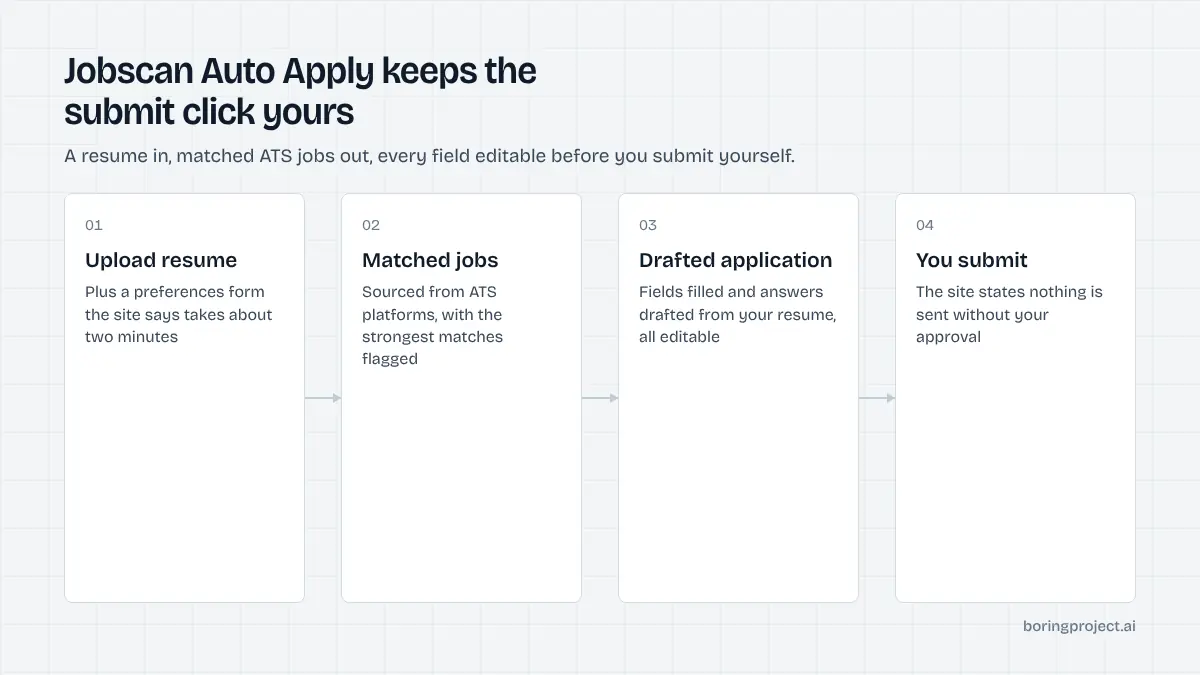
Jobscan is best known for its resume-to-job-description matching. Auto Apply is a newer product that extends that into the application itself: it finds roles that fit your profile, fills the application and drafts answers, then waits for you.
The word "auto" is doing less work than usual here. As of its site in November 2026, the page states that nothing submits without your approval and that the submit button is always yours. That is the defining design decision, and it shapes everything else about the tool.
Setup and matching
You upload a resume and complete a short preferences form, which the page says takes about two minutes. Auto Apply then shows AI-selected jobs, with the strongest matches flagged. The jobs come directly from ATS platforms rather than from aggregator boards; Greenhouse, Lever and Workable are named, with a claim of 20+ ATS platforms overall and more sources described as coming soon.
Sourcing from ATS feeds has a practical upside: the postings are live and the application goes to the employer's own system. The downside is coverage. Employers on an unsupported ATS simply do not appear.
Drafting and the review step
For each job you choose, the tool fills personal and standard application fields and drafts answers to the remaining questions from your resume. Every field is editable. You read the draft, fix what needs fixing, and submit.
This makes Auto Apply a review-first tool. It saves the typing but not the attention. If you have ever had an automated tool guess wrong on a screening question, you will understand why Jobscan chose this model; if you want volume without supervision, you will find it slow.
Tracking
Submitted applications, their statuses and outcomes are kept in a central view. There is no browser extension described on the page; the product appears to run entirely inside Jobscan's web app.
That has a side effect worth noting. Because Auto Apply only works on jobs it has sourced itself, you cannot paste in a posting you found elsewhere and have it drafted. If a large part of your search runs through LinkedIn, Indeed or employer sites outside the supported ATS list, you will still be applying to those by hand or with a separate tool.
Pricing, limits and fit
Auto Apply's pricing is simple to describe and unusual for the category.
Credits, not subscriptions
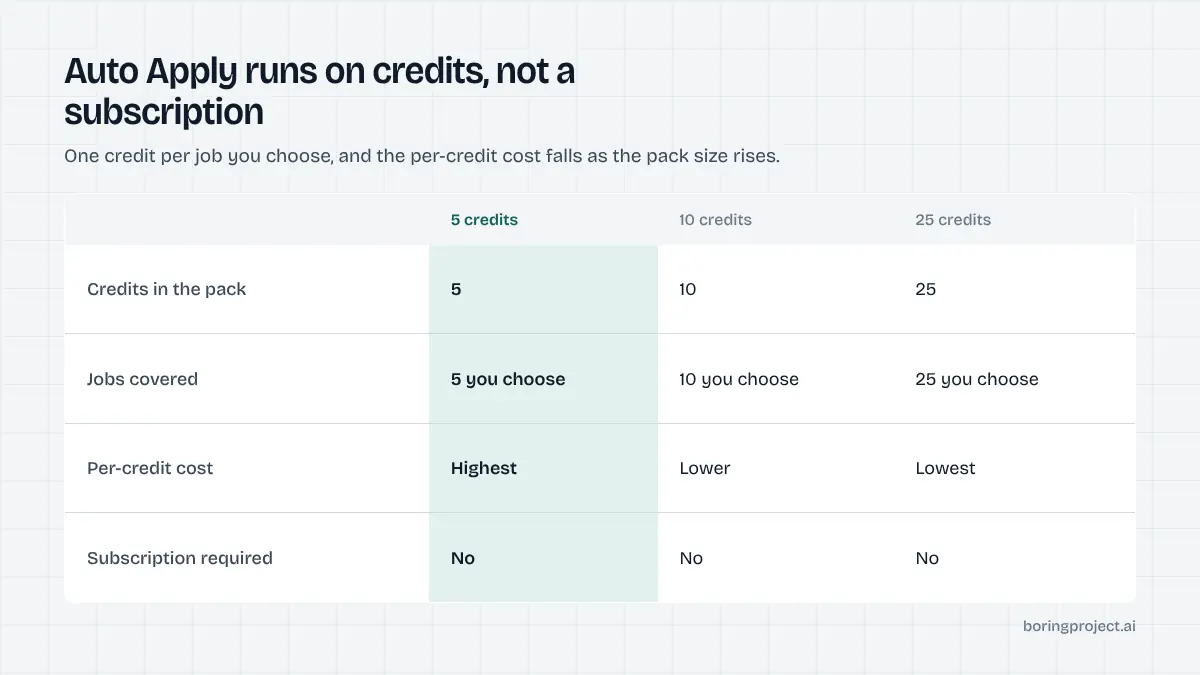
As of November 2026 the product is credit-based with no separate subscription. One credit is spent for each job you choose to Auto Apply to. Credits are sold in packs of 5, 10 and 25, with the per-credit cost falling as the pack size rises. Jobscan Premium members get two free credits, topped up to two each month.
We will not restate the dollar amounts because they can change. The important point is the shape: you pay per application you start, which makes the cost of a careless application visible in a way that monthly subscriptions hide.
Intended volume
The page describes the intended cadence as a few well-matched roles a day and does not publish a daily cap. Combined with per-application pricing, that positions Auto Apply as a tool for selective applying. Someone trying to send 50 applications a day would find the credit cost adds up quickly and the review step too slow.
That is not a flaw so much as a scope decision. The trade-off between selective and bulk approaches is covered in our auto-apply versus autofill comparison.
Who it suits
Auto Apply fits job seekers who already trust Jobscan's matching, want applications drafted from a tailored resume, and are willing to read each one before it goes. It suits people targeting employers on Greenhouse, Lever, Workable and similar systems.
It is a poor fit for people who want applications sent while they sleep, who need LinkedIn or Indeed coverage, or whose target employers run on an ATS outside the supported set.
How it compares with other models
Most tools in this space fall into one of three buckets. This Jobscan Auto Apply review places the product in the middle one, a position worth defining precisely.
| Model | Who submits | Sourcing | Typical cost basis |
|---|---|---|---|
| Autofill extension | You, on pages you open | You find the jobs | Free or monthly |
| Auto Apply (Jobscan) | You, after reviewing a draft | ATS feeds, matched for you | Per credit |
| Cloud auto-apply agent | The agent | Feeds and boards | Monthly or per application |
| Human service | An assistant | Assistant or you | Monthly or per batch |
Versus autofill extensions
Extensions wait for you to find a posting and then fill the form. Auto Apply reverses the first step by bringing matched jobs to you, which removes the browsing time. Both leave the final click with you.
Versus cloud agents
Cloud agents submit without a review step, which is where most of their speed comes from and where most of their mistakes happen. Screening questions are the usual failure point. If you want to understand why those questions are hard to automate, our explainer on how ATS screening questions work covers the mechanics.
For teams and builders
Auto Apply is a single-user consumer product with no API, no multi-candidate workflow and no consent records. Staffing agencies, job boards and career platforms that need to submit applications on behalf of many candidates generally use a job application API that accepts a job URL and a candidate profile and returns a status and a screenshot receipt for each submission.
Frequently asked questions
Does Jobscan Auto Apply submit applications on its own?
No. The product page is explicit that nothing submits without your approval and that the submit button is always yours. Auto Apply finds matching roles, fills the form and drafts answers from your resume, then stops. You review, edit if needed, and submit. It is closer to assisted applying than to a hands-off agent.
How much does Jobscan Auto Apply cost?
As of November 2026 it is credit-based with no separate subscription. One credit is used for each job you choose to Auto Apply to, sold in packs of 5, 10 and 25 with a lower per-credit price on larger packs. Jobscan Premium members receive two free credits, topped up to two each month. Current amounts are on the live page.
Where does Auto Apply find jobs?
It sources postings directly from ATS platforms rather than aggregator boards. The page names Greenhouse, Lever and Workable and says 20+ ATS platforms are covered, with more job platforms described as coming soon. If your target employers run on a system outside that set, those roles will not appear in your matches.
How many applications can I send per day with Auto Apply?
There is no formal daily cap published. The product describes its intended volume as a few well-matched roles a day, and the credit model reinforces that: each application costs a credit, so the economics favour selective applying over bulk. It is not designed for applying to hundreds of jobs a week.
Do I need a Jobscan subscription to use Auto Apply?
The page does not describe a free tier for non-Premium users, and the only free allowance it mentions is the two monthly credits for Premium members. Credit packs appear to be purchasable separately. If you are not already a Jobscan user, check the pricing page for the current relationship between the subscription and credit packs.
Is Auto Apply suitable for recruiters applying on behalf of candidates?
It is designed for a single job seeker working from their own resume and approving each application personally. It does not offer multi-candidate management, consent capture or an API. Recruiters, staffing agencies and platforms that need to submit applications for many people typically use application infrastructure built for that purpose.
Next step
If you want matched jobs drafted for you and are happy to approve each one, Jobscan's Auto Apply is a defensible, low-risk choice. If you are building a product or running a team that needs submissions at scale across 40+ ATS platforms with webhooks and receipts, start with our job application API.