 The Boring Project
How to Auto Apply on Workday Without 50 Accounts
Workday is the hardest mainstream ATS to automate: separate tenant accounts, a six-page form and employer-specific questions. This guide walks through where workday job application automation succeeds, where it pauses, and how to keep volume moving without creating fifty logins by hand.
Why Workday is different from every other apply form
Most applicant tracking systems put the whole application on one page. Workday does not. If you are learning how to auto apply on Workday, the first thing to internalise is that you are automating a workflow, not a form.
Every employer is its own tenant
A Workday career site lives on a subdomain like company.wd5.myworkdayjobs.com. Each of those sites has its own Candidate Home, its own user database and its own password rules. Registering at one employer gives you nothing at the next.
Candidates can sign up with an email address or through Google, Apple or LinkedIn sign-in, and the account must exist before the first application is submitted. For a job seeker applying to ten Workday companies, that is ten registrations. For a staffing agency pushing hundreds of candidates, it is thousands.
The application is a sequence of pages
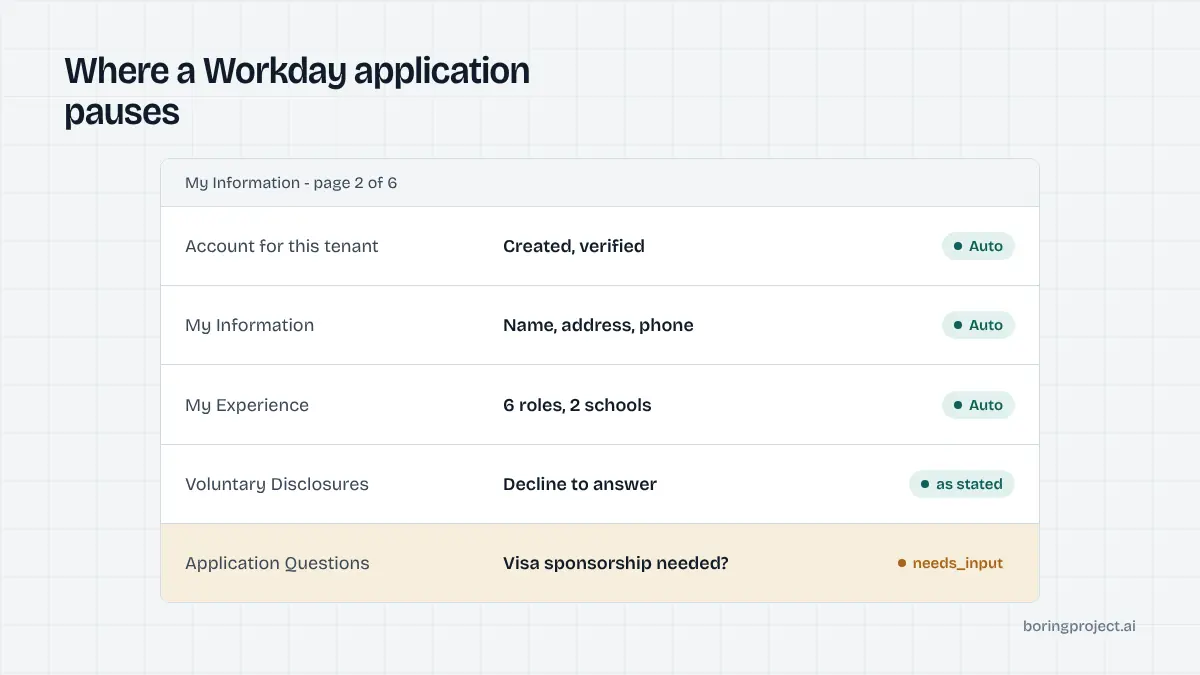
After clicking Apply, Workday offers three paths: Autofill with Resume, Apply Manually, or Use My Last Application (if one exists on that tenant). Whichever you pick, the flow then runs through a set of numbered pages, typically:
| Page | What it asks |
|---|---|
| My Information | Name, address, email, phone, how you heard about the role, previous-employee flag |
| My Experience | Work history blocks, education blocks, skills, languages, resume and optional attachments, websites |
| Application Questions | Employer-specific questions: work authorisation, relocation, salary, certifications |
| Voluntary Disclosures | Gender, ethnicity and similar fields where legally applicable, each with a "decline" option |
| Self Identify | Veteran status and disability status, usually on a separate page in US tenants |
| Review | A read-only summary and the Submit button |
Each page validates on Next, and a single missing required field blocks progress. Employers can also rename, reorder or remove pages, so the exact sequence varies.
Resume autofill helps less than it promises
Autofill with Resume parses the PDF and populates experience and education. In practice it splits job titles from employers incorrectly, drops months, and leaves empty blocks behind. Treat it as scaffolding. Any serious automation parses the candidate's structured profile and writes each field deliberately, then removes the junk blocks the parser created.
What a complete automated run looks like
The path below is how a job application API handles a Workday posting end to end. The specifics differ by tenant, but the shape is stable.
Account handling comes first
The system checks whether the candidate already has an account on this tenant. If not, it registers with the candidate's email and a generated password that satisfies the tenant's rules, stores the credentials against the candidate so re-applies to the same employer reuse them, and handles the verification email if the tenant sends one.
Some tenants send a one-time code to the candidate's inbox. This is one of the places automation pauses unless the system has consented access to read that code. Without it, the run returns needs_input with a clear description of what is missing.
Field mapping, page by page
With a session open, the engine walks the pages in order. Name, contact and address fields are mapped directly. Work history is written as discrete blocks: employer, title, location, start and end dates, current-role flag, description. Education follows the same pattern with school, degree, field of study and dates.
Websites and LinkedIn URLs go into the My Experience page. The resume is uploaded as an attachment even if autofill was skipped, because recruiters read the file, not the form.
Application questions are where runs stall
The Application Questions page is where Workday tenants put the questions that matter to them, and they vary widely. Typical types:
- Yes/no: "Are you legally authorised to work in this country?"
- Single select: "Will you now or in the future require sponsorship?"
- Free text: "Why are you interested in this role?"
- Numeric: desired salary, years of experience with a named tool
- Acknowledgements: "I certify that the information provided is accurate."
An automation should answer only from data the candidate supplied. Authorisation, sponsorship, relocation and notice period are standard profile fields, so they resolve cleanly. A question the profile cannot answer should trigger needs_input rather than a guess. Fabricated screening answers are the fastest way to get a candidate rejected or an agency account banned, and the reasoning behind that is covered in how ATS screening questions work.
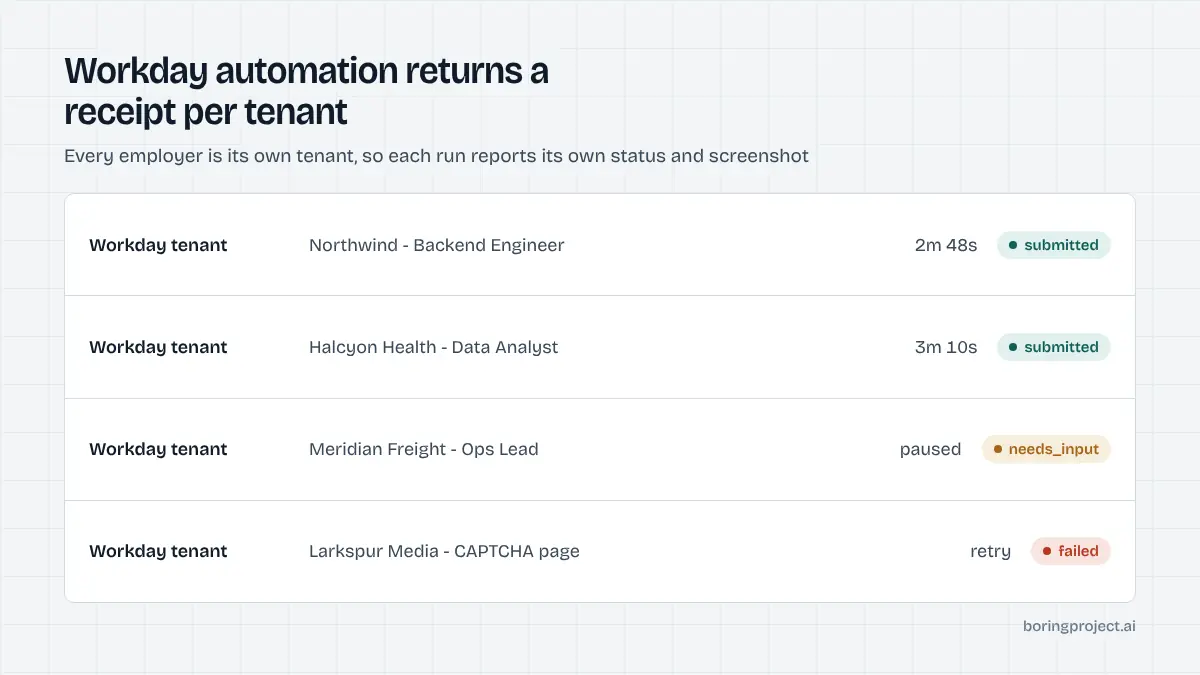
Voluntary Disclosures and Self Identify are filled only with values the candidate explicitly chose, including "I don't wish to answer". After Review, the Submit click is confirmed, a screenshot of the confirmation screen is captured, and the status is reported.
Practical tips for volume on Workday
Expect a longer median and plan around it
Any honest Workday job application automation will show a longer median than a single-page ATS, because of account creation, page loads and per-page validation. Budget more time per application and run tenants in parallel rather than waiting on one. If you are building a product on top, surface the longer wait to users so they do not assume the run failed.
Keep credentials and re-use last applications
Because each tenant stores a Candidate Home, a second application to the same employer is much faster: the account exists, and Use My Last Application pre-fills most pages. Store tenant credentials per candidate and reuse them. Never share one account across multiple candidates; Workday ties the profile to the person.
Design for pauses, not just for success
Three outcomes matter: submitted, needs_input and failed. Build your workflow so a needs_input event routes the exact question to the candidate or recruiter, collects an answer, and resumes the same run. The mechanics of consuming those events are laid out in our guide to the job application webhook. Treat every failed run as information: wrong tenant URL, expired posting, or a CAPTCHA that needs a human.
Respect per-employer rate limits. Workday tenants are individually administered, and a burst of submissions from one source to one company is visible to the recruiting team. Spread volume across employers and time.
Frequently asked questions
Do I really need a separate Workday account for every employer?
Yes. Each employer runs its own Workday tenant with its own Candidate Home, so credentials from one company do not carry over to another. The same email address can be registered at dozens of tenants independently. Any automation has to handle registration, email verification and password rules per tenant rather than logging in once.
Why does a Workday application take longer to automate than a Greenhouse one?
Workday splits the application across several pages, each of which loads and validates separately. Account creation adds a sign-up and sometimes a verification email. The experience page uses repeating blocks for every job and school, which means more fields to fill and more chances to hit a validation error. Expect a longer median time than on single-page systems.
What does "Autofill with Resume" actually do?
It parses the uploaded resume and pre-populates the My Information and My Experience pages. The parse is imperfect: dates, titles and employers often land in the wrong fields or get dropped. A careful automation treats the autofill as a starting point and then overwrites each field with the structured data from the candidate profile.
Where will auto apply on Workday pause and ask me for input?
The common pauses are custom application questions that cannot be answered from the profile, an email verification code during account creation, a legally required consent or acknowledgement, and the occasional CAPTCHA. A good system returns a needs_input status with the exact question so you can answer once and resume instead of starting over.
Can automation answer the Voluntary Disclosures and Self Identify pages for me?
Only with values you have explicitly provided. These pages cover gender, ethnicity, veteran status and disability, and the answers are voluntary. An automation should never guess or default them. If the candidate has stated a preference, including "decline to answer", the system fills that; otherwise it leaves them blank where the form allows it.
Does Workday block automated applications?
Workday tenants are configured by each employer, and some add CAPTCHAs or stricter validation. Well-behaved automation that respects per-employer rate limits, uses real candidate data and submits through the normal form generally completes. Mass submissions from a single IP or fabricated screening answers are what get applications flagged, regardless of the tool used.
Next step
If you need Workday handled at volume, the Apply API takes a job URL and a candidate profile, manages tenant accounts and multi-page forms, and returns a receipt with a screenshot. Start with the API documentation and test against a live Workday posting; per-application pricing applies only to successful submissions.