 The Boring Project
JobWizard Review: Autofill and Review Mode
This JobWizard review looks at how the JobWizard extension autofills application forms, what its tiers include, and where a review-first autofill tool fits compared with cloud auto-apply agents.
What JobWizard is and how it works
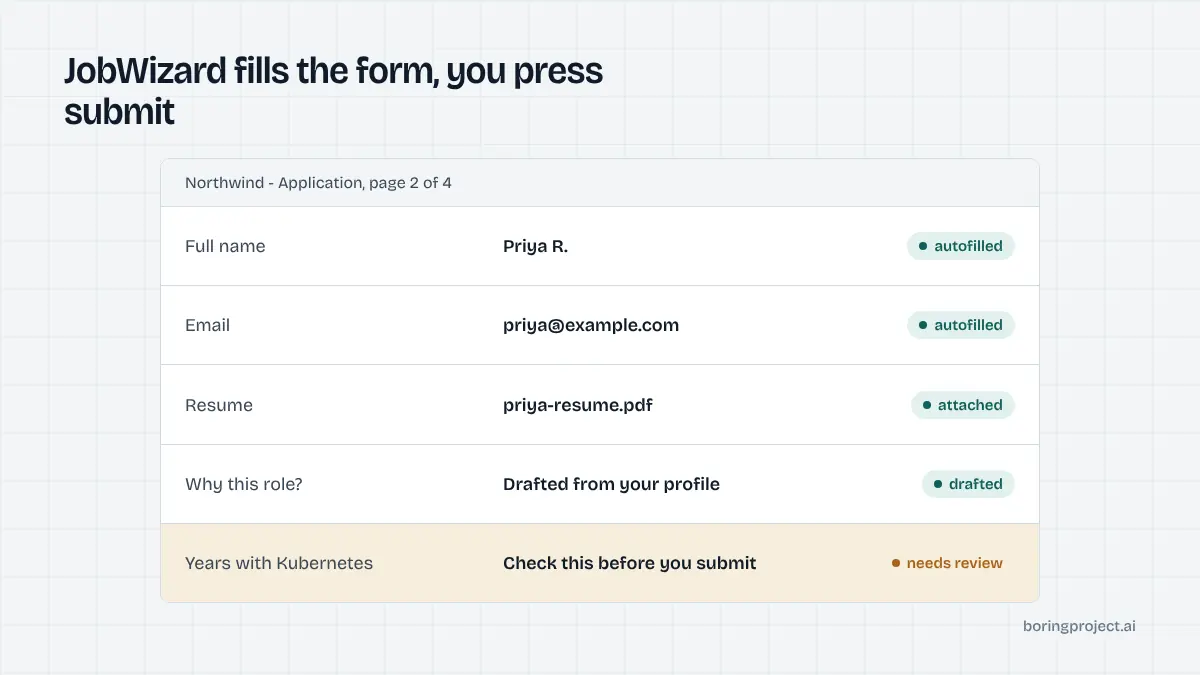
JobWizard is a Chrome extension aimed at job seekers. You install it, build a profile from your resume, and then open job postings as you normally would. When you land on an application form, the extension fills the fields it recognises and drafts answers for the ones it does not.
The distinguishing choice is that JobWizard stops before the submit button. Its site describes the workflow as fill, review, submit, with the final click belonging to you. That makes it an autofill tool with a review mode rather than an auto-apply agent.
The autofill layer
As of its site in November 2026, JobWizard says it fills text inputs, dropdowns, checkboxes and custom questions on supported forms. It lists Greenhouse, Lever, Workday, Workable, Ashby, Oracle, BambooHR, Eightfold, iCIMS, Jobvite, ADP and SmartRecruiters by name, plus a dedicated Taleo page, and claims 20+ ATS platforms in total.
It also advertises support for "1000+ platforms". That figure is not itemised anywhere on the site, so it is safer to rely on the named list when judging coverage for your own target employers.
Review mode and the tracker
Review mode is the point where the extension hands control back. You see the filled form, correct anything that looks off, and submit. Submitted applications then land in a kanban-style tracker inside the JobWizard dashboard.
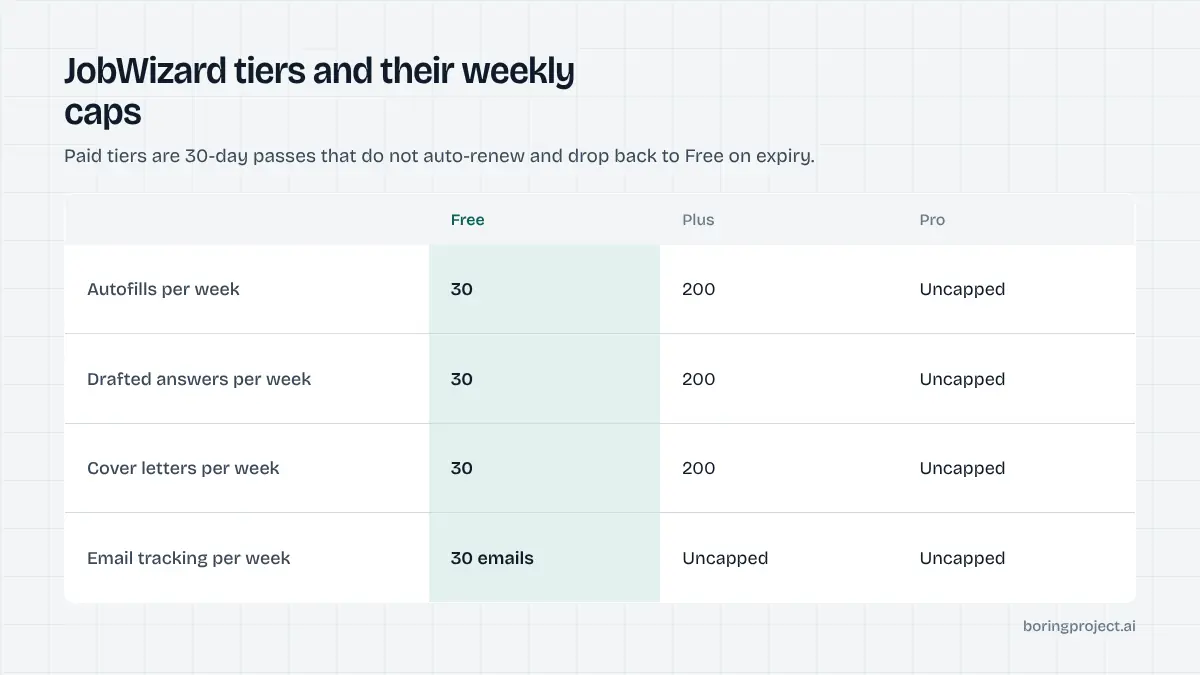
A newer email tracking feature lets you forward job-related Gmail messages, which the tool classifies as interview, offer, rejection or follow-up. On the free tier that is capped at 30 emails per week; paid tiers remove the cap.
Extras around the core
Beyond autofill, the extension shows a match score and keyword highlights for each job description, generates cover letters, and offers an AI chat for career questions. A referral finder surfaces potential LinkedIn contacts at the hiring company, with a weekly search allowance that scales by plan.
None of these are unique to JobWizard, but having them in one extension reduces tab switching. Whether they matter depends on whether you already use separate tools for resume tailoring and networking.
Pricing, limits and who it suits
The pricing model is slightly unusual for the category, so it is the part of this JobWizard review worth reading carefully before you compare it with subscription tools.
Tiers and the pay-once model
As of November 2026 the site lists three tiers: Free, Plus and Pro. The paid tiers are sold as 30-day passes that do not auto-renew by default and drop back to Free when they expire. A toggle offers auto-renew at a discount, and the duration picker also shows 7-day and 90-day options.
The free tier includes job description analysis, resume parsing and the tracker without limits, with weekly caps of 30 on autofill, answers, cover letters, chat rounds, keyword suggestions and resume retouches. Plus raises most of those to 200 per week; Pro removes them. Exact prices are on the live pricing page and can change, so we will not restate them here.
Where it works well
If you apply to a moderate number of roles each week and want to read every application before it goes out, the pay-once model is convenient. You can buy a month during an active search and let it lapse without cancelling anything.
The ATS list covers the systems most mid-size and enterprise employers use, so Workday and Greenhouse-heavy searches are a reasonable fit. The match score and cover letter drafts add some value when you are tailoring rather than blasting.
Where it falls short
Because every application still requires you at the keyboard, throughput is bounded by your own time. The free tier's 30 weekly autofills is enough for a selective search but not for a high-volume one.
The extension also runs only in Chrome and only on pages you have open, so there is no background applying, no mobile path and no way to hand the work to someone else. If that is what you need, the trade-offs between a browser extension and a hosted agent are covered in our guide to auto-apply Chrome extensions versus cloud agents.
How JobWizard compares with other approaches
The category splits into three models: autofill extensions that you supervise, cloud agents that submit on your behalf, and human services that apply for you. JobWizard sits firmly in the first group.
| Approach | Who clicks submit | Typical throughput | Supervision |
|---|---|---|---|
| Autofill extension (JobWizard) | You | Limited by your time | Every application |
| Cloud auto-apply agent | The agent | Tens to hundreds per week | Sampling or none |
| Human application service | An assistant | Set by plan | Delegated |
Versus cloud auto-apply
Cloud agents trade control for volume. They run on a server, pick jobs from a feed and submit while you are away, which is faster but means you see fewer applications before they go out. The difference matters most on screening questions, where a wrong answer can disqualify you. Our auto-apply versus autofill comparison goes deeper on when each approach is the right call.
Versus other autofill extensions
Several extensions do roughly what JobWizard does. The practical differences are ATS coverage on the forms you actually encounter, how often the autofill gets dropdowns and conditional fields right, and the pricing model. JobWizard's non-renewing pass is the most visible differentiator; the quality of fills is something you can only judge by testing on your own target postings.
For teams and builders
JobWizard has no API, no multi-candidate workflow and no consent records, which is expected for a consumer extension. Staffing agencies, job boards and career platforms that need to submit applications for many candidates usually look at a job application API instead, where a job URL and a candidate profile go in and a submission receipt comes back.
Frequently asked questions
Does JobWizard submit applications automatically?
Not according to its site. JobWizard fills the form fields, drafts answers and cover letters, and then hands the application back to you. The last step in its described workflow is review and submit, done by the user. If you want applications sent without you present, that is a different category of tool, usually a cloud auto-apply agent.
Which ATS platforms does the JobWizard extension support?
As of its site in November 2026, JobWizard lists Greenhouse, Lever, Workday, Workable, Ashby, Oracle, BambooHR, Eightfold, iCIMS, Jobvite, ADP and SmartRecruiters, with a separate Taleo page, and says it supports 20+ ATS platforms overall. It also mentions LinkedIn, Glassdoor, Wellfound and RemoteOK for browsing and job description analysis.
Is JobWizard free?
There is a free tier. As of November 2026 it includes job description analysis, resume parsing and application tracking without limits, plus weekly caps of 30 on autofill, answers, cover letters and chat rounds. Paid Plus and Pro tiers raise or remove those caps and add premium AI models and support channels.
How does JobWizard pricing work?
JobWizard sells 30-day passes rather than a rolling subscription by default. Its pricing page describes a pay-once model that does not auto-renew and downgrades to Free when the period ends, with an optional auto-renew toggle and 7-day or 90-day durations. Check the live page for current amounts, since the figures can change.
Can JobWizard answer custom screening questions?
Its site says the autofill handles text inputs, dropdowns, checkboxes and custom questions, and a separate Answer It feature drafts responses to open-ended questions. Those drafts are generated from your profile and the job description, so you should read them before submitting. Treat them as a first pass, not a final answer.
Is JobWizard a good fit for recruiters or staffing teams?
It is built for individual job seekers working inside their own browser. A recruiter could use it to speed up a single candidate's application, but it does not offer multi-candidate queues, consent records or programmatic access. Teams that need volume across many candidates generally need an API or a managed service instead.
Next step
If you are an individual applying to a handful of roles a day, an autofill extension like JobWizard is a sensible, low-commitment choice. If you are building a product or running a team that needs applications submitted at scale with receipts and consent tracking, look at our job application API instead.