 The Boring Project
Careerflow Review: Autofill and Career Tools
This Careerflow review covers the autofill extension, the LinkedIn and resume tools around it, and how Careerflow AI pricing is structured across its free and paid tiers.
What Careerflow is
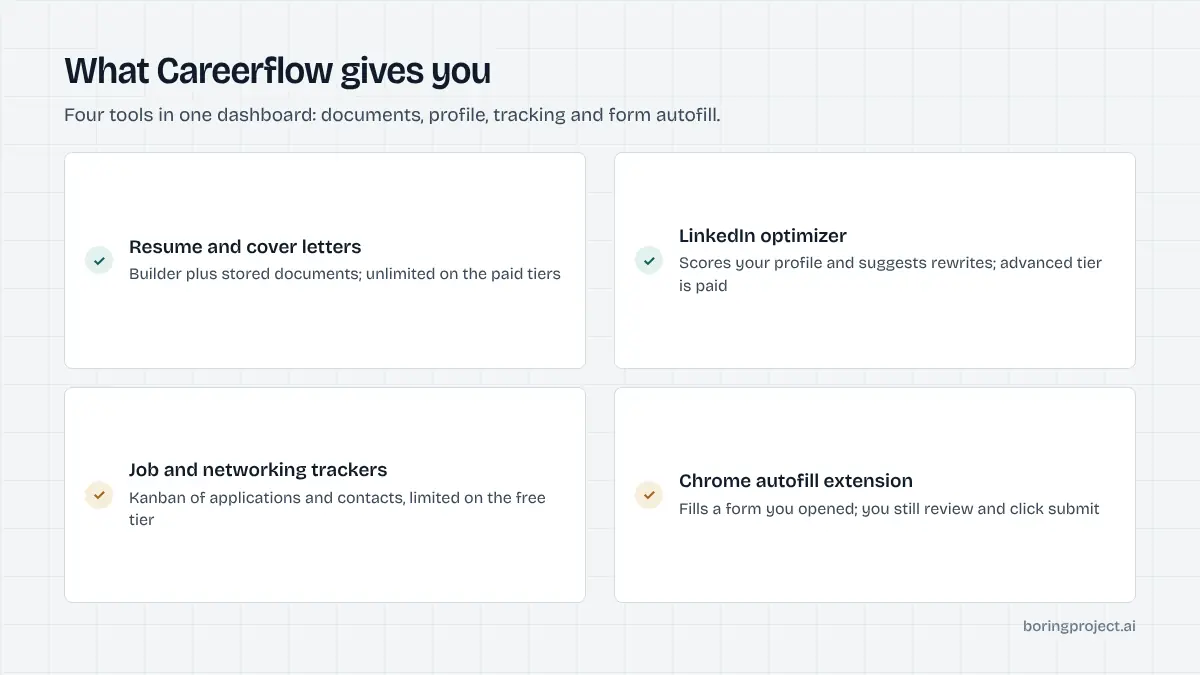
Careerflow positions itself as a career copilot rather than a single-purpose application tool. The platform bundles an AI resume builder, a job application tracker, a LinkedIn profile optimizer, a networking tracker, an autofill Chrome extension and AI mock interviews under one account.
That breadth is the main thing to understand before comparing it with narrower tools, and it shapes the rest of this Careerflow review: the autofill extension is one feature among several, not the centrepiece.
The Chrome extension and autofill
As of its site in November 2026, Careerflow describes the extension as a way to autofill forms and apply faster to jobs that match your profile. The site does not say the extension submits applications on its own, and nothing in its FAQ describes background or automated applying. Read it as supervised autofill: you are on the page, the extension fills what it can, you finish and submit.
The site also does not publish a named list of supported ATS platforms. That makes it hard to judge coverage in advance, so the practical test is to install the free version and try it on two or three postings from employers you actually want.
LinkedIn optimizer and resume tools
The LinkedIn optimizer is probably the most distinctive piece. It scans a profile and scores it, with a free one-click scan on the Basic plan and an advanced version on paid tiers. For job seekers whose search runs mostly through LinkedIn, this is the feature that justifies the account.
The resume side includes a builder, an ATS-focused optimizer, a job fit analyzer that tailors a resume and cover letter to a specific posting, and writers for cover letters, elevator pitches and LinkedIn posts. Most of these are gated behind Premium.
Tracking and interviews
The job tracker keeps applications in one list with status and follow-up reminders. A networking tracker does the same for people you have contacted. Premium Plus adds AI mock interviews and post-interview analysis.
Together these cover most of a search workflow except the part where applications actually get sent at volume. If that is your bottleneck, Careerflow does not solve it; it makes each manual application faster and better organised.
Careerflow AI pricing and plan limits
Careerflow uses a conventional freemium model with a wider-than-usual choice of billing periods.
The three tiers
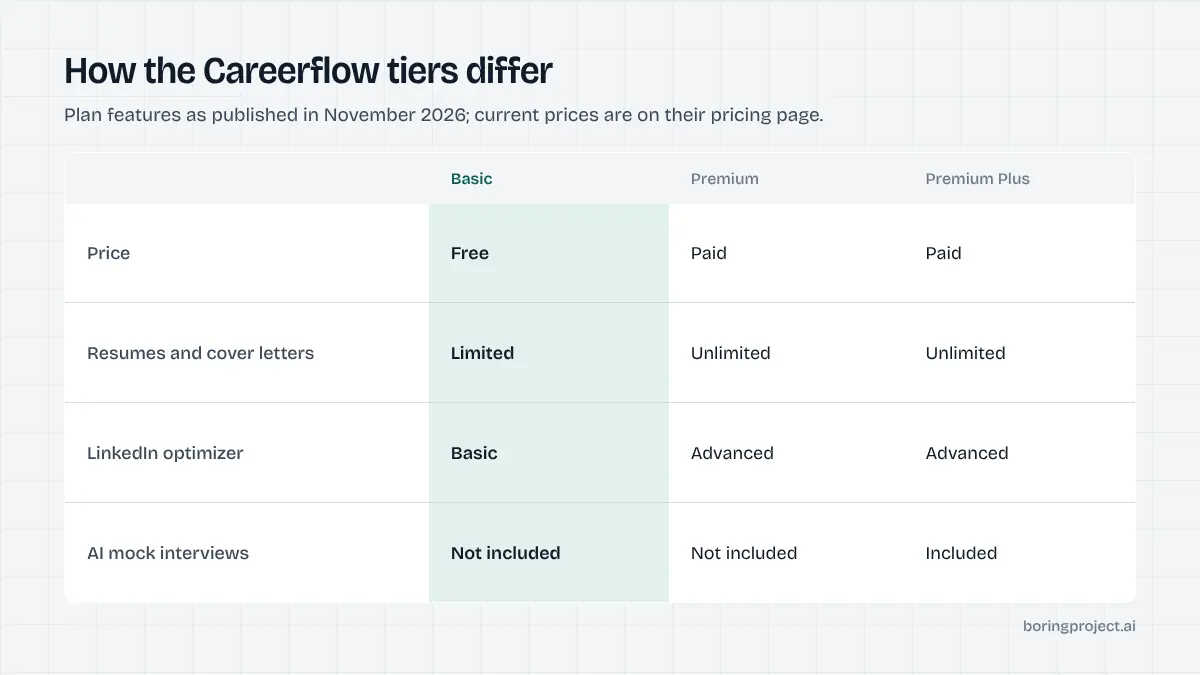
As of November 2026 the pricing page lists Basic, Premium and Premium Plus. Basic is free. Premium and Premium Plus can be billed weekly, monthly, quarterly or yearly, with the yearly option carrying the largest discount. We will not restate the amounts because they change; the live page is the source of truth.
Basic includes the Chrome extension, recruiter and hiring manager search, and guides, with limited versions of the tracker, autofill, resume builder and LinkedIn optimizer. Premium removes most of those limits and unlocks the writers and advanced analysis. Premium Plus adds the interview tools and priority support.
What the limits mean in practice
The free plan's limits are described as "limited" or "basic" rather than as numbers, so you will discover the ceilings by hitting them. For a light search that may never happen. For a daily search the autofill and tracker caps are likely to bite first.
The weekly billing option is worth noting. It lets you pay for the platform only during an intense fortnight of applying, which suits people who search in bursts.
Who gets the most out of it
Careerflow fits job seekers who want one place for resume, LinkedIn, tracking and light autofill, and who are comfortable doing the applying themselves. It is a weaker fit for people whose main problem is volume, since every application still goes through their own browser.
For a side-by-side with another extension-first tool, see our JobWizard review, which takes a narrower approach focused almost entirely on autofill and review.
How Careerflow compares with auto-apply tools
The question most readers are really asking is whether Careerflow replaces an auto-apply tool. It does not try to, and comparing the two directly clarifies what each is for.
| Need | Careerflow | Cloud auto-apply agent | Human application service |
|---|---|---|---|
| Resume and LinkedIn improvement | Core feature | Rarely | Sometimes bundled |
| Faster manual applying | Autofill extension | Not needed | Not needed |
| Applications sent without you | No | Yes | Yes |
| Review each application | Always | Optional or none | Delegated |
On LinkedIn specifically
Because Careerflow is strong on LinkedIn profile work but does not automate LinkedIn applications, people often pair it with something that handles Easy Apply volume. The constraints and risks of that pairing are covered in our guide to LinkedIn Easy Apply automation.
On control versus throughput
Careerflow's model keeps you in control of every submission, which protects against wrong screening answers and off-target applications. The cost is that your output is capped by your own hours. Cloud agents and human services invert that trade. Neither is universally better; it depends on whether your search is selective or broad.
For organisations and builders
Careerflow sells coaching-oriented packages to universities, bootcamps and career coaches. Those are built around helping candidates apply for themselves. Organisations that need to submit applications on behalf of candidates, with consent records and per-application receipts, are in a different category. They generally need a job application API or a managed service rather than a coaching platform, because the work is submitting forms across dozens of ATS systems, not coaching individuals to do it themselves.
The distinction matters when evaluating any career platform. A tool that makes one person faster is not the same as a tool that lets one operator run applications for a hundred people, and the pricing, consent model and reporting requirements differ accordingly.
Frequently asked questions
Does Careerflow apply to jobs for you?
Based on its site, no. Careerflow's Chrome extension autofills application forms so you can apply faster, but the site does not describe automatic submission. You still open each posting, check the filled fields and click submit yourself. It is an autofill and career-management platform rather than a cloud auto-apply agent.
What is included in the free Careerflow plan?
As of November 2026, the Basic plan is free and includes the Chrome extension, recruiter and hiring manager search, and guides. Most other features are present in a limited or basic form: job tracker, networking tracker, autofill, document storage, resume builder, LinkedIn optimizer, resume analysis and skill gap analyzer. The FAQ describes it as basic resume analysis and limited tracking.
How is Careerflow AI pricing structured?
There are three tiers: Basic (free), Premium and Premium Plus. Paid tiers can be billed weekly, monthly, quarterly or yearly, with the yearly option discounted. Premium unlocks unlimited resumes, cover letters and the advanced LinkedIn optimizer; Premium Plus adds AI mock interviews and interview analysis. Current prices are on the live pricing page.
Is Careerflow useful if I already have a resume tool?
The overlap is real. If you already pay for a resume builder, the parts of Careerflow that add value are the LinkedIn optimizer, the application and networking trackers, and the autofill extension. Whether that justifies a second subscription depends on how much of your search is LinkedIn-driven and how many applications you track.
Which ATS platforms does the Careerflow extension autofill?
Careerflow's homepage says the extension autofills forms and lets you apply faster, but as of November 2026 it does not publish a named list of supported ATS platforms. If your target employers use a specific system such as Workday or Greenhouse, test the extension on a real posting before relying on it for a high-volume search.
Can career coaches or universities use Careerflow?
Careerflow advertises separate offerings for organizations, including universities, bootcamps and career coaches. These are distinct from the consumer plans and are not detailed on the main pricing page. Organizations that need applications submitted on behalf of many candidates, rather than coached self-service, typically need a different category of tool.
Next step
If you want a single workspace for resume, LinkedIn and tracking while you apply by hand, Careerflow is a reasonable place to start on the free tier. If your problem is getting applications submitted at scale for many candidates, with status webhooks and screenshot receipts, see our job application API.