 The Boring Project
Auto Apply Tools Comparison: Side by Side
This page puts 17 auto apply tools in one table so you can compare auto apply tool features that actually matter: who submits, where the tool applies, whether you can review first, and what proof you get back. Each row links to a full review.
How to read the table
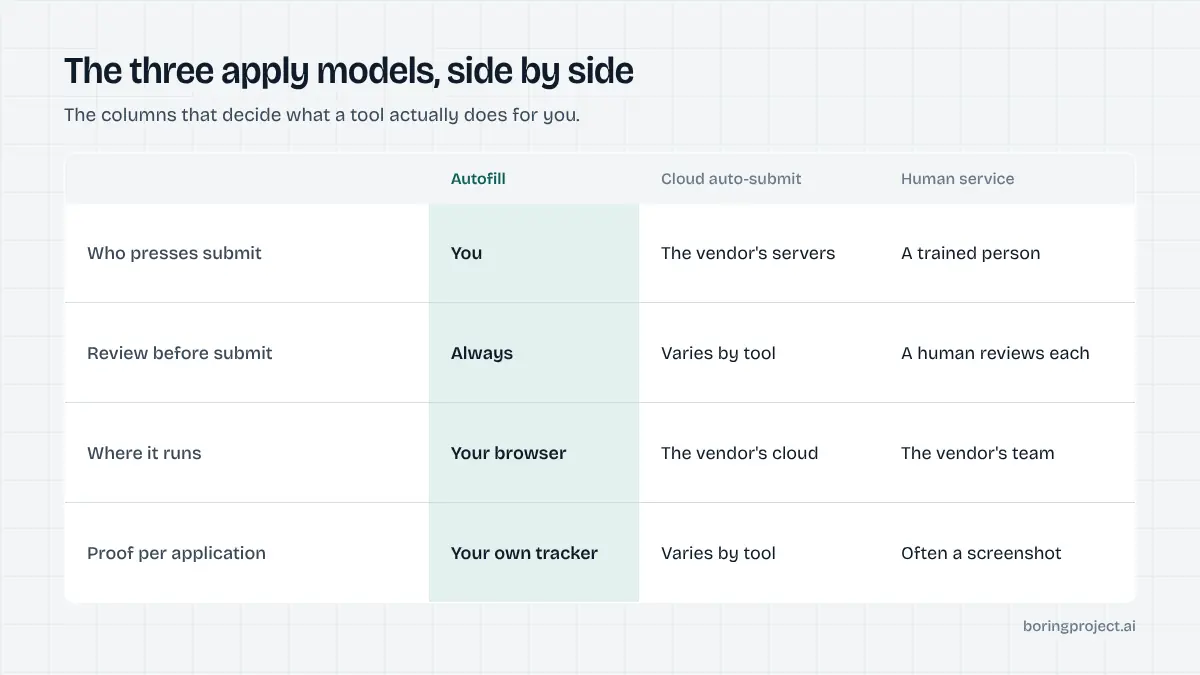
Four columns carry the comparison. "Apply model" says who presses submit: you, software, or a person. "Where it applies" summarises job sources and form types as described on the vendor's site. "Review mode" says whether you can see an application before it goes out. "Proof" says whether the vendor describes evidence per submission.
What the models mean
Autofill means the tool fills the form in your browser and you submit. Cloud auto-submit means the vendor's servers find roles and submit without you present. Human service means a trained person applies for you. The operational differences between the first two are covered in our guide to an auto apply Chrome extension vs cloud agent.
What "Not stated" means
Where a vendor's public site did not describe a behaviour when we checked in 2026, the cell says so. That is not a claim the feature is absent. Vendors often document review and receipt behaviour only inside the product, so confirm anything that matters before paying.
What we deliberately left out
No scores, no star ratings, no interview-rate claims, no user counts and no quotes. Those figures are self-reported and inconsistently defined across vendors, so putting them side by side would imply a precision that does not exist. If you want our use-case guidance rather than raw rows, start with the best auto apply tools by use case.
The comparison table
Facts reflect each vendor's site as of 2026. Links in the Review column go to our standalone review of each tool.
Rows are grouped by apply model rather than ranked: autofill tools first, then cloud agents, then human services. Within each group the order carries no meaning. If a tool you are considering is missing, it is because we have not reviewed it yet, not because we excluded it on merit.
| Tool | Apply model | Where it applies | Review mode | Proof per application | Review |
|---|---|---|---|---|---|
| Simplify Copilot | Autofill extension | Any site with an application form; tracker included | You submit | Tracker log | Simplify Copilot review |
| Careerflow | Autofill extension | Application forms; LinkedIn optimiser alongside | You submit | Tracker log | Careerflow review |
| JobWizard | Autofill extension | ATS forms incl. Greenhouse, Lever, Workday | You review, then submit | Not stated | JobWizard review |
| Jobright | Autofill (matching first) | Major ATS platforms; agent product referenced | You submit | Not stated | Jobright review |
| Jobscan Auto Apply | Autofill with drafted answers | Greenhouse, Lever, Workable and 20+ ATS | Approval required before submit | Not stated | Jobscan Auto Apply review |
| JobCopilot | Cloud auto-submit | Company career pages, daily | Optional resume check; per-application approval not stated | Not stated | JobCopilot review |
| LoopCV | Cloud auto-submit or manual | Multiple job platforms, ATS forms, recruiter email | Manual-approve mode available | Loop statistics | LoopCV review |
| AIApply | Cloud auto-submit | Listings matched to role, location, salary | Drafts reviewable | Dashboard tracking | AIApply review |
| FastApply | Extension plus cloud | Indeed, ZipRecruiter, Glassdoor and others; Workday, Greenhouse, Lever, iCIMS; LinkedIn Easy Apply | Co-pilot mode pauses each step | Not stated | FastApply review |
| LifeShack | Cloud auto-submit | Full-time roles, daily search | No per-application approval; pause and block | Dashboard of submitted applications | LifeShack review |
| JobHire.AI | Cloud auto-submit | US roles matching criteria | Not stated | Not stated | JobHire.AI review |
| Sonara | Cloud auto-submit | Daily matched openings | Not stated | Not stated | Sonara AI review |
| Massive | Cloud auto-submit | New matching roles daily | Preview of generated materials | Not stated | Massive review |
| ApplyPass | Automated submission | Company sites; software engineering focus | Not stated | Not stated | ApplyPass review |
| Scale.jobs | Human service | Roles matched by a dedicated assistant | Human reviews each | Proof screenshot per application | Scale.jobs review |
| Careerify | Human service | Roles chosen by a dedicated recruiter, weekdays | Human reviews each | Dashboard log with job-post screenshot | Careerify review |
| ApplyAll | Human service | US and Canada knowledge-work roles | Human spot-check before submit | Not stated | ApplyAll review |
Reading across the autofill rows
The five autofill tools share one property: you remain the person who submits. Where they differ is coverage and drafting. JobWizard and Jobscan Auto Apply emphasise custom question handling, Jobright leads with matching, and Simplify Copilot and Careerflow pair autofill with trackers and, in Careerflow's case, LinkedIn tools. Proof is mostly your own tracker, because you were present for every submission.
Reading across the cloud rows
The cloud tools diverge most on review mode. LoopCV offers an explicit manual-approve path, FastApply's co-pilot pauses at each step, AIApply and Massive let you review generated materials, and LifeShack states that per-application approval is not available. Several vendors do not describe the behaviour at all, which is exactly the thing to ask before signing up.
Reading across the human rows
Human services are the only group where proof per application is a selling point. Scale.jobs describes a screenshot for every application and Careerify a dashboard entry with a screenshot of the posting. They also sit at the higher end of per-application cost, and run at a daily or weekday cadence rather than around the clock.
Features the table does not capture
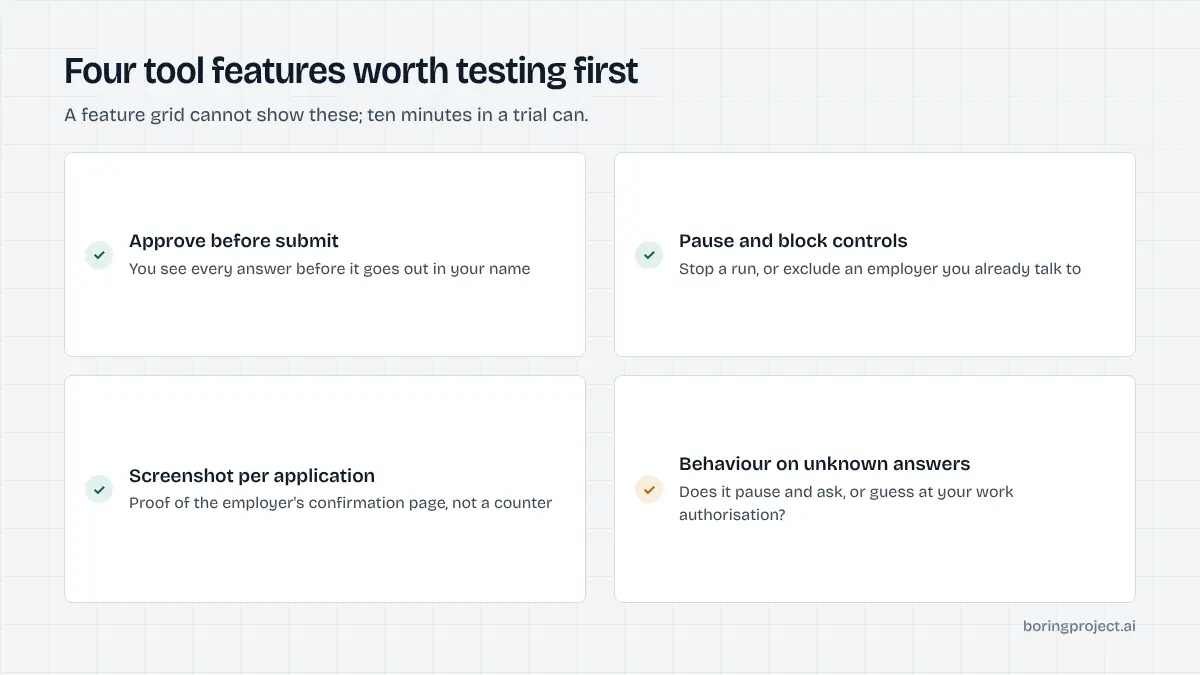
A grid can show what a tool does. It cannot show how a tool behaves on the hard cases, and the hard cases are where auto apply tools comparison usually goes wrong. The three behaviours below are the ones to test during a free tier or trial before paying for anything.
Testing is straightforward: pick three real postings on different ATS platforms, run the tool in whatever review mode it offers, and read every answer it proposed. Ten minutes of that reveals more than any pricing page.
Behaviour on unknown screening questions
The single most important feature is what a tool does when it meets a question it cannot answer from your profile: salary expectations, work authorisation, clearance, relocation. Guessing produces rejections you never see explained. Pausing and asking is slower and correct. Few vendor sites describe this; every linked review flags whether the vendor does.
Duplicate and rate behaviour
Two tools applying to the same role, or one tool applying to twelve openings at the same company in an hour, both damage your standing with that employer. Check whether a tool deduplicates against your history and whether it limits applications per employer. For teams submitting on behalf of candidates, per-employer rate limits are a requirement, not a nicety.
Related to this is what the tool does with stale or closed postings. Job feeds lag, and a tool that happily submits to a role that closed yesterday wastes credits and clutters your tracker. Tools that source from company career pages directly tend to have fewer dead listings than those relying on aggregated boards.
The category missing from the table
Every row above is a consumer tool built for one person's account. Job boards, staffing agencies, career services and product teams that need applications submitted for many candidates need something else: a job application API that takes a job URL and a candidate profile, requires consent per application, refuses to fabricate answers, enforces per-employer limits and returns a webhook with a screenshot receipt. It is priced per successful application rather than per seat, and it belongs in a different comparison from the one above.
Frequently asked questions
How did you decide what goes in the comparison table?
We used four criteria that can be verified from each vendor's own site: the apply model, where the tool applies, whether you can review before submission, and whether it provides proof per application. We did not score tools or rank them, and we left out metrics such as interview rates and user counts because vendors report those themselves and define them differently.
What does 'Not stated' mean in the table?
It means the vendor's public site did not describe that behaviour when we checked in 2026. It is not a judgement that the tool lacks the feature. If a cell matters to your decision, ask the vendor directly or check the linked review, which goes into what the site does and does not say in more detail.
Which column matters most?
Review mode, for most individual job seekers. It determines whether you see each answer before it is submitted in your name, which is the biggest safety and quality difference between tools. For businesses applying on behalf of candidates, the proof column matters most, because clients and candidates will ask for evidence that an application was submitted.
Why are human services in an auto apply comparison?
Because people searching for auto apply tools are usually trying to solve the same problem, getting applications submitted without doing the typing, and human services are one of the three ways to solve it. Including them makes the trade-offs visible: humans cost more per application and run slower, but handle judgement and typically provide proof.
Where is the API option in the table?
The table lists consumer tools, which are built for one person's account. A job application API is a different category for products and teams applying on behalf of many candidates, with consent per application, webhooks and screenshot receipts. It is described below the table rather than in it, because comparing it row by row against consumer extensions would mislead.
How current is this table?
Entries reflect vendor sites as of 2026, and we update the table when we revise the linked review posts. Tools in this category add agent products, change pricing structures and occasionally shut down, so treat the table as a starting point and confirm the apply model and plan details on the vendor's own site before paying.
Next step
If you need applications submitted for candidates rather than for yourself, the Apply API covers 40+ ATS platforms, requires consent on every application and returns a screenshot receipt with each webhook, priced per successful application. Start with the job application API overview, or ask about Managed Applies to send a CSV instead.