 The Boring Project
Auto Apply Chrome Extension vs Cloud Agent: Which Fits
An auto apply chrome extension runs in your browser while you watch; a cloud auto apply agent runs on someone else's servers while you do other things. This page compares the two on control, speed, risk and evidence, and gives a short decision flow at the end.
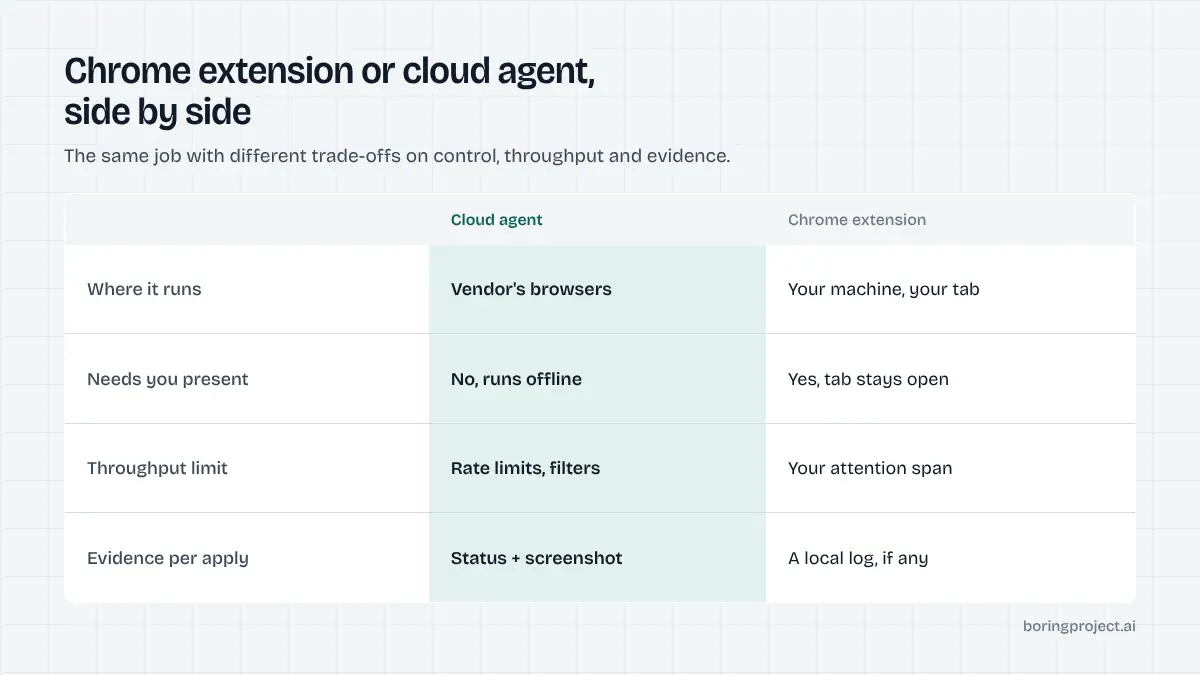
The comparison at a glance
The two models are not the same product in different packaging. They make different trade-offs, and the table below summarises them before the detail.
| Dimension | Chrome extension | Cloud agent |
|---|---|---|
| Where it runs | Your browser, your machine | Remote browsers on the vendor's infrastructure |
| Needs you present | Yes, tab must stay open | No, runs while you are offline |
| Control per application | High: you see every field | Varies: consent prompt or batch approval |
| Throughput | Limited by your attention | Limited by vendor rate limits and your filters |
| Account exposure | Uses your logged-in sessions | Depends; best ones avoid your social accounts |
| Evidence | Usually a local log, if any | Status per application, often with screenshots |
| ATS coverage | Good on simple forms, patchy on multi-step | Must handle end to end or fail cleanly |
| Cost | Often free or low | Usually subscription or per-application |
What "control" actually means
With an extension, control is literal. You can see the form, correct a field, and decide not to press submit. The cost is that every application takes your time, even when the tool fills ninety percent of it.
With a cloud agent, control is contractual. You set filters, write or approve your screening answers, and the agent acts within those limits. Good agents add a consent step per application or per batch; weaker ones treat your sign-up as blanket permission.
What "speed" actually means
Extension speed is bounded by how long you can sit at the keyboard. Thirty applications in an evening is realistic; three hundred is not.
A cloud agent's speed is bounded by the vendor's per-employer rate limits and the width of your filters. That sounds like a strict upgrade, but unlimited throughput with loose filters is how people end up applying to roles they would never accept.
Where each model breaks
Both approaches have failure modes that the homepage will not mention. Knowing them is more useful than the feature list.
Extension failure modes
Extensions depend on your browser state. A logged-out session, a changed page layout, a pop-up, or simply closing the laptop stops the run.
Because the tool borrows your session, platforms that limit automated activity see it as you, and any enforcement lands on your account. This matters most for LinkedIn, where Easy Apply is the common target; we cover the specifics in LinkedIn Easy Apply automation.
The second weakness is memory. Many extensions keep little or no history, so a month in you cannot say which employers you applied to, on which date, or with which resume version.
Cloud agent failure modes
The agent cannot ask you a quick question mid-form unless it was designed to. Tools that lack a needs-input state either fail the application or, worse, invent an answer to finish. Both outcomes are invisible unless the vendor reports honestly.
Cloud agents also need to handle anti-bot measures, CAPTCHAs and multi-page flows without a human present. How vendors solve that, and what it means for reliability, is explained in our note on headless browser job applications. The short version: coverage per ATS is either engineered properly or it does not work, and you should test the platforms your target employers actually use.
Failure modes they share
Neither model fixes a bad resume or a vague target. Both will faithfully send a mismatched profile to a hundred employers. And both can create duplicates if you also apply by hand, so keep one list of job URLs regardless of which you use.
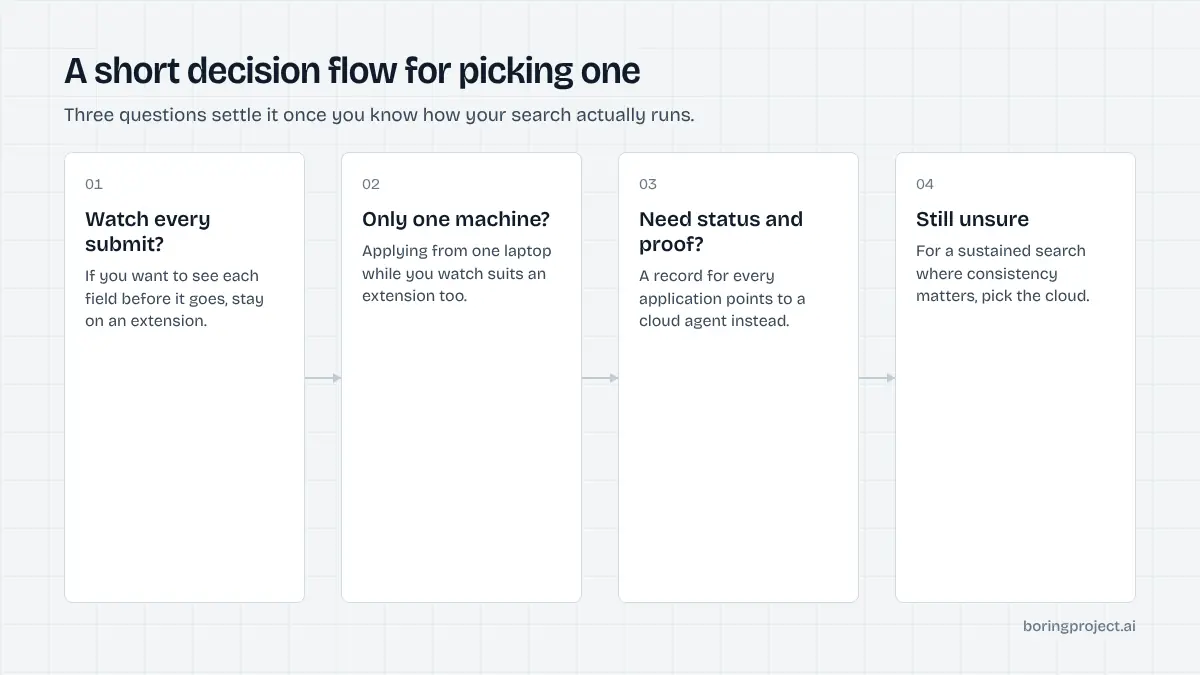
How to choose
You can decide this in a few minutes once you know how you actually search.
Pick an extension if
- You apply to a modest number of roles and want to tailor each one.
- You mostly target simple forms such as Greenhouse, Lever or Ashby single-page applications.
- You are comfortable supervising every submission and keeping your own tracker.
- You want to spend little or nothing on tooling.
An auto apply chrome extension is the right answer for a focused, low-volume search where your attention is the quality filter.
Pick a cloud agent if
- You want applications submitted while you are at work or asleep.
- You need a status and a receipt for every application without building a spreadsheet by hand.
- Your targets include multi-step platforms like Workday or iCIMS where finishing by hand defeats the point.
- You would rather set filters once and review results than click through forms.
A cloud auto apply agent is the right answer for a sustained search where consistency and record-keeping matter more than hand-tailoring each submission.
Questions to ask either vendor
Whichever you lean toward, ask the same four things. Does it require consent before applying? What does it do when it cannot answer a question?
Does it produce evidence per application? And does it operate inside your personal accounts or on the employer's site? The answers tell you more than any feature grid.
Frequently asked questions
Can I use a Chrome extension and a cloud agent at the same time?
Yes, and some people do: an extension for one-off roles they want to tailor by hand, a cloud agent for the steady background stream. The risk is duplicate applications. If you run both, keep one shared list of employers and job URLs, and check it before each manual submission so the same role is not applied to twice.
Does an auto apply extension work when my laptop is closed?
No. An extension runs inside your browser, so it stops when the browser or machine sleeps. That is the main practical difference from a cloud agent, which runs on remote infrastructure and keeps processing your queue whether or not you are online. If you want applications sent overnight or during work hours, the extension model will not do it.
Which option is safer for my LinkedIn or Indeed account?
Neither is automatically safe. Extensions that drive Easy Apply inside your logged-in session put your account directly in the path of platform rate limits. Cloud agents that log into your accounts carry the same exposure plus credential storage. The lowest-risk pattern is an agent that applies on the employer's own careers site and never touches your social accounts.
Why do cloud agents cost more than extensions?
They run browsers on servers, solve more of the form on your behalf, and usually include storage, status tracking and receipts. Extensions borrow your machine and your attention instead. Whether the extra cost is worth it depends on how many hours of supervised clicking it replaces and how much you value having a record of what was sent.
What happens when a cloud agent hits a question it cannot answer?
A well-designed one stops that application, marks it as needing your input, and asks you for the answer, then resumes. A poorly designed one guesses so the submission completes. Ask any vendor to show you exactly what the needs-input state looks like in their product before you trust it with unattended runs.
Do extensions handle Workday and other complex ATS platforms?
Some handle the first page well and struggle with multi-step flows, account creation, and resume parsing screens. Because you are watching, you can usually finish the step manually. Cloud agents have to handle these flows end to end or fail cleanly, so their coverage per ATS tends to be either solid or absent, with less of a middle ground.
Next step
If you want the cloud model done properly, the job application API behind Search + Apply submits directly on the employer's ATS, requires candidate consent on every application, never fabricates screening answers, and returns a status with a screenshot receipt. It is the same infrastructure used by job-search products and staffing teams, available to individuals through the products built on it.