 The Boring Project
Best AI Job Application Tools for Developers
Developers come to this topic with two different jobs: finding a role themselves and building apply features into a product. This guide covers developer job search tools for the first and APIs for the second, and is candid about the open-source bots that sit awkwardly in between.
Tools for your own job search
The best AI job application tools for developers are the ones that cover the systems engineering teams actually hire through. Software engineering roles are mostly hosted on a short list of applicant tracking systems: Greenhouse, Lever, Ashby, Workday and Workable dominate, with SmartRecruiters and iCIMS at larger companies. That makes ATS coverage the first filter when choosing developer job search tools, and the apply model the second.
Developers also tend to face a specific kind of custom question: links to GitHub or a portfolio, a short technical write-up, or a take-home acknowledgement. Tools that handle custom fields well, or that stop and let you answer them, are worth more here than raw application volume.
| Tool | Apply model | Developer-relevant notes | Review |
|---|---|---|---|
| Simplify Copilot | Autofill extension, free | Broad ATS coverage; you submit | Simplify Copilot review |
| JobWizard | Autofill extension | Built around Greenhouse, Lever, Workday forms; drafts custom answers | JobWizard review |
| Jobright | Matching plus autofill | Skill-based matching and resume tailoring; agent product referenced | Jobright review |
| Jobscan Auto Apply | Autofill with approval, credits | Sources roles from Greenhouse, Lever, Workable and 20+ ATS; nothing submits without approval | Jobscan Auto Apply review |
| ApplyPass | Automated submission | Focused on software engineering roles; free trial of 100 applications | ApplyPass review |
| FastApply | Extension plus cloud | Co-pilot mode pauses per step; covers major ATS and job boards | FastApply review |
| LoopCV | Cloud auto-submit or manual approve | Free plan; also sells API and white-label to organisations | LoopCV review |
Autofill tools that respect the submit button
Simplify Copilot and JobWizard fill the standard fields on the ATS platforms engineering teams actually use and leave submission to you. Jobscan Auto Apply adds drafted answers to custom questions with explicit approval before anything goes out. For developers, who tend to face "link to your GitHub" and "describe a system you designed" questions, keeping the final click is usually worth the time.
Volume tools with an engineering focus
ApplyPass is the only tool on this list that positions itself specifically around software engineering roles, submitting automatically on company sites. FastApply's co-pilot mode and LoopCV's manual-approve mode offer volume with a veto, which suits people applying broadly while still wanting to catch bad matches before they are submitted.
Matching when the market is crowded
Jobright's skill-based matching is useful when the problem is not applying but finding roles that fit a specific stack or seniority. Pairing a matching feed with a separate autofill tool is common; the only rule is to keep a single source of truth for what you have applied to so that two tools never submit to the same role.
Open-source bots: what they teach and what they risk
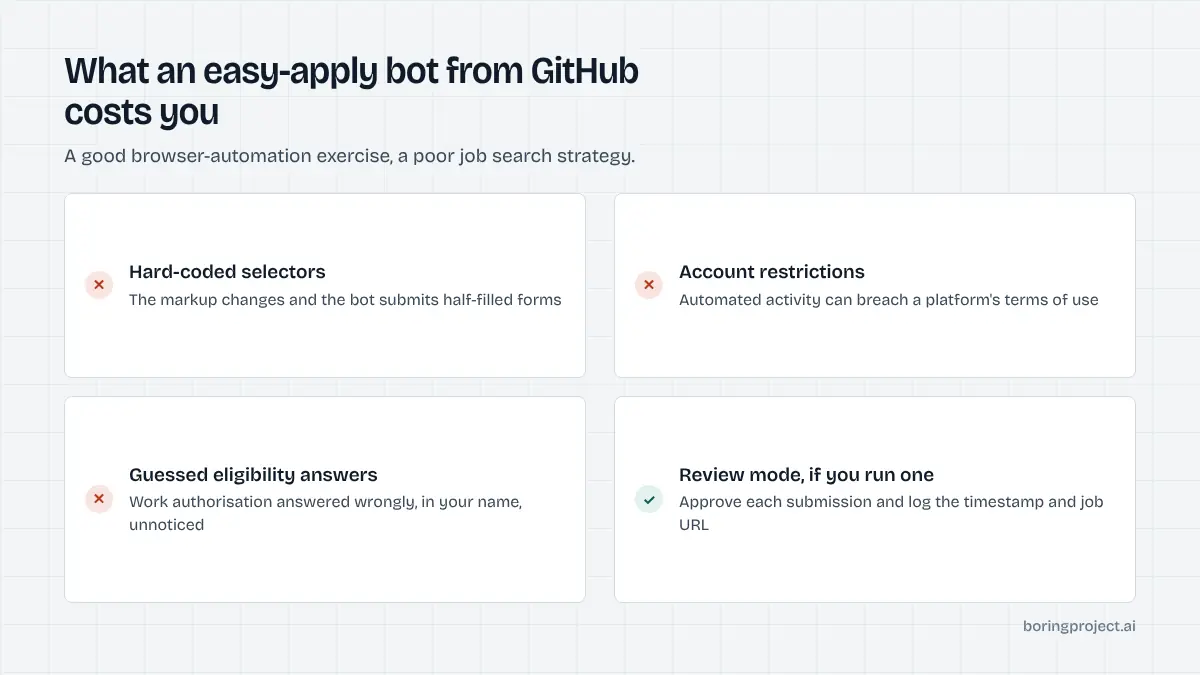
Search GitHub for "easy apply bot" and you will find many repositories that script a browser to apply on LinkedIn or fill ATS forms. They are a useful way to understand how application automation works. They are a poor way to run a job search.
Why they break
Each bot hard-codes selectors and flows for a specific version of a specific site. Platforms change their markup regularly, and a bot that worked last month will silently submit half-filled forms or stop entirely. Maintaining one across even a handful of ATS platforms is a part-time job, which is the core argument in our comparison of a job application API vs browser RPA.
Why they are risky to you
Automated activity can violate a platform's terms and result in account restrictions. More seriously, most bots answer screening questions from a static config and will guess when they do not know, which means an eligibility question about work authorisation or clearance can be answered wrongly in your name. That is not a bug you can patch; it is a design problem.
If you run one anyway
Keep it in a mode that pauses before submission so you approve each application. Log every submission with a timestamp and job URL. Never let it answer a question it has not been explicitly configured for. And treat the project as what it is: a good exercise in browser automation that happens to touch your professional reputation.
Building apply features into a product
The second group of developers is not job hunting. They are building a job board, a career platform, a staffing tool or an agent product and need applications submitted for their users. This is an infrastructure decision, not a tool choice.
The three routes
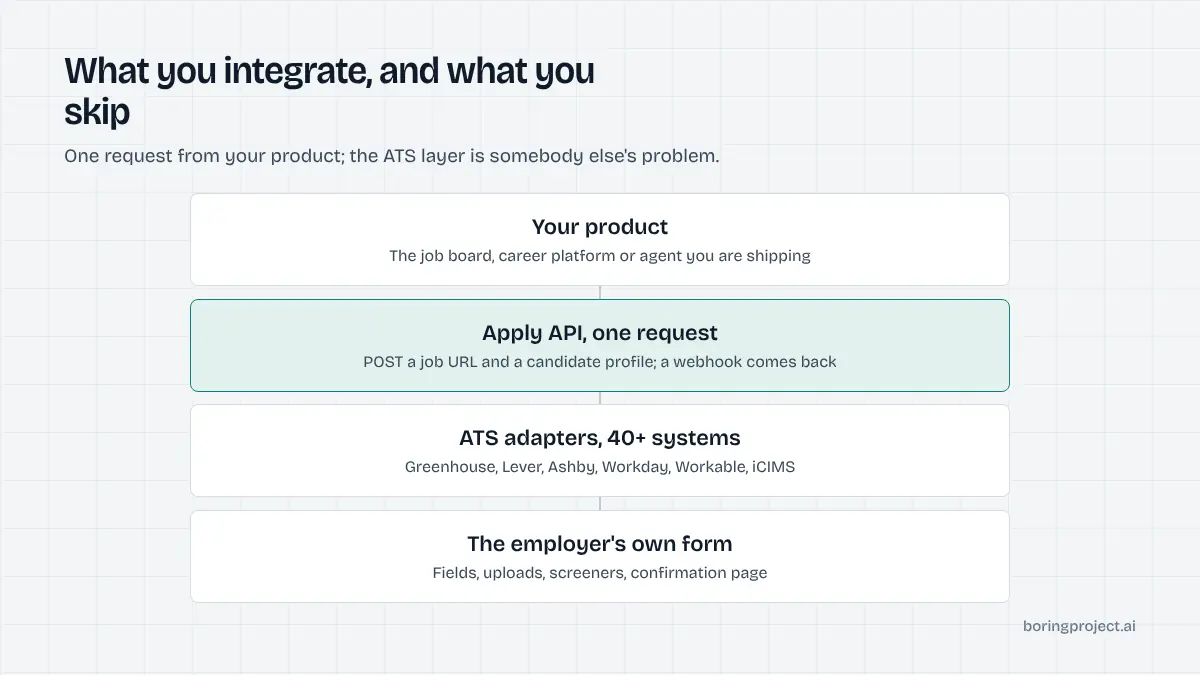
You can script browsers yourself, which is the open-source bot problem at commercial scale. You can use a general browser-agent platform, which gives you infrastructure but leaves ATS logic, screening questions and receipts to you. Or you can call a purpose-built job application API that abstracts the whole flow behind one request. Our guide on how to add auto apply to your job search app walks through the integration pattern.
What a purpose-built API should return
At minimum: a status of submitted, needs_input or failed, a screenshot receipt of the confirmation state, and enough structure that your product can ask the candidate for a missing answer and resume. It should require candidate consent per application, refuse to fabricate screening answers, and rate-limit per employer so no single client can flood a company's ATS. Coverage should span the ATS platforms your users' target companies actually run, not just board quick-apply buttons.
Evaluating before you integrate
Read the API reference, not the landing page. Check the request shape for the candidate profile, the webhook payload, how the API signals that it needs input, and what the receipt looks like. Then run a small batch against real postings on Greenhouse, Lever and Workday and inspect the screenshots. Median submit time, failure categories and how needs_input is surfaced will tell you more than any feature list.
Finally, check the commercial model. Per-application pricing on successful submissions aligns the provider's incentives with yours, because a failed or half-filled application costs you nothing. Seat-based or flat monthly pricing does not carry that guarantee, so ask what counts as a billable application before you integrate.
Frequently asked questions
Which AI job application tools work best for software engineering roles?
For your own search, autofill extensions such as Simplify Copilot and JobWizard cover the ATS platforms engineering teams commonly use, and Jobright adds matching and resume tailoring. ApplyPass focuses specifically on software engineering roles with automated submission. Choose on whether you want to keep the submit button, then on coverage of the ATS platforms your target companies run.
Should I run an open-source auto-apply bot from GitHub?
Treat it as a learning project, not a job search strategy. Open-source bots break when forms change, often violate platform terms, can get an account restricted, and may answer screening questions wrongly in your name. If you do run one, keep it in a review mode where you approve each submission, and never let it guess at eligibility questions.
What is a job application API and who is it for?
A job application API lets a product submit applications programmatically. You send a job URL and a candidate profile; the service fills and submits the employer's ATS form and returns a webhook with status and a screenshot. It is for developers building job search products, job boards, staffing tools or career platforms, not for an individual applying to a few roles.
How is an API different from browser automation libraries?
Browser automation libraries give you a controllable browser; you still write and maintain the logic for every ATS form, upload, question and confirmation page. An apply API hides all of that behind one request and carries the integration library for you. The library route is cheaper to start and more expensive to keep running across many ATS platforms.
Can an API answer screening questions honestly?
A well-designed one answers only from the candidate profile it was given and returns a needs_input status when a question cannot be answered from that data, rather than guessing. That status lets your product ask the candidate and resume the application. Any tool or API that fabricates answers to eligibility questions is a liability for you and the candidate.
What does it cost to add an apply feature with an API?
Pricing is typically per successful application rather than per seat or per month, so cost scales with usage and failed submissions do not count. Exact rates depend on volume and are quoted on request. Compare that against the engineering time and infrastructure of maintaining browser bots for the ATS platforms you need, which is the hidden cost of the do-it-yourself route.
Next step
If you are building rather than searching, the Apply API takes a job URL and a candidate profile, submits to 40+ ATS platforms including Greenhouse, Lever, Ashby and Workday, and returns submitted, needs_input or failed with a screenshot receipt by webhook. Read the API documentation and run a test batch against real postings.