 The Boring Project
Job Application API vs RPA Browser Bots
A job application API submits to employer ATS forms through a single request and returns a receipt; browser RPA scripts drive browsers yourself and break when forms change. This comparison covers maintenance, receipts, consent and cost for teams considering browser bot job applications at scale.
Two ways to submit an application programmatically
If your product needs to apply to jobs on behalf of users, there are only two engineering routes. You can drive browsers yourself, or you can call a service that does. Both end with a form submitted on Workday, Greenhouse, Lever or one of dozens of other systems, and the job application API vs RPA choice is mostly about who owns what happens in between.
Browser RPA: scripts that click for you
Robotic process automation launches a browser, navigates to the job URL, locates each field by selector, types the candidate's data, uploads a resume, answers whatever questions it recognises and clicks submit. Each ATS has a different flow, and many employers customise theirs, so coverage means a growing library of scripts. Our guide to headless browser job applications explains the mechanics.
Job application API: a request and a webhook
An API abstracts all of that behind one call. You POST a job URL plus a structured candidate profile; the provider identifies the ATS, fills and submits the form, and returns a webhook with a status of submitted, needs_input or failed, along with a screenshot receipt. Your code never touches a selector, and the provider carries the integration library.
What they have in common
Both ultimately operate the employer's real application form, because that is the only way to apply. The difference is not what gets submitted but who maintains the machinery, how failures surface, and whether the system produces evidence and respects limits by design.
Side-by-side comparison
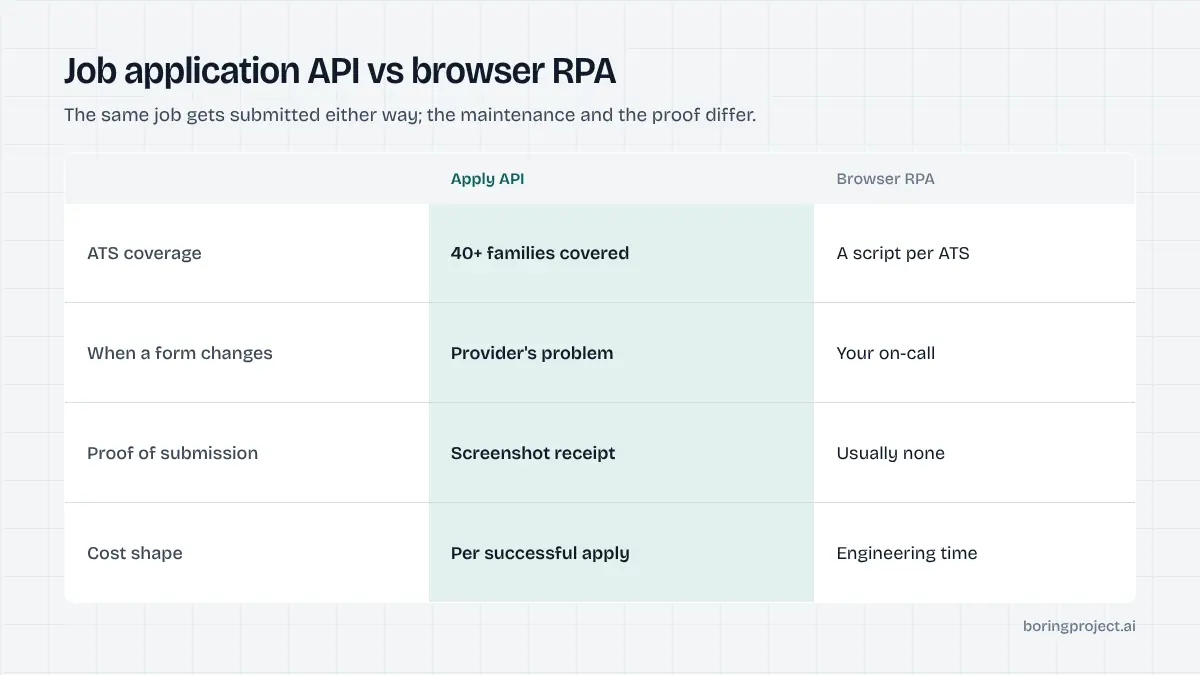
The table below mirrors the criteria we use on our own home page comparison, applied neutrally to the two approaches. The point is not that one column is always right; it is that the costs of the RPA column are mostly deferred and the costs of the API column are mostly visible.
That asymmetry is why teams often start with scripts and migrate later. The first script is cheap. The fortieth, plus the on-call rota to keep the other thirty-nine alive, is not.
| Criterion | Browser RPA (self-built) | Job application API |
|---|---|---|
| Integration effort | One script per ATS, often per employer variant | One endpoint; provider covers 40+ ATS platforms |
| Maintenance when forms change | Yours; breaks silently until noticed | Provider's; fixed centrally for all clients |
| Screening questions | Hard-coded mappings; guesses or skips | Answered from profile; pauses with needs_input otherwise |
| Evidence per submission | Only if you build it | Screenshot receipt with every webhook |
| Rate limits per employer | Must be built and enforced yourself | Enforced by the provider |
| Candidate consent | Your process | Required on every application |
| Infrastructure | Browsers, proxies, captcha handling, queues | None beyond your own server |
| Cost model | Engineering time plus infrastructure | Per-application pricing, successful submissions only |
| Time to first submission | Weeks to months | Minutes to hours |
Maintenance is the hidden line item
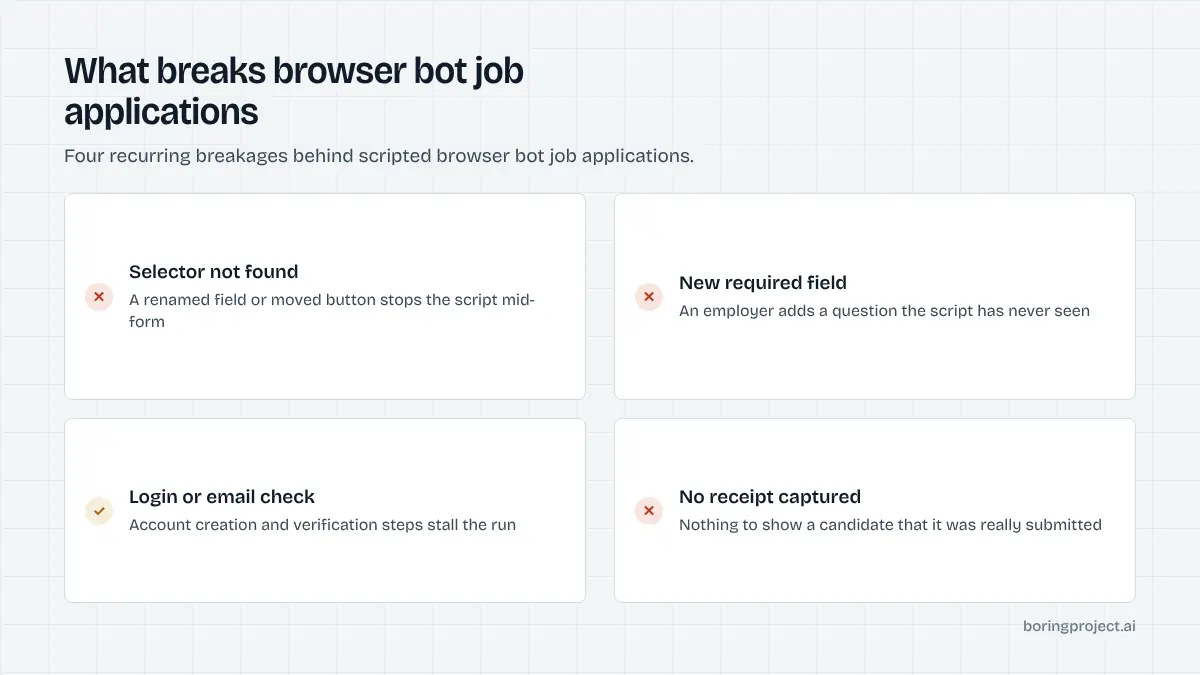
Applicant tracking systems change their forms more often than teams expect, and employers add custom questions constantly. A selector that worked on Friday fails on Monday, and a scripted bot fails quietly: it either submits a half-filled form or stops without telling anyone. With forty-plus platforms in play, breakage is continuous rather than occasional.
Multi-step flows make it worse. Workday-style applications span account creation, several pages and conditional questions, so a single change early in the flow can invalidate every step after it. Detecting that reliably means building monitoring on top of the bots, which is another system to maintain.
Receipts change the conversation with clients
A staffing agency or job board that submits for candidates will be asked "did it actually go in?" A screenshot of the confirmation page, attached to a webhook with timestamp and status, answers that in one message. Building the same thing into home-grown RPA means capturing and storing screenshots, handling the many confirmation layouts, and keeping them tied to the right application.
Consent and limits are easier to enforce centrally
An application submitted in someone's name without their consent is a liability, and a thousand submissions to one employer in an hour is a quick way to get blocked. An API can enforce consent capture and per-employer rate limits uniformly. Across a fleet of scripts written by different engineers at different times, that uniformity is hard to guarantee.
Choosing for your situation
The job application API vs RPA answer depends on your ATS coverage needs, volume and appetite for owning infrastructure. It also depends on who your users are: a job seeker tolerating a failed submission is one thing, a staffing client paying per placement is another. The full build-versus-buy reasoning is in our guide to build vs buy for job application automation; the short version follows.
When RPA is the reasonable choice
Build your own browser automation when you need one or two ATS platforms, your volumes are in the dozens per week, you already run headless browsers for other product features, and you have engineers willing to be on call for breakages. It is also a fair way to prototype before committing to infrastructure spend.
When an API is the reasonable choice
Use a job application API when you need broad ATS coverage, volume in the hundreds or thousands per week, evidence for every submission, or a predictable unit cost. It is the default for job boards adding one-click apply, staffing agencies submitting for pools of candidates, and career platforms that want to ship the feature this quarter rather than next year.
What to check before you commit to either
Whichever route you take, confirm how the system handles a question it cannot answer, what it returns on success and failure, how it rate-limits per employer, and how consent is recorded. For an API, read the integration reference first; our API documentation describes the request shape, webhook payload and status model so you can evaluate the fit before writing code.
Frequently asked questions
What is browser RPA in the context of job applications?
Robotic process automation drives a real or headless browser with scripts: open the job URL, find the name field, type, find the upload control, attach the resume, click submit. It works until the page changes. For job applications, that means a script per ATS vendor and often per employer, each of which breaks whenever a form, selector or flow is updated.
How is a job application API different from running my own bots?
An API hides the browser work behind a single request. You POST a job URL and a candidate profile; the provider handles the ATS form, screening questions, uploads and submission, then returns a webhook with the result and a screenshot. The maintenance of forty-plus ATS integrations, rate limits and failure handling becomes the provider's problem rather than yours.
Is RPA cheaper because there is no per-application fee?
On paper. In practice you pay in engineering time, browser infrastructure, proxy and captcha costs, and on-call for breakages. Those costs scale with the number of ATS platforms you cover and are hard to forecast. Per-application API pricing converts that uncertain overhead into a predictable unit cost that tracks successful submissions only.
What does a screenshot receipt actually prove?
It captures the confirmation state after submission, so you can show a candidate or client that an application was submitted at a specific time to a specific job. It also helps diagnose failures: a needs_input or failed status with a screenshot shows exactly which question or step blocked the application. Scripted bots rarely produce this by default.
Can an API respect employer rate limits and candidate consent?
It should, and that is a reason to prefer one. A well-designed API enforces per-employer rate limits so one client cannot flood a company's ATS, requires candidate consent on every application, and refuses to fabricate screening answers, pausing instead. Enforcing those rules consistently across a fleet of home-grown bots is difficult.
When does building browser RPA still make sense?
When you need only one or two ATS platforms, volumes are small, you already run browser infrastructure for other reasons, and you have engineers who can own the breakage. It also makes sense as a prototype to prove demand before committing to infrastructure. Beyond that, maintenance load tends to grow faster than the value it protects.
Next step
If you would rather ship the apply feature than maintain a bot fleet, the Apply API takes a job URL and candidate profile and returns submitted, needs_input or failed with a screenshot receipt, with a median submit of about three minutes. Read the API documentation to see the request and webhook shapes, then request a key.