 The Boring Project
Why Automated Applications Get Rejected by Employers
Employers do not reject applications for being automated; they reject them for what careless automation produces. This page explains why automated applications get rejected, what an auto apply rejection usually signals, and how well-built automation avoids every one of the causes.
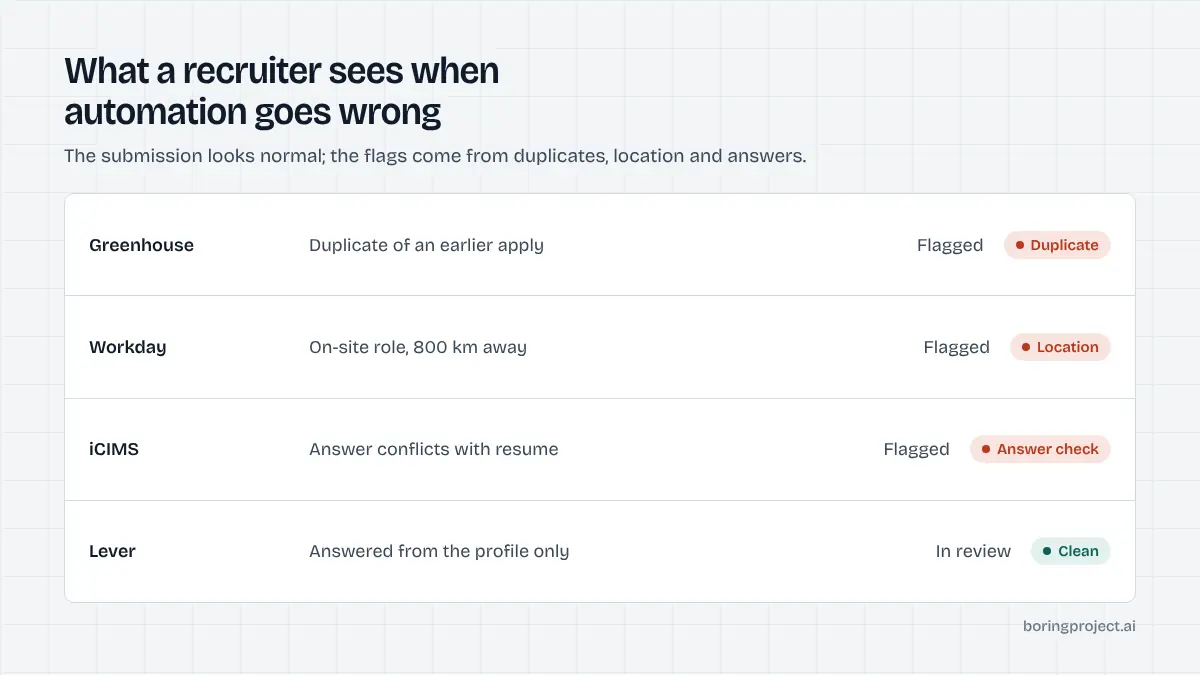
The three causes that account for most rejections
Across the applications we see fail, three patterns explain why automated applications get rejected. Each is a tool behaviour, not an employer policy, which means each is fixable.
Fabricated screening answers
Most forms include questions with a right answer for the employer: work authorisation, required licence, minimum experience, on-site availability. A tool that guesses favourable answers to get through the form passes the gate and then fails at review, reference check, or offer.
The signal is a rejection that arrives after a recruiter has looked at the file, often with a note about qualifications, or an offer that is withdrawn. The fix is a tool that answers only from facts you have confirmed and pauses on anything new.
Duplicate submissions
Aggregated job feeds list the same role under several URLs, and tools without deduplication apply to each. ATS platforms flag or merge duplicate candidates, and recruiters see the result. Some employers also enforce a waiting period after a rejection, so a repeat application within that window is rejected automatically.
The signal is multiple acknowledgement emails for one role, or an instant rejection for a company that rejected you recently. The fix is deduplication by employer and title across every source, and a shared log if you also apply by hand.
Location and role mismatch
On-site roles in cities you do not live in, seniority two levels off, industries where your experience does not transfer: automation makes these effortless to apply to and effortless to reject. Location is the most common, because many tools treat "remote" loosely or ignore the on-site requirement in the posting.
The signal is a high volume of auto apply rejection emails within a week or two, concentrated in roles you would not have chosen by hand. The fix is strict filters on location type, radius, seniority and employer, set tightly enough that the feed looks like a list you would apply to yourself.
Secondary causes worth checking
The three above explain most of the pattern. If you have fixed them and rejections continue, look here next.
Parsing errors in the submitted resume
Applicant tracking systems extract your resume into fields. Multi-column layouts, tables, graphics and unusual headings scramble that extraction, and the tool submits whatever the parser produced. The recruiter sees a profile that does not match the PDF, which reads as either carelessness or inconsistency.
Apply manually to one Workday or iCIMS posting and check the parsed preview. If it is wrong, rebuild the resume in a single column with conventional section names before running any automation again.
Identical free text across employers
Tools that insert the same paragraph into every "why this role" field produce text that is recognisably generic, and recruiters who see several applications from the same tool recognise the pattern. Keep free-text answers short and specific, or let the tool skip optional free-text fields rather than fill them with boilerplate.
Account-level problems on job platforms
Tools that run inside your LinkedIn or Indeed session can trip platform rate limits, and enforcement lands on your account rather than the tool. That is not an employer rejection, but it ends the same way: applications that never arrive. The trade-offs between account-based tools and ones that apply on the employer's site are covered in is auto apply safe.
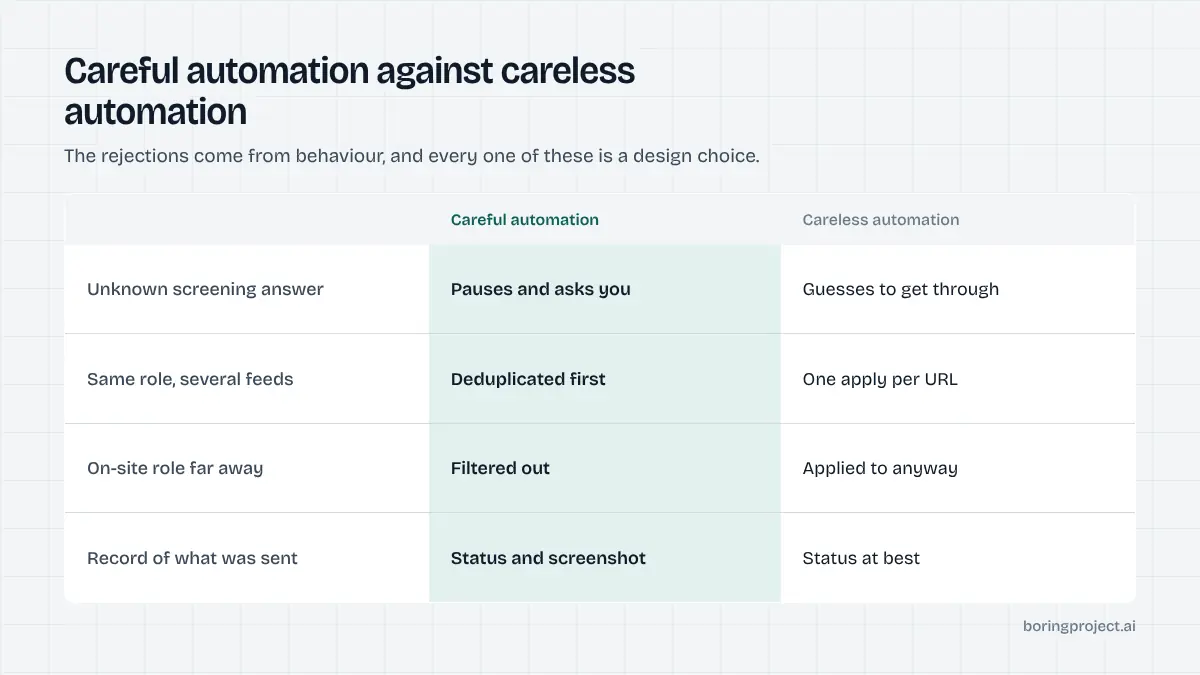
What good automation does differently
None of the reasons why automated applications get rejected are inherent to automation. They are design choices, and the better tools make different ones.
It asks before it acts
Consent on each application, or at least on each reviewed batch, means you see what is about to be sent. It also forces the tool to surface the roles it selected, which is where most mismatches are caught. Unattended tools that run on a schedule you cannot inspect remove that check.
It refuses to guess
When a screening question does not map to a confirmed fact in your profile, the right behaviour is to stop that application, mark it as needing your input, and ask. This is slower than guessing and produces a lower headline "success" number.
It also produces applications that survive review. If a vendor cannot show you what their needs-input state looks like, assume it guesses.
It leaves evidence
A status per application, the job URL, a timestamp and a screenshot of the confirmation page let you reconstruct exactly what was submitted. That is how you tell a failed knockout from a parsing error from a duplicate. Without evidence, every rejection looks the same, and you are left reading our companion guide on auto apply with no interviews with no data to apply it to.
The common thread is that careful automation is slower per application and honest about what it did. It will also show you a smaller number of submissions than a tool that applies to everything, and that smaller number is the point. That is the trade worth making, because the point of applying is to be considered, not to be counted.
Frequently asked questions
Can a recruiter tell an application was automated?
Not from the submission mechanism, which arrives through the same ATS form a person would use. They infer it from side effects: identical free-text answers across several applications, duplicates, applications to roles that clearly do not fit, or answers that contradict the resume. Automation that avoids those side effects is indistinguishable from a careful manual application.
Is it the automation itself that gets rejected, or the content?
The content. Employers reject applications for failing requirements, duplicating existing records, or lacking fit. A tool causes rejections when it produces those conditions: guessing a knockout answer, submitting the same role twice, or ignoring location. Fix the tool's behaviour and the rejection rate converges on what a manual application with the same profile would get.
What should I do if I was rejected because a tool answered a question wrongly?
Correct the stored answer immediately so it does not repeat. For the specific application, a brief, factual email to the recruiter explaining the error and giving the correct answer is reasonable, but do not expect it to reopen the role. Then audit every other answer the tool reuses, because one wrong guess usually means others.
Do duplicate applications actually hurt, or are they just ignored?
Both happen. Many ATS platforms merge or flag duplicate candidates automatically, and recruiters see the flag. At best it is noise; at worst it reads as not paying attention. Some employers also apply cooling-off periods after a rejection, and a duplicate submitted during that window is rejected on sight.
Can automation safely apply to roles in another city if I am willing to relocate?
Yes, if your profile states relocation willingness and the tool answers the location questions accurately. The rejection risk comes from applying to on-site roles with a profile that says you are elsewhere and gives no indication you will move. Keep location preferences explicit and let the tool answer from them.
How does good automation prevent these rejections?
By refusing to guess, checking for duplicates against your history before submitting, applying strict location and role filters, and asking for your consent on each application. It should also return a status and a receipt so you can see exactly what was sent. Those safeguards remove the causes rather than hiding the symptoms.
Next step
The job application API behind Search + Apply and Managed Applies was built around these constraints: consent on every application, no fabricated screening answers, deduplication against your history, per-employer rate limits, and a screenshot receipt with every submitted, needs_input or failed status. It removes the causes on this page rather than hiding them.