 The Boring Project
Managed Job Application Service: CSV In, Receipts Out
Managed Applies is the done for you job applications B2B option: you send a spreadsheet of candidates and roles, we submit on each employer's ATS and return receipts, no integration required.
Not every team that needs application volume has engineers to spare. Staffing agencies, outplacement firms, university career offices and small career platforms often have the candidates, the target roles and the consent, but no capacity to integrate an API.
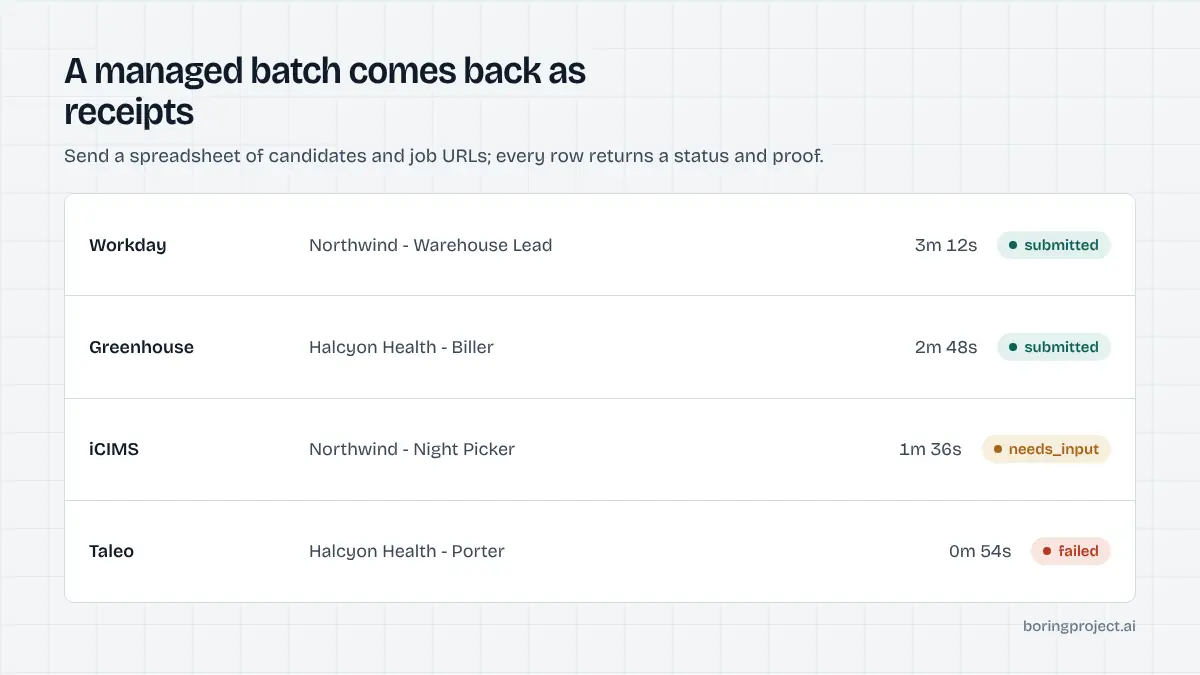
A managed job application service is built for that situation. The input is a spreadsheet. The output is the same spreadsheet with a status and a screenshot receipt for every row. This article explains how it works, who it suits, and how to decide between managed and API.
How a managed workflow runs
Preparing the file
Each row is one application. It carries a candidate identifier, the profile fields the forms will need (contact details, work history, education, work authorisation, location), a reference to the resume file, the job URL, and a consent confirmation. Rows without consent are not processed.
The more complete the profile columns, the fewer rows pause for input. Teams that run several batches quickly learn which fields their target employers ask for and add them to the export template.
Submission and rate limiting
Once the batch is accepted, each application is submitted on the employer's own ATS, whether that is Workday, Greenhouse, iCIMS, Taleo, SuccessFactors or one of dozens of others. Per-employer rate limits apply across the whole file, so a batch with forty candidates targeting one company is paced rather than fired all at once.
Nothing is fabricated. If a form asks a question the row cannot answer, that application pauses and is returned as needs input with the exact fields listed. The remaining rows continue.
Receipts back
The returned file has three kinds of rows. Submitted rows include a link to a screenshot of the confirmation page. Needs input rows list what is missing so you can collect it and resubmit. Failed rows include a reason, typically a closed posting or an ATS error.
| Status | What you receive | What you do next |
|---|---|---|
| Submitted | Screenshot receipt | Share with candidate, log in CRM |
| Needs input | List of missing fields | Collect answers, resubmit row |
| Failed | Reason | Replace job URL or drop |
Those receipts are the point. They let an agency show a candidate where they were submitted, let a career office report activity to leadership, and let a platform verify that paid-for applications actually landed.
Who managed suits, and who should use the API
Teams without engineering capacity
The clearest fit is any organisation where the people who own the candidate relationship cannot write code and cannot easily get it written. Recruiting teams submitting bench talent, outplacement providers, and career offices all fall here. Our guide to job application automation for recruiting teams covers the agency case in depth.
Pilots and seasonal pushes
Even teams with engineers often start managed. A pilot of a few hundred applications on your real candidate and job mix tells you the submit rate, the needs_input rate and which ATSs cause trouble, all before anyone writes an integration. Seasonal programs, such as a university's autumn recruiting cycle, are another natural fit; see our piece on auto apply for university career services.
When the API is the better choice
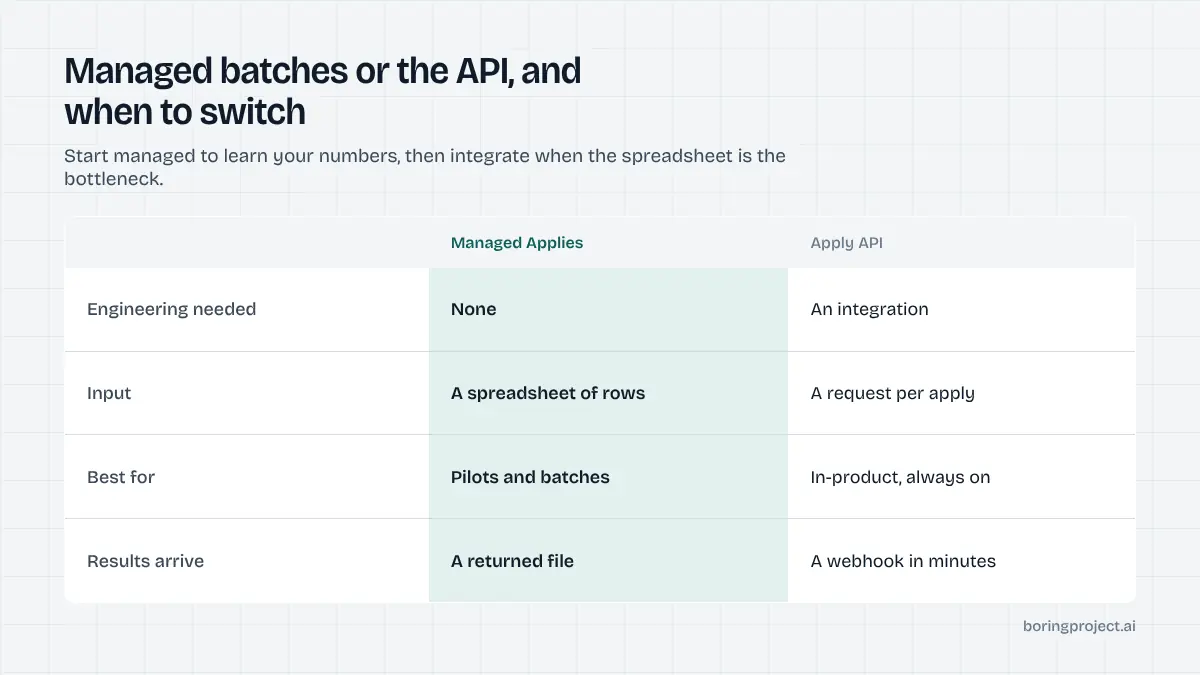
If applications need to trigger from inside your product in real time, the API wins. A job search app with an "Apply for me" button, a platform with thousands of daily users, or a CRM where recruiters want results attached to records within minutes all need webhooks and an always-on integration. Managed batches are too slow for that loop.
The usual pattern is to graduate: start managed, learn the numbers, then integrate when the spreadsheet becomes the bottleneck. The fields you prepared for the CSV are the same fields the API expects.
What to check before choosing a provider
Consent and accuracy guarantees
Ask how consent is required and recorded, and whether the provider ever fills in answers the candidate did not supply. The right answers are "per application, required on every row" and "never". Anything softer puts your candidates and your reputation with employers at risk.
It is also worth asking how the provider handles sensitive fields such as disability status, veteran status or demographic questions. These should be left blank or answered only from explicit candidate input, never inferred.
Evidence per application
Insist on a screenshot receipt for every billed application and a clear reason for every failure. Receipts are what make the service auditable, and they are the difference between knowing an application landed and hoping it did.
Check the format too. Receipts you can attach to a candidate record or drop into a client report are more useful than receipts locked inside a vendor dashboard. A returned spreadsheet with links per row is the simplest version of that.
Pricing basis
Per-application pricing for confirmed submissions, with no charge for paused or failed rows, aligns the provider's incentives with yours. Avoid structures that bill per attempt or expire prepaid balances before you can use them.
Finally, ask whether the provider offers an API path for later. A managed service that shares its data model with an API means your spreadsheet work is not thrown away when you decide to integrate.
Frequently asked questions
What exactly do we send, and what do we get back?
You send a spreadsheet with one row per application: candidate identifier, profile fields or a link to the profile, resume file reference, target job URL, and a consent confirmation. You receive the same sheet back with a status per row (submitted, needs input, or failed), a reason where relevant, and a screenshot receipt for each confirmed submission.
How is consent handled in a managed workflow?
The business submitting the CSV confirms that each candidate approved the application, and that confirmation is required per row. Rows without it are not processed. Many teams capture approval in their own portal or CRM and export it alongside the job list. The managed service does not contact candidates directly unless you arrange that.
What happens to rows that need input?
They are returned with the specific missing fields listed. You collect the answers from the candidate or your records, add them to the row, and resubmit that subset in the next batch. Nothing is guessed on the candidate's behalf. Over time, adding the commonly requested fields to your export reduces how many rows pause.
How quickly does a batch turn around?
Individual applications typically complete within minutes once started, but a batch is scheduled and processed as a whole, with per-employer rate limits applied across the file. Turnaround depends on batch size and how many distinct employers it covers. Expect same-day to a few days for typical files, with needs_input rows returned as they occur.
Is managed more expensive than the API?
Both are priced per successful application, so the unit economics are similar. The practical difference is where the operational work sits: with the managed service, scheduling, retries and receipt collation are handled for you, which suits teams without engineering time. Contact sales for current terms rather than relying on a general figure.
Can we move from managed to the API later?
Yes, and many teams do. The data you prepare for a CSV maps directly to the fields the API expects, so the migration is mostly about building the integration and the webhook handler. Starting managed lets you learn your real success rates and needs_input patterns before committing engineering effort.
Next step
If you have candidates, target roles and consent but no engineering time, Managed Applies is the fastest way to get submissions and receipts flowing on your own data. Talk to us about Managed Applies and we will scope a first batch.