 The Boring Project
API to Apply on Jobs: A Developer Walkthrough
This guide walks through integrating an api to apply on jobs: the request you send to the apply API, the statuses you get back, how to handle webhooks, and how to keep retries from creating duplicate applications. It assumes you have read the conceptual overview and want to ship.
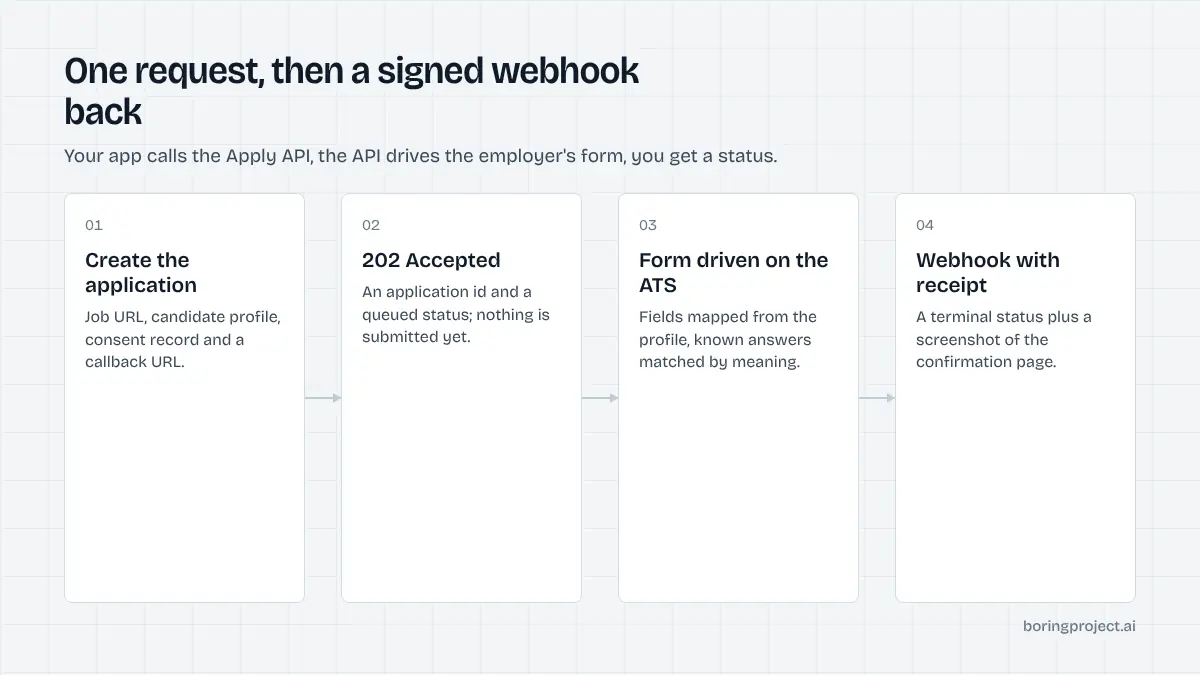
The request: job URL plus candidate profile
An API to apply on jobs has one endpoint that matters. You tell the service which job and which person, and it takes over from there. If you want the high-level picture before the details, start with what a job application API is and how it works.
Minimum viable payload
A request needs a job URL, a candidate profile, a consent record, and a callback URL. The job URL is the posting on the employer's career site or ATS, not a scraped aggregator page. The profile is structured JSON covering contact details, work history, education, authorisation, and links, with the resume as a file upload or a fetchable URL.
POST /v1/applications
{
  "job_url": "https://boards.greenhouse.io/examplecorp/jobs/123456",
  "candidate": {
    "first_name": "Priya",
    "last_name": "Nair",
    "email": "priya@example.com",
    "phone": "+65 8123 4567",
    "resume_url": "https://files.yourapp.com/r/abc.pdf",
    "work_authorization": "citizen",
    "experience": [ ... ],
    "education": [ ... ]
  },
  "consent": { "id": "cons_8f2a", "granted_at": "2026-11-09T10:12:00Z" },
  "callback_url": "https://yourapp.com/webhooks/applications",
  "idempotency_key": "cand_42:greenhouse:123456"
}
The response is a 202 Accepted with an application ID and a queued status. Nothing has been submitted yet. Persist the application ID immediately, keyed to your own candidate and job records, because every later event will reference it and nothing else.
Known answers and preferences
Screening questions are where most automation stalls. You can pre-supply answers to common ones: years of experience with specific tools, willingness to relocate, notice period, expected salary range, driver's licence. The service matches these to form questions semantically, not by exact string, and uses them only when the match is unambiguous.
Anything it cannot answer from the profile or the known answers triggers needs_input. It will not guess, and it will not pick a default. A wrong answer to a knockout question is worse than a short pause.
A practical pattern is to keep a per-candidate answer store in your own database, append to it every time a needs_input round trip completes, and send the whole store with each new request. After a handful of applications most candidates stop being asked anything new.
Consent is a field, not a checkbox
Every request carries a consent object identifying when and how the candidate authorised applications. Requests without it are rejected. In practice this is a record you already keep when the candidate signs up for your service; you are passing a reference so the application can be audited later.
The three outcomes and what to do with each
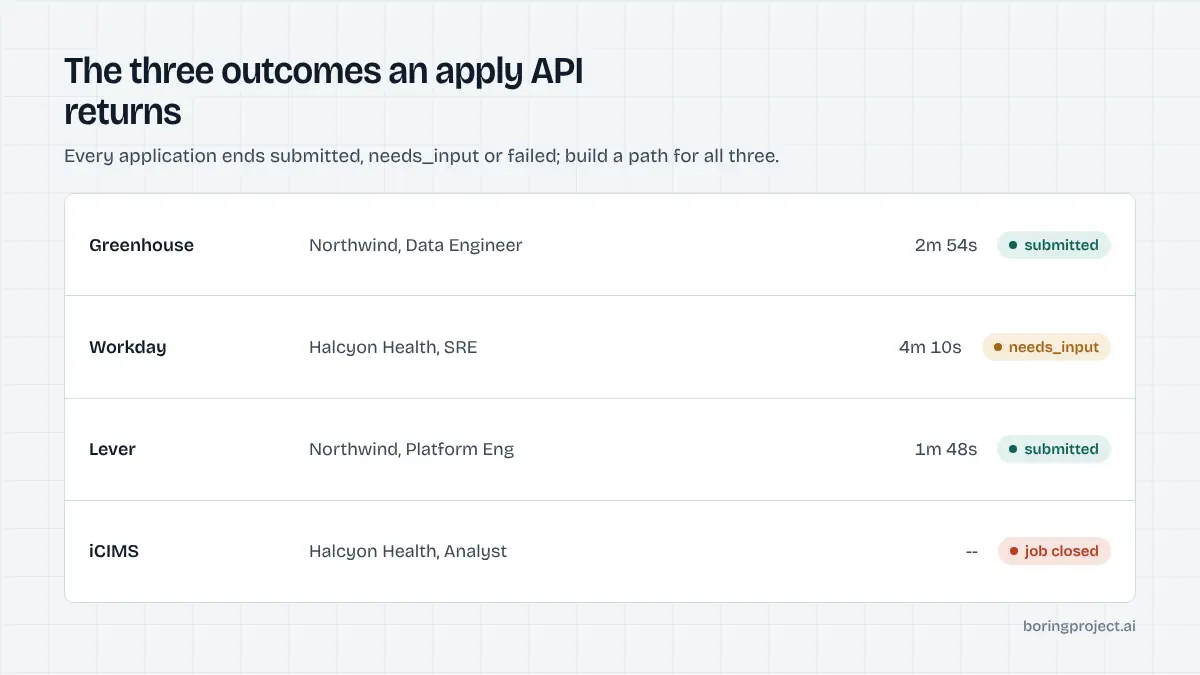
An application moves from queued to in_progress and then to one of three terminal states. Your product needs a path for all three.
submitted
The form was completed and the employer's confirmation page was reached. The webhook includes a screenshot URL of that page, the timestamp, and the ATS detected.
Store the screenshot reference; it is the proof you show the candidate or client. Most teams also surface it in their own application tracker.
needs_input
The form asked something the service could not truthfully answer. The payload lists each question with its type (free text, single choice, multiple choice, file) and the options where applicable.
Collect answers from the candidate in your UI, then call the resubmit endpoint with the same application ID and the answers. The session resumes where it stopped where possible, or restarts cleanly.
Design for this state from day one. A good share of real postings will hit it at least once per candidate, mainly on the first application to a new employer.
failed
Something prevented submission: the posting closed, the ATS is unsupported, the employer blocks automated access, or the resume failed a file validation. The webhook includes a machine-readable reason code and a screenshot of where it stopped.
Some codes are retryable (transient timeouts), some are not (job closed). Branch on the code rather than retrying blindly.
Webhooks, retries and idempotency
The parts that bite in production are rarely the happy path. They are duplicate submissions, missed webhooks, and reprocessing the same event twice.
Handling the webhook
Verify the signature header against your signing secret, acknowledge with a 200 immediately, and do the real work on a queue. Each event has a unique ID; store processed IDs so a redelivered event is a no-op. The full payload shape for each status, including the receipt fields, is documented in how job application webhooks report submission status.
If your endpoint is unreachable, events are retried with backoff for a bounded window. After that you can reconcile by listing applications updated since a timestamp.
Idempotency on your side
Pass an idempotency_key on every create request, typically candidate_id:job_identifier. A retry with the same key returns the original application rather than queueing a second one. This matters most when your own job runner crashes between sending the request and persisting the application ID.
The service also enforces per-employer rate limits and per-candidate duplicate checks, so a second genuine attempt at the same posting is rejected rather than submitted twice. Treat that as a backstop, not the plan.
Rate limits and pacing
Submissions are paced per employer so one customer's batch does not look like a flood from the employer's side. If you queue 500 applications across 40 employers they will be spread, and a few may take longer than the median.
Build your UI around "queued, we will notify you" rather than a spinner. If you expose a progress view, show the count of applications in each state rather than an estimated time, which will be wrong often enough to annoy people.
Frequently asked questions
Is the apply API synchronous or asynchronous?
Asynchronous. A POST returns quickly with an application ID and a queued status. The actual submission runs in a browser session against the employer's ATS and typically completes within a few minutes, sometimes longer for multi-page Workday or Taleo flows. The outcome arrives by webhook, and you can also poll the application resource if you prefer.
What exactly do I send in the candidate profile?
Structured JSON: name, email, phone, location, work authorisation, work history, education, skills, links, salary expectation, and the resume file or a URL to it. You can also include known screening answers such as years of experience with a technology. The more complete the profile, the fewer needs_input callbacks you will see.
How do I avoid submitting the same application twice?
Send an idempotency key with each request, usually a hash of candidate ID plus job URL. Repeat requests with the same key return the original application instead of creating a new one. The service also runs its own duplicate detection per candidate and employer, but client-side keys are the first line of defence.
What should my webhook endpoint do?
Verify the signature, return 200 quickly, and process the event off the request thread. Store the status, screenshot URL and any needs_input questions against your own application record. Handle redelivery gracefully by checking whether you have already processed that event ID, since retries can arrive if your endpoint was slow or down.
Can I test without applying to real jobs?
Point the integration at a posting you control, such as a role on your own careers page or a trial board on an ATS that offers free accounts. That exercises the real flow, including webhooks and screenshots, without touching another employer. Check the documentation for any dedicated test mode before you go live with production keys.
Do I need to handle ATS differences myself?
No. ATS detection and adapter selection happen on the service side. Your request looks the same whether the posting is on Greenhouse, Workday, iCIMS or an employer's own career site. If a posting runs on an unsupported system, you get a failed status with a reason code rather than a partial submission.
Next step
The Apply API is built for exactly this integration: one POST, three statuses, signed webhooks, screenshot receipts, per-application pricing. The API documentation has the full request schema, status codes, and example payloads.