 The Boring Project
Career Services Auto Apply Platform Guide
A practical guide for career centers evaluating auto apply as an addition to their university career center software, covering consent, volume, reporting and portal integration.
Career centers are judged on outcomes they only partly control. Advisors can coach, review resumes and run employer events, but the step that moves the needle, students actually submitting applications, happens in a browser the office never sees.
Auto apply changes that. Instead of telling a student to "apply to ten roles this week" and hoping, the office can offer a button that submits those applications on the student's behalf, with the student's approval, and get a receipt for each one. This article walks through what to look for in a career services auto apply platform and how to fit one into the tools you already run.
What a career services auto apply platform actually does
Submission, not just autofill
Browser autofill extensions are already common among students. They pre-populate fields but still leave the student to open each posting, handle every screening question, and press submit. Most students stall after a handful of applications because the friction never goes away.
A real auto apply platform takes the job URL and a structured student profile, fills the employer's application form end to end, and submits it. The form lives on an applicant tracking system such as Workday, Greenhouse, iCIMS or Taleo, and each of those behaves differently. The platform's job is to absorb that difference so the student and the advisor do not have to.
Status and receipts
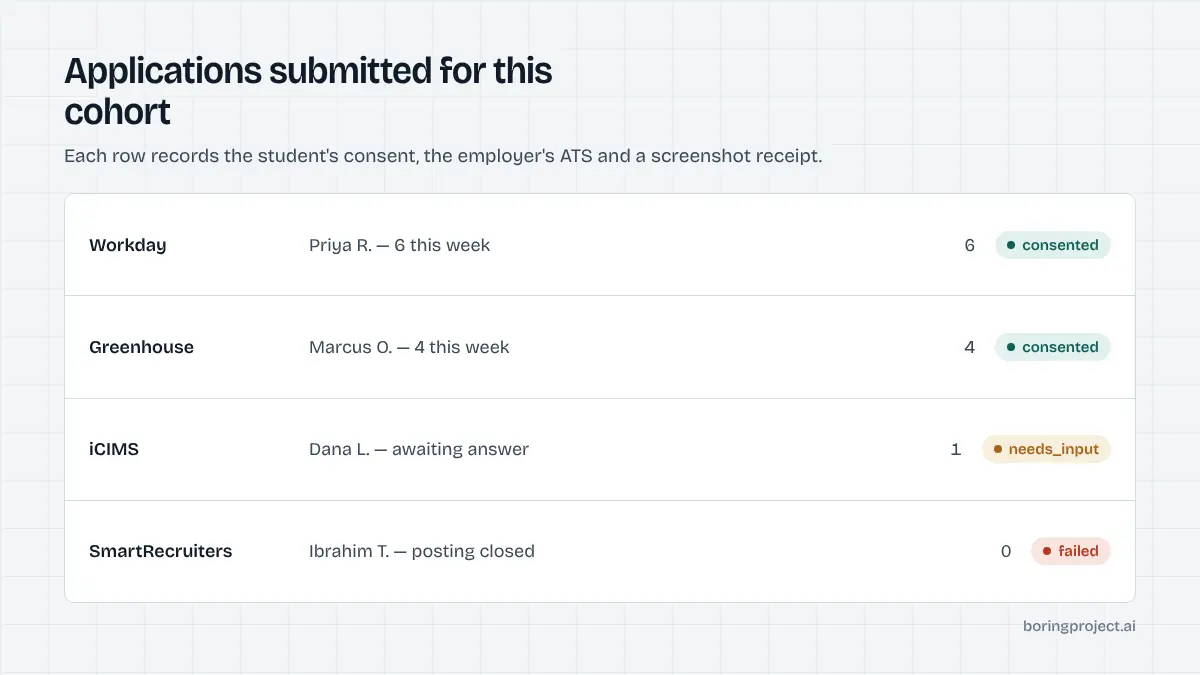
Every submission should resolve to one of a small number of states: submitted, needs input, or failed. Submitted comes with a screenshot of the confirmation page. Needs input means the form asked a question the profile did not answer, and someone has to supply it. Failed means the posting closed, the page errored, or the ATS blocked the attempt.
That three-state model is what makes reporting possible. Without it you have a pile of "we tried" with no evidence, which is not something you want to put in front of a dean.
Guardrails that protect the institution
The office's name is implicitly attached to every application a student submits through a university tool. Three guardrails matter more than any feature. The platform must never fabricate answers to screening questions. It must apply per-employer rate limits so one cohort does not flood a single company's inbox. And it must keep an audit trail of what was submitted, when, and under whose consent.
Consent, volume and reporting for a university setting
Student consent at the application level
Universities handle student data under stricter expectations than a commercial job board. Consent should be captured per application, not as a blanket checkbox buried in onboarding. The student sees the role, sees the profile that will be used, and confirms. If the profile is edited later, earlier confirmations should not silently carry over.
This also protects the student from a legitimate worry: an application sent to an employer they did not want to hear from, using details they have since changed. If you want a broader framework, see our compliance checklist for automated job applications.
Volume without spam
Volume is the whole point, but undirected volume creates problems. A sensible setup pairs auto apply with curation: the office or the student picks roles from a vetted feed, then the platform handles submission. Rate limits per employer stop a single company from receiving forty near-identical applications in an hour.
For most offices, the realistic target is to raise the median student from a few applications a month to a steady weekly cadence during recruiting season. That is enough to change outcomes without changing how employers perceive your graduates.
Reporting that survives scrutiny
Count what you can prove. Submitted applications with receipts are provable. Interviews and offers come from surveys and are self-reported. Keep those categories separate in every report. A dashboard that shows applications per student, per major, per employer and per ATS family, with needs_input and failure rates alongside, tells leadership where the office is adding value and where employers' forms are the bottleneck.
Integrating with the portal you already have
The API route
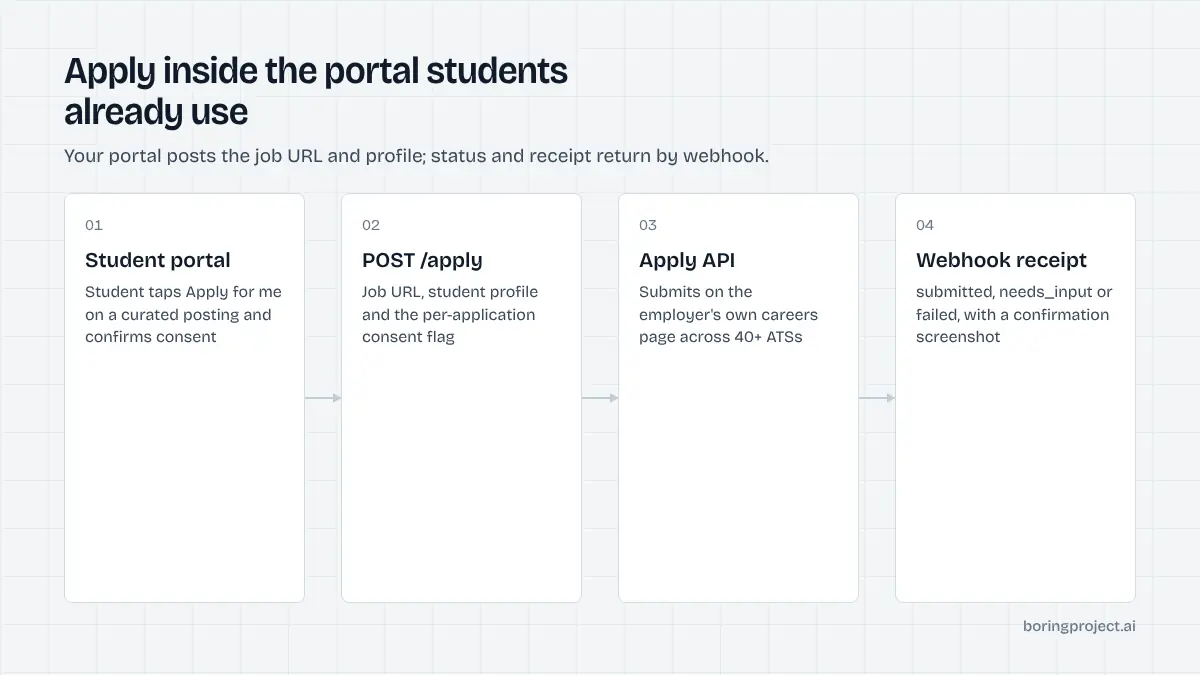
If your career center has access to campus IT or a vendor who maintains your job portal, the cleanest integration is an API call. The portal already knows the student and the posting. It sends both to an apply endpoint and receives a webhook when the application resolves. Students never leave the portal, and your existing analytics keep working.
Screening questions are the main design decision in that integration. When the API returns needs_input, the portal should surface the missing fields to the student and resubmit. We cover the design patterns in our guide on how automation should handle screening questions.
The managed route
Many career offices have no engineering capacity at all. For them, a managed service is the practical option: export a spreadsheet of students, profiles and target roles, send it in, and receive receipts back. This is a good way to run a pilot with one cohort before committing to a build.
The trade-off is speed of iteration. A managed workflow runs in batches, so it suits recruiting seasons and structured programs better than always-on self-service.
Choosing between them
| Factor | API integration | Managed service |
|---|---|---|
| Engineering required | Yes | No |
| Student experience | Inside your portal | Advisor-led batches |
| Time to first pilot | Weeks | Days |
| Best for | Large offices, existing portals | Small offices, pilots, cohorts |
Either route uses per-application pricing, so a small pilot does not require a large commitment. Start with a cohort, measure submitted applications and needs_input rates, and expand from there.
Frequently asked questions
Do students have to approve every application?
Yes. A career services auto apply platform worth deploying records consent per application, not per semester. The student sees the role, confirms, and the submission proceeds. This matters for trust, for your institution's reputation with employers, and for the student's own control over where their data goes. Blanket consent captured once at onboarding is not enough.
Will employers know the application was automated?
The application is submitted through the employer's own careers page in the same form a student would fill by hand, using the student's real details and documents. Nothing about the submission is hidden or spoofed. What employers care about is accuracy: correct answers, correct resume, no invented responses. Good automation refuses to guess on questions it cannot answer from the profile.
Can this work inside our existing student job portal?
That is the preferred setup. Most career centers already run a portal where students see curated postings. Adding an apply endpoint behind an "Apply for me" button keeps students in the tool they know and keeps your data model intact. The portal sends the job URL and the student profile; the API returns status and a receipt by webhook.
What happens when a form asks something the profile does not cover?
The application pauses with a needs_input status and a list of the missing fields. The student answers in your portal, the submission resumes, and the final receipt still arrives. This is better than a failed application and far better than a guessed answer, which could misrepresent a student's visa status, graduation date, or work authorisation.
How do we report outcomes to leadership?
Each application returns a status and a screenshot receipt, so you can count submitted applications per student, per cohort, per employer, and per ATS. Pair that with your existing first-destination survey data to connect activity to outcomes. Avoid reporting applications as if they were interviews; keep the two metrics separate and honest.
Is there a no-code option for small career offices?
Yes. If you have no engineering support, a managed service accepts a spreadsheet of students and target roles and returns receipts without any integration work. It is the fastest way to run a pilot for one cohort or one recruiting season before deciding whether a deeper portal integration is worth building.
Next step
If you run a career center and want to test auto apply with one cohort, the managed route is the quickest way to see real receipts. Talk to us about Managed Applies and we will set up a pilot sized to your office.