 The Boring Project
LinkedIn Easy Apply Automation Explained
Easy Apply makes applying on LinkedIn a few clicks, which is exactly why a linkedin auto apply bot is attractive and why running one inside your account is the riskiest way to get application volume.
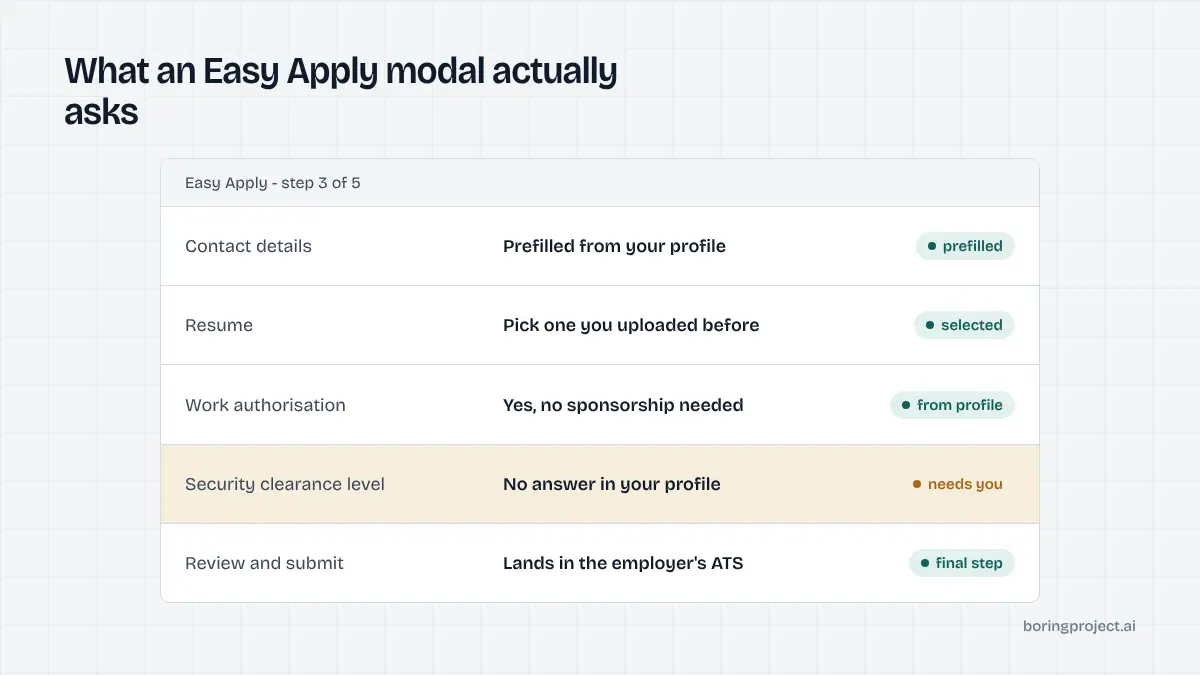
How Easy Apply works and what a bot does with it
Easy Apply is LinkedIn's in-platform application flow. When an employer enables it, the job shows an Easy Apply button instead of sending you to a careers site. Understanding the flow explains why LinkedIn Easy Apply automation is tempting and where it goes wrong.
The Easy Apply flow
Clicking Easy Apply opens a modal that prefills your contact details from your profile, asks you to pick a resume you have uploaded before, and then steps through any screening questions the employer configured. A review screen follows, then Submit. For a simple job it takes under a minute.
Where the application goes depends on the employer. Those with a LinkedIn-to-ATS integration receive it in their applicant tracking system alongside career-site applicants, while others manage Easy Apply candidates inside LinkedIn's recruiter tools.
In both cases the employer sees a profile-shaped application rather than a filled form.
What an Easy Apply bot actually does
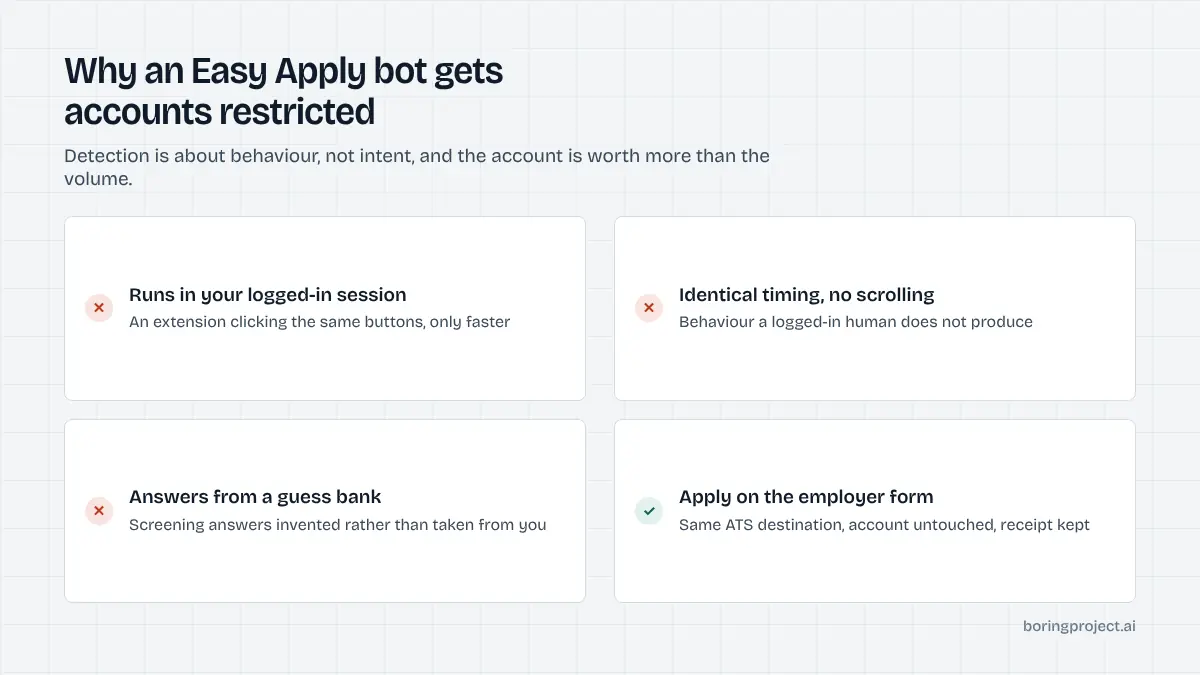
An Easy Apply bot is almost always a browser extension or desktop script that runs in your logged-in LinkedIn session. It searches jobs with your filters, opens each Easy Apply modal, fills the questions from a saved answer bank or a language model, and clicks Submit. Repeat a few hundred times.
The bot has no special access. It is clicking the same buttons you would, only faster and without reading the job. That is the whole product, and it is also why LinkedIn can detect it.
Why it gets flagged
LinkedIn's help centre has a page on prohibited software and extensions, and its user agreement bars bots, scrapers and tools that automate activity on the platform. Detection does not depend on reading your mind; it depends on behaviour. Dozens of applications per hour, identical timing between clicks, a session that never scrolls a job description, and activity that continues while the mouse is still are all signals a logged-in human does not produce.
The consequence LinkedIn describes is account restriction. People who have been through it describe identity checks and, after repeat offences, permanent closure. For most professionals the LinkedIn account is worth far more than the applications the bot sent.
The safer alternative: apply on the employer's system
The question job seekers and product builders should ask is not "how do I automate Easy Apply without getting caught" but "where does the application need to land, and what is the cleanest way to get it there".
Applications land in the ATS anyway
For most employers the system of record is their applicant tracking system: Workday, Greenhouse, Lever, iCIMS, SmartRecruiters and dozens of others. Easy Apply is one entry point into it.
The employer's own careers page is another, and it is open to anyone with the job URL. Applying there is the same action a candidate takes after clicking Apply on company website from any job board.
Automation that fills the employer's own form does not involve your LinkedIn session at all. It is governed by the employer's terms and by consent from the candidate, and it produces a confirmation page from the ATS that can be screenshotted and kept.
What changes for the candidate
Nothing about the outcome is worse. The employer receives a complete application with your real resume and real answers, exactly as if you had typed it. You lose the Easy Apply convenience of profile prefill, but a tool with your profile stored provides the same convenience on the employer form.
What you gain is a receipt per application and a LinkedIn account that stays untouched. The same reasoning applies to Indeed, which is covered in our guide to Indeed auto apply: the job board is a discovery layer, and the employer form is where submission belongs.
What changes for product builders
If you are building a job-search product, a staffing workflow or a career-services tool, the choice is sharper. A feature that drives your users' LinkedIn sessions puts their accounts at risk and your product one policy enforcement away from breaking. A feature that submits to employer ATS forms through a job application API is independent of any single platform's tolerance for bots.
It also scales differently. Session-based bots are limited to one account's behaviour envelope. An API that applies on employer sites can run with per-employer rate limits, candidate consent recorded on each run, and a submitted, needs_input or failed status per application.
A practical comparison
| Easy Apply by hand | Easy Apply bot in your session | Automation on employer ATS forms | |
|---|---|---|---|
| Touches your LinkedIn account | Yes, normally | Yes, abnormally | No |
| Account restriction risk | None | Real | None |
| Reads screening questions | You do | Answer bank or model guesses | Profile answers, otherwise pauses |
| Proof of submission | LinkedIn applied list | Often none | ATS confirmation screenshot |
| Works across job sources | LinkedIn only | LinkedIn only | Any job URL |
When Easy Apply by hand is the right call
If you are an active job seeker applying to a few roles a day, Easy Apply by hand is fine. Read the posting, pick the right resume, answer the questions properly. Keep the applied list in LinkedIn as your record.
When to move the volume elsewhere
When you need more than a handful of applications a day, or you are applying on behalf of other people, take the volume to the employer forms. Our post on whether auto apply is safe goes deeper on what to look for in a tool, but the first filter is simple: it should never ask for your LinkedIn password or run as an extension inside your LinkedIn session.
A note on answer quality
Whatever the channel, the screening answers are the part employers read. A bot that answers "yes" to every eligibility question and invents a salary figure produces applications that get rejected and sometimes remembered. Any automation you use should take answers from your own profile and stop to ask when it does not have one.
Frequently asked questions
Is LinkedIn Easy Apply automation against LinkedIn's rules?
LinkedIn's user agreement and its help pages on prohibited software say that bots, browser extensions and other tools that automate activity or scrape data on the platform are not permitted, and that using them can lead to account restriction. An Easy Apply bot operates inside your logged-in session and falls squarely into that category.
What happens if LinkedIn detects an auto apply bot?
LinkedIn says it may restrict accounts that use prohibited automation. In practice people report temporary restrictions that require identity verification, and in repeat cases permanent closure. Because your LinkedIn account is also your professional network and often your login for other services, the downside is larger than a few lost applications.
Does Easy Apply send my application to the employer's ATS?
It depends on the employer's integration. Many employers connect LinkedIn to their ATS so Easy Apply submissions flow into the same pipeline as career-site applications. Others review Easy Apply candidates inside LinkedIn's recruiter tools. Either way, the employer sees a profile-based application with your chosen resume and answers.
Why would applying on the employer's careers site be safer than Easy Apply automation?
Because it does not touch your LinkedIn session. Submitting on the employer's ATS form, whether by hand or through a tool acting with your consent, is the same action any applicant takes from a job board link. It is subject to the employer's terms, not LinkedIn's, and it leaves a confirmation you can keep.
Are there legitimate ways to automate finding jobs on LinkedIn?
You can use LinkedIn's own job alerts, saved searches and the Easy Apply flow by hand. For automation at volume, the honest answer is to source jobs from feeds and employer sites rather than from a scraped LinkedIn session, then apply on the employer's ATS. That gives the same job coverage without the account risk.
Do Easy Apply applications perform worse than careers-site applications?
There is no reliable public data that settles this, and claims either way should be treated with caution. What is observable is that Easy Apply lowers the effort to apply, so roles with the badge attract more applicants. A complete, accurate application through either channel beats a hasty one through the easier channel.
Next step
The Boring Project applies on employer ATS forms, not inside anyone's LinkedIn session, with candidate consent on every run and a screenshot receipt per submission. If you are building a job-search product or running applications for clients, the job application API is the place to start.