 The Boring Project
How Indeed Auto Apply Works and Where It Stops
Indeed auto apply splits into two paths, in-platform Indeed Apply and a redirect to the employer's site, and indeed apply automation only makes sense on the second one.
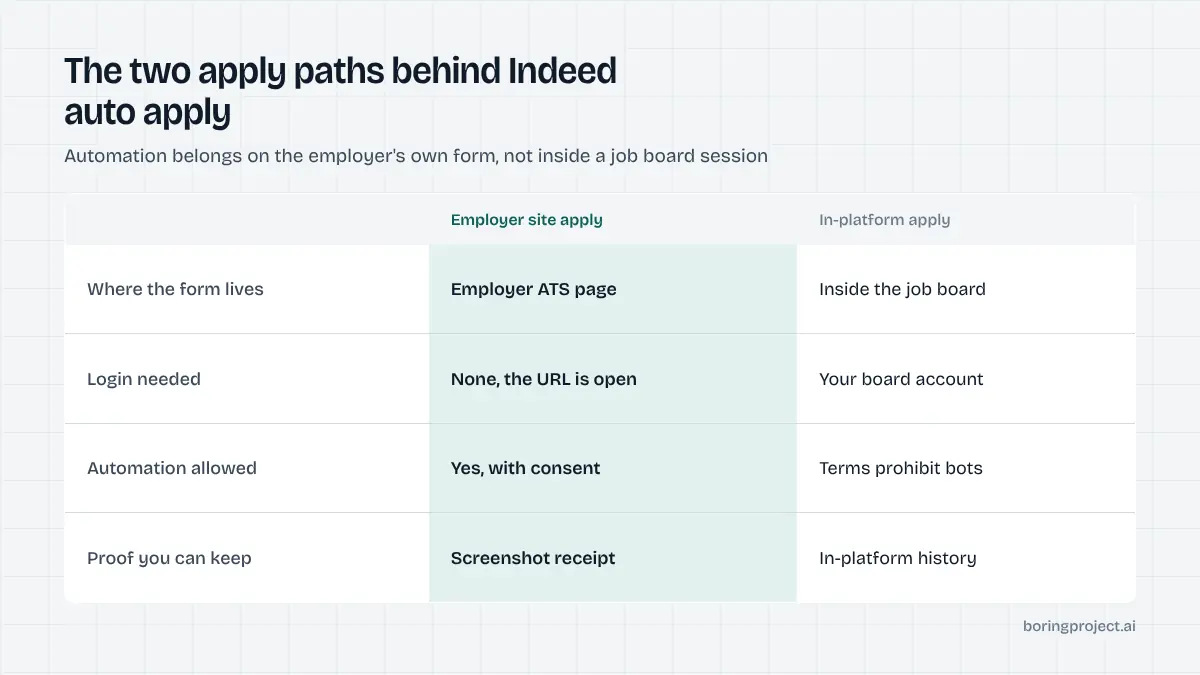
The two apply paths on Indeed
Every job on Indeed takes one of two routes when you click Apply, and the route decides what Indeed auto apply can legitimately mean. Knowing which one you are looking at tells you where the application will land and whether automation has any business being involved.
Indeed Apply
Indeed Apply is the in-platform flow. You apply with your Indeed profile and a resume stored on Indeed, answering any screener questions the employer configured. Listings using it show an Easily apply badge, and Indeed's own material describes the flow as fast and optimised for mobile.
Where it goes depends on how the job got onto Indeed. Jobs the employer posted directly on Indeed keep their applications in Indeed's employer dashboard. Jobs Indeed indexed from an ATS or careers site can use Indeed Apply Sync, which delivers applications into the employer's ATS, with screener and EEO questions pulled from that ATS.
Apply on company site
The other route redirects you to the employer's careers page or applicant tracking system. You complete that employer's form: account creation if the ATS requires it, resume upload, screening questions, consent, submit. Indeed is out of the picture once you leave.
Employers choose this route when they want every application in their own system with their own fields, or when their ATS is not connected for Indeed Apply. It costs more clicks, which Indeed openly says reduces completed applications. From a candidate's point of view, fewer completions means less competition per listing.
How to tell them apart
The badge is the simplest signal. Beyond that, hover or inspect the apply link: an in-platform apply keeps you on Indeed's domain, while a company-site apply points at the employer or an ATS domain such as myworkdayjobs.com, greenhouse.io, lever.co or icims.com.
For a tool, the apply URL is the only signal that matters. If it leaves Indeed, the destination is a form that can be filled like any other.
What Indeed's terms allow, and what they do not
The reason this distinction matters for automation is Indeed's position on how its platform may be accessed.
Automated access to Indeed itself
Indeed's terms of service prohibit scraping and automated access to its site without permission. A bot that logs into your Indeed account, searches, and clicks through Indeed Apply forms is automated access, and the account it runs in can be restricted. That is the same shape of risk we describe for LinkedIn Easy Apply automation: the platform is detecting behaviour inside a session, and the account owner carries the consequences.
There is an official Indeed Apply integration programme, but it runs the other way. ATS vendors, agencies and third-party platforms sign a developer agreement so that applications candidates submit on Indeed are posted to their systems. It is a channel for receiving applications, with testing, signature verification and a review process, not a way for a job seeker's tool to push applications into Indeed.
Indeed's own partner documentation shows how structured that channel is: applications arrive as signed JSON posts to the partner's endpoint, screener questions are hosted by the partner, and partners are told not to validate or reject applications at the point of delivery. None of that machinery is available to a candidate-side bot.
Applying on the employer's site
Once a listing redirects to an employer's ATS, Indeed's terms no longer govern the application. The employer's form is a public page, and submitting it is the ordinary act of applying for a job. The constraints that apply are the employer's own terms, data protection law, and the candidate's consent.
This is where automation belongs. The job URL came from Indeed, but the application is made on the employer's system, produces the employer's confirmation page, and can be verified with a screenshot.
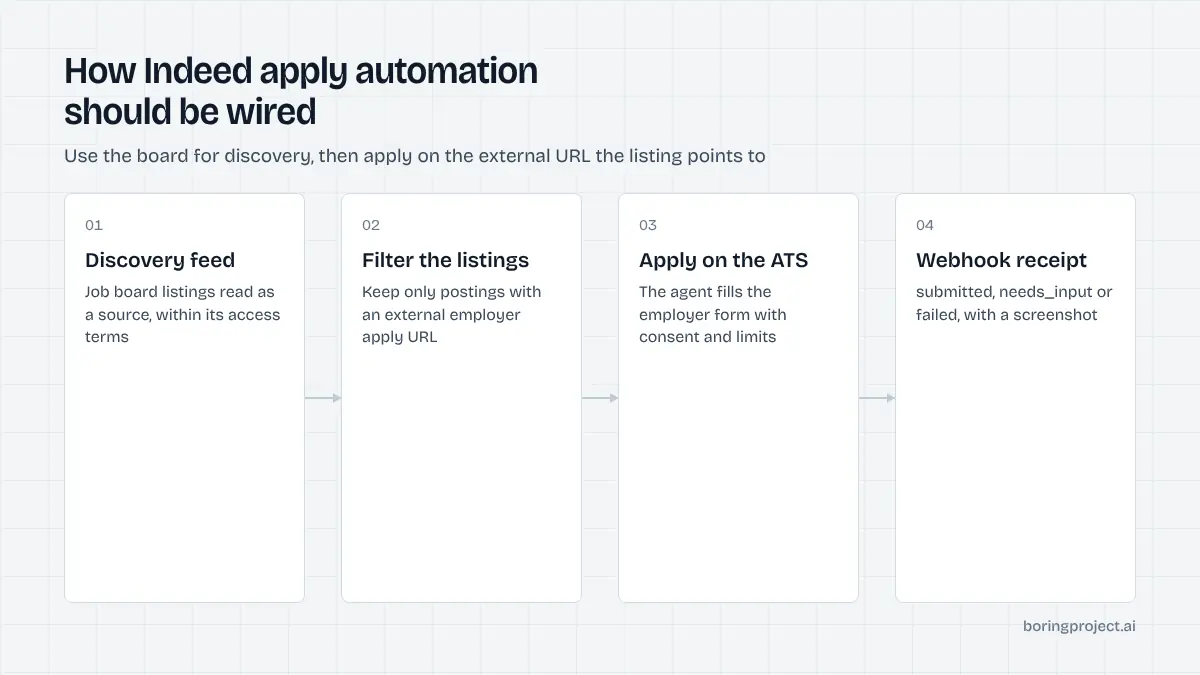
The practical rule
Use Indeed as a place to find jobs, within its terms. For Easily apply listings, apply by hand in your own account.
For company-site listings, apply on the employer form, by hand or with a tool that acts with your consent. Never hand a script your Indeed login.
How this looks for job seekers and for builders
The same rule plays out differently depending on who you are.
For job seekers
If you apply to a modest number of jobs a day, Indeed Apply by hand is fine and fast. Keep your Indeed resume current, read the screener questions, and do not skip the company-site listings; they often have a thinner applicant pool.
If you want to apply at higher volume, direct the volume at company-site listings through a tool that fills employer forms from your profile, asks you when it hits a question it cannot answer, and gives you a confirmation screenshot for each one. That keeps your Indeed account untouched.
For job boards and job-search products
A product that aggregates listings and offers one-click apply faces the same split. Listings with in-platform apply on another board cannot be automated without that board's permission. Listings with an external apply URL can be submitted to the employer's ATS, which is the model described in our post on auto apply for job boards.
The Boring Project's Apply API is built for exactly that half. POST the employer apply URL and the candidate's profile, and the agent fills the ATS form, pauses with needs_input for unknown questions, and returns a webhook with a screenshot receipt. The API documentation describes the request shape and the status model.
A summary table
| Listing type on Indeed | Where the application lands | Manual apply | Automation |
|---|---|---|---|
| Indeed Apply, employer-hosted job | Indeed employer dashboard | Yes | No, stay out of the session |
| Indeed Apply, indexed job with Sync | Employer ATS via Indeed | Yes | No, same reason |
| Apply on company site | Employer ATS directly | Yes | Yes, on the employer form with consent |
Frequently asked questions
What is the difference between Indeed Apply and applying on a company site?
Indeed Apply lets you submit inside Indeed using your Indeed profile and resume, with any screener questions the employer set. Jobs marked that way carry an Easily apply badge. Other listings redirect you to the employer's careers site or ATS, where you complete that employer's own form. Both routes can reach the same hiring pipeline.
Where does an Indeed Apply application go?
For jobs the employer posted directly on Indeed, the application stays in Indeed's employer tools. For jobs Indeed indexed from an ATS or careers site, employers can enable Indeed Apply Sync so applications submitted on Indeed are delivered into their ATS, often with screener and EEO questions drawn from that ATS.
Can I run a bot that applies for me inside Indeed?
Indeed's terms prohibit automated access and scraping of its site without permission, and a bot operating in your logged-in account can get it restricted. Automation that fills employer forms on the employer's own site is a different matter; it does not touch your Indeed session and is governed by the employer's terms and your consent.
Does Indeed have an official way for third parties to submit applications?
Yes, for employers and their platforms. Indeed Apply integrations let ATS vendors, agencies and third-party platforms receive applications that candidates submit on Indeed, under a developer agreement. This is an employer-side integration for receiving applications, not a channel for job seekers or tools to push applications into Indeed.
Are company-site jobs on Indeed worth applying to?
Yes. A redirect simply means the employer wants applications in its own system. The extra steps deter some applicants, which can mean less competition per role. For automation these listings are the natural target, because the employer form is open to anyone with the URL and produces a confirmation you can keep.
How should a job-search product use Indeed listings with automation?
Treat Indeed as a discovery source, respecting its terms on access, and apply on the employer's ATS for listings with external apply URLs. Record candidate consent, throttle per employer, and store a screenshot of each confirmation. Do not drive the user's Indeed account with a script; it adds risk without adding reach.
Next step
If your listings include employer apply URLs, the Apply API can submit on those ATS forms with consent logged and a screenshot receipt per application, across 40+ systems. Start with the API documentation, or ask about Managed Applies if you would rather send a CSV.