 The Boring Project
Job Application Tracking Automation: Receipts and Status
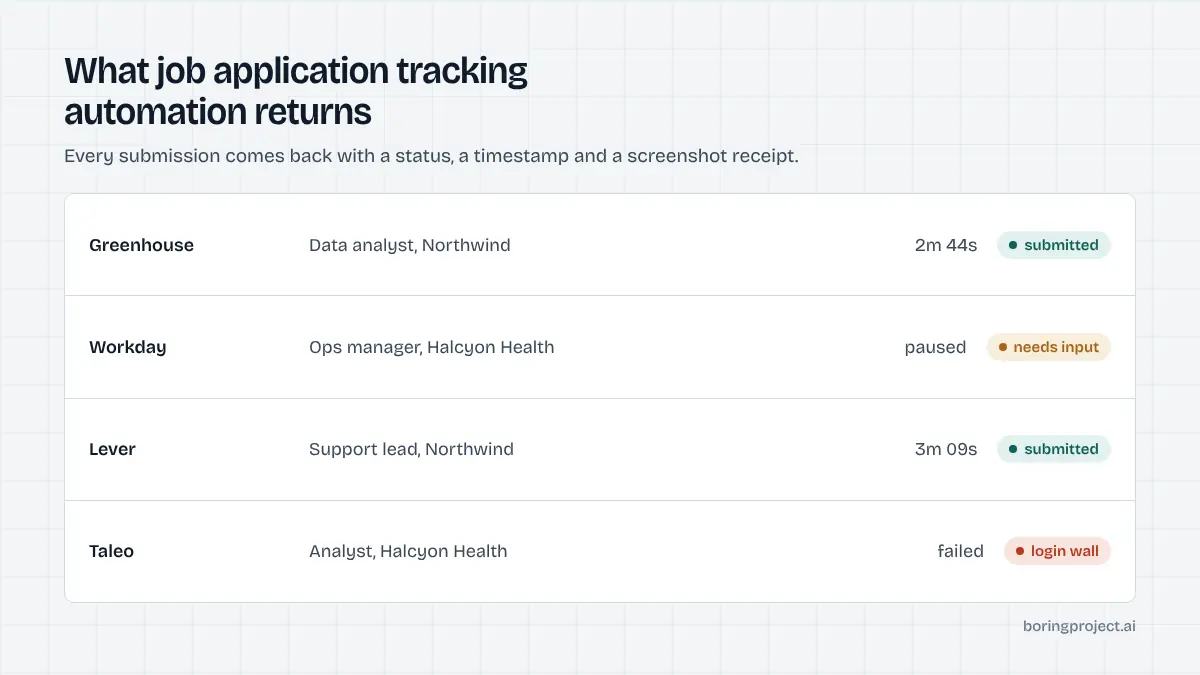
Job application tracking automation means every submission a tool makes on your behalf comes back with a status, a timestamp and proof. This page covers what each status should mean, why application receipts are worth insisting on, and a spreadsheet layout that keeps the whole search in one place.
The three statuses that actually matter
Job application tracking automation is only as good as the states it distinguishes. Many tools collapse everything into "applied", which tells you nothing. Three states are enough, and each implies an action.
Submitted
The form was completed and the employer's system confirmed receipt. This should be backed by evidence, ideally a screenshot of the confirmation page and, within a day or so, the employer's acknowledgement email. The action is to log the date and wait for a response, following up only if the posting invites it.
Needs input
The tool reached a question it could not answer from your profile and paused rather than guessing. The status should carry the exact question.
The action is to answer it, which lets the application resume. A tool with no needs-input state is either failing these applications or inventing answers, and you want to know which.
Failed
The application could not be submitted: the posting closed, the form timed out, a CAPTCHA blocked the session, or a required upload was rejected. The status should carry a reason.
The action is to decide whether to retry, apply by hand, or drop it. Failures that are reported honestly are far less costly than failures reported as success.
| Status | What it means | Evidence to expect | Your action |
|---|---|---|---|
| Submitted | Employer confirmed receipt | Screenshot, confirmation email | Log and wait |
| Needs input | Tool paused on a question | The question text | Answer, let it resume |
| Failed | Could not complete | Error reason | Retry, go manual, or drop |
If a tool offers only one or two of these, ask what happens to the applications that would have fallen into the missing category. The honest answer is usually that they are counted as submitted, which is exactly the number you cannot trust.
Why receipts matter more than counts
Most automation dashboards lead with a number: applications sent this week. The number is the least useful thing on the page. What you need is the ability to reconstruct any single application.
A screenshot settles arguments
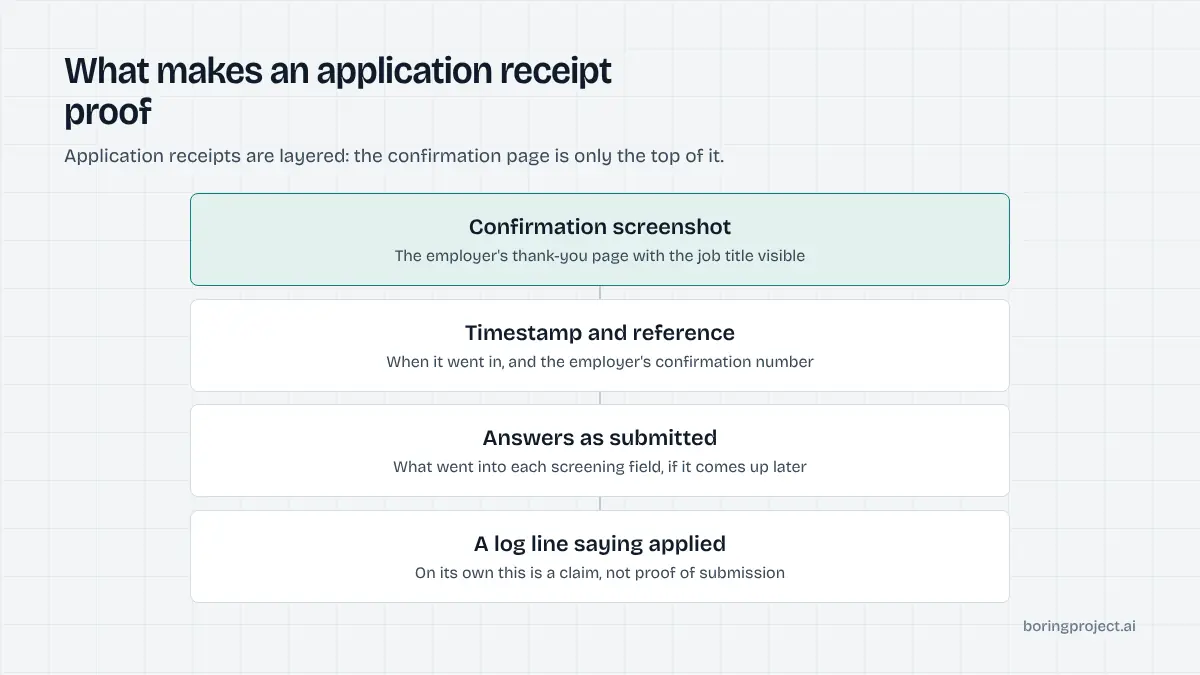
Months into a search, you may need to know whether you applied to a given employer, on what date, and what you answered. A screenshot of the confirmation page, stored with the job URL, answers all three. It also lets you check what a tool actually submitted in your name, which is how people discover that stored screening answers were wrong before an interviewer does.
Receipts expose tool behaviour
The pattern of your receipts tells you how a tool works. A high ratio of needs-input to submitted means it is cautious about guessing. A long run of "submitted" with no screenshots and no employer emails means something is being reported that did not happen.
Receipts are how you audit the tool. Treat application receipts as the primary output and the weekly count as a footnote. The rejection patterns receipts reveal are discussed in why automated applications get rejected.
Where the receipts come from
In well-built systems, the automation layer captures a screenshot at the moment of submission and emits an event for each status change. Products built on top of such a layer can show live status and attach the receipt without anyone exporting anything. If you are curious about the plumbing, our explainer on the job application webhook covers what those events contain and why a per-application event beats a daily summary.
A spreadsheet template that holds everything
Whatever tools you use, keep one sheet. It is the only place where automated, manual and platform-based applications coexist, and it is where duplicates get caught.
The columns
Use these, in this order:
- Date submitted
- Employer
- Role title
- Job URL (the canonical one, not an aggregator link)
- ATS platform (Workday, Greenhouse, Lever, and so on)
- Source (tool name, manual, or job board)
- Status (submitted, needs input, failed)
- Receipt link (screenshot or confirmation email)
- Resume version used
- Reply received (date and type: acknowledgement, rejection, screening call, interview)
- Notes
Columns four and ten do most of the work. The URL lets you search for duplicates before applying anywhere; the reply column, reviewed weekly, is the only reliable signal about what is working.
The weekly routine
Once a week, export your tool's log and append new rows. Then do three passes. Resolve every needs-input row by answering the question.
Decide on every failed row. Log every reply against its application. This takes fifteen minutes and turns a stream of submissions into something you can learn from.
What to do with the data
After a month, filter by reply type. Which platforms produced acknowledgements? Which resume version produced screening calls?
Which role titles produced nothing? Adjust your filters toward what worked and away from what did not. This is the feedback loop that makes job application tracking automation worth setting up, and it only exists if the tracking was there from the start.
One more habit: when you change a filter, a resume version or a tool, add a note in the sheet with the date. Without it, a shift in the reply column a month later cannot be attributed to anything, and you will be left guessing which change caused it.
Frequently asked questions
What counts as proof that an application was submitted?
The employer's confirmation, in some form. The strongest is a screenshot of the ATS confirmation page with the job title visible, paired with the acknowledgement email from the employer. A reference or confirmation number is also good. A tool's own log entry saying 'applied' with nothing behind it is a claim, not proof.
Why do I need a status beyond submitted or not?
Because the middle state is where the information is. An application that stalled because a screening question needed your answer is recoverable; a failed one may be retryable; a submitted one needs follow-up. Collapsing all three into 'applied' or 'not applied' hides the actions you should take and makes the tool's numbers look better than they are.
Can I track applications from several tools and manual applications together?
Yes, and you should, because duplicates happen across sources. Use one sheet with a source column and paste the job URL for every entry regardless of where it came from. Before any manual application, search the sheet for the employer. Most tools let you export a CSV, which you can append weekly.
How long should I keep screenshot receipts?
At least until the role is clearly closed, and ideally for the whole search. Receipts settle disputes about whether and when you applied, show exactly which answers were submitted if a question comes up at interview, and let you audit a tool's behaviour months later. Storage is cheap; reconstructing what you sent is not.
What should I review each week?
Three things. Any application marked needs input, so you can answer and let it resume. Any marked failed, so you can decide whether to retry or apply by hand. And every reply received, logged against the row it belongs to. Over a month, the reply column tells you which roles, platforms and resume versions are working.
Do webhooks matter if I am not a developer?
Not directly, but they matter to the products you use. A tool built on an API that emits a webhook per status change can show you live status, deliver receipts automatically and sync a sheet without manual exports. If the product you use updates status instantly and attaches a receipt, that plumbing is probably behind it.
Next step
If you are building a product that needs this kind of tracking, or want to understand what a well-instrumented application pipeline returns, the API documentation describes the submitted, needs_input and failed statuses, the webhook per status change, and the screenshot receipt attached to every application.