 The Boring Project
How Job Application Webhooks Report Submission Status
A job application webhook tells your system what happened after you asked an API to apply: submitted, needs_input or failed, with a screenshot receipt attached. This page explains each status, what the application status callback payload contains, how to build a handler that survives retries, and what a sample event looks like.
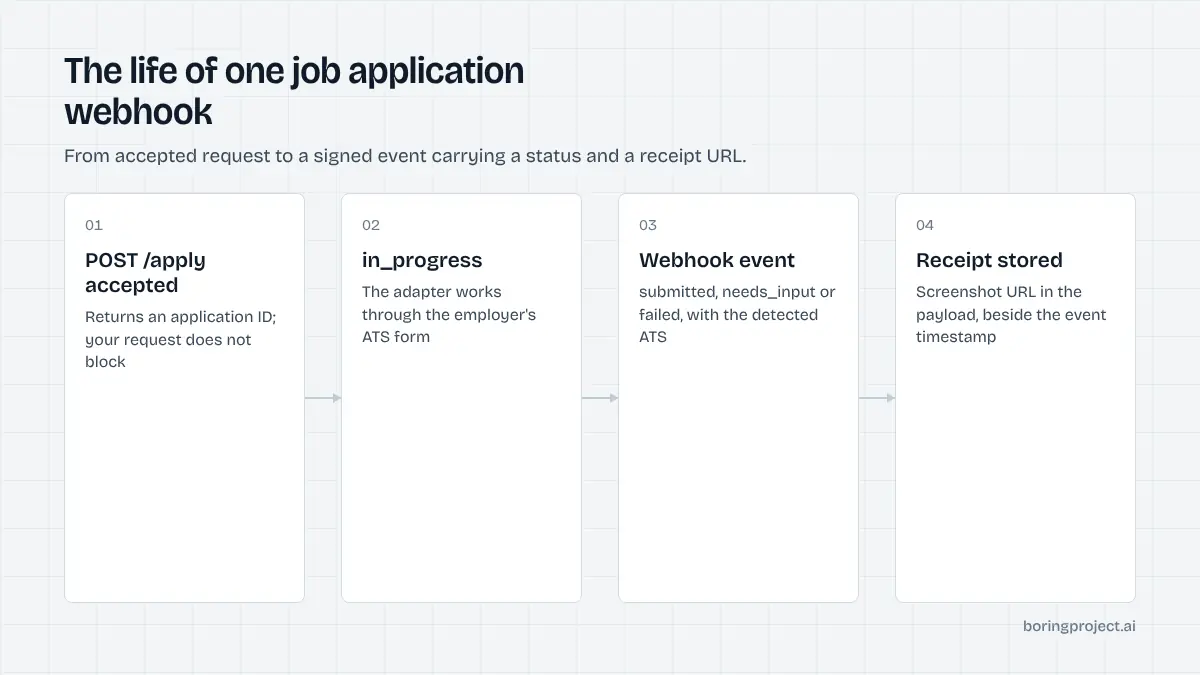
The three statuses
Applying is asynchronous. You send a request, get an ID back, and some minutes later the outcome arrives at your job application webhook endpoint.
There are exactly three outcomes, and your product needs a path for each. The request side of this exchange is covered in the developer guide to applying on jobs with an API.
submitted
The adapter completed the employer's form and positively recognised the confirmation page. The event carries the timestamp, the detected ATS, any confirmation reference the employer displayed, and a screenshot URL. This is the state you show to a candidate as "applied" and the record you attach to a client report.
Treat the screenshot as part of the record, not decoration. It is the evidence when someone asks whether an application was really sent. Store the URL against your own application record the moment the event arrives, and surface it wherever a user or a recruiter would otherwise ask you to prove it.
needs_input
The form asked something that could not be answered truthfully from the profile and known answers. The application is paused, not failed.
The event lists each outstanding question with its text, type (free text, single choice, multiple choice, number, file) and options where relevant. Your job is to collect answers and resubmit against the same application ID.
Expect this to be most frequent on a candidate's first applications. Save each answer to the profile and the rate drops quickly.
Two product details matter here. Batch the questions into one prompt to the candidate rather than one notification per question, and make it obvious that the application is still alive; users who think it failed will often apply again by hand and create a duplicate.
failed
Submission could not complete. The event carries a reason code and a screenshot of where it stopped.
Codes fall into two groups: retryable (transient timeouts, temporary site errors) and terminal (job closed, unsupported ATS, employer blocks automated sessions, resume file rejected). Branch on the code. Retrying a closed job wastes a slot; not retrying a timeout loses an application you could have had.
It is also worth recording failure codes over time. A rising share of closed-job failures points to stale sourcing on your side; a cluster of unsupported-ATS failures tells you which coverage request to raise with your vendor. The webhook stream is operational data as well as a notification channel.
Anatomy of a payload
Every application status callback shares a common envelope and a status-specific body. Field names below are illustrative; the authoritative schema lives in the documentation.
Sample submitted event
{
  "event_id": "evt_01HZX8Q4K2",
  "type": "application.submitted",
  "created_at": "2026-11-10T09:41:17Z",
  "application": {
    "id": "app_7f3c9a",
    "idempotency_key": "cand_42:workday:R-118204",
    "job_url": "https://examplecorp.wd5.myworkdayjobs.com/en-US/careers/job/R-118204",
    "ats": "workday",
    "status": "submitted",
    "submitted_at": "2026-11-10T09:41:02Z",
    "receipt": {
      "screenshot_url": "https://receipts.example/app_7f3c9a/confirmation.png",
      "confirmation_text": "Thank you for applying"
    }
  }
}
Sample needs_input event
{
  "event_id": "evt_01HZX8R9ME",
  "type": "application.needs_input",
  "created_at": "2026-11-10T09:38:50Z",
  "application": {
    "id": "app_7f3c9b",
    "ats": "greenhouse",
    "status": "needs_input",
    "questions": [
      { "id": "q1", "text": "Are you legally authorised to work in Germany?", "type": "single_choice", "options": ["Yes", "No"] },
      { "id": "q2", "text": "Years of experience with Kubernetes", "type": "number" }
    ],
    "receipt": { "screenshot_url": "https://receipts.example/app_7f3c9b/paused.png" }
  }
}
What the receipt object holds
For every terminal status there is a screenshot URL, taken at the final page reached. For submitted events it is the confirmation page; for the other two it is the point of pause or failure, which is often all you need to diagnose a problem.
Receipt URLs are stable for your retention window. Download and store them on your side if you need them beyond that, since they are part of your audit trail. If you show receipts to end users, proxy them through your own domain so the experience stays under your brand and you can revoke access when an account closes.
Building a handler that survives real life
The happy path is a few lines. Production is about duplicates, outages and ordering.
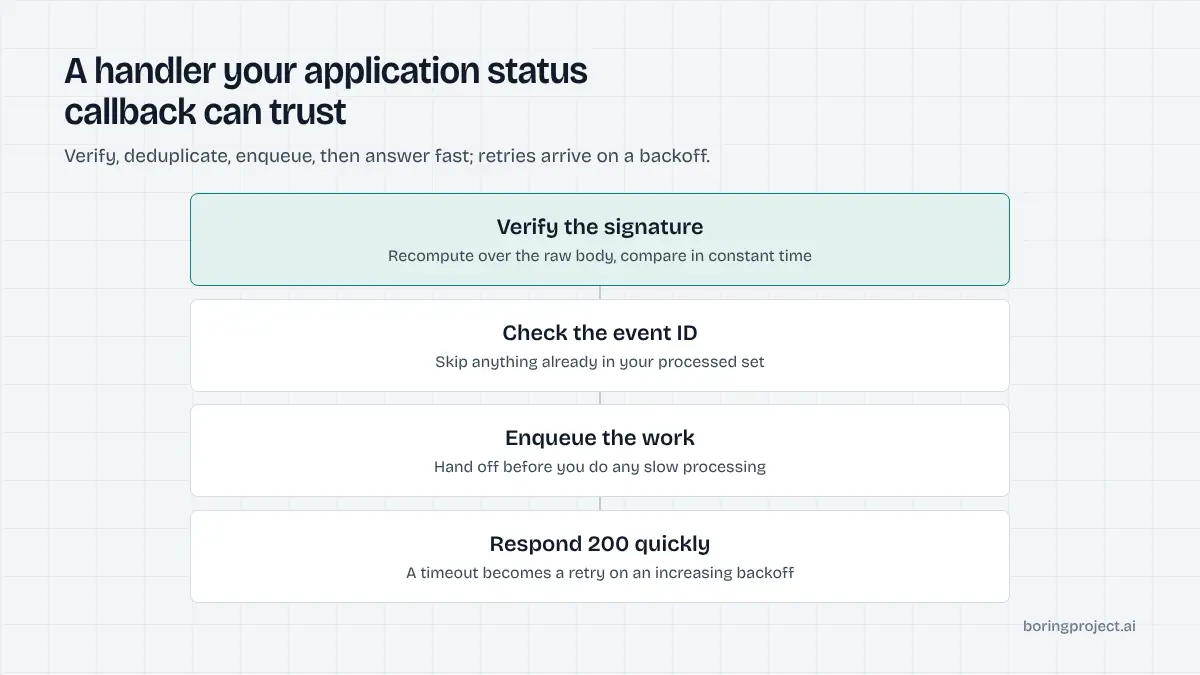
Verify, acknowledge, then process
Verify the signature header against your secret over the raw body, using a constant-time comparison. Return 200 immediately.
Put the event on a queue and do the actual work (update your record, notify the candidate, store the screenshot) off the request thread. Slow handlers cause retries, and retries cause duplicates if you are not careful.
Idempotency and ordering
Store processed event_id values and treat a repeat as a no-op. Events for one application can in principle arrive out of order if your endpoint was down and several were queued; apply them by created_at or by status precedence (a terminal status always wins over an earlier intermediate one). Key your records on the application ID you received at creation, and keep your own idempotency key on it so a crashed job runner can recover without creating a second application.
Log every raw event before you process it. When a user disputes a status weeks later, the original payload and its signature are what let you reconstruct exactly what was reported and when, independently of whatever your application logic did with it.
Retries and reconciliation
If delivery fails, it is retried on a backoff schedule for a bounded window. Beyond that, reconcile: periodically list applications updated since your last processed event and fill any gaps.
For batch workloads this reconciliation step is especially useful, since a few hundred events can land within minutes; the operational side of that is covered in our guide to bulk job application automation. Alert on a rising count of unacknowledged events; it usually means your endpoint, not the sender, has a problem.
Frequently asked questions
What statuses can a job application webhook deliver?
Three terminal statuses: submitted, meaning the employer's confirmation page was reached; needs_input, meaning the form asked something the profile could not answer and the application is paused; and failed, meaning submission could not complete, with a reason code. Intermediate states such as queued and in_progress are available by polling but are not usually sent as events.
What is in the screenshot receipt?
A capture of the employer's confirmation page for submitted applications, or of the point where the flow stopped for needs_input and failed. It is stored at a URL referenced in the webhook payload, alongside the timestamp and the detected ATS. It serves as proof of submission for candidates, clients and your own audit records.
How should I handle a needs_input callback?
Read the questions array, which includes each question's text, type and options. Present them to the candidate in your UI, collect answers, and call the resubmit endpoint for that application ID with the answers. Save the answers to the candidate's profile so the same question from another employer does not pause again.
What happens if my endpoint is down when the webhook fires?
Delivery is retried on a backoff schedule for a bounded period. Each event carries a stable event ID so your handler can ignore duplicates once it recovers. After the retry window closes, reconcile by listing applications updated since your last successful event. Design the handler to be idempotent from the start.
How do I verify a webhook is genuine?
Each delivery is signed with your webhook secret, with the signature in a header. Recompute the signature over the raw request body and compare in constant time before processing. Reject anything that fails. Also check the timestamp in the payload to defend against replay of old events.
Should I poll instead of using webhooks?
A job application webhook is the primary mechanism and gives you results within seconds of completion. Polling the application resource is useful as a fallback for reconciliation and for environments where inbound HTTP is awkward. Most production integrations use webhooks for real-time updates and a periodic poll to catch anything missed.
Next step
The Apply API delivers exactly these events, signed, with screenshot receipts on every terminal status and per-application pricing. Wire up a handler against the API documentation, send one application, and you will have the whole loop working in an afternoon.