 The Boring Project
Job Application Automation Success Rate: What to Expect
A framework for measuring your application submission rate honestly: how to define success, why results vary by ATS family, what causes failures, and how to run a pilot that produces numbers you can trust.
Everyone evaluating application automation asks the same question first: what percentage of applications actually go through? It is the right question with a misleading answer, because any single figure hides the definitions and inputs that produced it.
This article does not give you a universal job application automation success rate. It gives you the definitions, the factors that move the numbers, and a method for measuring your own rate on your own job mix, which is the only figure that matters for your business.
Defining success before you measure it
Three outcomes, not two
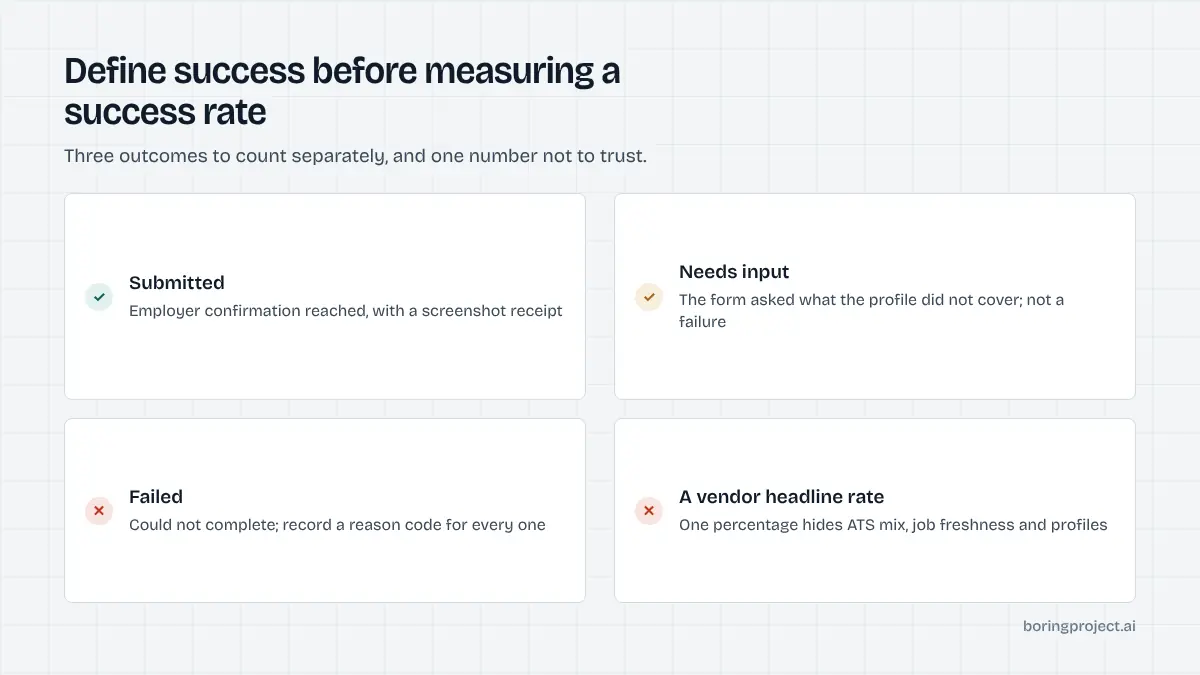
Every application attempt ends in one of three states. Submitted means the employer's ATS confirmed receipt, ideally captured as a screenshot. Needs input means the form asked a question the candidate profile could not answer and the system paused rather than guessing. Failed means the attempt could not complete: a closed posting, a login wall, a captcha, an unexpected required field, a timeout.
Collapsing these into "worked" and "did not work" destroys the information you need. A needs_input pause is the system behaving correctly, and most paused applications complete once the candidate answers.
It also matters for billing. If your provider charges per successful application, the definition of submitted is the definition of what you pay for. Pauses and failures should cost nothing.
What should count as submitted
Insist on evidence. A confirmation page screenshot is the practical standard. Without it, "submitted" can mean anything from "pressed the final button" to "reached the last page". If you are comparing providers, make sure each is counting the same event, or the comparison is meaningless.
Resumed applications
Track what happens after a pause. The share of needs_input applications that are answered and then submit tells you whether your product's pause experience is working. A high pause rate with a high resume rate is a healthy system with incomplete profiles. A high pause rate with a low resume rate is a product problem you can fix. Our guide to screening questions automation covers the design side.
What moves the numbers
ATS family and tenant
Applicant tracking systems differ structurally, and that structure drives outcomes. Single-page forms with standard fields and a direct submit are the most reliable. Multi-step wizards that create a candidate account, send an email verification code and spread questions across several pages introduce more points where an attempt can stall. Some systems sit between the two.
Within a family, employers customise heavily. One tenant adds a dozen required custom questions; another adds none. Family-level rates are useful for planning, but tenant-level monitoring is where you actually find problems.
Job feed freshness
A large share of failures in many pipelines has nothing to do with automation: the posting closed, but the job URL is still in the feed. The older your job data, the more attempts you waste. Refreshing listings frequently and dropping stale URLs before they reach the apply step raises the submit rate without touching the automation at all.
Aggregator feeds are the usual culprit. A posting can be removed from an employer's careers page days before the aggregator notices, so a pre-check of the job URL before queuing the application is cheap insurance.
Profile completeness
The other input you control is the candidate profile. Forms routinely ask about work authorisation, sponsorship, relocation, start date, salary expectation and role-specific qualifications. Each field missing from the profile is a pause waiting to happen. Collecting the standard set at onboarding, and saving candidates' answers for reuse, steadily reduces needs_input rates over time.
| Factor | Effect on outcomes | Who controls it |
|---|---|---|
| ATS structure | More steps, more stall points | Employer / ATS vendor |
| Tenant customisation | Unexpected required fields | Employer |
| Job URL freshness | Closed postings become failures | You (feed hygiene) |
| Profile completeness | Missing fields become pauses | You (onboarding) |
| Adapter maintenance | Form changes break submissions | Provider |
Measuring your own rate
Run a representative pilot
Pick a few hundred applications that reflect your real mix of employers and ATSs, not a curated list of easy forms. Run them over at least a week so you see normal day-to-day variation in employer sites. Record the outcome and, for every failure, the reason.
Resist the temptation to exclude awkward employers from the pilot. If a hard ATS tenant is a meaningful share of your real volume, you need to know how it behaves before you commit, not after.
Build a failure taxonomy
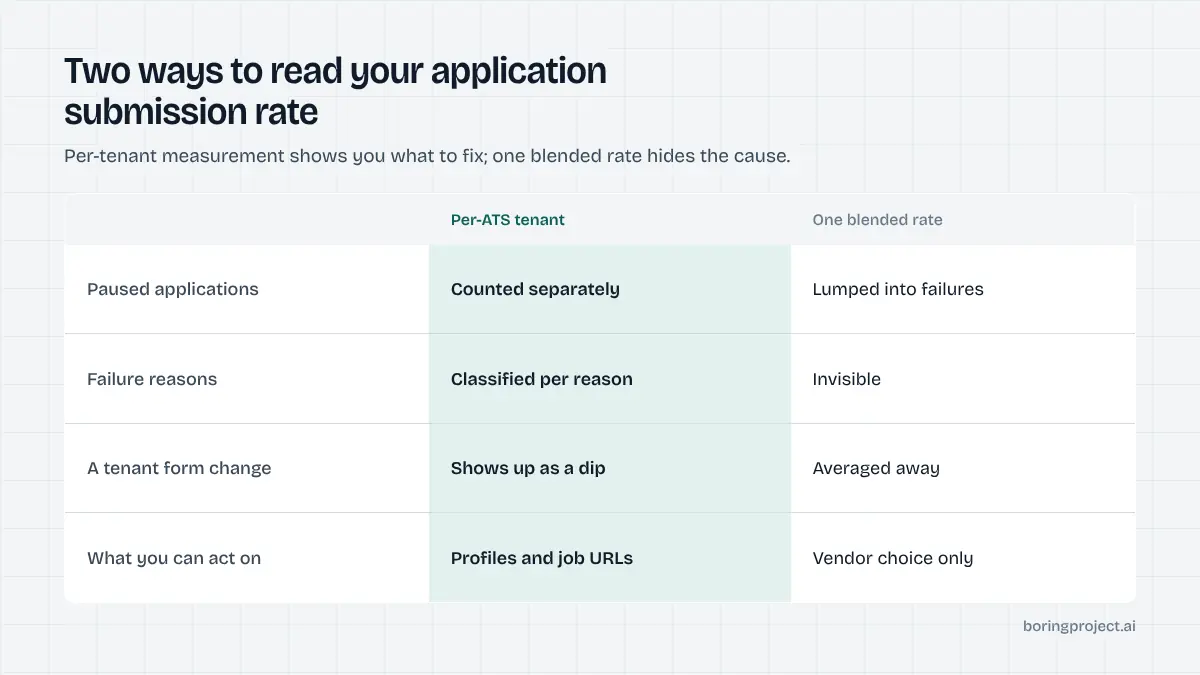
Classify every failed attempt: closed posting, login or account wall, captcha or bot detection, unknown required field, timeout, other. The distribution tells you where to act. Closed postings point at feed hygiene. Unknown fields point at adapter gaps your provider should fix. Captchas and login walls point at specific employers you may choose to deprioritise. The engineering behind this classification is covered in our explainer on job search automation infrastructure.
Watch the trend, not the snapshot
A submit rate on one day is weather. The trend over weeks, broken down by ATS family and tenant, is climate. Employers change forms constantly, so expect dips and watch how quickly they recover; recovery time is a direct measure of your provider's maintenance. Report submit, needs_input and failed rates together, every time, so no one mistakes a pause for a failure or a guessed answer for a success.
Frequently asked questions
What is a good success rate for automated job applications?
There is no single number. A job application automation success rate depends on how you define success, which ATS families your jobs sit on, how fresh the job URLs are and how complete the candidate profiles are. The useful approach is to measure your own submit, needs_input and failed rates on a pilot of a few hundred applications, then improve the inputs you control. Treat any vendor's single headline percentage with caution.
Should needs_input count as a failure?
No. A needs_input pause means the form asked something the profile did not cover and the system correctly declined to guess. Once the candidate answers, the application completes. Count it separately from failures, and track how often paused applications are resumed. A high pause rate is a profile-completeness problem, not an automation problem.
Why do success rates differ by ATS?
Systems differ in structure. Single-page forms with standard fields are the most reliable. Multi-step wizards with account creation, email verification and tenant-specific pages introduce more places to stall. Employers also customise forms differently within the same ATS, so even family-level figures hide variation between tenants.
What are the most common reasons applications fail?
Closed or expired postings that still appear in a job feed, login walls or account requirements the system cannot complete, captchas or bot detection, required fields the adapter has not seen before, and timeouts on slow tenant pages. Most of these are detectable and classifiable, which is why a good failure taxonomy matters more than a headline rate.
How can we improve our own submission rate?
Refresh job URLs frequently so you are not applying to closed roles. Collect the standard screening fields at onboarding so fewer applications pause. Save candidates' answers for reuse. Monitor by ATS tenant and report recurring failures to your provider. Each of these moves the numbers more than switching providers usually does.
How many applications do we need to measure a reliable rate?
Enough to see patterns by ATS family, which in practice means a few hundred applications spread across your real job mix rather than a handful of hand-picked roles. Run the pilot over at least a week so you capture day-to-day variation in employer sites, and record the reason for every failure so you can act on the results.
Next step
The fastest way to learn your real job application automation success rate is a pilot on your own job list, with a screenshot receipt for every submission and a reason for every failure. Talk to us about a measured pilot and we will size it to your mix of ATSs.