 The Boring Project
Screening Questions Automation: Answer or Pause?
A design guide for handling ATS screening questions in automated applications: what to fill from the profile, when to pause for the candidate, and how to make the pause painless.
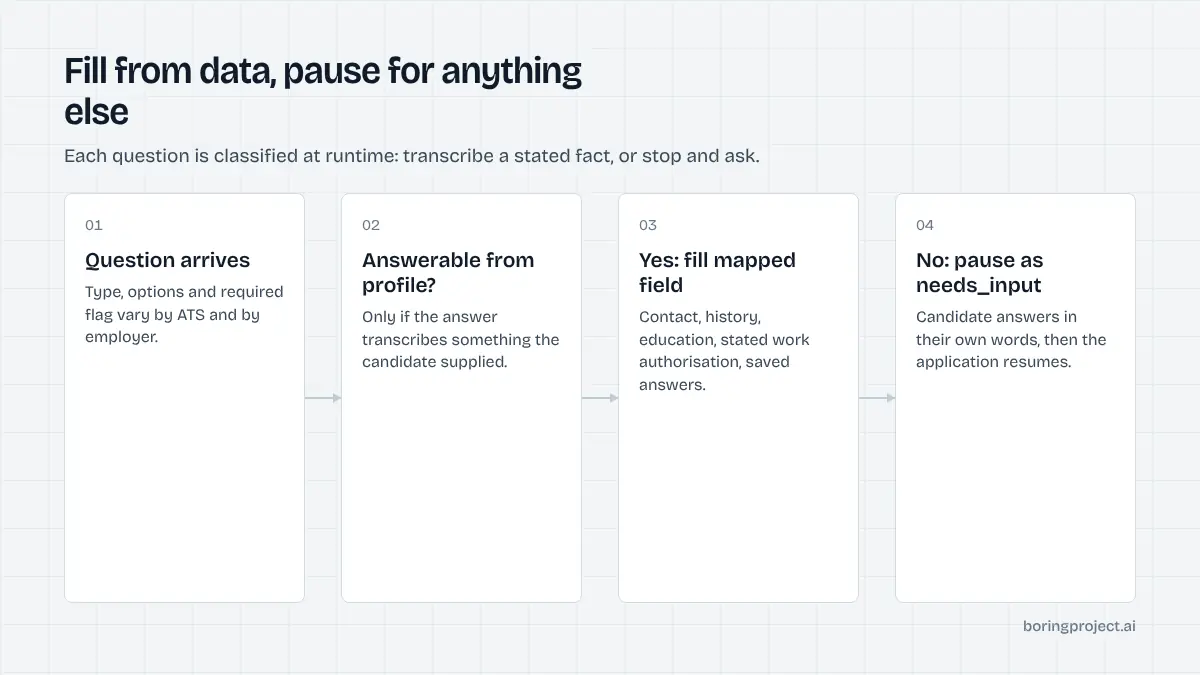
Screening questions are where automated applications either earn trust or lose it. Contact details and work history are easy. "Do you now or will you in the future require sponsorship?" is not, unless the candidate told you.
This article lays out a simple rule, answer only what the candidate has actually said, and shows how to build a product around it. The rule costs a little speed and buys a great deal of accuracy, which is the trade candidates and employers both want.
What ATS screening questions look like in practice
The common set
Most employer forms, whatever the ATS, draw from a familiar pool. Work authorisation and sponsorship. Years of experience with a named skill or tool. Willingness to relocate or to work on-site. Salary expectation. Earliest start date. Whether the candidate has previously worked for or applied to the company. Whether they hold a specific licence, certification or clearance.
A second group is voluntary self-identification: gender, ethnicity, disability, veteran status. These exist for compliance reporting and are explicitly optional.
A third, smaller group is employer-specific: knockout questions about shift availability, driving licences, physical requirements or proximity to a site. These vary the most and are the least likely to be covered by a generic profile.
Tenant variation
Two employers on the same ATS can ask completely different questions, in different formats, with different required flags. One Greenhouse form has three custom questions; another has fifteen. A Workday tenant may put screening questions on page two of a five-page wizard; another puts them last.
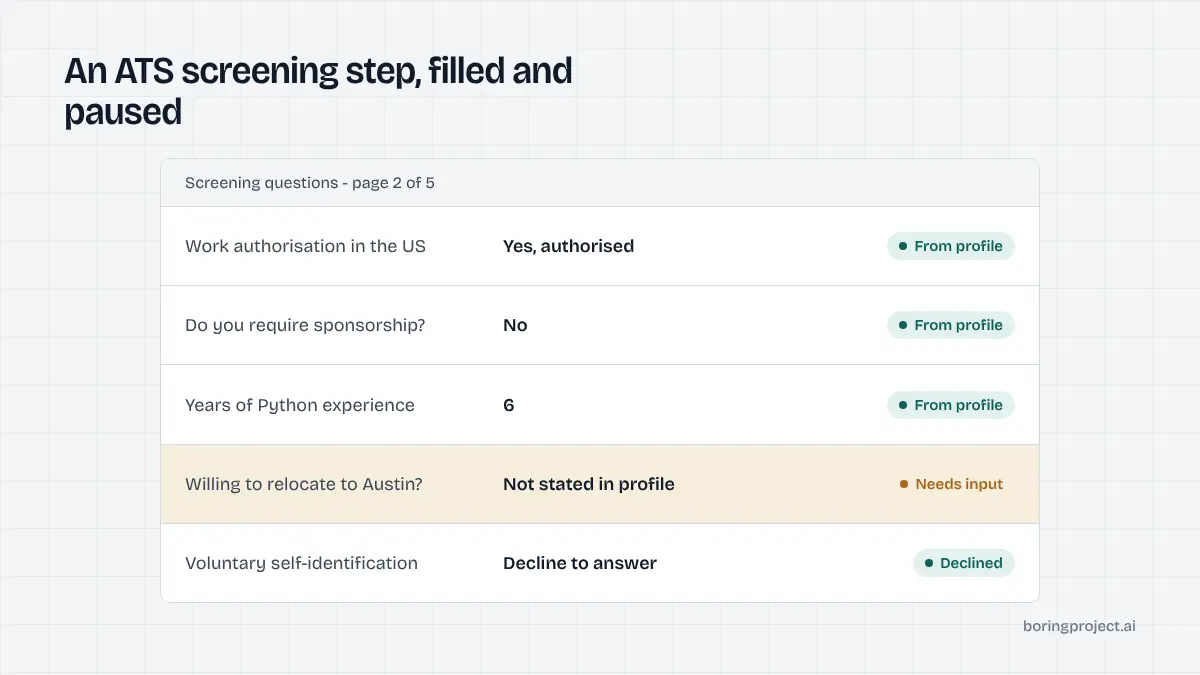
This variation is why screening questions cannot be solved with a fixed list. The automation has to classify each question at runtime and decide, per question, whether the profile holds a trustworthy answer.
Format matters
Questions arrive as yes/no toggles, dropdowns with employer-defined options, numeric fields, date pickers and free text. A good mapping layer handles the type conversion: a profile's "authorised to work in the US, no sponsorship required" becomes the right dropdown option in one tenant and two separate yes/no answers in another. When the options do not map cleanly, that is itself a reason to pause.
The rule: answer from data, never from inference
Answerable questions
A question is answerable when the response is a transcription of something the candidate provided. Years of experience with a skill listed in their profile. Location. Education level. Work authorisation, when the profile states it. Previously saved answers to an equivalent question. In all of these cases the automation is copying, not deciding.
Questions that must pause
Anything requiring a judgement the candidate has not made is a pause. Salary expectation for a role they have not discussed. Willingness to relocate to a specific city. Availability of a licence or clearance not in the profile. Free-text questions such as "Why do you want to work here?" unless the candidate has pre-approved a response. Voluntary self-identification fields, which should default to decline-to-answer or pause.
The pause is implemented as a needs_input status carrying the exact questions, their types and their options. The consuming product shows them to the candidate, collects answers, and resubmits. Nothing moves until the candidate has spoken. Our compliance checklist for automated applications explains why this is also the right legal posture.
Why guessing is the wrong trade
A guessed answer looks like a success in a dashboard and is a failure everywhere else. It can disqualify an eligible candidate, commit them to terms they did not agree, or misrepresent them to an employer who will remember. For a platform, a single incident of fabricated answers undermines every other receipt you have shown your users.
| Question type | Source | Behaviour |
|---|---|---|
| Contact, education, history | Profile | Fill |
| Work authorisation (stated) | Profile | Fill |
| Previously answered equivalents | Saved answers | Fill, show to candidate |
| Salary, relocation, start date | Not in profile | Pause (needs_input) |
| Free text, motivation | Not pre-approved | Pause (needs_input) |
| Self-identification | Sensitive | Decline or pause |
Designing a good needs_input experience
Make the pause specific
The candidate should see the employer's wording, an input matched to the question's type, and a one-line note that the application completes once they answer. Two or three precise questions convert well. A vague "more information needed" screen does not. Our guide on adding auto apply to a job search app covers the surrounding product flow.
Save answers for reuse
Every answer a candidate gives is a future pause avoided. Store it against the profile with the question wording it answered, and let the automation reuse it for equivalent questions. Give the candidate a place to review and edit stored answers. Over a few weeks, a candidate's needs_input rate falls as their saved answers cover more of what employers ask.
Measure pauses as a product metric
Track needs_input frequency by question type and by ATS tenant. High pause rates on a particular question tell you which profile field to collect at onboarding. High rates on a particular employer tell you where a mapping could improve. Pauses are not errors; they are the system working as designed, and the data they generate makes the product better.
Report pause rates alongside submit and failure rates so stakeholders see the full picture. A product with a modest needs_input rate and zero fabricated answers is in far better shape than one that reports a higher raw submit rate by guessing.
Frequently asked questions
Why not let the automation guess the most likely answer?
Because a wrong guess on a screening question is worse than no application. It can disqualify a candidate who was actually eligible, misrepresent them to an employer, or commit them to a salary or start date they never agreed to. Pausing costs a minute of the candidate's time; a fabricated answer can cost them the role and cost you their trust.
Which screening questions are safe to fill automatically?
Anything that maps directly to a field the candidate supplied: contact details, work history dates, education, years of experience in a listed skill, location, and work authorisation when the profile states it explicitly. The test is whether the answer is a transcription of candidate-provided data rather than an inference about it.
How should a needs_input pause be presented to the candidate?
Show the employer's question in its original wording, provide an input matched to its type (yes/no, number, choice, free text), and explain that the application will complete once answered. Offer to save the answer to the profile for reuse. Keep the pause short and specific; a list of two or three precise questions converts far better than a generic "additional information required" message.
Do pauses hurt the success rate?
They change what success means. An application that pauses and then completes with accurate answers is a success. One that completes with guessed answers is a liability that looks like a success in a dashboard. Over time, saving answers to the profile reduces pause frequency, so needs_input rates fall as a candidate uses the product.
What about questions on protected characteristics?
Voluntary self-identification questions about gender, ethnicity, disability or veteran status should never be inferred. The safe behaviour is to select the decline-to-answer option where it exists, or to pause and let the candidate choose. Treat these fields with the same care as any other sensitive personal data.
Can common answers be stored to reduce future pauses?
Yes, and this is the main lever for reducing needs_input over time. When a candidate answers a question such as sponsorship requirement or willingness to relocate, store it against their profile with the wording it answered. Future applications that ask an equivalent question can be filled from it, with the candidate able to review and change stored answers at any time.
Next step
The Apply API implements exactly this screening questions automation policy: fill from candidate data, never fabricate, and return needs_input with the precise questions when the profile falls short. The API documentation shows the payload so you can build the pause into your product.