 The Boring Project
Job Search Automation Infrastructure Explained
A plain explanation of the apply infrastructure that sits behind any serious job search automation product: browsers, adapters, consent and captcha handling, and the monitoring that keeps it alive.
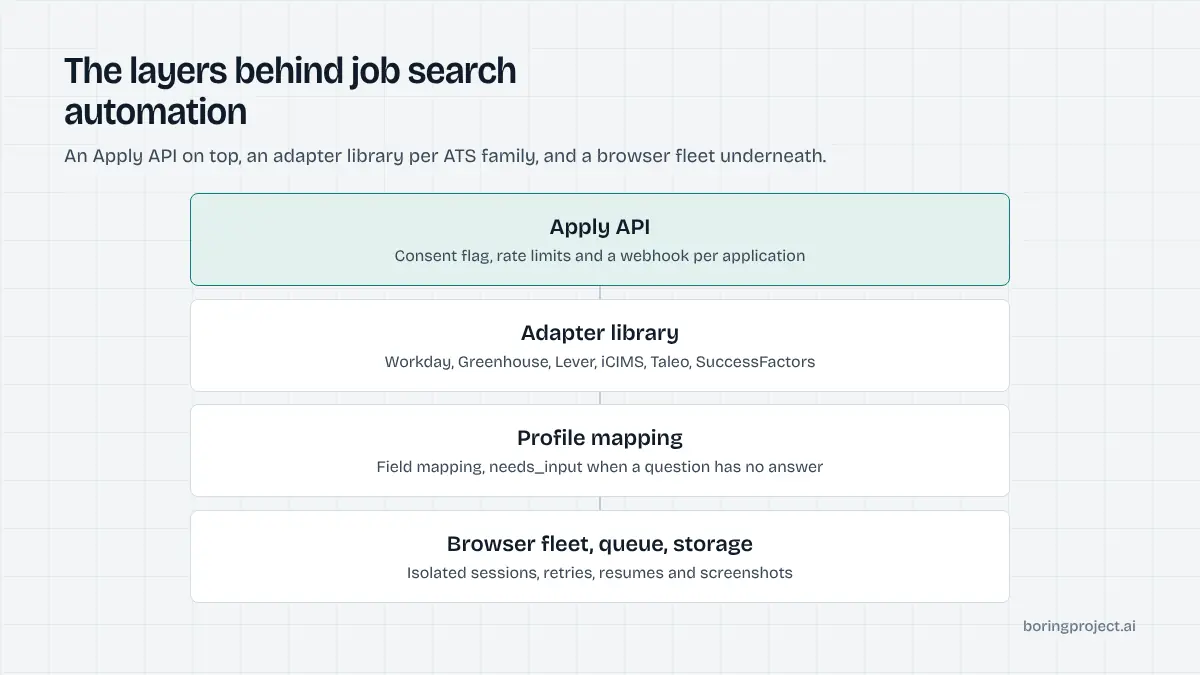
From the outside, automated job applications look like a simple trick: fill a form, press submit. From the inside, it is a distributed system that drives thousands of unique web forms, each owned by a different employer, each free to change without notice.
This article describes the pieces of that system and why each exists. It is written for product leaders and engineers deciding whether to build, buy or partner, and for anyone who wants to understand what they are actually paying for.
The core components
Browser fleet and job queue
Applications are submitted through real browser sessions, because that is the only interface employers offer to candidates. Each application becomes a job on a queue; workers pick jobs up, open a browser, and drive the form. The fleet needs to scale with demand, isolate sessions from one another, and recover cleanly when a browser hangs.
Around the fleet sit the unglamorous parts: object storage for resumes and screenshots, a database for application state, and retry logic that distinguishes a transient network error from a closed posting.
The adapter library
An adapter encodes how one ATS family's application form works. Workday wizards advance through several pages and create a candidate account along the way. Greenhouse forms are mostly single-page but vary widely in custom questions. iCIMS, Taleo and SuccessFactors each have their own patterns for file upload, address entry and confirmation.
Within a family, tenants differ. Two employers on the same platform can configure entirely different field sets and required questions. Adapters therefore need both family-level logic and tenant-level tolerance, and they need tests that run against live forms. Our overview of ATS integration for job applications goes deeper on what varies by system.
Profile mapping and screening detection
Between the candidate profile and the form sits a mapping layer. It translates structured data into whatever the form expects: date formats, country codes, phone formats, education levels, employment types. It also has to recognise when a question is not answerable from the profile.
That recognition is a safety feature. A screening question about security clearance, work authorisation or a licence number must stop the application and surface a needs_input state rather than receive a guess. The mapping layer is where that judgement lives.
Handling the hard parts
Consent, rate limits and receipts
Consent is enforced at the API boundary: no application starts without a flag confirming the candidate approved it. Rate limits are enforced per employer across all consumers, so one busy platform cannot flood a single company's inbox.
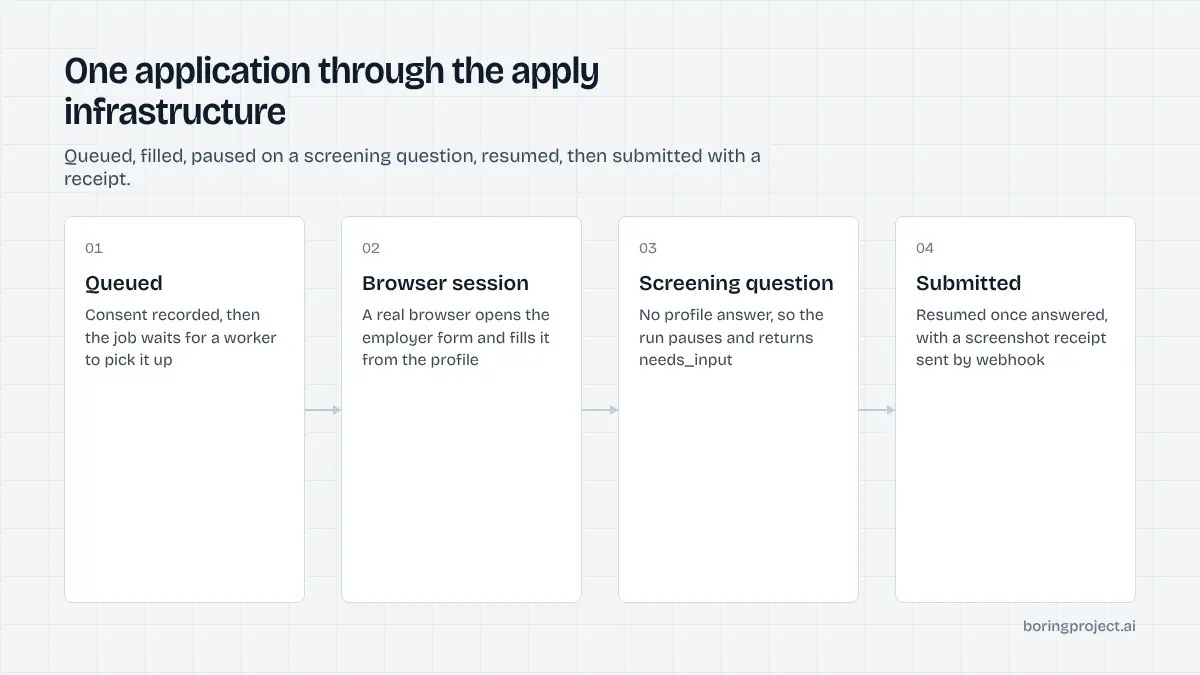
Receipts close the loop. A screenshot of the confirmation page is captured on every submission and returned by webhook alongside the status. Screenshots at intermediate stages are retained briefly for debugging, which turns out to be essential for the monitoring described below.
Captchas and anti-automation measures
Some careers sites deploy captchas or bot-detection services. The responsible approach is to detect them, resolve them through legitimate means where possible, and otherwise return a clear status rather than fail silently or resort to evasion that violates a site's terms. Infrastructure built on evasion is brittle and exposes every downstream customer to the same risk.
Account creation and email verification
Several ATS families require a candidate account before an application can be submitted, and many send a verification code to the candidate's email. The infrastructure needs a consented way to complete that step, typically by handling a one-time code on the candidate's behalf with their permission, without storing more credentials than necessary.
Why it is hard to keep running
Forms change without notice
Employers reconfigure their application forms constantly: new required questions, reordered steps, renamed fields, a new ATS vendor after a migration. Each change can break an adapter for that tenant. Across thousands of employers, something changes every day.
That is why monitoring is not optional. The system has to detect that a previously reliable adapter is now failing, classify the failure, and route it to someone who can fix it. Screenshots and structured failure reasons make that triage possible in minutes rather than hours.
Monitoring and failure taxonomy
Useful dashboards break results down by ATS family and by tenant, track submit, needs_input and failed rates over time, and alert on sudden shifts. A failure taxonomy (closed posting, login wall, captcha, unknown required field, timeout) lets the team see whether a drop is a product problem, an employer change or a platform-wide issue.
| Layer | Main failure mode | Mitigation |
|---|---|---|
| Browser fleet | Hangs, resource exhaustion | Session isolation, timeouts, retries |
| Adapters | Form changes per tenant | Live tests, screenshots, fast fixes |
| Mapping | Unanswerable questions | needs_input instead of guessing |
| Anti-automation | Captchas, bot detection | Detect and report, no evasion |
The maintenance curve
The first adapter is easy and the hundredth is not. Teams that build in-house usually ship something that works for a few ATSs within weeks, then spend most of the following year keeping it working as forms shift. Our companion piece on submitting job applications with headless browsers describes that curve in detail and explains why many teams eventually stop maintaining their own stack.
Frequently asked questions
Why not just use an ATS's public API to submit applications?
Most applicant tracking systems expose APIs for employers and their integration partners, not for candidates. Public job-board feeds give you listings, and a few systems offer limited apply endpoints for specific partners, but there is no general candidate-side submission API across the market. That is why submission infrastructure drives the employer's own web form.
What is an adapter in this context?
An adapter is the code that knows how one ATS family's application form is structured: where fields live, how multi-step wizards advance, how file uploads work, and how a confirmation page looks. Adapters also encode tenant-level variations, since two employers on the same ATS can configure very different forms. Keeping adapters current is most of the ongoing work.
How are captchas handled?
Carefully and transparently. Many ATS forms have no captcha; where one appears, the infrastructure should detect it and either resolve it through legitimate means or return a needs_input or failed status rather than silently abandoning the attempt. Evasion techniques that violate a site's terms are not a sustainable foundation for a business.
What does monitoring look like for apply infrastructure?
Success and failure rates broken down by ATS family and by employer tenant, detection of new failure signatures, latency per stage, and alerts when a previously stable adapter starts failing. Screenshots at each stage make triage fast. Without this layer, form changes go unnoticed until candidates complain.
How long does a single application take end to end?
On well-supported systems the median is a few minutes from request to confirmed submission. Multi-step wizards, slow tenant pages, document uploads and needs_input pauses extend that. The variability is why webhooks, rather than synchronous responses, are the right interface for consumers of the infrastructure.
Can a small team build this themselves?
A small team can build a prototype for one or two ATSs quickly. The difficulty is sustaining coverage across dozens of systems and thousands of tenant variations while employers change their forms. Most teams that start down this path either narrow their scope or move to a provider once the maintenance load becomes visible.
Next step
If you would rather consume job search automation infrastructure than operate it, the Apply API exposes all of the above as a single request and a webhook, across 40+ ATS integrations, with per-application pricing. See how the job application API works and start with a small pilot.