 The Boring Project
How to Automate Job Applications: Three Working Models
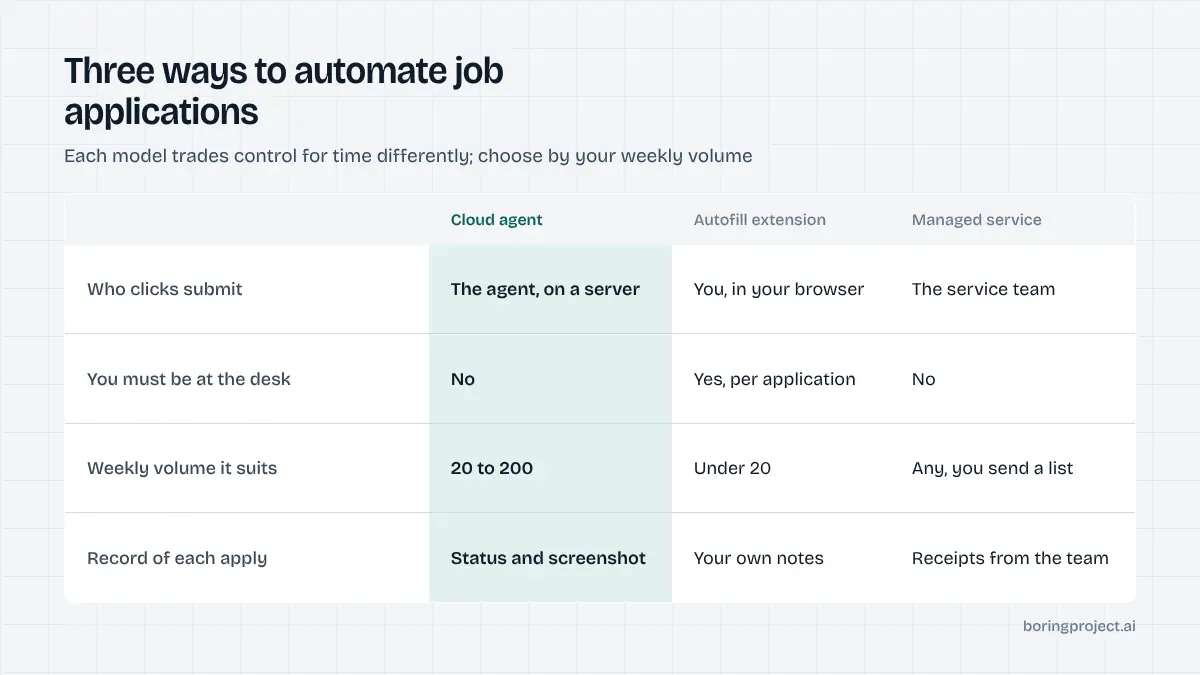
How to automate job applications has three working answers, and each model of job application automation trades control for time differently: an autofill extension, a cloud agent that submits for you, and a managed service that runs the whole process.
Model 1: the autofill extension
The oldest answer to how to automate job applications, and still the most common. You install a browser extension, save a profile, open a job application, and the extension fills what it recognises.
What it does well
It removes retyping. Name, contact details, education and work history go in with one click, and on well-labelled forms the hit rate is high.
You are still in the browser for every application, so you see each form, catch oddities and click submit yourself. Nothing is sent without your eyes on it.
For someone making 10 to 20 thoughtful applications a week, this is often the right level of automation. It respects the fact that you are reading each posting.
It also costs little to try. Most extensions are free or cheap, install in a minute, and can be removed just as quickly if the fill quality on your target employers' forms turns out to be poor.
Where it stops
It stops at anything it does not recognise: custom screening questions, employer-specific dropdowns, consent checkboxes, multi-page wizards that load fields dynamically. On enterprise systems such as Workday the extension may fill half the form and leave you to finish. It has no memory of what you applied to unless you keep one, and it provides no proof beyond the employer's confirmation email.
The time saving is real but bounded. Each application still costs you several minutes of attention, so volume is limited by your day, not by the tool.
Who it suits
Active job seekers with a clear target list and time to read each posting. It is also the only model that costs nothing in trust, because nothing acts without you present.
Model 2: the cloud agent
The second model moves the work out of your browser. You provide a job URL and a profile; a server opens the employer's application form, fills it, uploads your documents, answers screening questions from your profile, submits, and reports back.
What it does well
It completes applications end to end while you do something else. Because it runs on a server rather than inside your logged-in session on a job platform, it does not put your accounts at risk; it is applying on the employer's own form like any applicant. The better implementations handle the full range of ATS platforms, from single-page SMB forms to multi-step enterprise systems, and return a status plus a screenshot of the confirmation page for each application.
Scale changes completely. The limit becomes the number of roles that pass your filters, not the hours you can spend clicking. Our comparison of a Chrome extension versus a cloud agent goes into the architectural differences.
Where it needs care
The agent acts without you watching, so the quality of its behaviour matters. There are three things to check before trusting one.
First, what does it do with a screening question it cannot answer from your profile: pause and ask, or guess? Second, does it require your consent per application or per batch, and is that logged? Third, does it limit how fast it applies to any single employer?
The Boring Project's Apply API answers those with a needs_input status that pauses the application until the candidate supplies the answer, consent recorded on every run, and per-employer rate limits. Tools that cannot answer those three questions clearly should be treated with caution; our piece on whether auto apply is safe lists the warning signs.
Who it suits
Job seekers who need volume in a large market, and especially products and services that apply on behalf of others. For a developer, a cloud agent exposed as an API is a building block; for a job seeker, it usually arrives inside a job-search app.
Model 3: the managed service, and how to choose
The third model removes the tool entirely. You hand over a list of roles and candidates, usually as a spreadsheet, and a service runs the applications and returns receipts. No software to configure, no dashboard to operate.
What it does well
It fits teams whose job is not operating software: career services departments, reverse recruiters with a client list, staffing agencies pushing candidates into client pipelines. The service handles ATS variety, pauses on unknown questions and comes back to the operator for answers, and delivers a receipt per application that can be forwarded to the candidate or client.
Managed Applies at The Boring Project works this way: a CSV in, screenshot receipts out, with the same consent and no-fabrication rules as the API underneath it. Questions the profile cannot answer come back to the operator as a short list rather than silently stalling the batch.
Where it stops and who it suits
It does not pick the roles for you, and it should not. Targeting is still the operator's job, and a managed service that promises to find and apply to everything is promising spam. It also costs more per application than running a tool yourself, which is the point: you are buying the operation, not just the software.
It suits anyone applying for other people at meaningful volume, and individual job seekers who would rather pay per successful application than learn a tool.
Choosing between the three
| Autofill extension | Cloud agent | Managed service | |
|---|---|---|---|
| You are in the browser | Always | Never | Never |
| Handles screening questions | Partly, you finish | From profile, pauses otherwise | From profile, operator answers the rest |
| Proof per application | Employer email only | Status + screenshot | Status + screenshot |
| Realistic weekly volume | Tens | Hundreds | Hundreds, operated for you |
| Best for | Careful individual search | Volume and products | Teams applying for others |
Whichever model you choose, keep the judgement for yourself: which roles, which answers, which documents. Automate the typing and the clicking, never the deciding.
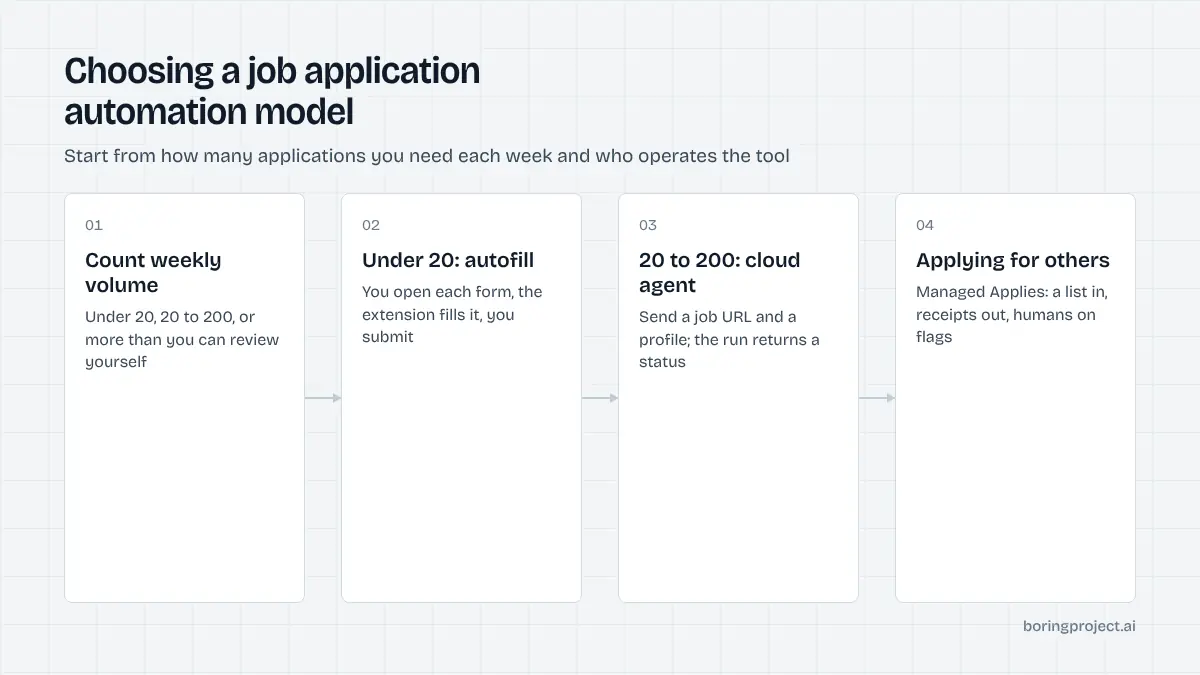
A reasonable path is to start with autofill while your target list is small, move to a cloud agent when the list outgrows your week, and hand the operation to a managed service when you are applying for other people. Each step up buys time and asks for more trust, so check the three questions above before you take it.
Frequently asked questions
Can job applications be fully automated?
The mechanical parts can: opening the form, filling fields from a profile, uploading documents, submitting, and recording a confirmation. The judgement parts should not be. Deciding which roles to target, approving answers to new screening questions and giving consent per application are yours. Good tools automate the first set and route the second set back to you quickly.
What is the difference between autofill and auto apply?
Autofill fills fields on a page you have opened, then stops; you review and click submit. Auto apply takes a job URL and your profile and completes the whole application without you in the browser, usually from a cloud server, returning a status and a receipt. Autofill saves typing; auto apply saves the whole session.
Is it safe to give an automation tool my resume and personal details?
It is the same information you hand every employer, so the question is who holds it and how. Check that the tool explains its data retention, lets you delete your profile, and never asks for passwords to job platforms. A tool that applies on employer forms needs your profile; it never needs your LinkedIn or Indeed login.
How do automated applications handle screening questions?
Well-built tools fill questions from a structured profile and pause when a question is not covered, asking you for the answer and saving it for next time. Poorly built tools guess, which produces wrong eligibility answers and invented salary figures. Ask any tool what it does when it does not know an answer; the response tells you most of what you need.
Do employers reject applications that were submitted automatically?
Employers reject applications that are incomplete, mismatched or obviously templated, whichever way they were submitted. An automated application with your real resume, truthful answers and a relevant target is indistinguishable from a manual one in the ATS. The risk is in low-quality content and poor targeting, not in the submission method.
What should a job application automation tool give me as proof?
A record per application with the employer, role, URL, timestamp, final status, and ideally a screenshot of the confirmation page from the employer's system. Without that you cannot verify what was sent or reconcile a recruiter's call with a posting. Confirmation emails from employers are useful too, but not every ATS sends them.
Next step
If you are applying for other people or need volume without operating a tool, Managed Applies takes a CSV and returns a receipt per application across 40+ ATS platforms. Talk to us about your list; if you would rather build, the same engine is available as the Apply API.