 The Boring Project
How to Auto Apply on Teamtailor Applications
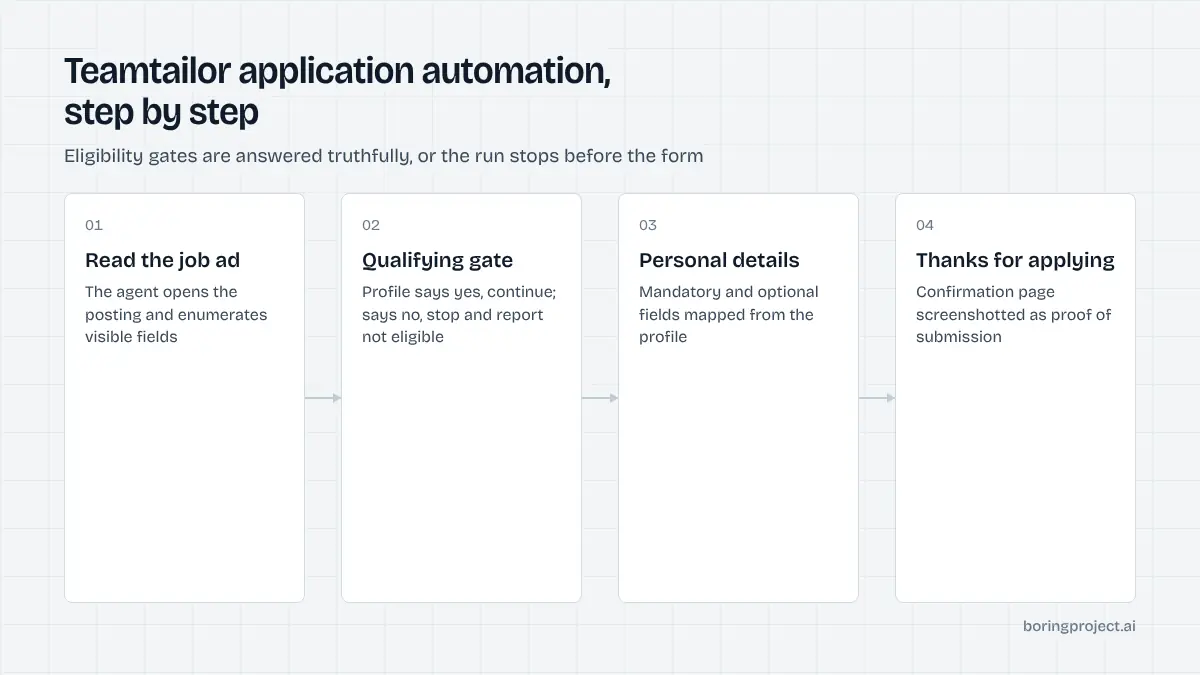
How to auto apply on Teamtailor depends on the order of the form: career sites put qualifying questions before the personal-details section, so teamtailor application automation has to answer eligibility gates honestly before it ever touches a contact field.
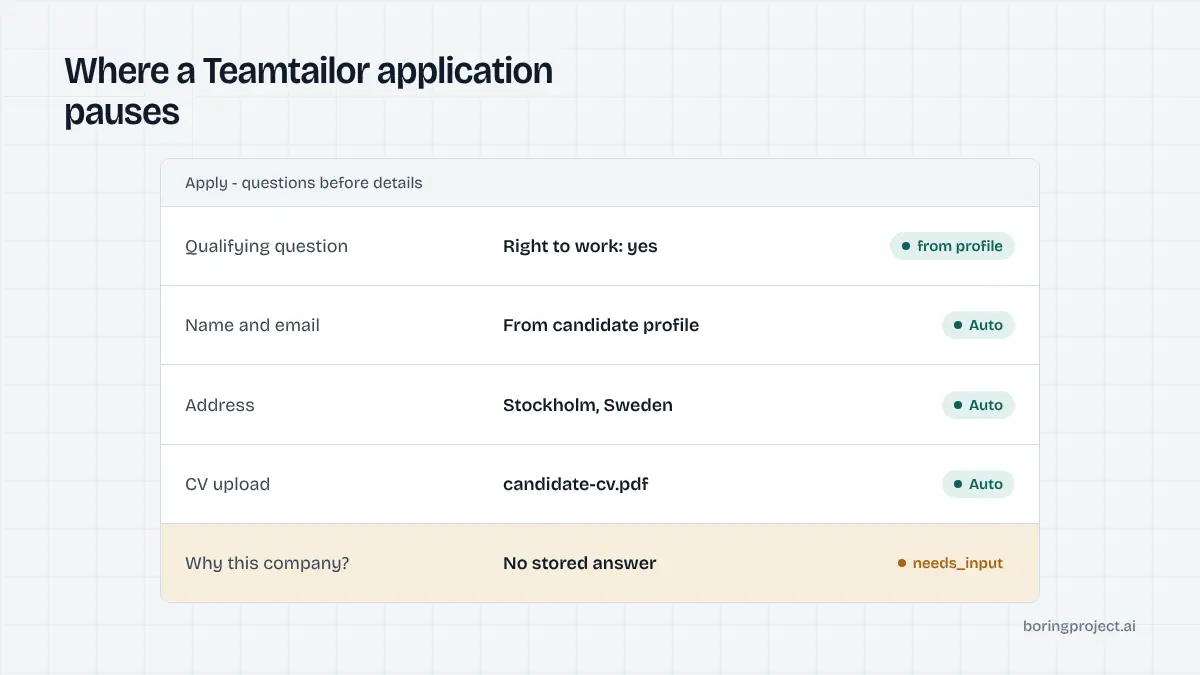
How a Teamtailor application is structured
Teamtailor is a Swedish ATS with a large footprint across the Nordics and the wider EU, particularly among scale-ups and mid-sized employers. Its selling point is the career site builder, so the pages are polished, but the application form follows a fixed order that matters for automation.
Questions come first
Teamtailor's own guidance describes the form as job-specific questions followed by personal information. Employers can add questions of several types and mark each as optional or mandatory. Yes/no and range questions are always mandatory because they have no neutral value.
The important variant is the qualifying question. An employer can set a yes/no question so that a candidate must answer yes to apply, and only positive answers can qualify.
A no triggers a message saying the candidate does not meet the requirements, and the rest of the questions are hidden. The application is over before you have typed your name.
Personal details and documents
After the questions come the personal details. The employer decides whether each field is mandatory, optional or hidden, so the set varies by job.
An address field lets candidates search for and add a location, which the employer may use to filter by distance. Documents, usually a CV and sometimes a cover letter, are uploaded in this section too.
If the employer has enabled social apply options, buttons such as Apply with LinkedIn appear in this section and prefill contact data. Questions can also be linked to candidate custom fields and shown or hidden with conditional logic, so the form can change as you answer it.
The confirmation and Connect
Submitting lands you on a Thanks for applying page, and the application enters the job's pipeline immediately. On that page Teamtailor invites you to Connect with the company, which creates a light candidate profile for future roles, and to add endorsements.
Connect is optional and is not the same as the application. Declining it has no effect on the application you just sent; it only means the employer cannot proactively match you to future openings.
That confirmation page is the artifact a tool should capture as proof of submission. Some employers also send a confirmation email, but the page is the reliable signal because it appears in every deployment.
The two things automation must get right
Teamtailor forms are not technically difficult, which means how to auto apply on Teamtailor is a design question rather than an engineering one. The order of operations and the honesty of answers are what separate a usable integration from a harmful one.
Never lie to a qualifying gate
A qualifying question is a hard filter the employer deliberately placed in front of the form. If a candidate's profile says they lack the right to work in Sweden and the gate asks exactly that, the correct outcome is to stop and report "not eligible". Answering yes to reach the form produces an application that will be rejected on review and damages the candidate's standing with that employer.
The Boring Project's agent treats these gates as deterministic: if the profile holds a truthful answer, use it; if the answer is no, end the run with a clear status; if the profile is silent, pause with needs_input and ask. The post on why automated applications get rejected covers what happens when tools skip this step.
Read the form at runtime
Because employers control which personal fields are mandatory, optional or hidden, and because conditional logic can reveal fields as you answer, a cached form template per company is unreliable. The agent needs to render the page, enumerate the visible fields and their required flags after each answer, and map them to the candidate profile.
This is also why a resume-upload-and-done approach fails on Teamtailor. The upload is one field among several, and a mandatory range question left blank will block submission.
The same runtime read should capture the required flags on personal fields. An employer that makes phone number mandatory on one job and hidden on another is normal in Teamtailor, and the agent should notice rather than assume.
Handle anonymous mode and video gracefully
Some employers enable anonymous mode, which hides identifying details such as names and photos from recruiters in early stages; the form tells candidates when this is active. Others attach a recorded video to a question so the hiring manager can explain what they are looking for.
Neither changes what the candidate has to submit, but a tool should not break when the layout includes these elements. Log them in the receipt and carry on.
A related detail: questions can be linked to candidate custom fields on the employer side. That is invisible to the applicant, but it means the answers are stored as structured data the employer can filter on later, which is one more reason to answer accurately rather than approximately.
Teamtailor versus its EU neighbours
If you are covering Nordic and EU employers, Teamtailor usually shows up alongside Recruitee and Personio. They look similar and behave differently in small ways.
Order of operations
Teamtailor asks job questions first and can end the application at a qualifying gate before you type your name. Recruitee and Personio put contact details first and questions after, with a privacy consent near the submit button. Our Recruitee guide describes that pattern.
Candidate identity
Teamtailor offers an optional Connect profile after applying. Recruitee and Personio have no candidate account at all. None of the three requires a login to apply, which keeps all of them far simpler than Workday-class systems.
Summary table
| Teamtailor | Recruitee | Personio | |
|---|---|---|---|
| Questions before contact fields | Yes | No | No |
| Hard eligibility gate | Yes/no qualifying question | Not built in | Not built in |
| Social prefill | Apply with LinkedIn and others, if enabled | Apply with LinkedIn, if enabled | LinkedIn URL field |
| Post-apply profile | Optional Connect | None | Talent pool via consent |
For developers wiring up all three, the field-mapping and needs_input behaviour are documented in the API documentation; the per-ATS differences are handled inside the integration.
Frequently asked questions
How do I recognise a Teamtailor career site?
Teamtailor sites commonly live on a company subdomain of teamtailor.com, such as company.teamtailor.com, or on a custom careers domain built with Teamtailor's site editor. The look is image-heavy with job cards, and the application form opens from the job ad. The confirmation page says Thanks for applying and often offers to Connect with the company.
What are qualifying questions on Teamtailor?
A qualifying question is a yes/no question the employer marks as required for applying. If you answer no, the form tells you that you do not meet the requirements and hides the remaining questions. Only a yes can qualify. They typically cover work authorisation, location or a hard skill requirement. Answer them truthfully; a false yes wastes everyone's time.
Do I need a Teamtailor account to apply?
No. You can apply as a guest with your name, email and documents. Teamtailor also offers Connect, a lightweight candidate profile you can create after applying to follow the company, add an address or endorsements, and be considered for future roles. Connect is optional and separate from the application itself.
Can I apply on Teamtailor using LinkedIn?
If the employer has turned on Apply with LinkedIn under their apply-with settings, a button in the personal-details section prefills your information from your LinkedIn profile. Not every employer enables it. Even when available, it fills contact fields only; the job-specific questions still need answers.
What happens to my data on Teamtailor?
Your application is stored in the employer's Teamtailor account, and the employer is the data controller. Teamtailor is widely used in the EU and provides GDPR tooling to its customers, but the retention period and privacy terms are set by each employer. Check the privacy notice on the career site if retention matters to you.
Why did my automated Teamtailor application stop before the form?
Most likely a qualifying question. If your profile indicates no for a required yes/no gate, a responsible tool stops and reports that you are not eligible rather than answering yes to get through. That is correct behaviour, not a bug. Review the job requirements and update your profile if the no was a mistake.
Next step
Teamtailor is part of the 40+ ATS set the Apply API handles, with qualifying gates answered only from the candidate's own profile and a screenshot of the Thanks for applying page returned on every submission. The API documentation is the place to start if you are integrating; if you would rather hand us a list, Managed Applies covers the same flow with no code.