 The Boring Project
How to Auto Apply on Recruitee Applications
How to auto apply on Recruitee is mostly simple: careers sites use single-page forms with an optional privacy consent step, which makes recruitee application automation straightforward as long as the consent and custom questions are handled honestly.
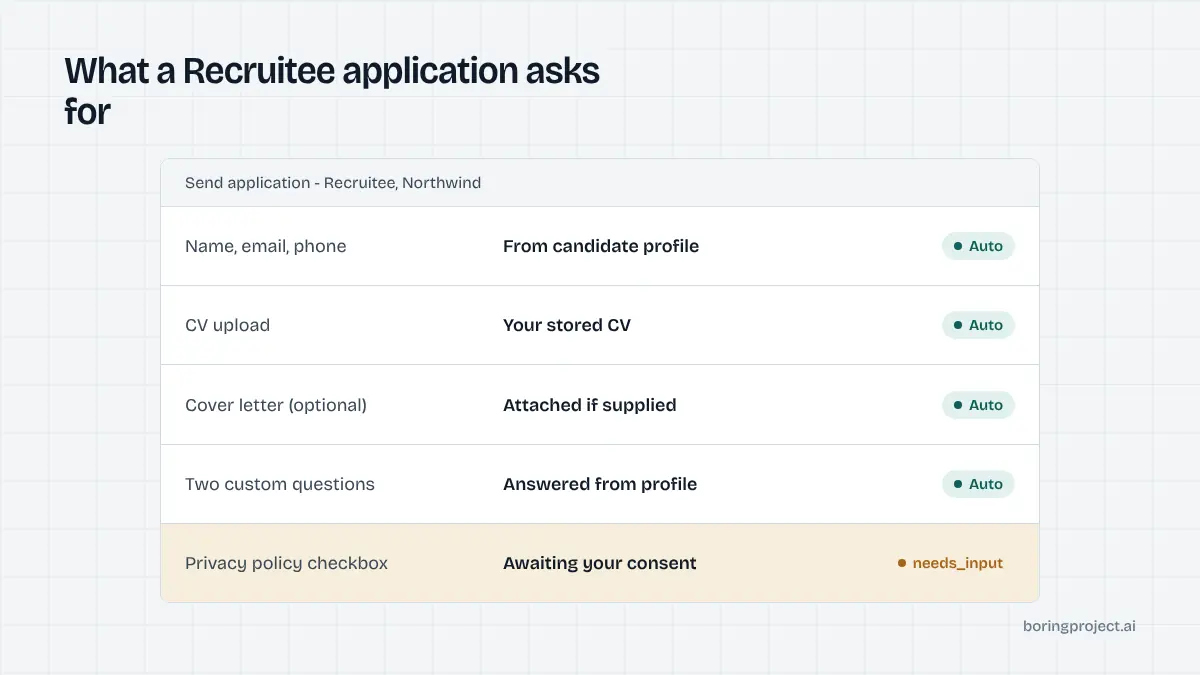
Step by step: applying on a Recruitee job page
Recruitee (now part of Tellent) is popular with small and mid-sized European employers. Its careers sites are simple by design, and that simplicity is the main thing to understand before you automate anything.
Step 1: Find the job and open the form
Most Recruitee careers sites live at a company subdomain of recruitee.com, with jobs listed on the home page and each posting at its own URL. Some employers map a custom domain, but the layout is recognisable: job description on the left or top, an Apply button that scrolls or jumps to the form.
The form sits on the same page or one click away. There is no candidate account, no login and no multi-step wizard. That alone makes Recruitee one of the easier systems to apply on by hand.
Before you start, read the posting for any document the employer specifically asks for, such as a portfolio link or a cover letter in a particular language. The form will not tell you; the job text will.
Step 2: Fill the fields and attach documents
The standard fields are name, email and phone, followed by document uploads for a CV and, if the employer asks for it, a cover letter. Employers choose which fields are required and can add their own questions: short text, long text, single choice, multiple choice or a file upload.
If Apply with LinkedIn is enabled, a button prefills the contact fields from your LinkedIn profile. The employer has to hold a LinkedIn Recruiter contract or paid job slots to offer it, so you will not see it everywhere. Prefill saves typing but does not answer custom questions.
Step 3: Accept the terms and send
Employers can require applicants to accept their privacy policy before submitting. In the Recruitee careers site editor this is configured under Terms and privacy, and the policy can be pasted in or linked externally. When required, the form will not submit without the agreement.
After sending, you land on a thank-you message and typically receive an auto-confirmation email. Recruitee's confirmation emails can include a GDPR footer that lets you request deletion or correction of your data later. Keep that email; it is your only receipt, since there is no applicant portal.
What to get right when automating Recruitee
Because the form is small, the temptation is to treat Recruitee as trivial. In practice, how to auto apply on Recruitee comes down to the three things below, which are where tools go wrong.
Consent is a candidate decision
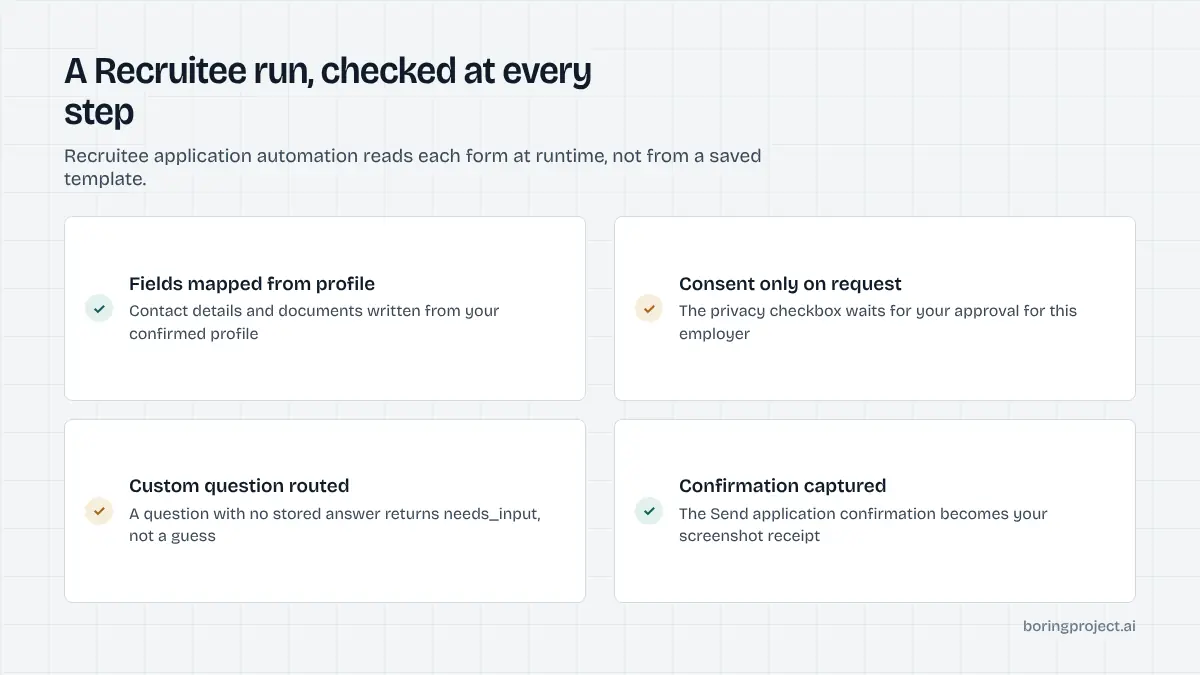
The privacy agreement is legal consent to the employer's processing of personal data. An automation tool should tick that box only because the candidate has agreed to it, either per application or through a standing instruction that covers employer privacy terms. Silently accepting on someone's behalf is poor practice and, under GDPR, arguably not valid consent at all.
The clean approach is to make consent part of the candidate's setup, log it with each submission, and surface the employer's policy link in the receipt. For a fuller treatment, see our notes on job application automation compliance.
Custom questions are not templates
Recruitee employers configure questions per job, and two roles at the same company may ask different things. A tool that caches a form layout per company will break when a recruiter adds a question. Read the form at runtime, map each field to the candidate's profile, and route anything unmapped to the candidate instead of guessing.
The Boring Project's Apply API does this with a needs_input state: the application pauses, the candidate or the integrating product supplies the missing answer, and the run resumes. Short-answer questions about motivation or availability are the usual trigger.
Documents and formats
Recruitee accepts common document formats for CV and cover letter uploads. The practical issue is not format but relevance. If the employer asks for a cover letter and the tool uploads a generic file addressed to no one, the application reads as spam even though every field is technically filled.
Either generate a short, role-specific letter from the candidate's own material and let them approve it, or leave the optional letter off. A missing optional document is better than an obviously templated one.
Recruitee compared with similar EU systems
Recruitee overlaps heavily with Personio and Teamtailor in the European small-business market. If you are building coverage for EU employers, the differences are worth knowing.
Form complexity
Recruitee and Personio both use a single-page form with a consent element. Personio's form additionally asks how you heard about the company and treats acceptance of its data privacy statement as consent to longer retention and talent pool inclusion. Our guide to auto applying on Personio covers that flow.
Teamtailor adds qualifying yes/no questions that can block an application before the personal-details step, so order of operations matters more there.
Data retention after you apply
Recruitee gives employers GDPR tooling that sets a retention period starting from the moment you apply, with automation that can request renewed consent by email or delete profiles whose period has expired. If you apply twice and the employer merges your profiles, the later application resets the clock.
For a candidate this is mostly invisible, but it explains the consent emails you may receive months later from a Recruitee employer. For automation it is a reminder that the privacy agreement at submission time is the start of a data relationship, not a formality.
Where the receipt comes from
| System | Candidate account | Consent step | Receipt |
|---|---|---|---|
| Recruitee | None | Privacy policy agreement if required | Thank-you page + email |
| Personio | None | Data privacy statement | Thank-you page + email |
| Teamtailor | Optional Connect profile | Varies by employer | Thanks-for-applying page |
In all three cases the confirmation page is the moment a tool should mark an application as submitted, and a screenshot of that page is the evidence worth storing. Anything earlier, including a successful file upload, is not a submission.
Frequently asked questions
How can I tell a careers site runs on Recruitee?
Look at the URL. Recruitee-hosted careers pages typically sit on a subdomain of recruitee.com, for example company.recruitee.com, with each job at a path like /o/job-title. Companies can also map a custom domain, in which case the page source or the footer branding usually gives it away. The single-page form with a Send application button is another tell.
Do I need to create an account to apply on Recruitee?
No. Recruitee careers sites take applications from guests. You fill the form, attach documents, accept the privacy terms if the employer requires it, and submit. There is no candidate login or dashboard to track status, so keep the confirmation email the employer's account sends you after you apply.
What is the privacy checkbox on Recruitee forms?
Employers can require applicants to accept their privacy policy before submitting. It appears as an agreement step near the submit button, and the policy may be hosted on the careers site or linked externally. It is a legal consent, so an automation tool should only tick it when the candidate has agreed to the employer's terms.
Can I apply on Recruitee with my LinkedIn profile?
If the employer has enabled Apply with LinkedIn, a button on the job page prefills the form from your LinkedIn data. It requires the employer to hold a LinkedIn Recruiter contract or paid job slots, so not every Recruitee site offers it. Even when present, you should still review the fields before sending.
Are Recruitee application forms the same for every job?
No. The core contact fields are consistent, but employers can configure per-job questions, choose which fields are required, and toggle options such as Apply with LinkedIn individually. Two jobs at the same company can have different forms, so automation should read the form at runtime rather than rely on a saved template.
Will the employer know I used an auto apply tool on Recruitee?
The employer receives the same application record a manual applicant would produce: your details, documents, answers and the timestamp. What stands out is low-quality content, such as a generic cover letter or an answer that ignores the question. Good automation submits your real answers and real documents, so the record reads as yours.
Next step
Recruitee is one of the 40+ ATS platforms the Apply API covers, with consent logging and screenshot receipts on every submission. If you have a list of EU roles and candidates ready, talk to us about Managed Applies and we will run the batch without you writing any code.