 The Boring Project
How to Auto Apply on Taleo Career Sites
Oracle Taleo career sections are long, sequential and unforgiving of missed fields, which is exactly why they are worth automating. This guide covers how to auto apply on Taleo block by block, and what Taleo application automation has to handle: the privacy gate, the account, the flow pages, the session timer, and the moments where the run has to wait for a person.
Why Taleo tests everyone's patience
Taleo serves large employers: banks, universities, hospitals, public-sector bodies, manufacturers. Their career sections live on URLs like company.taleo.net/careersection/..., and each is configured by the employer from Oracle's building blocks. Anyone learning how to auto apply on Taleo quickly discovers three things.
The flow is built from pages and blocks
Oracle structures a career section as application flows made of pages, and pages made of blocks. A block might be resume upload, personal information, work experience, education, a questionnaire, a diversity form, a statement to accept, or an eSignature. The employer chooses which blocks appear and in what order, so one site may have five pages and another twelve.
A progress bar across the top lists the steps, and once a page is completed the candidate can click back along the bar to edit it. Each page validates on Save and Continue; a missing required field stops progress with an error message at the top.
Statements, consent and signatures are part of the form
Taleo career sections attach a privacy statement that the candidate must accept before entering the flow. Inside the flow, additional statements can be placed above a diversity form, a background-check consent or an eSignature block. The eSignature usually asks the candidate to type their name or initials as attestation that the information is accurate.
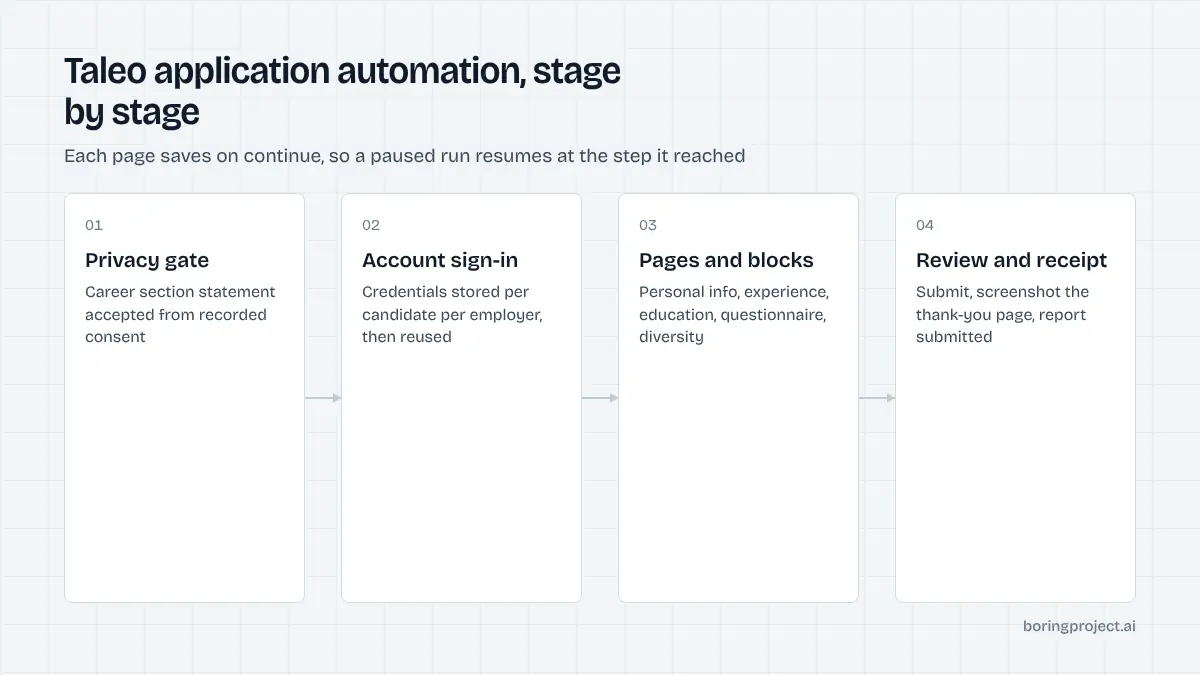
These are legal acknowledgements, not form fields, and automation treats them differently: accepted only on the basis of recorded candidate consent, and surfaced for confirmation when the wording is employer-specific.
The clock is running
Sessions expire after a period of inactivity, with a reminder shortly before, and unsaved work on the current page disappears. Opening two sessions in the same browser is not supported. For a human, this means saving often. For an automation engine, it means moving through pages steadily and never leaving a half-filled page idle while waiting for an external answer.
The application flow, block by block
Account and sign-in
Clicking Apply on a requisition prompts for sign-in or new-user registration: username, password, email and security questions on older configurations. Some sites allow sign-in with Google; corporate sites may use single sign-on for employees. The account belongs to that employer's career section, so a candidate applying to several Taleo employers holds several accounts.
The engine registers a new user with a compliant password, stores the credentials per candidate per employer, and reuses them next time. A returning email without stored credentials requires a reset through the candidate's inbox, which is a needs_input pause unless inbox access was consented. This mirrors the portal-per-employer pattern on iCIMS, only with a slower front end.
Resume, personal information, experience, education
Many flows open with a resume upload block that parses the file into later pages. Oracle delivers parsing through a third-party partner with support varying by language, and the output is uneven. Automation uploads the file for the recruiter, then writes personal information (name, address, phone, email), work experience (employer, title, dates, description, one block per role) and education (institution, degree, field, dates) from the structured profile, correcting whatever the parser populated.
Repeated blocks are where time goes. Each added job or school is a separate "add" action with its own small form, and the engine fills them one at a time. A candidate with six roles and two degrees generates eight sub-forms on top of the main pages, each saved individually. Some sites also include a plain-text resume box and a cover letter block; the engine pastes the candidate's own text there rather than composing anything new.
Attachments follow the same rule. Licences, certificates or a portfolio are uploaded where the flow exposes an attachments block, and only files the candidate supplied are used.
Questionnaire, prescreening, diversity, eSignature, review
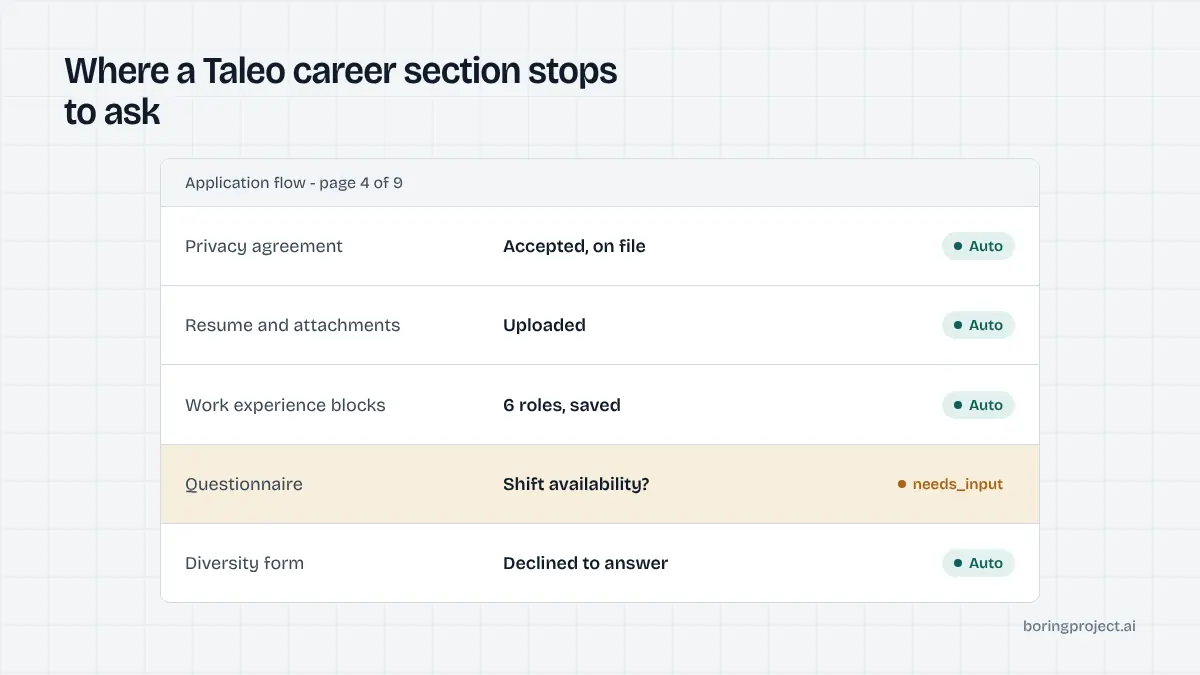
The questionnaire and prescreening blocks hold the employer's questions: eligibility, licences, shift availability, salary, relocation, and often a free-text prompt. Select and yes/no questions resolve from a complete profile. Anything requiring a fact the candidate never supplied returns needs_input with the exact wording. Fabricated answers are the fastest route to the outcomes described in why automated applications get rejected.
The diversity form collects gender, ethnicity and similar fields with decline options, filled only from explicit candidate choices. The eSignature block is completed only with the candidate's recorded authorisation. On the review page the engine checks for validation errors, submits, waits for the thank-you page, screenshots it and reports submitted.
Running Taleo without losing your mind
Budget for the longest median in your pipeline
Whatever else you optimise, how to auto apply on Taleo at volume is mostly a question of patience. Taleo and Workday are the slow end of the range: account creation, a dozen page loads, repeated experience blocks and server-side validation add up. Report realistic expected times to whoever is waiting, run several employers in parallel, and never judge a system's overall speed by its Taleo runs.
Save state, resume cleanly
Because the flow is paged and sessions expire, the engine saves each page before moving on and records the step reached. A pause for input does not abandon the application; the resumed run signs back in, walks the progress bar to the saved step and continues. Keep candidate plus requisition in your own records to prevent duplicate submissions, and read the candidate portal's submission list as a secondary check.
Respect the employer's limits
Public-sector and healthcare employers on Taleo often post many near-identical requisitions. Submitting one candidate to all of them in an hour is visible to the recruiting team and rarely helps the candidate. Apply per-employer rate limits, confirm consent per application, and favour the roles that match. The receipts will show what went where.
Frequently asked questions
Why do Taleo career sites look so dated?
Oracle Taleo Enterprise is a long-established product and its Career Section front end has kept its page-and-block structure for many years. Employers can restyle it, but the underlying flow of sequential pages with a progress bar remains. The age of the interface does not stop automation; it just means more page transitions and stricter validation than newer single-page systems.
Do I have to accept a privacy agreement before applying on Taleo?
Most Taleo career sections open with a privacy statement attached to the career section itself, and candidates must accept it before the application flow starts. Other statements, such as background check consent or an eSignature attestation, can appear later in the flow. Automation records the candidate's consent and accepts these only on that basis.
Is a Taleo account required, and does it work across employers?
An account is required to submit, and it is tied to the employer's career section. Some employers allow sign-in with Google or through corporate single sign-on for internal candidates. The same email can be registered on many separate Taleo sites. Automation stores credentials per candidate per employer and reuses them for later applications to that company.
What happens if the session times out during an automated run?
Taleo ends a session after a period of inactivity, with a warning shortly before, and unsaved work on the current page is lost. An automation engine keeps the session active by progressing steadily and saves each page as it completes. If a pause for input is needed, it saves what it can, records the step reached, and resumes by signing in again.
Where does taleo application automation most often stop with needs_input?
On the questionnaire and prescreening blocks, where employer-specific questions may require facts not on the candidate's profile; on eSignature or attestation blocks that need the candidate's explicit confirmation; and on account recovery when a returning email has no stored password. Each pause returns the exact prompt so it can be answered once.
Can automation see which jobs a candidate already applied to on Taleo?
After the first submission, Taleo exposes a candidate portal page listing completed submissions and saved searches. Automation can read it to avoid duplicate applications to the same requisition. More reliably, the apply system keeps its own record of candidate plus job URL and rejects repeats before the form is ever opened.
Next step
Taleo is where a job application API earns its keep: one request with a job URL and a candidate profile, and the account, the twelve pages and the signature block are handled with a screenshot receipt at the end. Start with a single Taleo requisition and compare the elapsed time with doing it by hand; pricing is per successful application.