 The Boring Project
How to Auto Apply on SuccessFactors Careers
SAP SuccessFactors is the enterprise ATS where consent comes before data: no account, profile or application exists until the candidate accepts the employer's privacy statement. This guide covers how to auto apply on SuccessFactors layer by layer: how a successfactors job application is structured, what an automated run does at each stage, and where it stops to ask.
Consent is step one, not a checkbox at the end
SuccessFactors Recruiting is used by large multinationals, and its career sites, built with SAP's Career Site Builder, reflect that: branded pages on the employer's own domain or on an SAP-hosted address, multiple languages and country-specific legal text. Understanding how to auto apply on SuccessFactors starts with the consent gate.
The Data Privacy Consent Statement
When an external candidate creates an account on a SuccessFactors career site, the system shows a Data Privacy Consent Statement. The candidate must accept it before entering any data. Employers can configure country-specific versions shown in the candidate's preferred language, and if the statement is updated, every applicant is prompted to accept the new text.
Declining is not a soft option. For an external candidate, declining removes the account and anonymises any applications attached to it. For automation, this means the decision has to be the candidate's, recorded in advance for that employer, and never defaulted.
Account creation and verification
After acceptance, the candidate registers with an email and password. Some employers offer sign-in through LinkedIn or another provider, and many send a verification email to confirm the address. The account belongs to the employer's SuccessFactors instance, so each employer is a separate registration, as on other enterprise systems such as Taleo.
Why this shapes the whole run
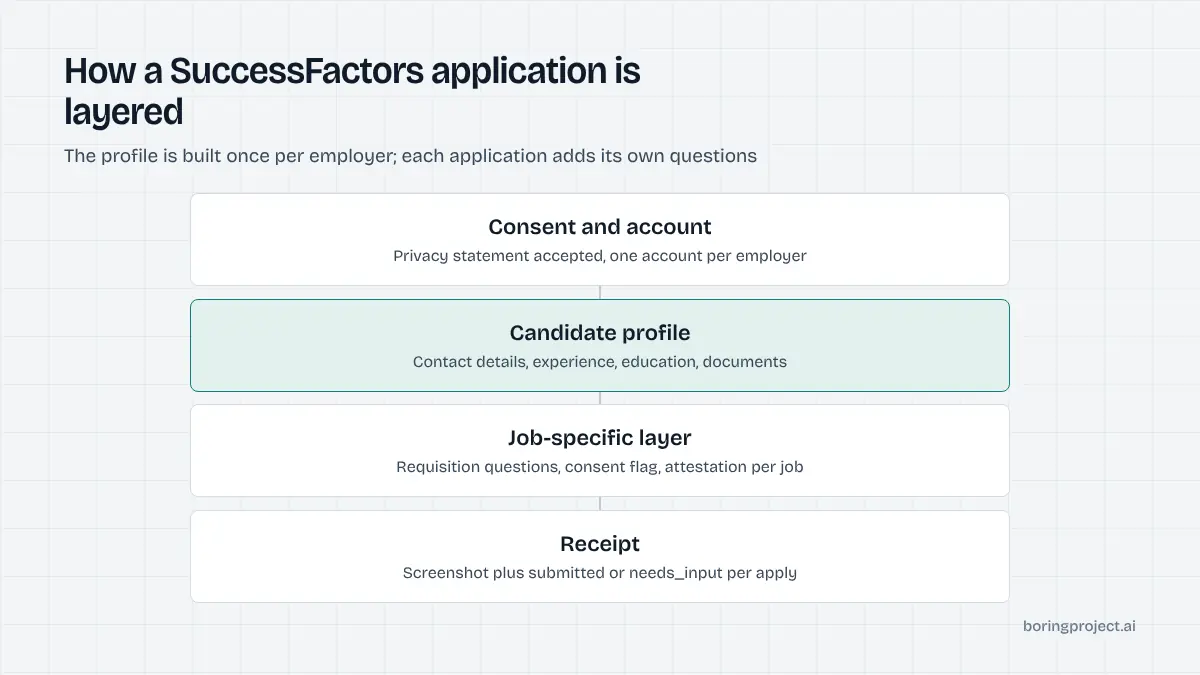
Because consent and account come first, an automated run cannot "just fill the form". It has to confirm that consent exists for this candidate and this employer, create or log in to the account, handle verification, and only then reach the profile. The engine treats these as distinct stages with their own status, and a failure or pause at any of them is reported with that stage named.
That stage-by-stage reporting is useful beyond debugging. A recruiter looking at a paused run can see immediately whether the problem is a missing consent, an unverified email or an unanswered question, and route it to the right person. Lumping everything into a generic error hides which of those it was.
Profile versus application: the two layers
The candidate profile is reusable
SuccessFactors separates the candidate profile from individual applications. The profile holds personal information (name, address, phone, email), work experience, education, documents such as the resume and certificates, and preferences like desired location or job alerts. Many career sites offer a resume upload that parses into these fields, and the candidate reviews the result before saving.
The profile is created once per employer and reused across that employer's requisitions. For automation this is the main efficiency: the first application to an employer does the full profile build, and later applications to the same company skip straight to the job-specific layer.
It also means profile quality compounds. A clean, complete profile written on the first run improves every later application to that employer, while a sloppy parse left uncorrected is resubmitted again and again. The engine therefore checks the saved profile against the candidate's current structured data on each run and updates fields that have changed, such as a new role or a new phone number.
Each application adds a job-specific layer
On top of the profile, every application carries its own fields: job-specific questions configured for the requisition, a cover letter if enabled, EEO or diversity questions where legally applicable, and often an attestation that the information is accurate. Employers configure these per job, so two roles at one company can ask different things.
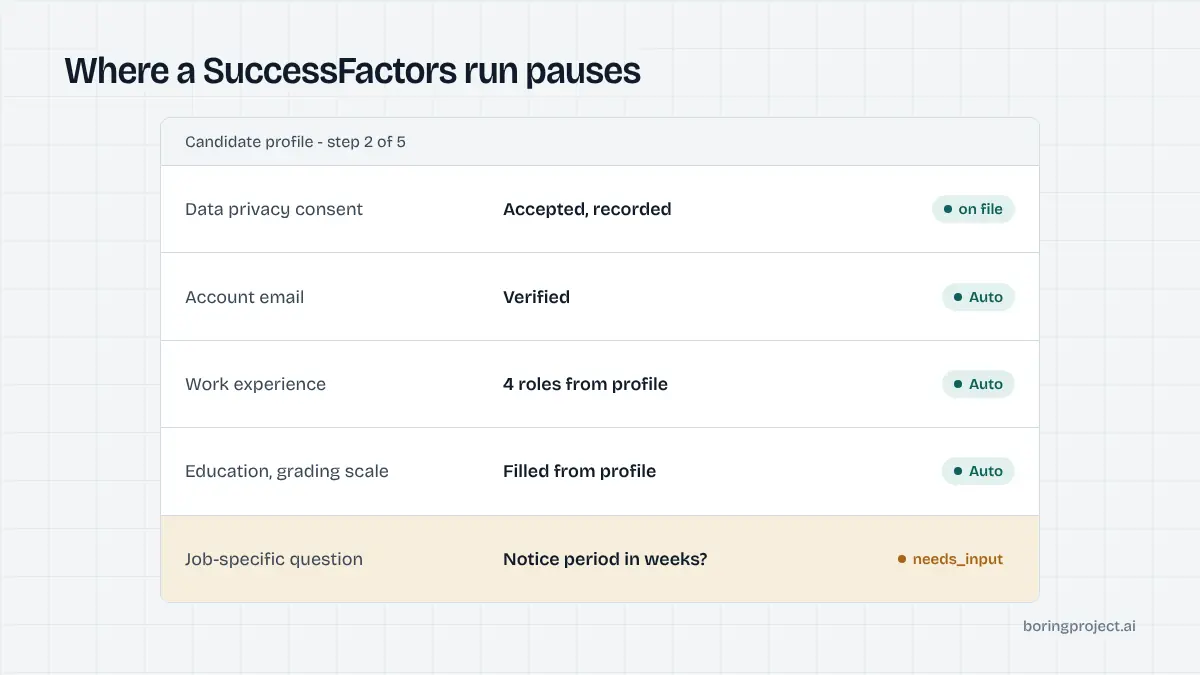
The job-specific layer is where runs pause. Authorisation, relocation, salary, start date and notice period resolve from a complete profile. A free-text or employer-specific prompt with no answer on file returns needs_input with the question. The engine never invents an answer.
Data fields that need care
Enterprise employers on SuccessFactors tend to ask for more structure than startups: full address with country and region, nationality or work-permit details in some countries, education with grading scale, and language proficiency levels. The engine writes these from structured profile data and pauses when a required value is missing rather than approximating. Diversity fields are filled only with explicit candidate choices, including decline options.
What the automated run does, stage by stage
Consent, account, profile
The run begins by checking recorded consent for this candidate and employer. Absent consent, it stops immediately with needs_input describing the statement that must be accepted. With consent, it registers or logs in, handles the verification email if the candidate has authorised inbox access, and otherwise pauses for the code.
Then it builds or updates the profile: resume uploaded, parsed fields corrected from the structured profile, experience and education blocks written one at a time, documents attached. The profile is saved and the engine confirms the save succeeded before opening the application.
Application, submit, receipt
The last stretch of how to auto apply on SuccessFactors is the mechanical part: job-specific questions are matched against the profile, select options are chosen by text match, attestation checkboxes are ticked only with recorded authorisation, and the application is submitted. The engine waits for the confirmation page, captures a screenshot as the receipt and reports submitted through the webhook. A closed requisition or a persistent validation error yields failed with the reason.
Compliance and volume on enterprise sites
SuccessFactors employers log consent, track applications per candidate and often operate under strict data-protection regimes. Automation should match that discipline: consent recorded per application, per-employer rate limits, no duplicate submissions to the same requisition, and candidate data handled under the same expectations the employer applies to itself. The broader obligations are set out in our guide to job application automation compliance. Done this way, automated applications are indistinguishable from careful manual ones, which is the point.
Frequently asked questions
What is the data privacy consent statement on SuccessFactors?
It is a statement every external candidate must accept when creating an account on an employer's SuccessFactors career site, before any personal data can be entered. Employers can publish country-specific versions in the candidate's language. If the statement is later changed, candidates are asked to accept the new version. Declining removes the account and anonymises any applications.
Do I need an account to apply on a SuccessFactors career site?
Yes. External candidates create an account on the employer's site, accept the privacy statement and build a candidate profile. That account belongs to the employer's instance, so a different company on SuccessFactors means a separate registration. Some employers also offer sign-in through LinkedIn or other providers to speed up the first step.
How is the candidate profile different from the job application?
The profile is the reusable layer: contact details, work history, education, attachments and preferences stored once per employer. Each application adds job-specific questions, consent flags and, where enabled, a cover letter for that requisition. Automation fills the profile on the first run and reuses it, so later applications to the same employer need only the job-specific layer.
Where does a successfactors job application pause for input when automated?
At the consent statement if the candidate has not authorised acceptance, at account verification when a confirmation email is sent, and at job-specific questions that require facts not in the profile. Some employers also require an attestation checkbox with custom wording. Each pause is returned as needs_input with the specific text so it can be answered once.
Can automation accept the privacy statement on my behalf?
Only with explicit, recorded consent from the candidate for that employer. The statement is a legal document, and acceptance is logged by the employer. A compliant apply system presents the requirement, stores the candidate's decision and acts on it; it does not default to Accept. Without that recorded consent, the run stops before any data is entered.
Is SuccessFactors faster or slower to automate than Workday?
Usually somewhere in between Workday and the single-page systems. The account and consent steps add time on the first application to an employer, but the reusable profile makes subsequent applications to that employer quick. Page count varies with how the employer configured the apply flow, so expect variation between companies.
Next step
If your candidates target multinationals, SuccessFactors will be a large share of your volume. The Apply API handles consent recording, account creation, the reusable profile and the job-specific layer, and returns a screenshot receipt for each submission. See the API documentation to send your first SuccessFactors posting; pricing is per successful application.