 The Boring Project
How to Auto Apply on SmartRecruiters Applications
SmartRecruiters puts the entire application on one page, offers a LinkedIn shortcut at the top, and then makes up for the simplicity with a rich screening-question toolkit. This guide shows how SmartRecruiters apply automation handles the form, the question types and the consent options without inventing a single answer.
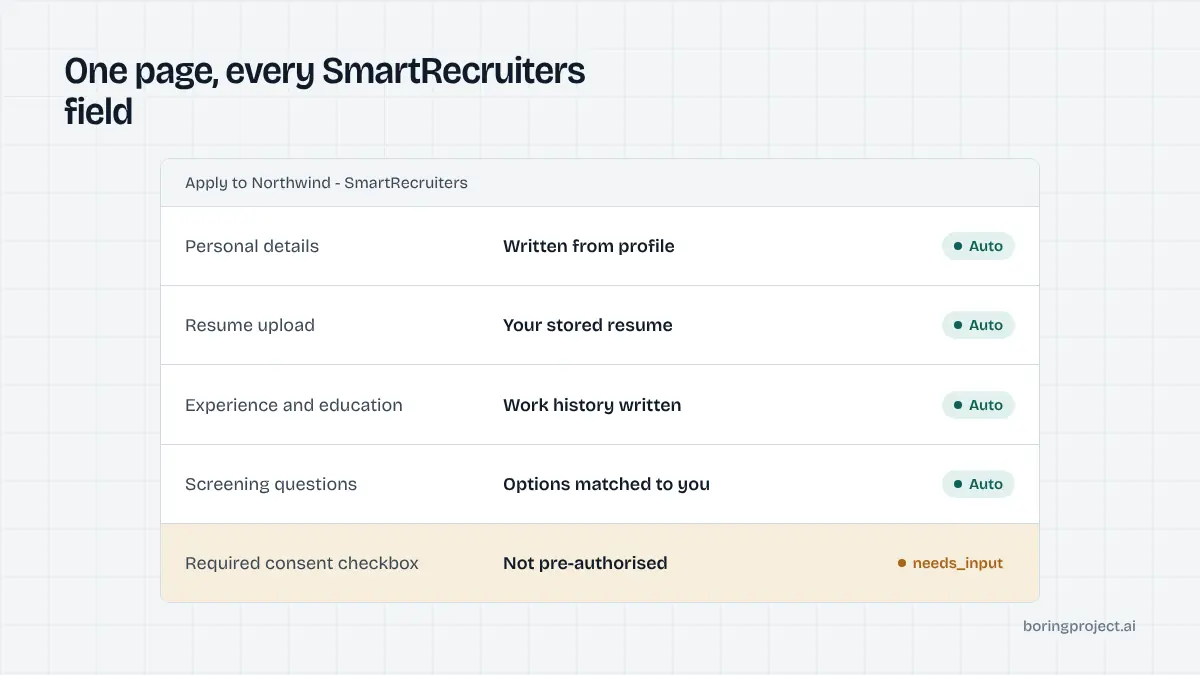
The one-page form and what sits on it
SmartRecruiters hosts postings at jobs.smartrecruiters.com/<Company>/<id> and powers many employer career sites with the same form. Learning how to auto apply on SmartRecruiters is mostly learning this single page.
Personal details and attachments
The top of the form collects first name, last name, email and usually phone and location. Below it sits the resume upload, with an optional cover letter or other attachment. SmartRecruiters accepts the common document formats and image types, with a modest size limit per file, so very large portfolios need a link instead.
Optional web profile fields may appear for LinkedIn, personal website and similar. Some employers also enable a short "message to the hiring manager" box. The engine fills it only with text the candidate wrote, such as a stored two-line introduction; it does not compose a note the candidate has never seen.
Here is the standard block as automation sees it:
| Field | Source in the candidate profile | Behaviour if missing |
|---|---|---|
| First name, last name, email | Identity | Required; run cannot start without them |
| Phone, location | Contact | Filled when present; pause only if the employer requires them |
| Resume | Primary document | Uploaded as a file; required on most postings |
| Cover letter, other attachment | Optional documents | Attached only if the candidate supplied one |
| Web profiles | Links | Filled when present, otherwise skipped |
Experience and education entries
Rather than a resume-only approach, SmartRecruiters can show structured experience and education sections where the candidate adds entries: employer, title, dates, description; institution, degree, field, dates. Employers decide whether these are shown and required. When present, they are repeating blocks, and the engine writes one entry per role or qualification from the candidate's profile.
Where the employer has turned these sections off, the resume carries the history on its own, and the form is noticeably shorter. Where they are required, a candidate with a long career produces a long form, and the engine's time per application rises accordingly. Either way the data comes from the structured profile, not from re-parsing the uploaded PDF.
The Apply with LinkedIn shortcut
A prominent button lets candidates import details from LinkedIn to pre-fill contact and experience fields. Everything remains editable, and the employer's screening questions still have to be answered by hand. For automation this button is irrelevant: writing fields from a structured candidate profile is more reliable than importing a LinkedIn profile of unknown completeness, and it avoids coupling a submission to a third-party login.
Screening questions: types and how they resolve
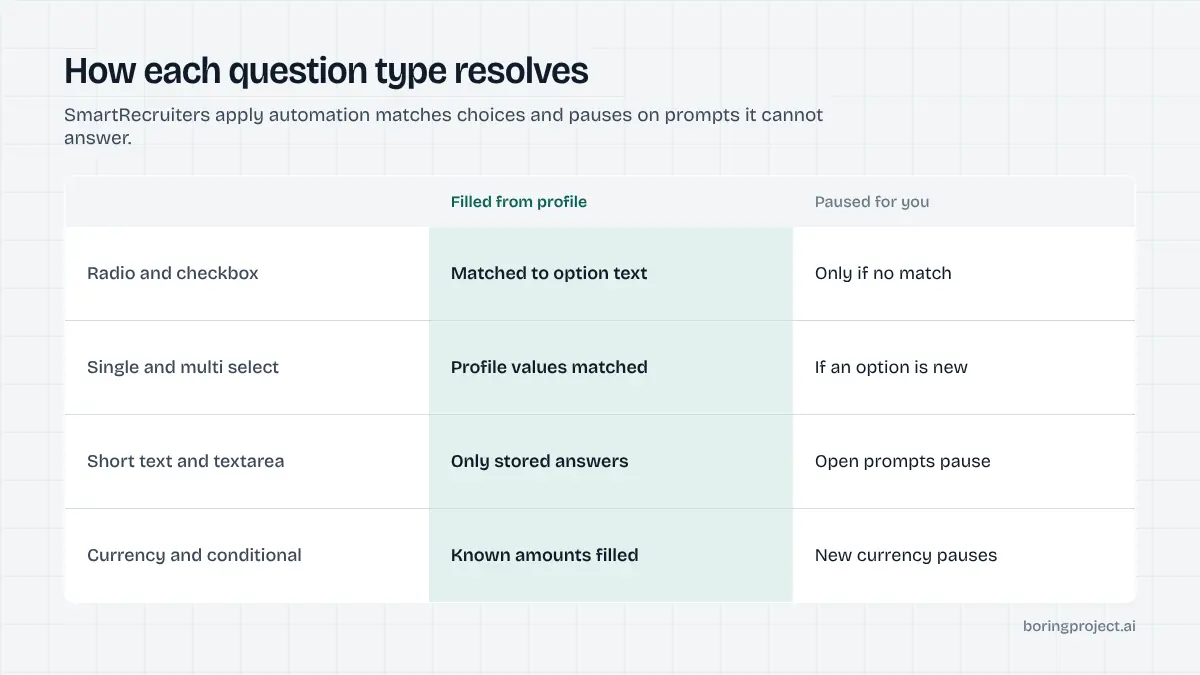
SmartRecruiters gives employers a wide set of question types, and the mix on a given posting determines whether a run completes in one pass.
Choice questions resolve by matching options
Radio groups, checkbox groups, single select and multi select lists all expose fixed options. The engine normalises the candidate's profile value and matches it to the option text: "Yes" to an authorisation question, a seniority band, a location preference, a shift. Multi select questions accept several matches. If no option is defensible, the run pauses rather than picking one. Our guide to how ATS screening questions work covers why that discipline matters to employers.
Text, currency and repeatable questions
Short text and long textarea prompts are answered only when the profile contains the fact. "Earliest start date", "notice period" and "LinkedIn URL" resolve; "describe a time you led a project" does not, and returns needs_input with the wording so the candidate answers once and the answer is stored.
Currency questions ask for an amount with a currency indicator, typically salary expectation. The engine supplies the candidate's stated expectation in the matching currency and pauses if the currency on file differs. Repeatable questions, such as languages with proficiency levels, are filled from the corresponding profile list, one record per entry.
Conditional and information blocks
Information blocks are display-only text with nothing to answer; the engine reads them, because they sometimes carry instructions. Conditional questions appear only after a specific earlier answer. The engine answers in order, waits for the form to reveal any dependent question, and treats the new question like any other. A conditional free-text question is a common late pause.
Consent, submission and running at scale
Consent is configurable, so read it
SmartRecruiters employers choose between a single consent checkbox and separated consents: processing for this recruitment, retention in a talent pool or CRM, and messaging channels such as SMS or WhatsApp. The engine ticks only what the candidate has granted for that employer. Optional consents the candidate has not granted stay unticked. A required consent with no recorded authorisation is a pause, not an assumption.
Submit, confirmation, receipt
Validation happens client-side first: an empty required field or a malformed email is highlighted inline, and the engine corrects it from the profile or pauses if the fix needs a human. Then the Submit button is clicked. SmartRecruiters replaces the form with a confirmation page and generally emails the candidate. Some employers surface a candidate portal link for tracking status. The engine waits for the confirmation state, captures a screenshot as the receipt and reports submitted. Postings that closed between discovery and submission return failed with the reason.
Volume without friction
Because there is no account, SmartRecruiters is fast, and that speed needs guardrails. Deduplicate candidate plus posting before opening the form, apply per-employer rate limits so one company does not see a burst from a single source, and record consent per application. For job boards and marketplaces routing many candidates to SmartRecruiters employers, the architecture for doing this cleanly is covered in auto apply for job boards. Receipts with screenshots let you prove each submission happened as described.
Frequently asked questions
Is the SmartRecruiters application really one page?
Yes, on the standard hosted job page at jobs.smartrecruiters.com and on most employer career sites built on it. Personal details, resume, optional experience and education entries, screening questions and consent all sit on a single scrolling form with one submit button. There is no account requirement to apply, though candidates may be offered a portal afterwards.
What does Apply with LinkedIn do on SmartRecruiters?
It imports profile details from the candidate's LinkedIn account to pre-fill contact and experience fields, saving typing. The candidate can still edit everything, and employer screening questions have to be completed manually. Automation does not use this button; it writes fields from the candidate's structured profile so the result does not depend on how complete their LinkedIn is.
What screening question types can SmartRecruiters employers use?
Radio and checkbox groups, single and multi select lists, short text, long textarea, a currency question with an amount field, repeatable questions such as languages with proficiency, display-only information blocks and conditional questions that appear based on an earlier answer. Automation resolves choice types by matching profile values to option text and pauses on text prompts it cannot answer.
How does consent work on a SmartRecruiters application?
Employers configure either a single consent checkbox or separated consents, for example one for recruiting data processing, one for talent-pool or CRM retention and others for SMS or WhatsApp messaging. Automation ticks only the consents the candidate has explicitly granted for that employer. Unticked optional consents are left unticked; a required consent without authorisation pauses the run.
Where does smartrecruiters apply automation stop and ask for input?
Most often on a required free-text question with no answer in the profile, a currency question in an unexpected currency, a conditional question revealed by an earlier answer, or a required consent the candidate has not pre-authorised. The run returns needs_input with the exact prompt; once answered, the same application resumes rather than restarting.
How do I confirm a SmartRecruiters application was submitted?
The form is replaced by a confirmation page after a successful submit, and candidates usually receive an email acknowledgement from the employer. Some employers also offer a candidate portal link to track status. An apply system waits for the confirmation state, captures a screenshot as the receipt and reports submitted through its webhook.
Next step
SmartRecruiters is a good second system to test after Greenhouse: fast form, richer questions. Send a posting URL and a candidate profile to the job application API and compare the receipt with a manual submission. Pricing is per successful application, so paused or failed runs cost nothing.