 The Boring Project
How to Auto Apply on Rippling ATS Applications
Rippling's recruiting module is newer than most ATS platforms, and its job boards keep rippling ats apply flows short: one page, a required resume, a handful of basic fields, and employer-defined additional questions, with no candidate account needed.
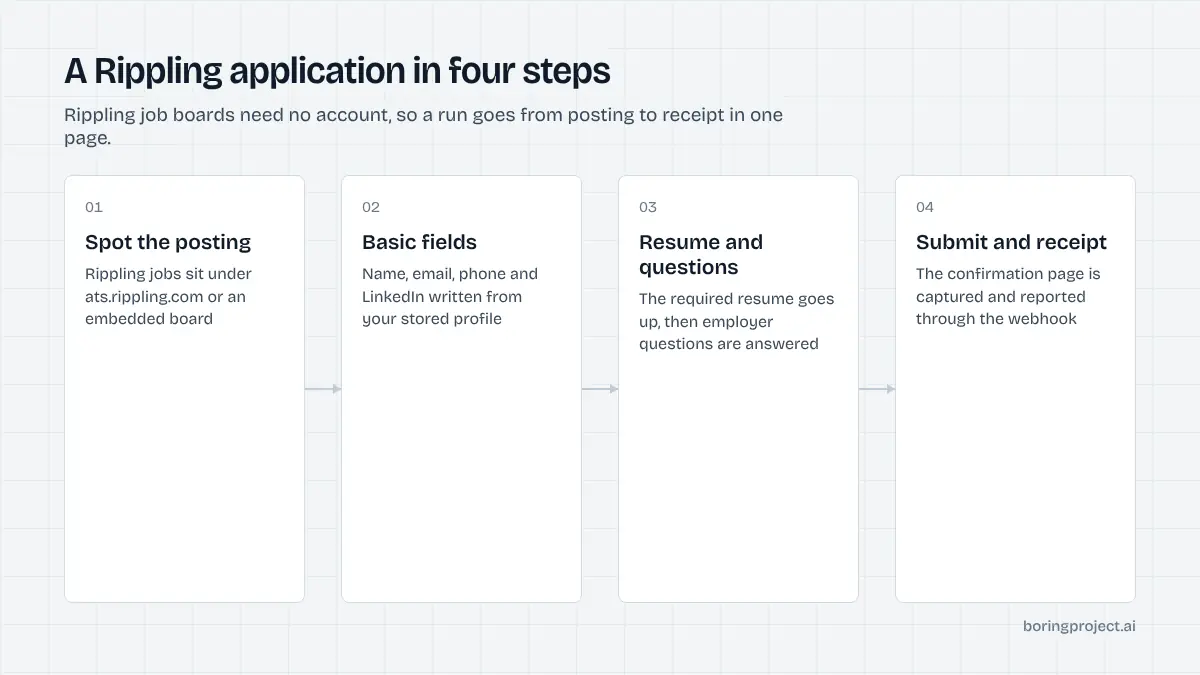
Identifying a Rippling-hosted posting
Rippling added an applicant tracking system to its HR and payroll suite, and a growing number of startups and mid-sized companies now publish jobs through it. Before any automation runs, the first job is to confirm the posting is actually on Rippling.
The URL pattern
Rippling job boards sit at ats.rippling.com/<company-slug>/jobs/<job-id>. The company slug is chosen by the employer, and the job ID is a long identifier. Employers can also embed the board inside their own careers page, in which case the application still submits to Rippling behind the scenes.
A useful signal: when a posting is closed, the Rippling URL commonly redirects to the employer's general careers page instead of showing a "closed" notice. An automated agent should treat that redirect as a strong hint that the role is gone.
Public job data
Each Rippling board exposes structured job data that includes the application form definition. That data lists the basic fields, their required flags, any additional question forms, and whether the equal opportunity questionnaire is enabled. Reading it before loading the page is a reliable way to plan the fill.
That structured definition also makes it possible to flag problems before the browser opens. If a job's required questions include a file the candidate has not supplied, the platform can prompt for it up front instead of discovering the gap mid-run.
No account, optional sign-in
Candidates do not have to register to apply. This is a deliberate design choice and it removes an entire class of failures that plague enterprise systems. There is no password to create, no verification email to wait for, and no duplicate-profile check that can block a second application.
Anatomy of the Rippling application form
Knowing how to auto apply on Rippling comes down to understanding two groups of questions that Rippling itself distinguishes: basic questions and additional questions.
Basic questions
These are the standard fields and they are fairly consistent across employers. Based on Rippling's own public form definitions, a typical set looks like this.
| Field | Usually required | Notes |
|---|---|---|
| First name, last name | Yes | Plain text |
| Yes | Used for confirmation | |
| Phone | Yes | Country code handled by a picker |
| Current company | Often | Free text |
| City | Often | Free text or autocomplete |
| LinkedIn URL | Varies | Validated as a link |
| Resume | Yes | File upload |
| Pronouns | No | Dropdown |
| Cover letter | No | File or text |
Employers can toggle which of these appear and which are mandatory, so the agent reads the live definition rather than assuming. The resume is the one field that is required almost everywhere, and Rippling parses it to suggest values for name and contact fields.
Additional questions
This is where employers add their own screening. Rippling supports several question types: single-select dropdowns, multi-select, short text, long text, and knockout questions. Knockout questions are yes/no or single-choice items where one answer disqualifies the candidate automatically.
Some employers attach more than one question form to a job. One might cover role-specific experience, another might ask whether the candidate applied to the same company within the last six months. Each form is rendered in sequence on the same page.
Equal opportunity questionnaire
When enabled, voluntary self-identification questions appear last. They cover gender, race or ethnicity, veteran status, and disability status, each with a decline option. These are never inferred; they are filled only from values the candidate explicitly chose to disclose.
How the automated run handles each part
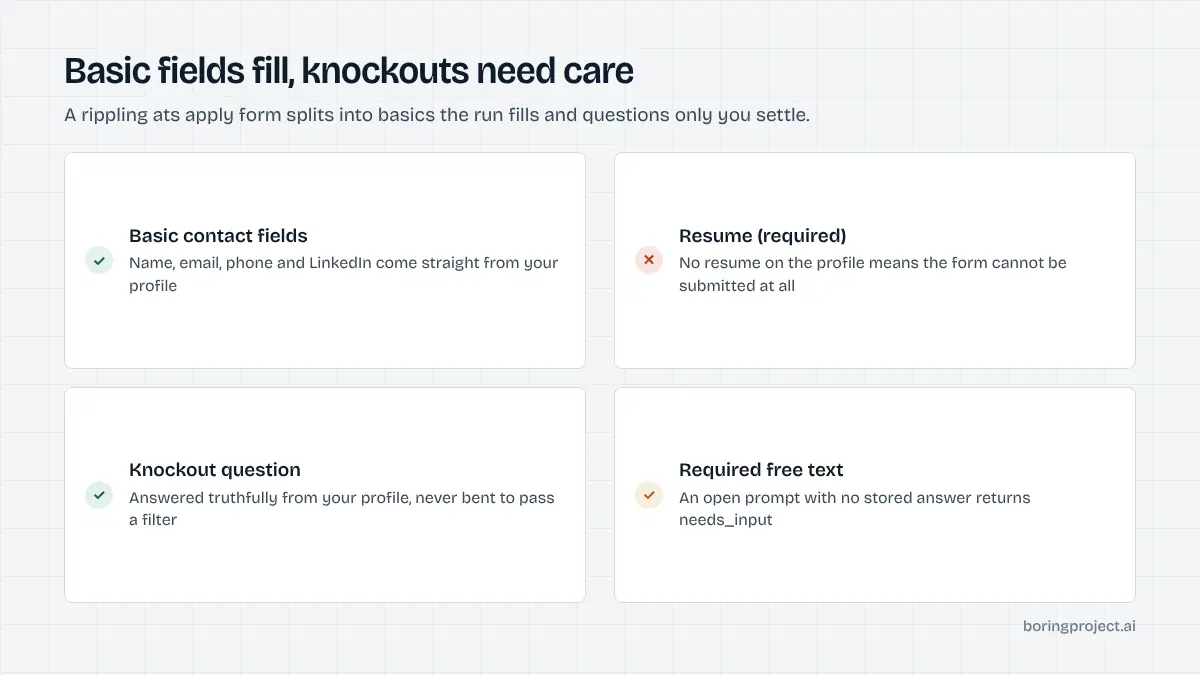
Filling and uploading
Basic fields are populated from the candidate profile. The resume is uploaded as supplied. Phone numbers are normalised to the format Rippling's picker expects, which is a small detail that causes a surprising share of validation errors when done by hand.
Dropdown and multi-select additional questions are matched against profile data. If the candidate's profile says they have three years of billing-support experience and the dropdown offers ranges, the agent picks the matching range. If the options are ambiguous, it pauses rather than guessing.
Knockout questions and honesty
Knockout questions deserve particular care. The agent answers them from the candidate's actual profile and never selects the "passing" answer to get through the filter. If the honest answer disqualifies the candidate, the application is still submitted truthfully, or the candidate is told before submission, depending on how the integrating platform configured it.
Open-text questions without a profile answer trigger a needs_input status. The webhook includes the question text so the candidate can reply and the run can resume. The format of that payload is covered in our job application webhook guide.
Receipts and duplicates
After submit, the confirmation screen is captured as a screenshot and returned with a submitted status. Because Rippling employers sometimes ask whether the candidate has applied recently, the agent also checks its own history to avoid sending a second application to the same job within a short window.
Closed postings deserve a note. Rippling tends to redirect a dead job URL to the employer's main careers page rather than showing an error, so the agent treats an unexpected redirect as a failed outcome with a "posting closed" reason instead of trying to apply on whatever page it landed on.
Rippling's form structure has a lot in common with Ashby's, another modern ATS popular with startups. If your feed includes both, the Ashby auto apply guide is a natural companion to this one.
Frequently asked questions
What URL tells me a job is on Rippling's ATS?
Rippling-hosted postings live under ats.rippling.com, usually in the form ats.rippling.com/company-slug/jobs/job-id. Employers can also embed the board on their own careers site, but the application still posts to Rippling. If a job page redirects you to a company's generic careers page, the specific posting may have been closed.
Do I need a Rippling account to apply?
No account is required to submit an application on a Rippling job board. Candidates fill in the form and submit directly. Some employers may offer an option to sign in or to receive status updates, but this is not a prerequisite, which is why Rippling is well suited to automated submissions.
What are Rippling knockout questions?
They are yes/no or single-choice questions that an employer marks as disqualifying. A candidate who gives the wrong answer is automatically filtered out on the recruiter side. The candidate still sees a normal confirmation. Automation answers these truthfully from the candidate profile and never adjusts an answer to pass the filter.
What file is uploaded for the resume field?
The resume the candidate attached to their profile, in the format they provided. The resume is a required basic field on most Rippling applications, so a profile without one cannot be submitted. A cover letter is usually optional and is only attached if the candidate supplied one for that application.
How long does an automated Rippling application take?
Rippling forms are short, so they usually complete well inside the median submit time of about three minutes across all supported systems. The main variable is the number of additional questions the employer added. A form with only basic fields and a resume can finish in a fraction of that time.
What does the EEO section look like on Rippling?
When an employer turns on the equal opportunity questionnaire, voluntary self-identification questions appear at the end of the form. Each has a decline-to-answer option. Automation only fills these from values the candidate explicitly chose to share and otherwise selects the decline option.
Next step
Staffing agencies and job boards with Rippling employers in their pipeline can send applications by CSV through Managed Applies, no code required. Talk to sales about per-application pricing and a pilot batch.