 The Boring Project
How to Auto Apply on Ashby Applications
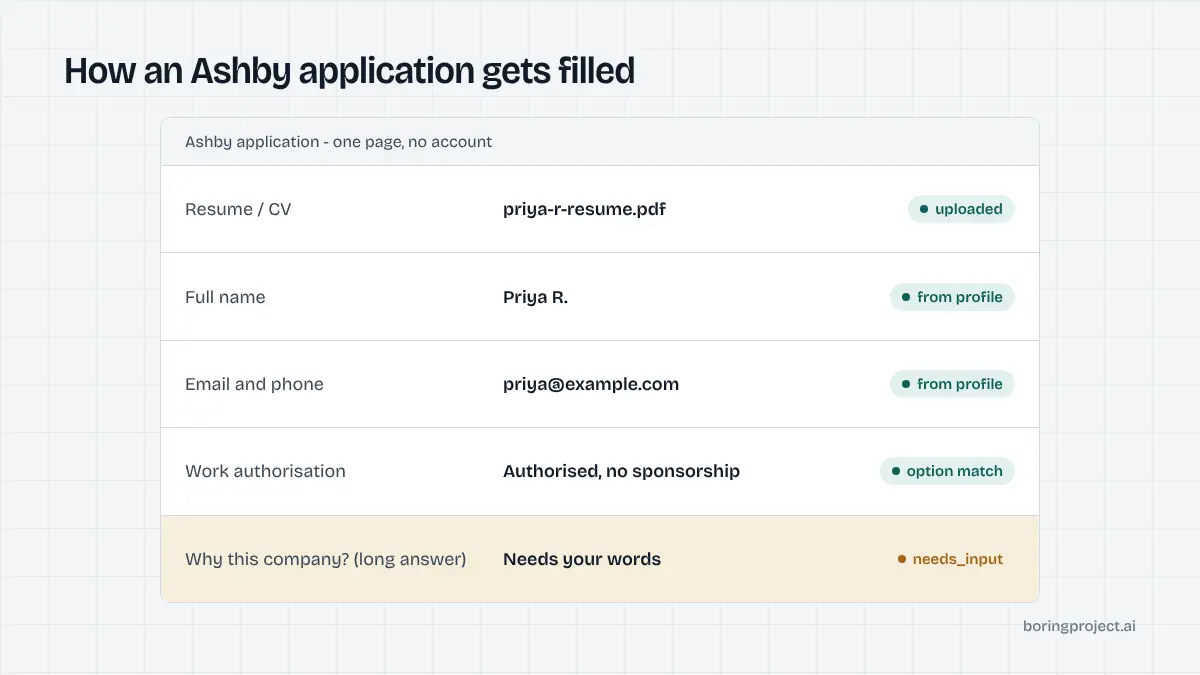
Ashby is the ATS of choice for a large share of venture-backed startups, and its application form is as clean as its reputation suggests: one page, no account, a resume dropzone and a tidy set of custom questions. This guide covers how an Ashby ATS apply works end to end and the handful of places an automated run has to stop.
Why Ashby forms are pleasant to automate
Ashby-hosted postings live at jobs.ashbyhq.com/<company>/<posting-id> with the form at /application, and many companies embed the same form on their own careers page. The underlying structure is identical in both places. If you are working out how to auto apply on Ashby, the good news is that there is very little ceremony.
No account, one page, one submit
There is no registration step and no candidate portal. The form loads, the candidate fills it, the candidate submits. Nothing is stored between applications except what the employer keeps on their side. Automation therefore has no credentials to manage and no session to keep alive. Each run is self-contained, which keeps the median time short and the failure surface small.
The flip side is that applying to three roles at one startup means three full submissions. Ashby does let employers ask global application questions that apply across all their postings, so a candidate will often see the same authorisation or location question at each of a company's roles. Storing those answers once on the profile means they are reused automatically.
A default form that employers tailor
Every Ashby organisation starts with a default application form, pre-configured in the account, and applies it to postings unless they choose otherwise. Admins can edit the default, create shared forms for role families, or unlink a form for one posting and customise it. In practice, startups keep the core small: resume, name, email, phone, perhaps location, then a few questions that matter to them.
Ashby also lets employers group questions into titled sections with descriptions. The section headings carry context ("About your work authorisation", "Links") that a careful engine reads, because they sometimes clarify what an ambiguous question wants.
Resume first, then structured fields
The resume dropzone usually sits at the top. Ashby can use the upload to autofill some fields, and files within its processing limit are indexed for the employer's search. The engine uploads the candidate's PDF, lets any autofill settle, and then writes every field from the structured profile. The recruiter gets the real document; the form gets accurate data. This is the same approach that works on Lever, and the two systems are close cousins in practice.
Every Ashby question type, and how it resolves
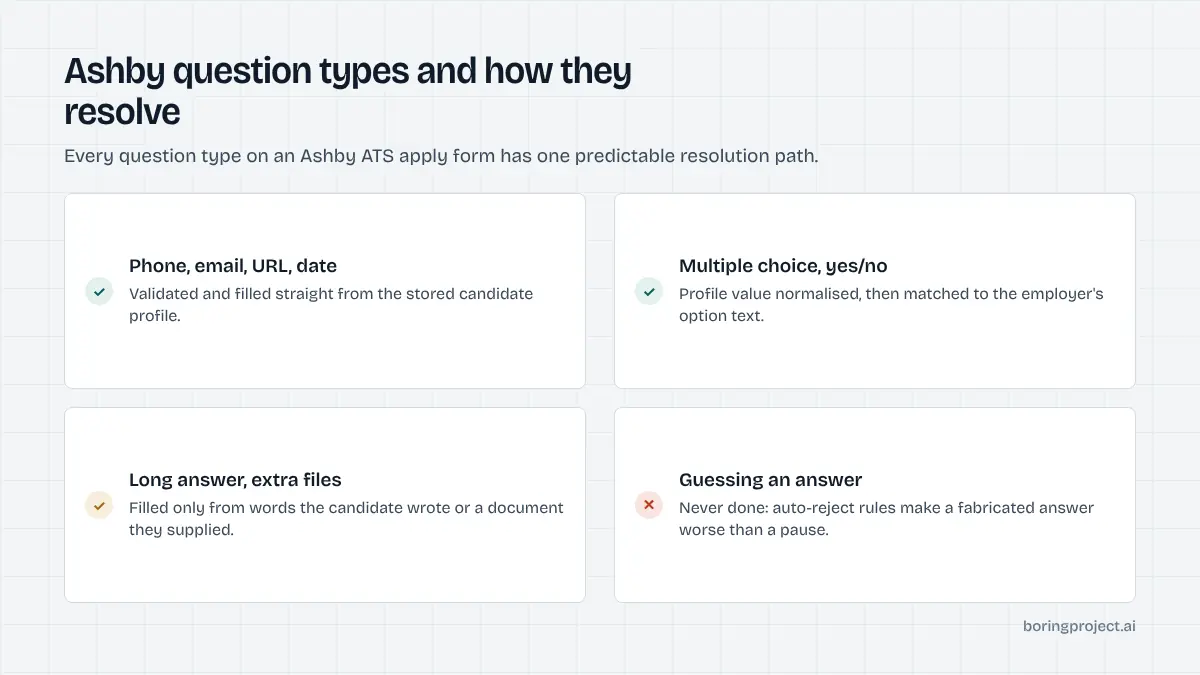
Ashby's question palette is broad, and the mix on a posting decides whether the run finishes in one pass. Below is each type with its typical resolution.
Contact-style types fill directly
Phone, email and URL questions validate their format and fill directly from the profile: phone number, email address, LinkedIn, GitHub, portfolio. The candidate's location question uses an autocomplete, and the engine selects the suggestion matching the profile's city and country. "Other location" questions, such as preferred office, are matched the same way. Date and number questions take values like earliest start date or years of experience when the profile holds them.
Choice types match options
Multiple choice, checkboxes and yes/no questions expose fixed options. The engine normalises the candidate's value and matches it to option text: authorised to work, needs sponsorship, open to relocation, seniority band, time zone. Checkbox questions accept several matches. If nothing on the profile maps to any option, the run pauses with the question and its options rather than guessing. On Ashby that matters more than usual, because employers can attach auto-reject rules to specific answers, and a fabricated answer that passes the rule misleads everyone.
Text, file and education types
Short answer questions are filled when the profile has the fact: notice period, current title, how you heard about the role. Long unformatted answer prompts ("why this company?", "describe a project") are answered only from content the candidate wrote and stored; otherwise they return needs_input with the prompt text. File questions beyond the resume, such as a portfolio PDF or a writing sample, are attached only when the candidate supplied that document.
The education history block asks for school, degree, field of study and dates, and may allow multiple entries within a minimum and maximum. The engine writes one entry per qualification on the profile.
Conditional fields, pauses and good behaviour
Conditional logic means the form can grow
Ashby supports conditional form fields: a question can appear only after a particular answer to an earlier one. The engine answers top to bottom and re-reads the form after each choice so newly revealed questions are handled. A conditional long-answer question is the most common late pause on Ashby, because it appears only after the candidate has indicated something specific, such as needing sponsorship.
Private questions and what they mean for candidates
Some question types can be marked private, so only organisation admins or elevated users see the responses. From the candidate's side the question looks normal. Automation treats private questions exactly like public ones: answer from the profile, pause when it cannot. Salary expectation is the usual private question, and a candidate who has stored a range with currency will see it filled; one who has not will be asked once and the figure saved for later forms.
Submission, receipts and volume
After validation the engine clicks submit, waits for Ashby's confirmation state (employers can customise the message shown), captures a screenshot as the receipt and reports submitted by webhook. Because Ashby forms are quick and account-free, the guardrails are the same as on other startup systems: deduplicate candidate plus posting before opening the form, hold to per-employer rate limits, and record consent on every application.
Most Ashby forms also load as modern single-page applications, which is why they are run through a real browser rather than raw HTTP requests; the reasons are set out in headless browser job applications. The result is a submission that looks exactly like a careful human's, with the paperwork to prove it.
Frequently asked questions
Do I need to create an account to apply on Ashby?
No. Ashby-hosted job boards at jobs.ashbyhq.com and the forms embedded on company careers pages accept applications without registration. Each application is a single form submission. That makes Ashby one of the quickest systems to complete, with no credentials for automation to create or store and no dashboard to log back into.
What fields does a typical Ashby application form include?
A resume upload, name, email, usually phone and sometimes a location field with autocomplete, followed by the employer's custom questions. Ashby gives every organisation a default form, and companies edit it or create shared forms per role type. Expect startups to keep it short and add a few targeted questions such as a GitHub link or a work-authorisation check.
What question types can an Ashby employer add?
Short answer, long unformatted answer, phone, email, URL, multiple choice, checkboxes, yes/no, date, number, resume, file upload, the candidate's location, another location, and an education history block with school, degree, field and dates. Any question can be required, some can be private to admins, and conditional logic can show or hide questions based on earlier answers.
Does Ashby auto-reject applications based on answers?
Employers can configure auto-reject rules tied to specific answers, for example declining candidates who answer no to a required authorisation question. This is why fabricated answers are worse than pauses: a wrong yes gets through the rule and wastes everyone's time, while an honest answer or a paused run keeps the candidate's record accurate.
Where does automation pause on an Ashby ATS apply?
On required long-answer prompts the profile cannot answer, on multiple-choice questions where no option matches the candidate's data, on a conditional question revealed late in the form, and occasionally on a CAPTCHA. The run returns needs_input with the exact question so it can be answered once; the answer is stored and reused for the same prompt elsewhere.
How does automation handle the resume on Ashby?
The file is uploaded to the resume dropzone, and Ashby may use it to autofill some fields. The engine then writes each field from the candidate's structured profile so nothing depends on parse quality. Files within Ashby's processing limit are indexed for the employer's search, so a clean PDF under that limit serves the candidate best.
Next step
If your candidates are aiming at startups, Ashby postings will be a large part of the list. The Apply API handles the form, the question types and the conditional logic, and returns a screenshot receipt per submission. The API documentation shows how to send your first Ashby posting; pricing is per successful application.