 The Boring Project
How to Auto Apply on Personio Applications
How to auto apply on Personio starts with a compact guest form and a mandatory data privacy statement, so personio apply automation is mostly about mapping a few fields correctly and treating consent as the candidate's decision.
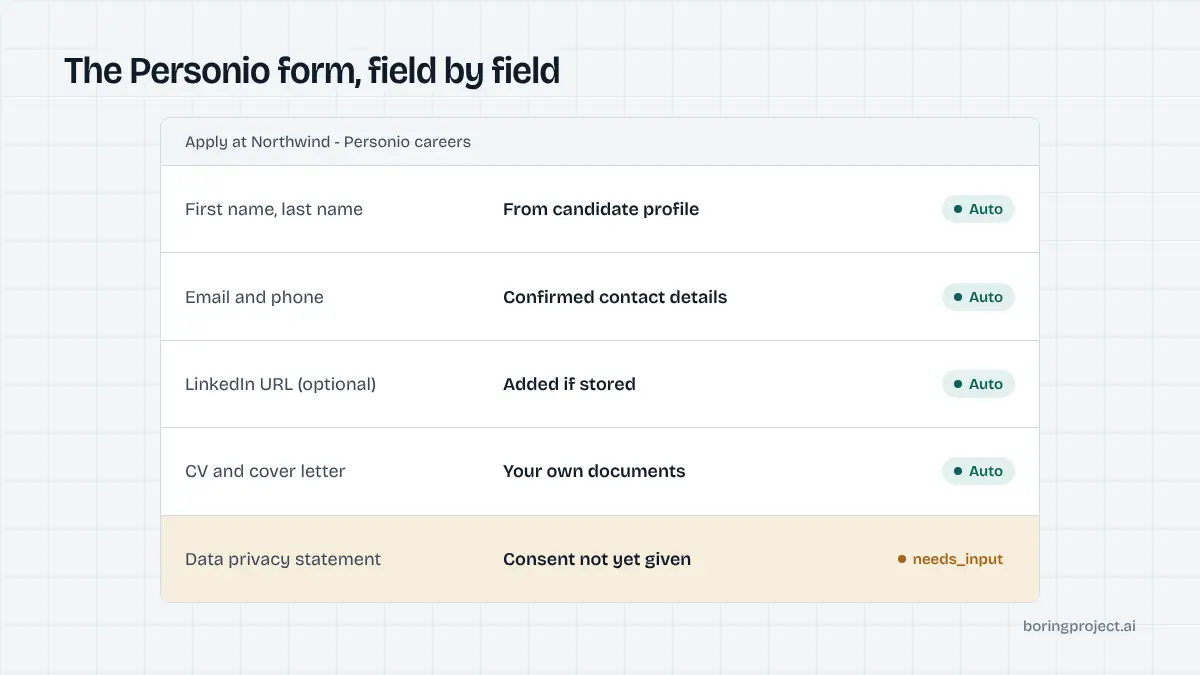
What the Personio application looks like
Personio is an HR platform for small and mid-sized companies, with a strong base in Germany, Austria, Switzerland and increasingly the rest of Europe. Its recruiting module publishes jobs to a hosted career page, and candidates apply through a Personio-rendered form.
The URL and page layout
Most employers' job lists live on a subdomain such as company.jobs.personio.com or company.jobs.personio.de. Some embed the list on their own site, but clicking a job generally lands you on the Personio-hosted posting with the form at the bottom or behind an Apply button.
The form is a single page. There is no account creation, no wizard and no progress bar. Compared with enterprise systems, it takes a minute or two by hand.
Language is worth a glance. Many Personio career pages are bilingual or German-only, and the form labels follow the page language. The fields are the same either way, but a candidate applying to a German-language posting should expect the employer to read a German cover letter more favourably than an English one.
The fields
According to Personio's own help material, the application asks for first name, last name, email address and phone number. A LinkedIn profile link is optional, and the form includes a question about how you found the company. Employers can add further questions of their own.
Document uploads cover a CV, a cover letter and reference letters. In German-speaking markets, reference letters (Arbeitszeugnisse) are a normal part of an application, which is why Personio gives them a dedicated slot. For roles outside DACH, the slot is usually optional and often left empty.
The privacy statement
Before submitting, you accept the employer's data privacy statement. Personio's documentation is explicit that this consent covers further storage of your data and inclusion in the company's talent pool, not just the single application. The statement text is the employer's, hosted on the career page.
After you submit, you see a confirmation and receive an email from the employer's Personio account. That email is your receipt.
Automating Personio without cutting corners
Personio forms are easy to fill mechanically, so how to auto apply on Personio is less a technical question than a judgement one. The parts that need design are consent, employer-specific questions and documents.
Consent has to be real
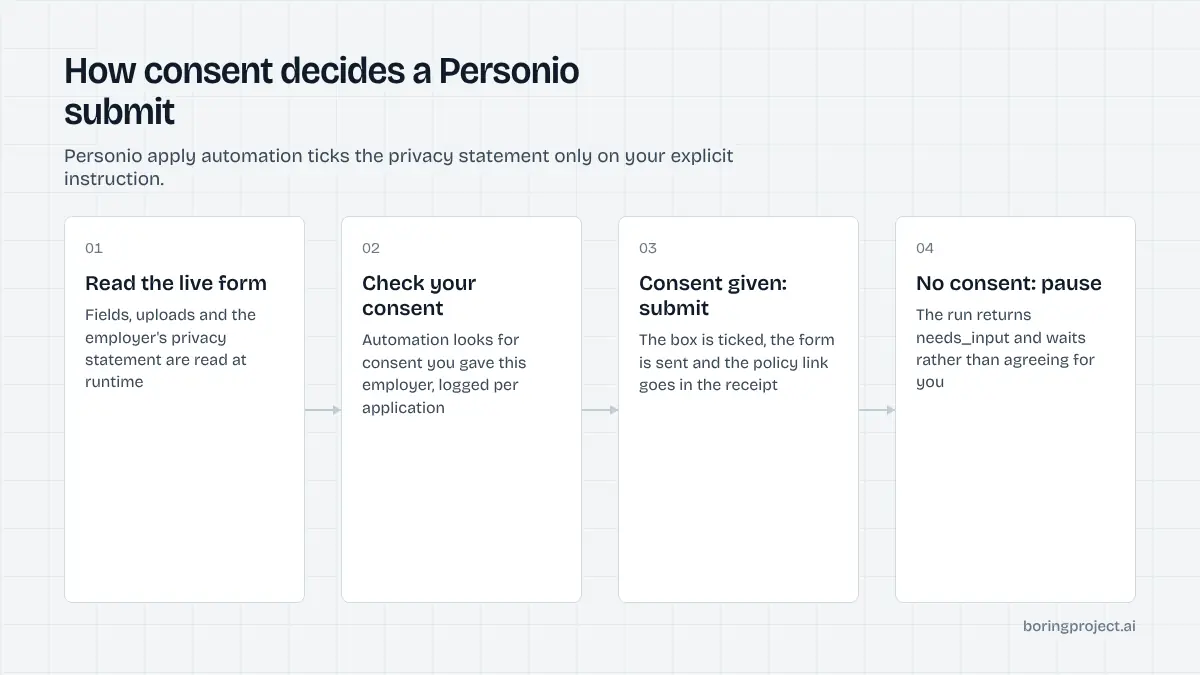
The privacy checkbox is not a cookie banner. Ticking it creates a record that the candidate agreed to the employer's processing and retention terms. If a tool ticks it without the candidate having agreed, the consent is hollow and the candidate may later be surprised to find themselves in a talent pool they never knowingly joined.
The Boring Project requires candidate consent on every application and logs it with the submission. For Personio, that means the candidate has agreed, up front or per run, that employer privacy statements may be accepted on their behalf, and the receipt includes the link to the specific statement that was accepted.
Employer questions and the needs_input state
Employers add their own questions to Personio forms: expected start date, salary expectation, work permit status, or free-text prompts. The tool should map what it can from the candidate's profile and stop for the rest. Guessing a salary figure or a visa status on a candidate's behalf is how automated applications get rejected or, worse, lead to awkward conversations later.
In practice, a needs_input webhook with the exact question attached handles this cleanly. The candidate answers once, the answer is stored, and the next Personio form that asks the same thing is filled from memory. Our piece on screening questions automation goes into how that memory should be structured.
Documents that match the market
For DACH employers, a CV plus a short cover letter is the norm, and references are a bonus. For a Personio employer in the UK or the Netherlands, a CV alone is often fine. A tool that forces a generic cover letter onto every Personio application produces worse results than one that lets the candidate decide per market.
Personio's help material also notes that uploaded documents may contain extra personal details such as date of birth or address. That is normal for a German CV, but candidates applying from markets where those details are unusual should know the employer will see them.
Manual, extension or agent: which fits Personio?
Personio sits at the easy end of the ATS spectrum, which changes the calculation about whether automation is worth it.
Applying by hand
For a handful of roles, apply by hand. Two minutes per form, no account, immediate confirmation. Write a short cover letter if the employer is in a market that expects one.
Read the privacy statement once. It tells you how long the employer keeps your data and whether you are joining a talent pool, which is useful to know if you plan to apply to the same company again.
Autofill extensions
Browser autofill tools handle the contact fields well because the field labels are consistent. They do not handle the privacy statement, the employer questions or the document choice; you still finish each form yourself. That is fine for a job seeker and useless for a business that needs volume.
A cloud agent through an API
For a job board, staffing agency or career service that needs to submit many Personio applications on behalf of candidates, the API route is the only one that scales. A job application API takes the job URL and candidate profile, fills the Personio form, handles consent per the candidate's instruction, pauses for unknown questions, and returns a webhook plus a screenshot of the confirmation.
| Method | Fills contact fields | Handles consent correctly | Answers employer questions | Returns proof |
|---|---|---|---|---|
| Manual | You | You | You | Confirmation email |
| Autofill extension | Yes | No, you tick it | No | No |
| Apply API | Yes | With logged candidate consent | From profile, else needs_input | Webhook + screenshot |
If you are also covering Recruitee or Teamtailor employers, the same architecture applies with minor differences in field layout; our Recruitee guide covers the closest sibling.
Frequently asked questions
Where are Personio job applications hosted?
Personio career pages are usually served on a company-specific subdomain such as company.jobs.personio.com or company.jobs.personio.de, although employers can embed the job list on their own website. Either way, the application form itself is rendered by Personio, so the fields and the privacy statement step behave the same across employers.
What information does a Personio application form ask for?
At minimum, first name, last name, email address and phone number. A LinkedIn profile URL is optional, and most forms ask how you found the company. You can attach a CV, a cover letter and reference letters, and the employer may add its own questions. The form ends with the data privacy statement you must accept to submit.
What does accepting the Personio data privacy statement mean?
Personio's own guidance says that by accepting the data privacy statement you consent to further storage of your data and to being included in the company's talent pool. In other words, it covers more than the single application. Read the linked statement if retention matters to you, because it is the employer's policy rather than Personio's.
Do I need an account to apply through Personio?
No. Personio career pages accept guest applications and there is no candidate login. You will not get a dashboard showing your status; communication comes by email from the employer's Personio account. Save the confirmation email as your record of having applied.
Can automation handle the Personio privacy checkbox?
Mechanically, yes. Ethically and legally, the checkbox should only be ticked when the candidate has agreed to the employer's privacy terms. A well-built tool collects that consent up front, logs it per application, and includes the policy link in the receipt. It should never accept on the candidate's behalf without an explicit instruction.
Why would a Personio application fail when automated?
The common causes are an employer-specific question the tool has no answer for, a required document that was not attached, or a consent step that was not approved. Each of these should pause the application and ask, rather than fail outright. If a tool reports a failure without telling you which field caused it, that is a weakness in the tool.
Next step
Personio is covered by the Apply API alongside the other European SMB systems, with consent logged on every submission and a screenshot receipt returned by webhook. Start from the job application API overview, or send us a CSV of roles and candidates and let Managed Applies handle the run.