 The Boring Project
How to Auto Apply on Paylocity Applications
Paylocity applications start with a resume upload that pre-fills the rest of the form, and paylocity apply automation is mostly about correcting that pre-fill, answering employer questions, and handling any extra attachments the posting demands.
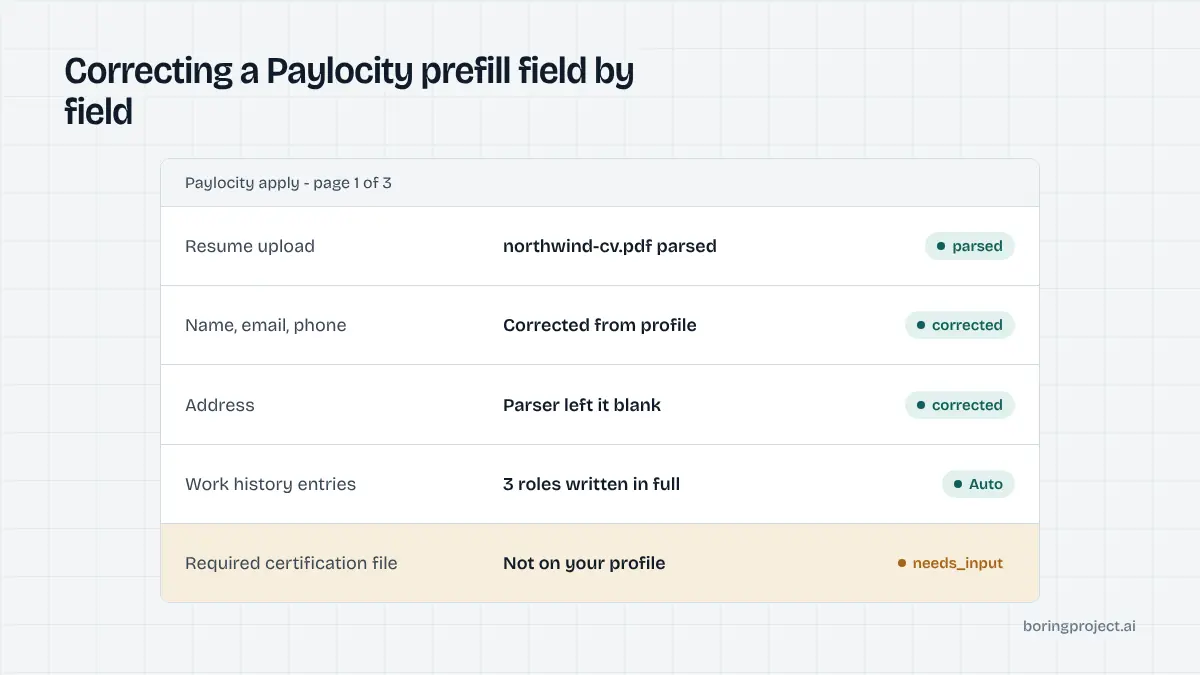
The shape of a Paylocity application
Paylocity is a mid-market payroll and HR platform with a recruiting module, and many employers between roughly a hundred and a few thousand staff use it to publish jobs. The candidate experience is a single flow without an account, ordered so that the resume comes first.
Hosting and detection
Postings are commonly served at recruiting.paylocity.com with an employer identifier in the path, or embedded in a frame on the employer's own careers page. Because the embedded version hides the Paylocity address, detection relies on the form markup as much as on the URL, and the agent checks both before choosing its playbook. An agent can identify the system from either the domain or the characteristic form layout, which places the resume drop zone above the personal details.
Resume first, then everything else
Candidates upload a resume in a common document format. Paylocity parses it and pre-fills the following sections: personal information, work history, and education. Candidates then review and correct those fields, answer employer-configured questions, optionally complete voluntary self-identification, and submit.
No account in most setups
Most Paylocity configurations do not require registration. A returning candidate may be offered a sign-in, but it is not a gate, and the application can be completed as a one-time submission. That alone removes a large share of the failures seen on enterprise portals, where registration, verification emails, and duplicate-profile checks each add a place for a run to stall.
Running the automated flow
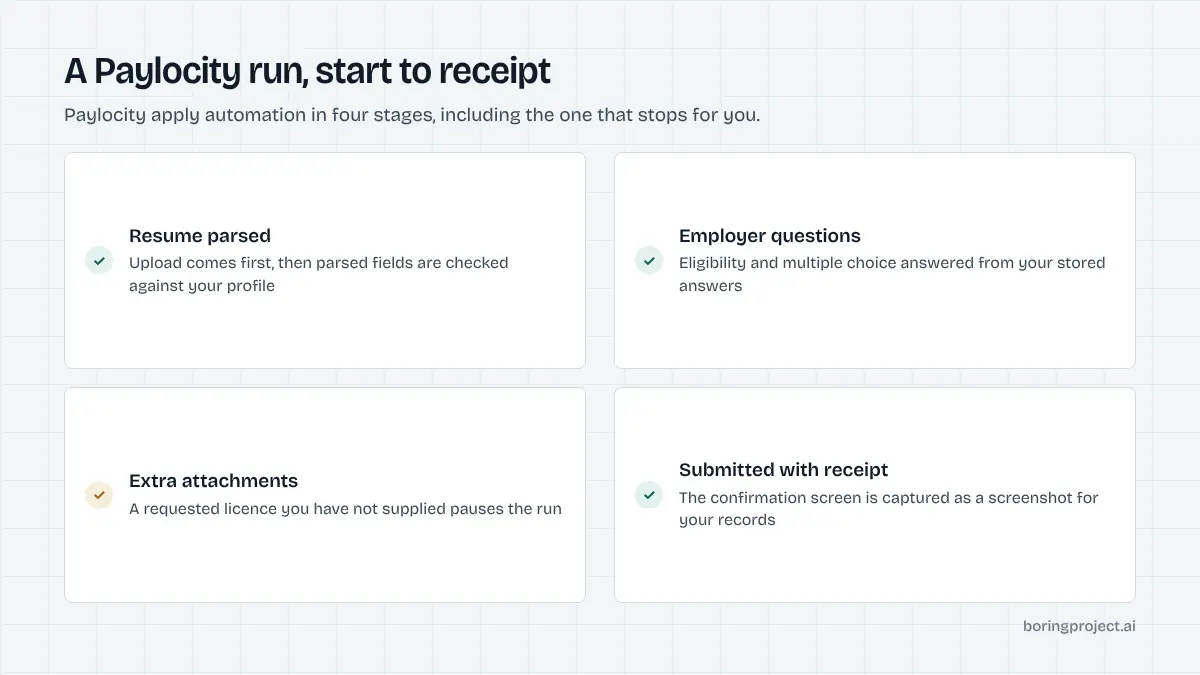
If you are working out how to auto apply on Paylocity reliably, the main lesson is to treat the parser as a convenience rather than a source of truth.
Upload and verify the parse
The agent uploads the candidate's resume and waits for the pre-fill. It then walks each populated field and compares it with the structured profile. Parsers often misread multi-column layouts, headers, and date formats, so names, phone numbers, and employment dates are overwritten with the confirmed values when they disagree.
Simple single-column resumes parse best. That is a tip worth passing on to candidates, but the agent does not depend on it, because the correction pass catches the errors either way.
Complete history, then answer employer questions
Paylocity typically requires at least one work history entry, with employer, title, dates, and a description. The agent fills these as discrete entries from the profile rather than relying on whatever the parser extracted. Education follows the same pattern.
Address fields are completed carefully, since employers may use them for jurisdiction purposes later in hiring. A skills field is often present and optional; it is filled from the profile because recruiters search on it, and leaving it blank makes a candidate harder to find.
Employers add their own questions after the history sections. Common forms include yes/no eligibility checks, multiple choice, and short free text. Some add a knockout question or a link to a third-party assessment.
Factual items are answered from the profile. Open prompts without an approved answer, and any external assessment, pause the run with needs_input so the candidate can respond.
Attachments and submission
Beyond the resume, an employer can request a cover letter, certification, or licence. If the candidate supplied the file, it is uploaded; if not, the run pauses and names the missing document.
Once all required items are present, the agent submits, captures the confirmation screen, and sends a submitted webhook with the screenshot attached. A confirmation email from the employer usually follows but is not relied upon, and because some employers lock submitted applications, the receipt is treated as final.
Where Paylocity sits among mid-market systems
Paylocity is often grouped with Dayforce as a payroll-first platform that added recruiting, and its employers overlap with the small-business systems too. From an automation standpoint the three groups are not alike.
| System | Account gate | Form length | Main pause cause |
|---|---|---|---|
| Paylocity | Usually none | Medium | Missing attachments, open questions |
| Dayforce | Often required | Long, multi-step | Account, acknowledgements |
| BambooHR, Breezy HR | None | Short | Open questions, file questions |
Attachments are the differentiator
Paylocity's base form is comparable to SMB systems, but employers on it lean more heavily on required documents. Licences and certifications are common in the healthcare and skilled-trade employers that use the platform.
Candidate profiles that include these documents up front see far fewer pauses. Platforms that collect a licence number and a scanned certificate at onboarding, rather than at apply time, get the most out of Paylocity employers.
Throughput considerations
Because there is no account step, Paylocity jobs batch well. A staffing agency or job board pushing many candidates to Paylocity employers can run them in parallel, subject to per-employer rate limits that keep one company's recruiters from receiving a burst. Our guide to bulk job application automation covers how batches are structured and paced.
The Dayforce comparison
Employers sometimes migrate between Paylocity and Dayforce, and the two careers pages can look superficially similar. The presence of an account registration prompt is the quickest way to tell them apart. The Dayforce auto apply guide walks through that longer flow.
Frequently asked questions
How do I know a job is on Paylocity?
Paylocity-hosted postings commonly appear at recruiting.paylocity.com with the employer's identifier in the path, or inside a frame embedded on the employer's own careers page. The resume-first application layout, where upload comes before the personal details, is a further sign once the form loads.
Do candidates need an account on Paylocity?
In most configurations, no. The application is a direct submission without registration or login. Some employers may offer a sign-in option for returning candidates, but it is not a gate. The absence of an account step is one reason Paylocity forms automate cleanly compared with enterprise portals.
What resume formats does Paylocity accept?
Common document formats such as PDF, Word, and plain text are accepted. The parser pre-fills personal details and work history from the file, and it is generally more reliable on simple, single-column layouts than on heavily designed resumes. Automation corrects whatever the parser gets wrong using the confirmed candidate profile.
What kinds of questions do Paylocity employers ask?
Employer-configured questions range from yes/no eligibility checks and multiple choice to free-text prompts. Some employers add a knockout question or link to a third-party assessment. Factual questions are answered from the candidate profile; open prompts and external assessments pause the application for the candidate.
Why does automation pause on attachments?
Employers can require documents beyond the resume, such as a cover letter, certification, or licence. If the candidate has not supplied the requested file, the run pauses with a needs_input status naming it. Uploading a placeholder would produce a visibly broken application, so pausing is the correct behaviour.
Can a submitted Paylocity application be edited?
That depends on the employer's configuration; some allow edits from the confirmation page and some lock the submission. Because of that variability, the screenshot receipt captured at submission is treated as the final record, and corrections are handled by contacting the employer rather than re-submitting.
Next step
Whether you are a developer or a staffing team, the job application API submits Paylocity applications from a job URL and a candidate profile and returns a receipt by webhook. Pricing is per successful application, with no charge for runs that fail.