 The Boring Project
How to Auto Apply on Dayforce Career Sites
A ceridian dayforce application runs through an account step, a resume import into a candidate profile, document uploads, employer-required fields, and a signed acknowledgement before submit, and each of those stages has its own automation behaviour.
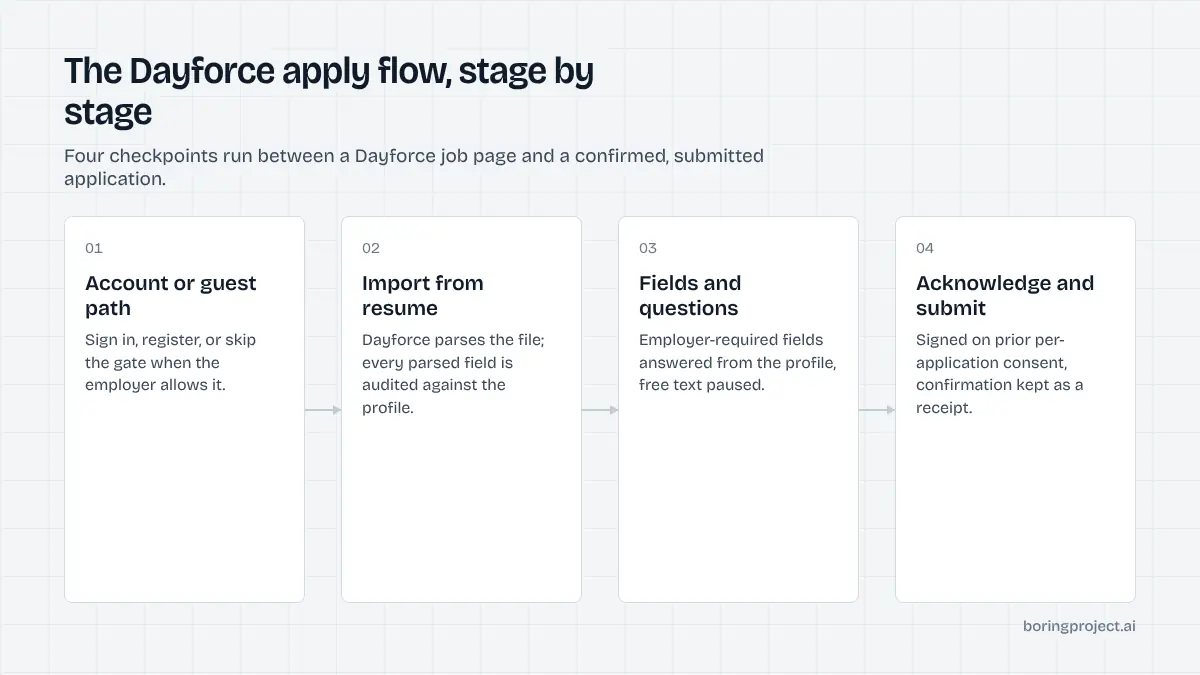
The Dayforce apply flow, click by click
Dayforce, formerly Ceridian, is an enterprise HCM platform whose recruiting module hosts career sites for large employers in retail, healthcare, public sector, and hospitality. The candidate flow is longer than a form-based ATS and is best understood as a sequence of screens, each of which the automated agent treats as its own checkpoint.
From job page to account
A candidate opens the job, reads the posting, and clicks Apply, and a sign-in dialog appears. New candidates choose to create an account and enter the required details; returning candidates sign in with email and password.
Some employers add CAPTCHA at this point, and accounts can be protected with multi-factor authentication. Both are employer choices, so two Dayforce career sites can differ here.
Dayforce also offers employers a setting that allows applications without an account. When it is on, the dialog can be skipped. An automated agent checks for this at run time instead of assuming either way.
Building the profile from a resume
After sign-in, the candidate is asked to build a profile. The usual route is Import from Resume: add the file, upload it, and let Dayforce parse it into contact, experience, and education sections. A cover letter can be uploaded next, and additional documents such as transcripts, reference letters, or certifications are optional.
Required fields, acknowledgement, submit
If the employer configured extra required fields or screening questions, they appear after the documents step. The candidate then reads a candidate acknowledgement and clicks to agree, then submits. A final screen offers a link to view the profile and the submitted application.
Public how-to guides written by Dayforce employers for their own applicants count roughly a dozen clicks from job page to confirmation. The exact number depends on how many documents and questions the employer added.
Automating each stage
Anyone working out how to auto apply on Dayforce will spend most of their effort on the first and last stages: the account and the acknowledgement. The middle is ordinary form filling.
Stages one and two: account, then import and attach
Consent for the specific job is confirmed before the browser opens. If the career site allows applying without an account, the agent takes that path. Otherwise it signs in with credentials the candidate supplied, or creates an account with the candidate's email and authorised credentials.
If the site requires an email verification link, a CAPTCHA, or multi-factor authentication, the run pauses with needs_input and names the step. The candidate completes it and the run resumes in the same session.
The resume is then uploaded through Import from Resume. The agent audits every parsed field against the structured profile and corrects discrepancies in names, dates, and titles.
The cover letter is attached if the candidate supplied one. Optional documents are only uploaded when the candidate provided them; nothing is attached as filler.
Stage three: required fields and questions
Employer-defined fields and screening questions follow. Dayforce supports several answer types, from single and multiple choice to free text, and employers configure them per posting.
Factual questions are answered from the profile. Free-text questions without a candidate-approved answer trigger a pause rather than a guess, and knockout-style eligibility questions are answered from the candidate's actual situation.
Stage four: acknowledgement and receipt
The acknowledgement is agreed to on the strength of the candidate's prior, per-application consent. The agent submits, captures the confirmation screen as a screenshot, and sends a submitted webhook. The whole run happens in a real browser session, which is why this class of portal needs a headless browser approach to job applications rather than a direct form post.
Configuration switches that change the flow
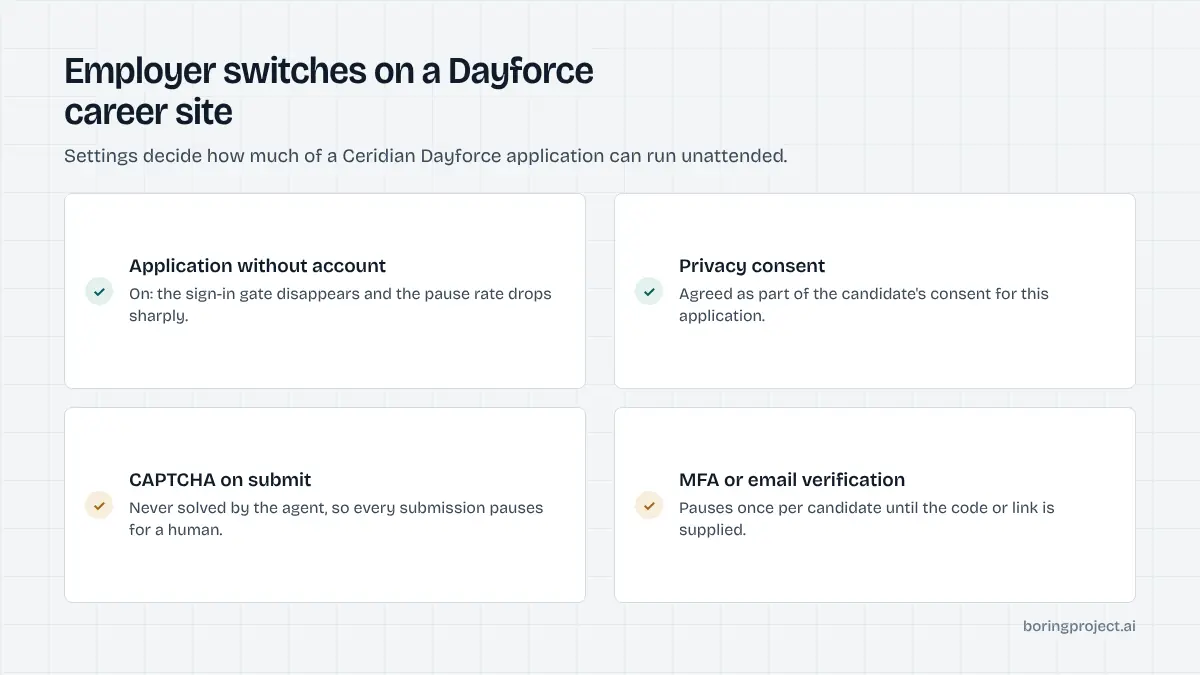
Dayforce gives employers several switches, and two career sites on the same platform can feel quite different. These are the ones that affect automation most.
Application without an account
When enabled, the sign-in gate disappears and the flow resembles a mid-market form. This is the single biggest reducer of pause rate on Dayforce.
When disabled, every first-time candidate goes through registration, and every repeat candidate signs in. The agent detects the mode from the dialog that appears after Apply, so no per-employer configuration is needed on the automation side.
Consent and verification prompts
Employers can require privacy policy consent, SMS consent, and CAPTCHA image verification. Privacy consent is agreed to as part of the candidate's application consent, and SMS consent is declined unless the candidate opted in.
CAPTCHA always pauses for the candidate; it is not something the agent attempts to solve. Sites that place CAPTCHA on registration therefore pause once per candidate, while sites that place it on every submission pause every time.
Document and field requirements
Employers decide which documents are mandatory and which extra fields are required. Career sites that demand a cover letter or licence see more pauses when candidate profiles lack them, and platforms that collect these documents up front have a noticeably smoother Dayforce experience.
The contrast with Paylocity, which rarely gates on an account but often on attachments, is covered in our Paylocity auto apply guide.
Frequently asked questions
Is Ceridian Dayforce the same as Dayforce?
Yes. Ceridian rebranded the company as Dayforce, and the recruiting module is part of the Dayforce HCM suite. Older job links and employer pages still say Ceridian, and the careers experience is the same multi-step flow regardless of which name appears in the page header or URL.
Does Dayforce require a candidate account?
By default, candidates create an account or sign in before the application opens. Employers can enable application without an account as a configuration option, in which case the flow is shorter. Automation detects which mode a given career site uses at run time rather than assuming.
What does 'Import from Resume' do on Dayforce?
It uploads the candidate's resume and parses it into the profile sections, such as contact details, work experience, and education. The parsed values need checking, which the automated agent does against the candidate's confirmed profile before moving on. The resume file itself is stored under the candidate's documents.
What is the candidate acknowledgement step?
Before submission, Dayforce shows an acknowledgement statement that the candidate must agree to, typically confirming the information is accurate and consenting to its use in hiring. Because this is a legal attestation about the candidate's own data, it is agreed to only on the basis of the candidate's prior consent for that specific application.
Where does a Dayforce application pause for the candidate?
Account creation when email verification or multi-factor authentication is required, CAPTCHA challenges, required fields the candidate profile does not contain, document requests the candidate has not supplied, and open-ended screening questions with no approved answer. Each pause is reported with a needs_input status and the exact item.
How many steps does a Dayforce application have?
Public employer guides describe roughly a dozen clicks from the job page to confirmation: apply, create or sign in, import resume, upload cover letter and optional documents, complete required fields, agree to the acknowledgement, submit, and view the profile. The number of required fields and questions varies by employer.
Next step
Job boards and staffing agencies with large retail, healthcare, or public-sector employers in their feed meet Dayforce often. Managed Applies handles the account, import, and acknowledgement steps and returns a receipt per candidate, with per-application pricing. Talk to sales to run a pilot.