 The Boring Project
Bulk Job Application Automation: How Teams Do It
Bulk job application automation is the practice of submitting applications in batches, with a spreadsheet in and receipts out, instead of one browser tab at a time. This guide describes how teams run a bulk apply tool day to day: preparing the file, quality checks, pacing, and handling the rows that come back as failed or incomplete.
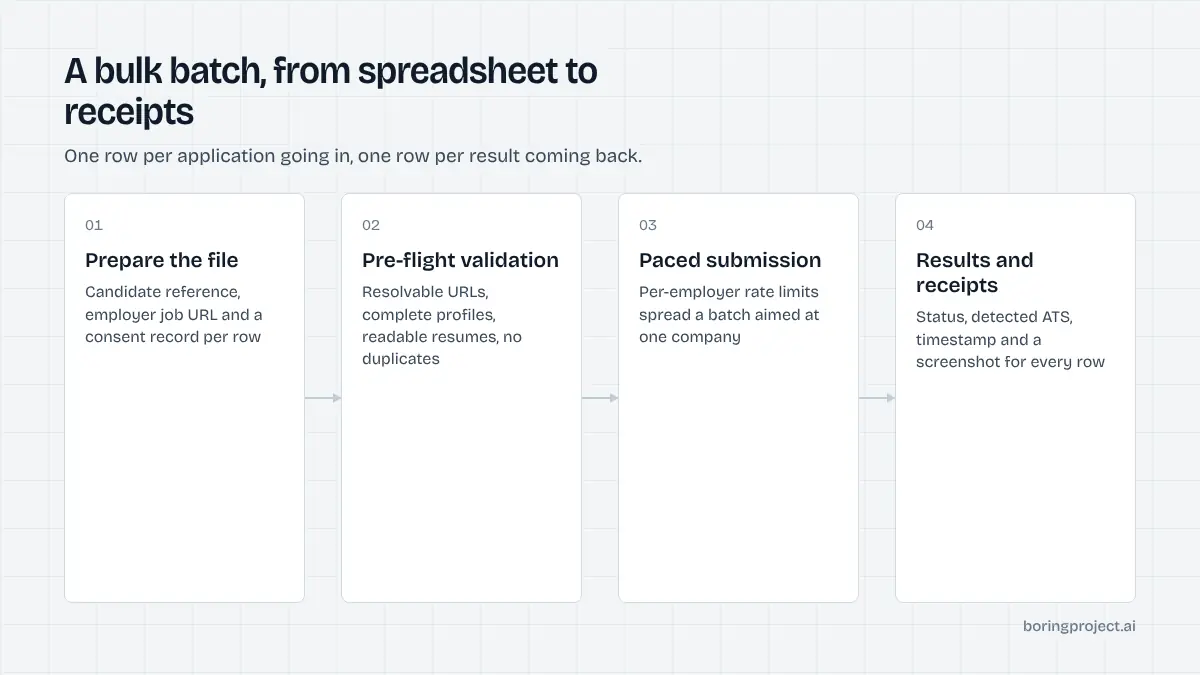
The CSV in, receipts out flow
The managed version of a bulk apply tool needs no code. It needs a disciplined file and a clear idea of what you expect back. Agencies evaluating this alongside other options will find the surrounding checklist in our guide to auto apply tools for staffing agencies.
What goes in the file
Each row is one application: a candidate reference, the job URL, and a consent flag or consent record ID. Candidate profiles and resumes are supplied once, separately, and referenced by ID so you do not repeat a full profile on every row. Optional columns carry known screening answers, a priority, or a client tag for reporting.
Keep the job URL pointed at the employer's posting on their career site or ATS, not an aggregator page. Aggregator links add a redirect hop and often expire, which inflates your failure count for no reason.
What comes back
A results file with one row per input row: application ID, status (submitted, needs_input, failed), detected ATS, timestamp, a screenshot URL, and a reason code or the list of outstanding questions where relevant. Teams typically join this back to their CRM or client tracker by the candidate reference.
The screenshot is the point. It is the confirmation page the candidate would have seen, and it is what you show a client or a candidate when they ask whether something was really sent.
Where the API fits
Most teams start with the managed CSV flow and stay there. Some later move to the API, usually because they want applications to trigger automatically from their own system, or they want needs_input questions to appear directly in their recruiter UI.
The results you receive are the same; only the transport changes. The status model is explained in detail in how job application webhooks report submission status.
Quality checks before and after the batch
Bulk job application automation multiplies whatever you give it. A bad file produces hundreds of bad applications quickly. Two short QA passes prevent most of it.
Pre-flight validation
Before sending, check that every row has a live job URL, a complete profile with the fields employers commonly require, a resume file that opens, and a consent record. Deduplicate against your previous batches so no candidate applies twice to the same posting. Pull a random sample of ten rows and open the postings by hand: are they open, and are they actually a fit?
A managed service will reject rows that fail hard validation, but it cannot tell you a job is a poor match. That remains your call.
Pacing and rate limits
Per-employer rate limits are a feature, not a limitation. If your batch has forty applications to one employer, they will be spread over time so the employer sees a normal flow rather than a burst.
This protects your candidates and your domain reputation. It also means a batch concentrated on a few employers finishes later than one spread across many; plan client expectations accordingly.
Results arrive progressively. Do not wait for the whole batch before reviewing; start on the early failures while the rest runs. If a particular employer or ATS is failing consistently in the first few rows, pause the remaining rows for that employer and investigate before the rest of the batch repeats the same failure.
Post-batch review
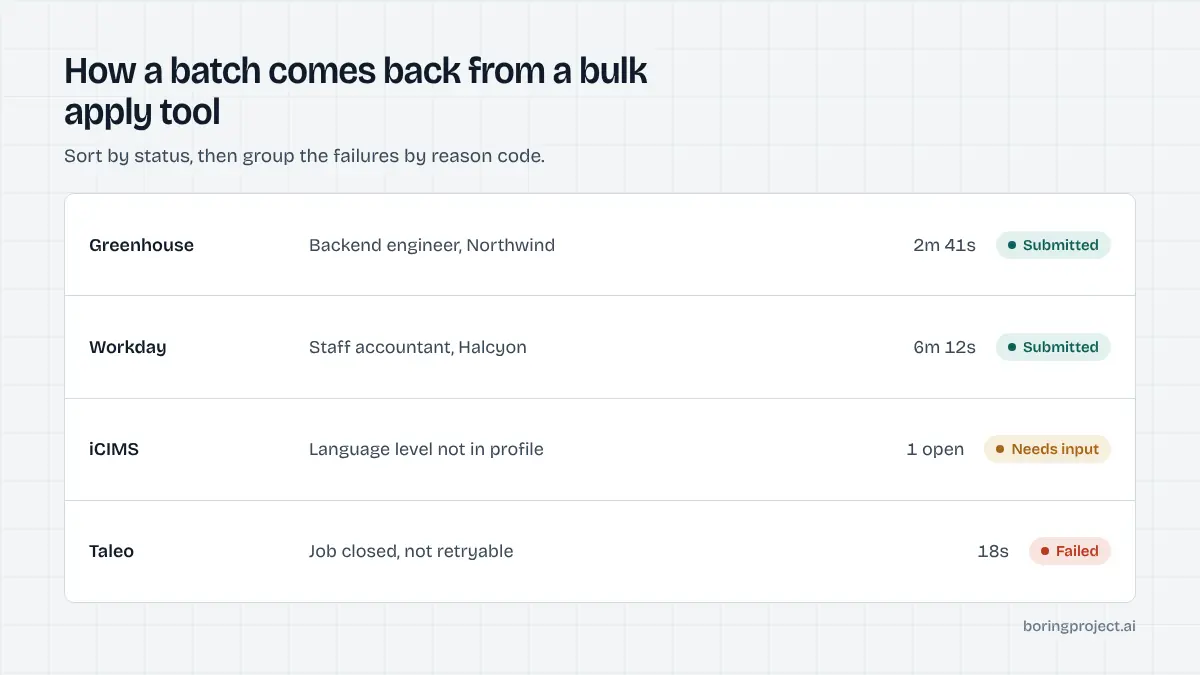
Sort results by status. Confirm a sample of submitted rows by opening the screenshots.
Group failed rows by reason code: closed jobs are not worth retrying, transient errors are, and unsupported ATS rows tell you something about your sourcing. Route needs_input rows to whoever can answer them. Record what you learned in the candidate profiles so the next batch has fewer gaps.
Handling failures and incomplete applications
The realistic outcome of any sizeable batch is a majority submitted, a minority needing input, and a small tail of failures. The tail is where process matters.
needs_input is normal
A form asked something the profile could not answer truthfully: a certification, a language level, a relocation preference, a specific years-of-experience question. The service pauses rather than guessing.
For a candidate's first few applications this is common; as answers are saved to the profile it becomes rare. Build a quick loop for collecting answers, ideally in one message to the candidate covering all outstanding questions across employers.
Reading failure codes
Typical reason codes are job closed, unsupported ATS, employer blocks automated access, resume file rejected, and transient timeout. Only the last is worth an automatic retry.
Closed jobs point to stale sourcing; unsupported systems point to a coverage gap you can raise with your vendor; rejected files usually mean an oversized or unusual resume format. Each has a different fix and none of them is "run it again".
Keeping the record straight
Every row should end in a terminal state in your own tracker, with the receipt attached. Partial records are what cause awkward conversations later. If a candidate or client asks about a specific employer you should be able to answer in seconds: submitted on this date, here is the screenshot, or failed for this reason, here is what we did about it.
Frequently asked questions
What is bulk job application automation?
It is submitting many job applications, for one or many candidates, as a single batch rather than one at a time by hand. A team prepares a list of candidate-to-job pairs, a service fills and submits each employer's application form, and the team receives per-application results with proof. It is used by staffing agencies, career services, reverse recruiters and job platforms.
Do I need a developer to run a bulk apply tool?
Not for a managed service. You supply a spreadsheet with candidate references, job URLs and a consent flag, plus each candidate's profile and resume, and receive a results file and screenshots back. API access exists for teams that want to embed the flow in their own systems, but it is not required to start.
How long does a batch of a few hundred applications take?
Individual submissions take a few minutes each, and many run in parallel, but per-employer pacing deliberately spreads applications to the same company. A batch concentrated on a few employers takes longer than one spread across many. Plan on hours rather than minutes for several hundred, and expect results to arrive progressively.
What does QA look like before a batch?
Validate the file: every row has a resolvable job URL, a complete candidate profile, a resume that opens, and a consent record. Check for duplicates against previous batches. Spot-check a sample of rows against the actual postings to confirm they are still open and relevant. Ten minutes here prevents a large share of failures.
What happens to applications that need extra information?
They come back as needs_input with the specific questions listed. Your team or the candidate answers, and you resubmit those rows. The service does not guess at screening answers, so this state is normal, particularly for a candidate's first application to a new employer. Answers can be saved to the profile for next time.
Are we charged for failed applications?
Under per-successful-application pricing, no. You pay for applications that reach the employer's confirmation page. Failures such as closed jobs, unsupported systems or rejected files are reported with a reason and a screenshot but do not count. Confirm how your vendor defines success before committing to a large batch.
Next step
Managed Applies is the CSV-in, receipts-out flow described here, with validation, per-employer pacing, needs_input handling and per-application pricing included. Talk to us about managed applies and send a sample of your batch format; we will tell you what will and will not run cleanly.