 The Boring Project
How to Auto Apply on Oracle Recruiting Cloud Jobs
Oracle Recruiting Cloud replaces the password-based candidate account with a one-time verification code, so an oracle hcm job application is quick to fill but almost always includes a moment where only the candidate can proceed.
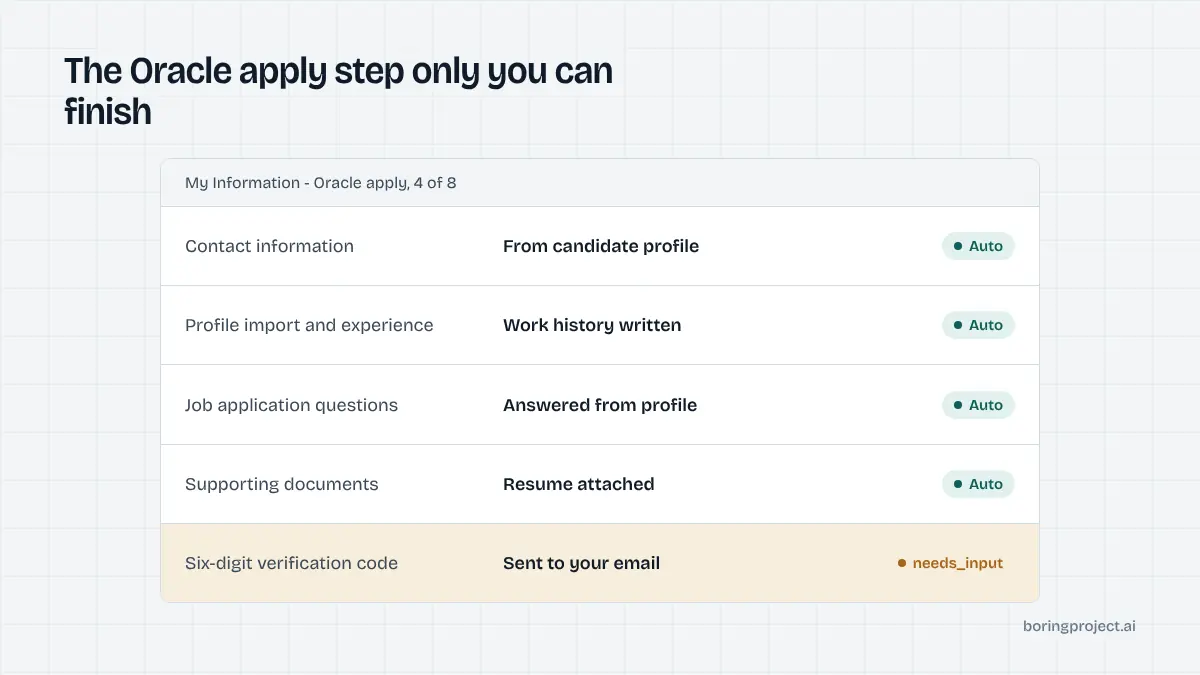
Oracle's modern career site in context
Oracle Recruiting Cloud, often shortened to ORC, is the recruiting module inside Oracle Fusion Cloud HCM. It is the successor to Taleo for Oracle's own customer base, and the two could not be more different for a candidate.
Taleo asks for a full account; ORC asks for an email or phone number and a code. The trade-off is that the code step cannot be skipped by automation, so the design of the candidate-facing prompt matters more here than on any other system.
Where the jobs live
Hosted career sites usually sit on an oraclecloud.com domain with a CandidateExperience path and a site identifier such as CX_1, although many employers map a custom domain over the top. The job page carries an apply button that, in the default configuration, reads "I'm interested". Clicking it opens the application flow directly, with no intermediate account-creation screen.
Blocks instead of pages
Employers assemble the application from blocks grouped into sections. Oracle's documentation lists the available blocks, and employers pick which to include.
The result can be a one-screen form or a longer flow, but the building blocks are the same across employers, which is what makes a single Oracle playbook workable.
| Block | What it asks for | Automation behaviour |
|---|---|---|
| Contact Information | Name, email, phone | Filled from profile |
| Profile Import | Resume upload with parsing | Uploaded, then corrected |
| Experience, Education | Work and study history | Filled from profile |
| Skills, Languages, Licences | Structured lists | Filled where present |
| Job Application Questions | Employer screening questions | Answered or paused |
| Supporting Documents | Cover letter, extra files | Uploaded if supplied |
| Diversity, Disability, Veteran | Voluntary self-identification | Only candidate-disclosed values |
| Assessment | Third-party test link | Pauses for candidate |
| Review | Summary before submit | Verified, then submitted |
The verification code
Instead of a password, Oracle verifies identity with a code sent by email or SMS. Its timing is the single most important detail for anyone learning how to auto apply on Oracle Recruiting Cloud, and it is covered in its own section below.
Timing of the verification step
Oracle's own documentation describes three scenarios, and each changes where the automated run has to pause.
New candidate, no draft
A candidate who has never applied to this employer and has no saved draft fills the whole flow first. The verification code is sent at the end, after the Review block. The agent completes every block, then pauses with needs_input while the candidate retrieves the code.
Existing profile, or a saved draft
A candidate who already has a profile with the employer, or who left a draft application, is asked for the code before entering the flow. Oracle requires this so that stored profile data is not revealed to someone who merely typed in an email address. Here the pause comes first, and the fill happens after the candidate supplies the code.
Autoconfirmation enabled
Employers can switch on candidate autoconfirmation. For a new candidate with no profile or draft, no code is sent at all and the email is confirmed automatically after submission.
The setting makes no difference for candidates with an existing profile, who still verify. When a career site has this enabled, first-time applications run end to end without a pause, which makes it the friendliest configuration for high-volume submissions.
Filling, pausing, and receipts
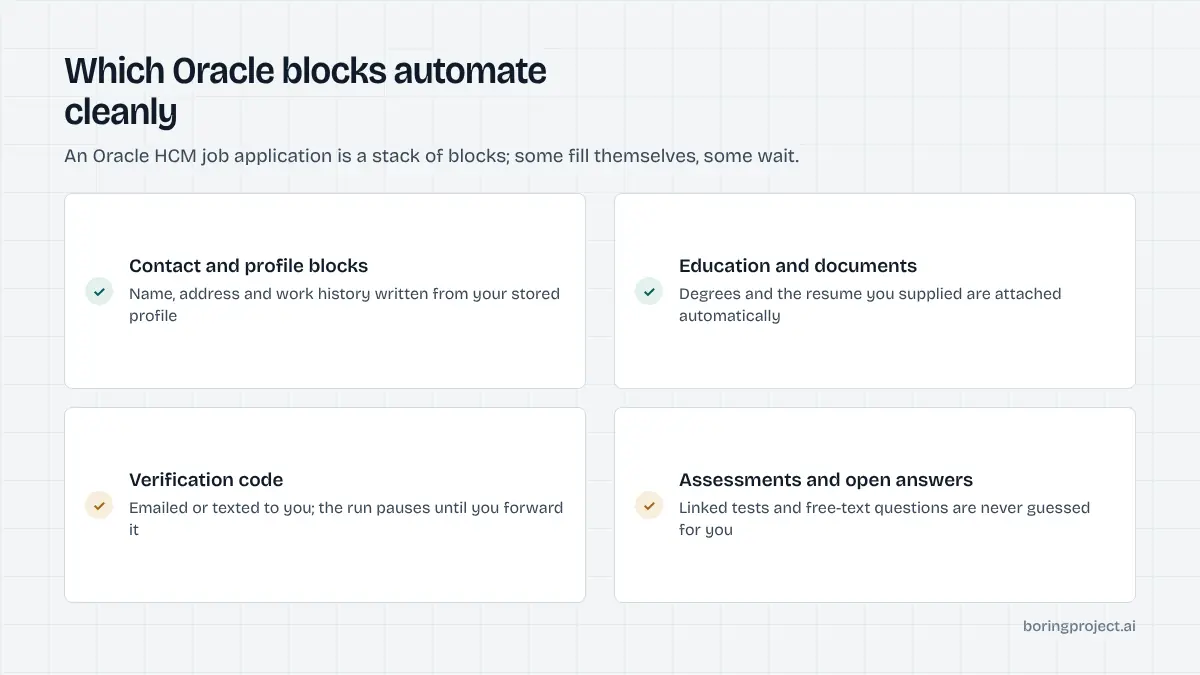
Blocks that fill cleanly and blocks that pause
Contact Information, Experience, Education, and the structured list blocks come straight from the candidate profile. Profile Import is used when present: the resume is uploaded, the parse is checked field by field, and errors are corrected. Supporting Documents are attached only when the candidate supplied them.
Job Application Questions are the usual source of pauses. Dropdown and yes/no items are answered from the profile; open-text prompts without an approved answer are surfaced to the candidate.
The Assessment block links to a third-party test that only the candidate can take. Sensitive Personal Information is filled only from values the candidate explicitly consented to share, and the voluntary Diversity, Disability, and Veteran blocks follow the same rule.
Easy Apply through the chatbot
Oracle also offers Easy Apply inside its recruiting assistant chat. Employers configure a flow of between one and five blocks, always including Contact Information and Review, and candidates see contact details, job application questions, and supporting documents inside the conversation.
The agent prefers the standard career-site flow because it is more predictable, but it recognises Easy Apply jobs and handles the redirect to the full site when the flow is too large for chat. Chat-based applies are also central to Phenom career sites, covered in our Phenom auto apply guide.
What the webhook reports
On submission the confirmation screen is captured and a submitted webhook is sent with the screenshot. A pause for the verification code is reported as needs_input with a clear message that a code was sent to the candidate's email or phone.
Once the candidate provides it, the run resumes from the same session. Codes expire, so the candidate-facing prompt should make clear that a prompt reply matters. For employers still on Oracle's older platform, the account-based flow is described in the Taleo auto apply guide.
Frequently asked questions
How do I recognise an Oracle Recruiting Cloud career site?
Hosted career sites typically live on an oraclecloud.com domain with a CandidateExperience path and a site code such as CX_1, though employers can map them to a custom domain. The 'I'm interested' apply button and the verification-code prompt at the start or end of the flow are reliable signals once the page loads.
Why does Oracle send a verification code when applying?
Oracle Recruiting verifies the candidate's identity through a code sent by email or SMS rather than a password-based account. The code confirms the candidate controls the address or number they entered. For candidates with an existing profile, the code is required before any stored data is shown.
When in the flow does the verification code appear?
It depends on the candidate's history with that employer. A brand-new candidate with no draft usually receives the code at the end of the flow, after filling the blocks. A candidate with an existing profile or a saved draft receives it at the start. Employers can enable autoconfirmation, which skips the code for new candidates entirely.
Can automation enter the verification code?
Only if the candidate's platform forwards it. The default behaviour is to pause with a needs_input status, tell the candidate a code was sent, and resume as soon as they provide it. Automation never attempts to intercept a candidate's inbox or phone on its own; the candidate stays in control of the verification step.
What is Oracle Easy Apply?
It is a shortened application delivered inside Oracle's recruiting assistant chat for jobs the employer configured with an easy-apply flow of up to five blocks, always including Contact Information and Review. Candidates see only contact details, job application questions, and supporting documents in the chat. Jobs with fuller flows redirect to the career site.
Which parts of an Oracle application pause automation?
The verification code, assessments linked from the flow, open-ended job application questions without an approved answer, required supporting documents the candidate has not supplied, and sensitive personal information blocks the candidate did not consent to share. Each is reported through the webhook with the specific block and reason.
Next step
If you are integrating Oracle-hosted employers, the Apply API handles the block fill and reports the verification pause so your product can prompt the candidate for the code. Start with the API documentation; pricing is per successful application.