 The Boring Project
How to Auto Apply on Jobvite Applications
Jobvite career pages look older than most, and that works in your favour: a short required set, a single-column form and predictable custom fields. This guide explains how jobvite application automation handles the form, the resume and attachment rules that trip people up, the optional account step, and the moments where a run has to ask for help.
An older interface with a simple contract
Jobvite's standard career site uses a single-column layout with jobs grouped by category, a job description page and an application form. Employers can restyle it with their own CSS and embed it in their site, and postings are also reachable at jobs.jobvite.com/<company>/job/<id>. The styling varies; the contract does not. Anyone learning how to auto apply on Jobvite should start with that contract.
The required core is small
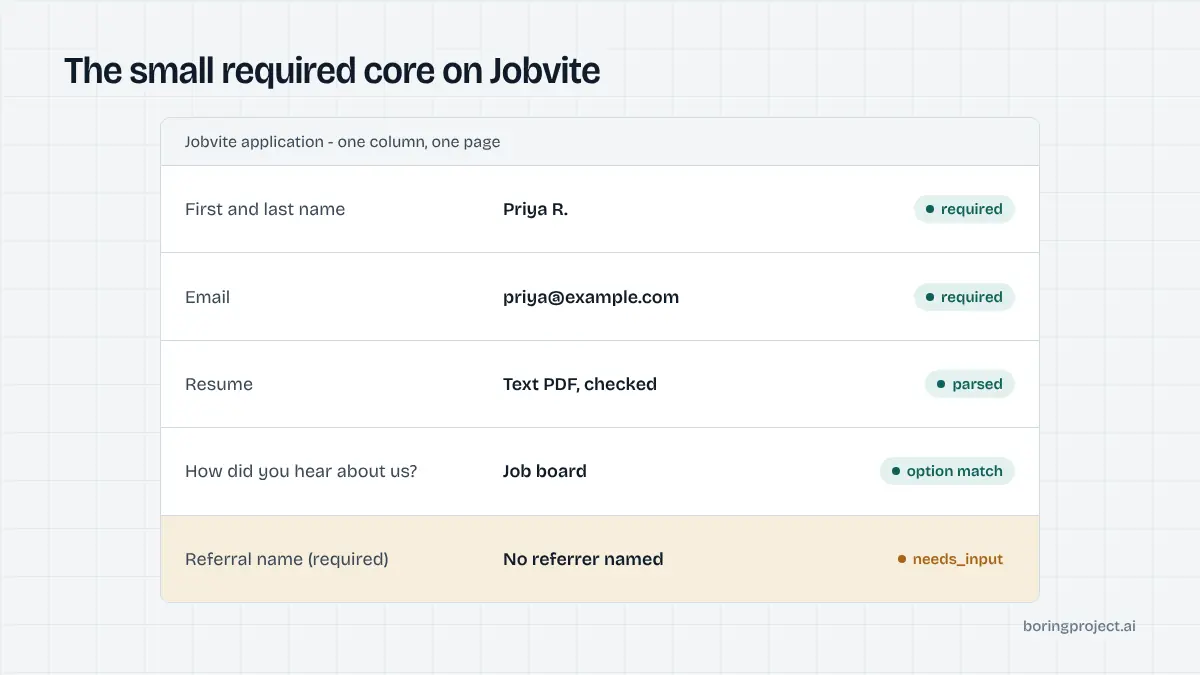
By default the Jobvite application form requires first name, last name, email and a resume. That is it. Resume upload can be made optional by the employer on request, but most leave it required. Phone, address and links are commonly present as optional fields. Compared with enterprise systems that demand a full address and a dozen dropdowns before you reach the questions, this is a light form.
Custom fields are predictable
Employers add their own fields and can make any of them mandatory. The additions Jobvite itself highlights as common are a "How did you hear about us?" question, usually with an "Other" option, a referral field for the name of an employee who recommended the candidate, and a desired salary field. On top of these, employers may add screening questions in the usual formats: yes/no, dropdown, short text, long text.
The engine fills source and salary from the candidate profile, leaves the referral field empty unless the candidate has named a referrer, and handles screening questions the same way it does on every ATS: answer from facts on file, pause otherwise. For the source question, the honest answer is whichever channel actually surfaced the posting to the candidate, such as a job board or the company site, and the engine selects that option or "Other" rather than claiming a referral that never happened.
Mandatory flags matter here. A field the employer marked required blocks submission with an inline error, and the engine reads that state rather than assuming the click succeeded.
Apply with LinkedIn and other shortcuts
Employers can enable Apply with LinkedIn on the form, and a candidate who attaches a LinkedIn profile that way is excused from uploading a resume. Applications arriving from Indeed, Facebook and similar sources are tracked automatically by Jobvite. None of this changes how an automated run behaves. The engine uploads the resume and writes the fields from the structured profile, so the application is complete regardless of which shortcut the employer offers.
Attachments and parsing: where Jobvite is picky
Accepted formats
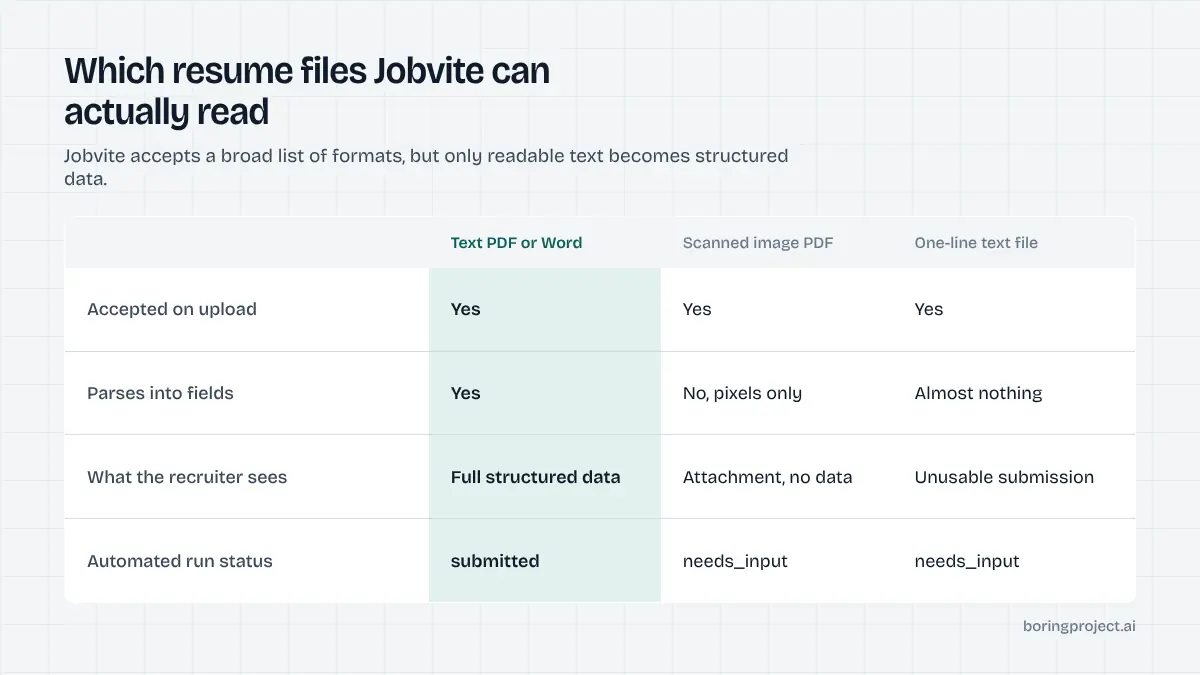
Jobvite's standard site accepts a broad list of resume formats: PDF, Word documents, plain text, RTF, HTML, several image types and even XLSX. Breadth is not the same as usefulness. The parser populates fields from text it can read, and it cannot read pixels.
What does not parse
Image files and image-only scanned PDFs upload but do not parse, so the recruiter sees an attachment with no structured data behind it. Very short pasted text, such as a file containing only "N/A", produces an unusable submission. These are the two resume problems an automated run on Jobvite is most likely to report.
The engine checks the resume before upload: text-based PDF or Word document, reasonable length, matches the candidate on file. If the only resume available is a scan, the run returns needs_input describing the problem rather than uploading a placeholder to force the form through. A submission with a blank resume behind it helps no one.
Cover letters and other attachments
Where the form exposes additional attachment slots, the engine adds a cover letter, portfolio or certificate only when the candidate has supplied that document. It does not generate a cover letter. If an employer marks the cover letter mandatory and the candidate has none on file, that is a pause with a clear message, and the candidate can provide one once for reuse.
Accounts, pauses and good behaviour
Account or no account
The standard Jobvite form does not require a login to submit. Some employers enable a candidate account option so applicants can save progress and track status, and a few make it mandatory. The engine detects which case applies on the live page. Where an account is optional, it is skipped. Where it is required, the engine registers the candidate with a generated password, stores the credentials per candidate per employer and reuses them for later applications to that company.
The pause points, in order of frequency
- A required custom question with no answer on the candidate profile.
- A resume the site rejects as unparseable or unusable.
- A mandatory cover letter or attachment the candidate has not supplied.
- A required account step with an email verification the candidate has not authorised the engine to read.
- A CAPTCHA on the form.
Each returns needs_input with the specific prompt or problem. After the answer or file is provided, the same run resumes and submits. Submission is confirmed by waiting for Jobvite's thank-you state, capturing a screenshot as the receipt, and reporting submitted; closed postings return failed with the reason.
Volume and etiquette
Because the required set is small, Jobvite runs are quick, roughly on a par with Greenhouse once the resume check is done. Keep the same discipline: deduplicate candidate plus posting before opening the form, apply per-employer rate limits, and record consent on every application. Mid-sized employers on Jobvite tend to have small recruiting teams who read what comes in. Treat each submission as something a person will open, because one will.
If you track outcomes across systems, resist comparing Jobvite's quick submits with Workday's slow ones as if speed were success. The measures that matter are laid out in our job application success rate benchmarks: submitted versus paused versus failed, and why each happened.
Frequently asked questions
Do I need a Jobvite account to apply for a job?
On the standard Jobvite career site, no. The form requires only first name, last name, email and a resume by default, and submission does not depend on a login. Some employers enable a candidate account option so applicants can save progress or track status, but it is typically optional. Automation registers only when a particular site requires it.
What resume formats does Jobvite accept?
Jobvite's standard career site accepts PDF, Word documents, plain text, RTF, HTML, several image formats and XLSX. The catch is parsing: image files and image-only scanned PDFs are not parsed, so the recruiter sees the file but no fields are populated from it. A text-based PDF is the safest choice for both humans and automation.
Why did my Jobvite application fail with an unusable resume?
Jobvite rejects or flags resume uploads it cannot use, which includes very short pasted text such as "N/A" and image-only documents. If a run reports a resume problem, replace the file with a text-based PDF or Word document containing the candidate's actual resume. The engine will not substitute a placeholder file to force a submission through.
What custom fields do Jobvite employers usually add?
The most common additions are a "How did you hear about us?" question, often with an "Other" option, a referral field for an employee's name, and a desired salary field. Employers can also add their own screening questions and mark any field mandatory. Automation fills these from the candidate profile and pauses on anything it cannot answer honestly.
Where does jobvite application automation pause for input?
On a required custom question with no answer in the profile, on a resume upload the site rejects, on an optional account step if the employer has made it mandatory, and occasionally on a CAPTCHA. The run returns needs_input with the exact prompt or problem so it can be fixed once, then resumes the same application rather than starting over.
Does Jobvite support Apply with LinkedIn?
Employers can enable it on the standard career site. A candidate who attaches a LinkedIn profile through that option does not have to upload a resume. Automation does not rely on the button; it uploads the candidate's resume and writes fields from the structured profile so the application does not depend on a LinkedIn login or on how complete that profile is.
Next step
Jobvite is a straightforward place to see a job application API at work: a posting URL and a candidate profile in, a screenshot receipt out, with the resume check done before anything is submitted. Run one Jobvite posting next to a Greenhouse one and compare the receipts; pricing is per successful application.