 The Boring Project
How to Auto Apply on Greenhouse Applications
Greenhouse is one of the most automation-friendly applicant tracking systems: no account, one page, predictable fields. This guide covers how a Greenhouse ATS apply actually works, what the employer can add to the form, and the few places an automated run has to stop and ask.
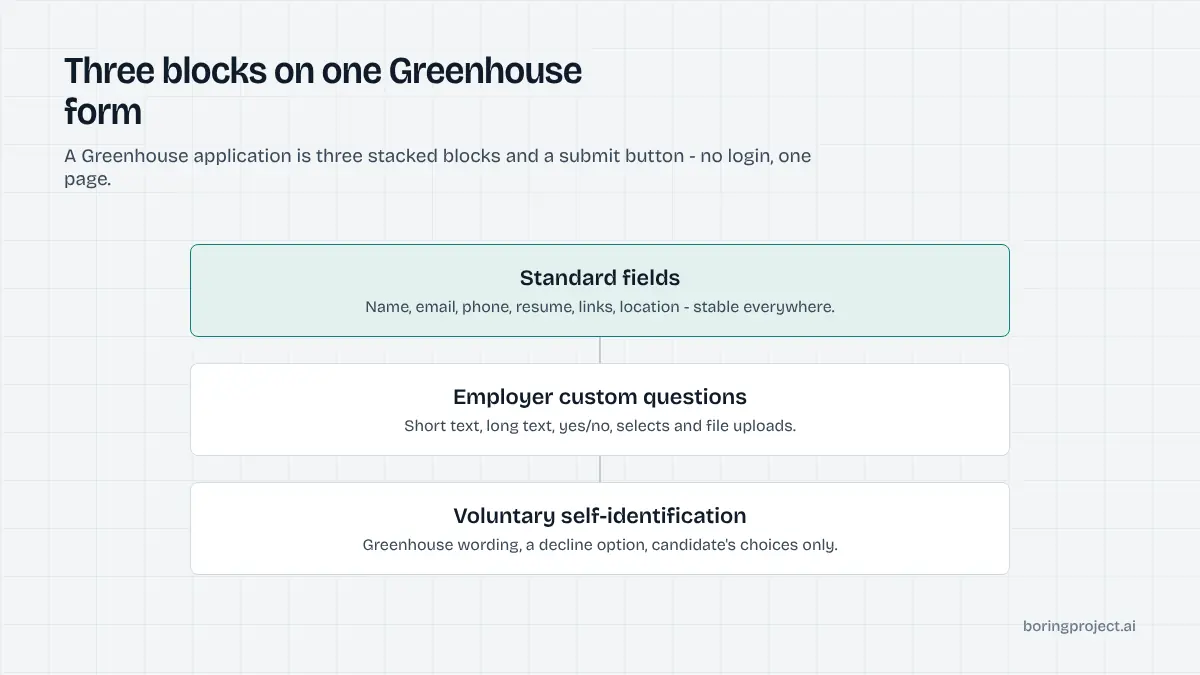
Anatomy of a Greenhouse application form
Before working out how to auto apply on Greenhouse, it helps to see the form the way a machine does: three blocks stacked on one page, followed by a Submit button.
The standard block is the same everywhere
Greenhouse-hosted boards (the boards.greenhouse.io and job-boards.greenhouse.io pages, and the same form embedded on company career sites) share a common core. Employers can toggle some fields between required, optional and hidden, but the set is stable:
| Field | Typical state | Notes |
|---|---|---|
| First name, last name | Required | Plain text |
| Required | Used for confirmation email | |
| Phone | Required or optional | Free-format, country code accepted |
| Resume/CV | Required | Attach, Dropbox, Google Drive or "enter manually" |
| Cover letter | Optional | Same attach-or-paste options |
| LinkedIn profile, website | Optional | URL fields |
| Location | Optional | Autocomplete city field on newer forms |
| How did you hear about us? | Optional | Free text or dropdown |
No login. No multi-page wizard. Each application is a stateless form post, which is why it is among the quickest systems to complete. The trade-off is that there is no candidate dashboard either: once submitted, the only record the candidate holds is the confirmation email, which is why a screenshot receipt from the apply system matters more here than on account-based platforms.
Custom questions are the variable
Below the standard block, employers add their own questions. Greenhouse supports short text, long text, yes/no, single select, multi select and file-attachment types, and any of them can be marked required.
The content varies enormously by company. A seed-stage startup might ask only for a GitHub link. A larger employer may ask about work authorisation, sponsorship, notice period, salary expectations, willingness to relocate and a free-text "why us" prompt. This block decides whether an automated run finishes in one pass.
Two details matter for automation. First, select questions expose a fixed option list, so an answer has to match one of the employer's choices exactly. Second, a question marked required blocks submission with an inline error, so the engine has to detect that state rather than assume the click worked.
The voluntary self-identification block
When enabled for a posting, Greenhouse appends a fixed questionnaire covering gender, race or ethnicity, veteran status and disability status. The wording is set by Greenhouse and cannot be edited by the employer, and each item carries a decline option. Some employers also add their own demographic questions. Everything here is voluntary and must be treated that way by any automation.
What an automated run does with that form
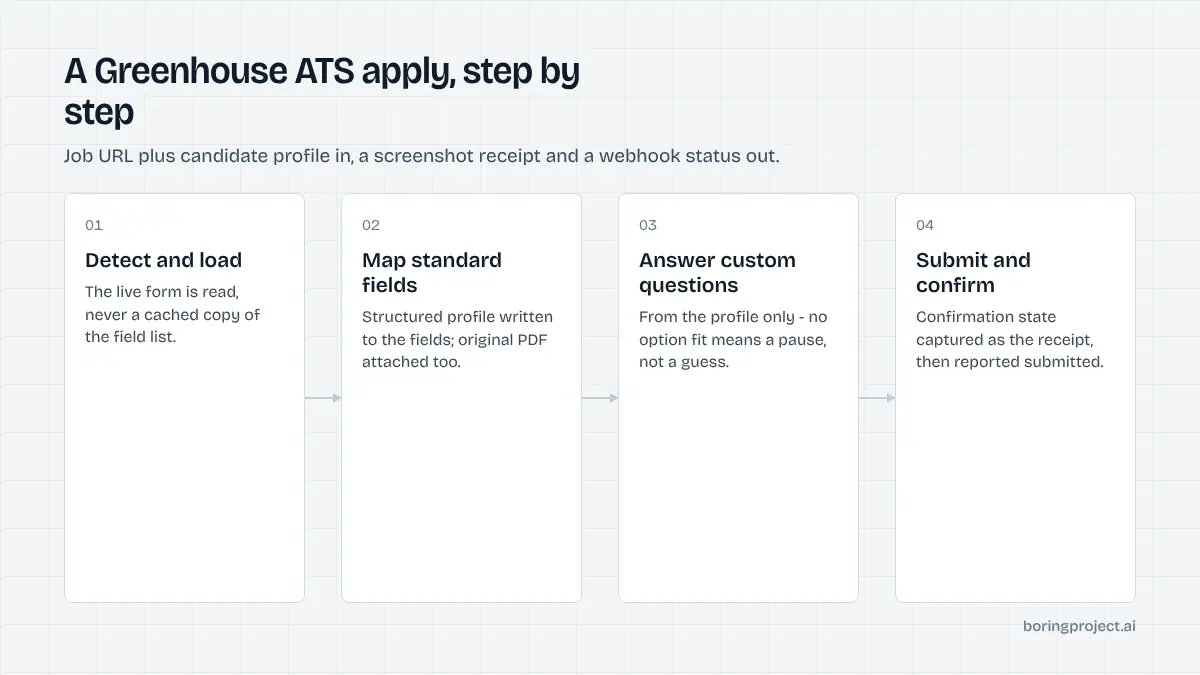
A job application API follows a repeatable sequence on Greenhouse. Here is the sequence, and the decisions made at each step.
Detect, load, map
The system recognises a Greenhouse posting from the URL or the embedded board markup, loads the live form rather than a cached copy, and reads the field list. Standard fields map directly from the candidate profile: name, email, phone, resume file, links, location.
The resume is uploaded as a file every time. Greenhouse offers resume parsing for candidates, but the "enter manually" fallback exists because parsing misreads dates and titles. Automation sidesteps the problem by writing structured data to the fields and attaching the original PDF for the recruiter.
Answer custom questions from the profile only
Each custom question is matched against the candidate profile. Authorisation, sponsorship, relocation, notice period and compensation range are standard profile attributes and resolve immediately. Select-type questions are matched to the closest option; if no option fits, that is a pause, not a guess.
Free-text prompts are where discipline matters. A question that can be answered from facts the candidate provided gets answered. A question that would require inventing experience, a credential or a motivation the candidate never stated returns needs_input with the question text, so the person answers once and the run resumes. The reasoning and the reuse mechanics are in our guide to screening questions automation.
Submit, confirm, receipt
After the form validates, the Submit Application button is clicked. Greenhouse shows an on-page confirmation and typically sends an acknowledgement email to the candidate. The automation captures a screenshot of the confirmation state as the receipt and reports submitted. If the posting has closed or the form fails to validate after a retry, the status is failed with the reason.
Where Greenhouse runs go wrong, and how to avoid it
Required questions with no profile answer
The single largest cause of pauses. If you are a staffing agency or product team sending volume through Greenhouse, enrich candidate profiles up front with the fields employers ask about most: authorisation per country, sponsorship need, earliest start date, salary range with currency, and relocation preference. A complete profile turns most pauses into straight submissions.
Embedded boards and modified forms
Many companies embed the Greenhouse form inside their own careers page. The underlying fields are identical, but surrounding scripts, cookie banners and occasional CAPTCHA challenges can interfere. A robust system handles the embed the same way as the hosted board and treats a CAPTCHA as a documented pause rather than a silent failure.
Duplicate applications
Because there is no account, nothing stops the same candidate from being submitted twice to one posting. Greenhouse flags duplicates on the recruiter side, which does not help the candidate. Keep a record of job URL plus candidate and reject repeats before they reach the form. Per-employer rate limits also matter: dozens of applications to one company in a short window are visible to the recruiting team and reflect badly on the people behind them.
Timing is the good news. Without account creation or page transitions, a Greenhouse ATS apply is at the fast end of the range described in how long an automated job application takes. Most of the elapsed time is the form load and file upload rather than filling.
Frequently asked questions
Does Greenhouse require an account to apply?
No. Greenhouse-hosted job boards let candidates apply directly from the posting without registering or logging in. That is one reason it is among the fastest systems to automate. Each application is independent, so applying to several roles at one company means filling the form several times, with the same profile data each time.
Which Greenhouse fields does an auto apply tool fill automatically?
The standard block is predictable: first name, last name, email, phone, resume, optional cover letter, LinkedIn URL, website and sometimes location. These map directly from a structured candidate profile. The variable part is the employer's custom question set, which can range from zero questions to a dozen and determines whether the run completes without a pause.
How are EEOC questions handled when I auto apply on Greenhouse?
Greenhouse lets employers attach a fixed voluntary self-identification questionnaire covering gender, race, veteran and disability status, and each item includes a decline option. Responsible automation fills these only with values the candidate explicitly chose. If no preference is recorded, it selects the decline option or leaves them blank rather than inventing an answer.
Why did my Greenhouse application pause with needs_input?
Almost always because a required custom question could not be answered from your profile. Common examples are "Why do you want to work here?", a compensation expectation in a specific currency, or a certification the profile does not list. The system reports the exact question text so you can answer once; the answer is stored and reused for similar prompts.
Is Greenhouse resume parsing reliable enough to skip manual entry?
Greenhouse's "enter manually" option exists precisely because parsing is imperfect. Automation does not depend on it. The resume file is uploaded so the recruiter sees it, while the form fields are written from the structured profile. That avoids mangled job titles or missing dates that a parser might introduce.
Can I detect a Greenhouse job before sending it to an auto apply system?
Usually. Greenhouse-hosted postings live on boards.greenhouse.io or job-boards.greenhouse.io, and embedded boards on company sites load from those domains. A good apply system detects the ATS itself from the URL and page structure, so you do not need to classify postings before submitting them.
Next step
Greenhouse is the easiest place to see what a job application API does: send a posting URL and a candidate profile, get back a submitted receipt with a screenshot in a few minutes. Try it on a live Greenhouse board first, then expand to the harder systems. Per-application pricing means you pay only for successful submissions.