 The Boring Project
How to Auto Apply on JazzHR Applications
JazzHR applications combine a resume-first form with employer-built screening questionnaires, and jazzhr application automation hinges on classifying each question correctly before it is answered.
Why JazzHR is a questionnaire-first ATS
JazzHR serves small and mid-sized employers, and its distinguishing feature from a candidate's point of view is the screening questionnaire. Two employers using the same product can present forms of very different length, depending on how many questions they attached to the job.
Hosting and URLs
JazzHR careers pages are typically served from a company subdomain of applytojob.com, with each job at its own path. Some employers embed the list on their own website. Both routes land on the same application layout, so detection is reliable once the form loads.
The order of the form
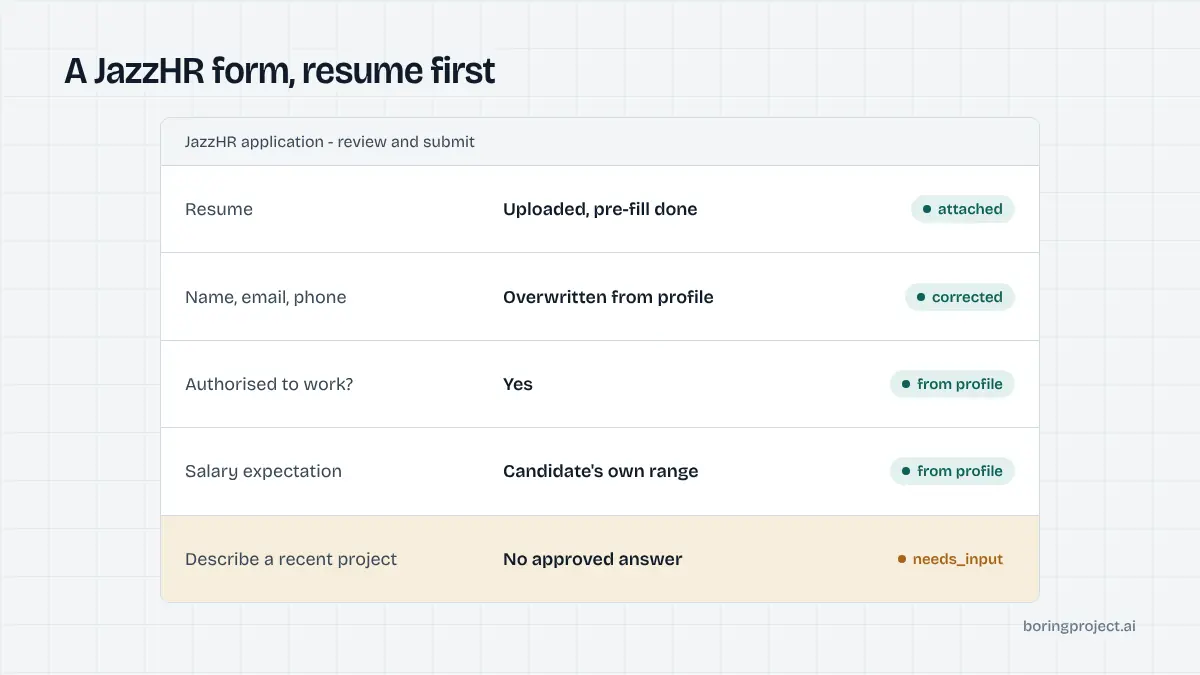
The application tends to start with the resume. Uploading one lets JazzHR pre-fill name, email, phone, and sometimes work history. Candidates then confirm or correct those fields, answer the questions section, optionally complete a voluntary EEO section, and submit.
There is no account to create and no login. A candidate who applies to three jobs at the same employer fills three separate forms, although the resume upload makes each one quick.
Where questions come from
JazzHR employers draw questions from two places: a library of standard candidate profile questions, and custom questions written for the specific job. Both appear in the same section of the form. The custom ones are where the variety lives, and where automation earns its keep.
The question types you will meet
If you want to know how to auto apply on JazzHR without a high pause rate, start by understanding what the questions look like and what each type needs.
Factual and choice questions
Yes/no, multiple choice, dropdown, and short text questions make up the bulk of most questionnaires. Typical prompts cover work authorisation, willingness to relocate, years of experience with a tool, availability to start, and salary expectations. A structured candidate profile answers nearly all of these without human involvement.
Salary questions are worth a specific note. Some employers ask for a number, others for a range, and a few for a yes/no on whether the posted range is acceptable. The agent uses the candidate's stated expectation and formats it to match the field, but it will not lower the figure to fit a posted range.
Essay and file questions
Some employers include long-form prompts, such as a request to describe a relevant project, or they ask for a file beyond the resume, such as a portfolio or certification. These cannot be answered from profile fields alone. If the candidate pre-approved an answer or supplied the file, the run proceeds; otherwise it pauses.
Knockout questions
JazzHR lets employers flag specific answers to any question as disqualifying. When a candidate selects a flagged answer, one of two things happens on the recruiter side.
In flag-only mode, the answer is highlighted on the candidate's profile for review. In auto-reject mode, the candidate is moved to a not-hired disposition and may receive a templated rejection email at a time the employer chooses.
The candidate sees neither mode. The confirmation screen looks identical whether the application sailed through or was filtered out immediately.
How automation handles a JazzHR run
Here is the sequence an automated agent follows on a JazzHR posting. The structure is the same for a single application or a batch of several hundred.
Consent, detection, resume
The candidate's consent for this specific job is verified first, then the page is loaded and recognised as JazzHR. The resume is uploaded and the agent waits for the pre-fill to complete.
It then overwrites any parsed fields that disagree with the candidate's confirmed profile. Parsers get names and dates wrong often enough that trusting the profile over the parse is the safer default, and a wrong phone number is the kind of error that silently costs a candidate the callback.
Question classification
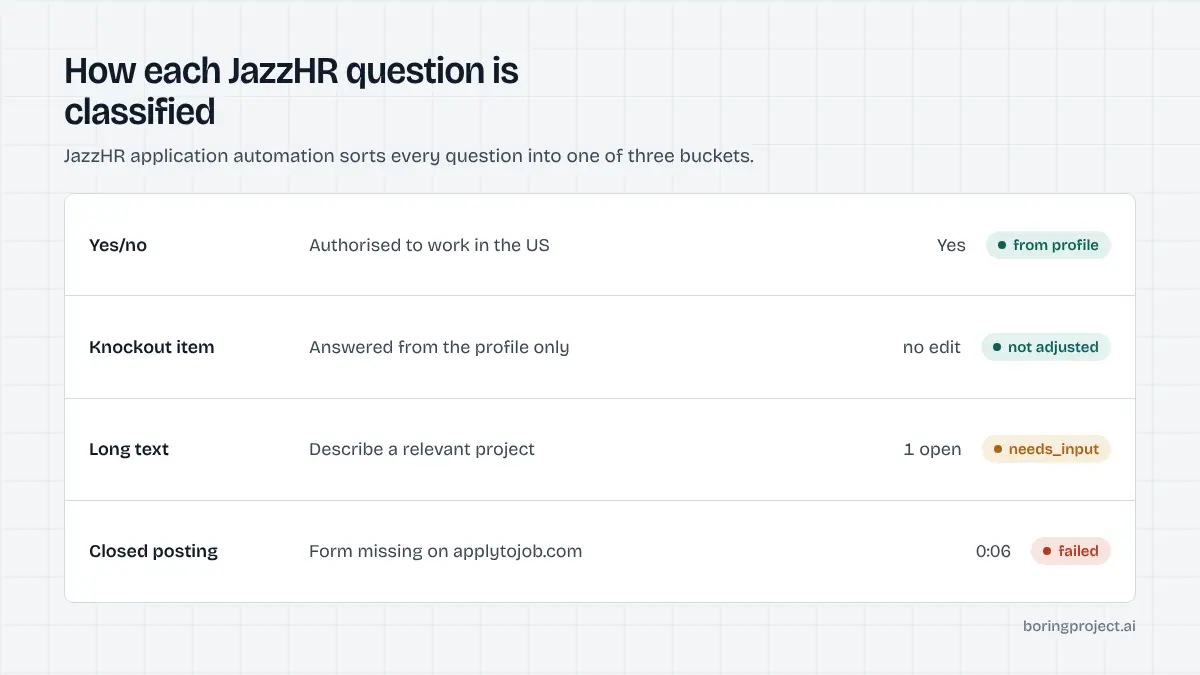
Each question is read and sorted into one of three buckets: answerable from profile, needs candidate input, or knockout-sensitive. The first bucket is filled immediately. The second raises a needs_input event through the webhook with the question text attached.
The third bucket is answered strictly from the profile, with no adjustment to pass the filter. Since JazzHR does not label knockout questions for the candidate, the agent treats every eligibility-style question as if it might be one.
That last rule matters more than it may seem. An application that clears a knockout dishonestly can lead to a wasted interview at best, and to a rescinded offer at worst. Our post on why automated applications get rejected goes into the downstream cost.
Submission and evidence
When all required questions are answered, the form is submitted. The confirmation screen is captured as a screenshot and returned with a submitted status.
If the employer's careers page shows a closed notice or the form is missing, the run returns failed with a reason so the job can be removed from the feed. Per-employer rate limits keep a candidate from hitting one company's inbox with several applications in a single minute.
JazzHR's form is close in spirit to BambooHR's, minus the knockout layer. If your coverage includes both, the BambooHR auto apply guide describes the simpler cousin.
Frequently asked questions
How can I tell a job is hosted on JazzHR?
JazzHR careers pages and application forms are commonly served from a company subdomain of applytojob.com, and the posting URL often includes 'apply' in the path. Employers can also embed the job list on their own site. The application form itself, with its resume-first layout and questions section, is consistent across both.
Do candidates need to register before applying on JazzHR?
No. JazzHR applications are single submissions without an account. A candidate uploads a resume, confirms contact details, answers whatever questions the employer configured, and submits. There is no login, password, or email verification gate, which keeps automated runs short and predictable.
What is a JazzHR knockout question?
It is a screening question where the employer flags one or more answers as disqualifying. Depending on settings, a flagged answer either marks the candidate for the recruiter's attention or triggers automatic rejection with a templated email. The candidate sees a normal confirmation either way, so honesty in the answer is essential.
Does automation change answers to avoid knockouts?
No. Knockout questions are answered from the candidate's actual profile. Changing a work-authorization or availability answer to pass a filter would misrepresent the candidate and create problems later. If the honest answer is disqualifying, the platform can choose to warn the candidate before submitting.
What questions pause a JazzHR application for input?
Open-ended questions without a stored answer, such as 'Describe a project you led', pause with a needs_input status. So do file requests for documents the candidate has not supplied. Yes/no, multiple choice, and short factual questions are answered automatically when the profile supports a confident answer.
Does JazzHR send a confirmation email after applying?
Employers can enable an automatic acknowledgement, and many do, but it is a per-account setting. The screenshot receipt captured at the moment of submission is the dependable record. If a candidate receives no email, the receipt still proves the application went through.
Next step
Reverse recruiters and career services that place candidates with small employers see a lot of JazzHR postings. Managed Applies takes a CSV of jobs and candidates and returns receipts, with per-application pricing. Talk to sales to run a pilot batch.