 The Boring Project
How to Auto Apply on BambooHR Applications
BambooHR careers pages use a compact, single-page form, which makes bamboohr apply automation one of the simpler ATS flows to run reliably, provided attachments and custom questions are handled with care.
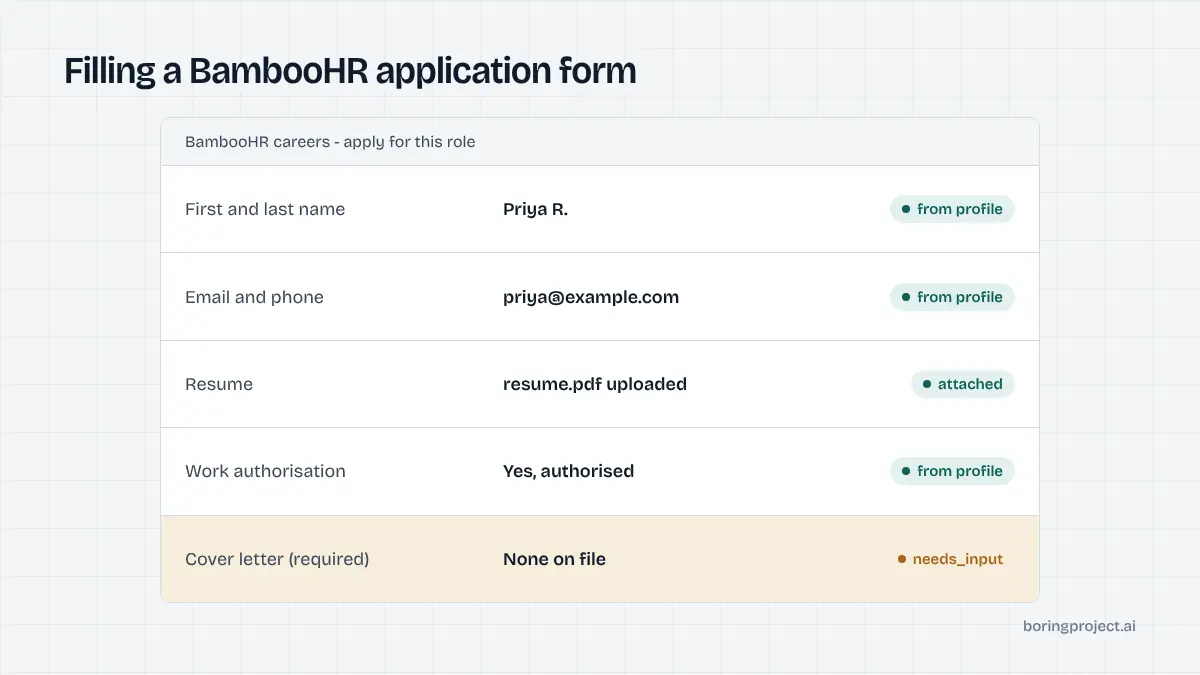
What the BambooHR application flow looks like
BambooHR is a small and mid-sized business HR suite with an applicant tracking module bundled in. Its careers pages are plain by design: a list of openings on a company subdomain, a job description page, and an application form on the same page or one click away.
Where the jobs live
Most employers on BambooHR publish openings at an address like companyname.bamboohr.com/careers. Each opening has a numbered path under that root. Some companies embed the same listing inside their own website, but the form still posts to BambooHR.
There is no candidate account. A job seeker does not register, confirm an email, or sign in. Every application is a fresh form submission, which is good news for anyone learning how to auto apply on BambooHR openings at volume.
The standard fields
The default form asks for a resume, first and last name, email, and phone. Employers can turn on additional fields such as address, LinkedIn URL, website, desired salary, availability date, and referral source. Each can be set to required, optional, or hidden, so two BambooHR employers can show quite different forms.
Attachments are the main variable. Beyond the resume, an employer can ask for a cover letter as text or as a file, and can add further document uploads. Automation needs to detect which attachment slots are present and which are mandatory before it begins typing.
Custom questions
BambooHR lets employers add their own screening questions to the form. In practice these are short text, long text, yes/no, and multiple choice fields, placed after the standard section. There is no knockout logic shown to the candidate, so a wrong answer does not visibly block submission, but it can disqualify the application in the recruiter's view.
Because the questions are free-form rather than drawn from a shared library, wording varies widely between employers. One asks "Are you legally authorized to work in the US?" and another asks "Work authorization status?" with a dropdown. Automation has to interpret the intent of each question, not match it against a fixed list.
Running bamboohr apply automation step by step
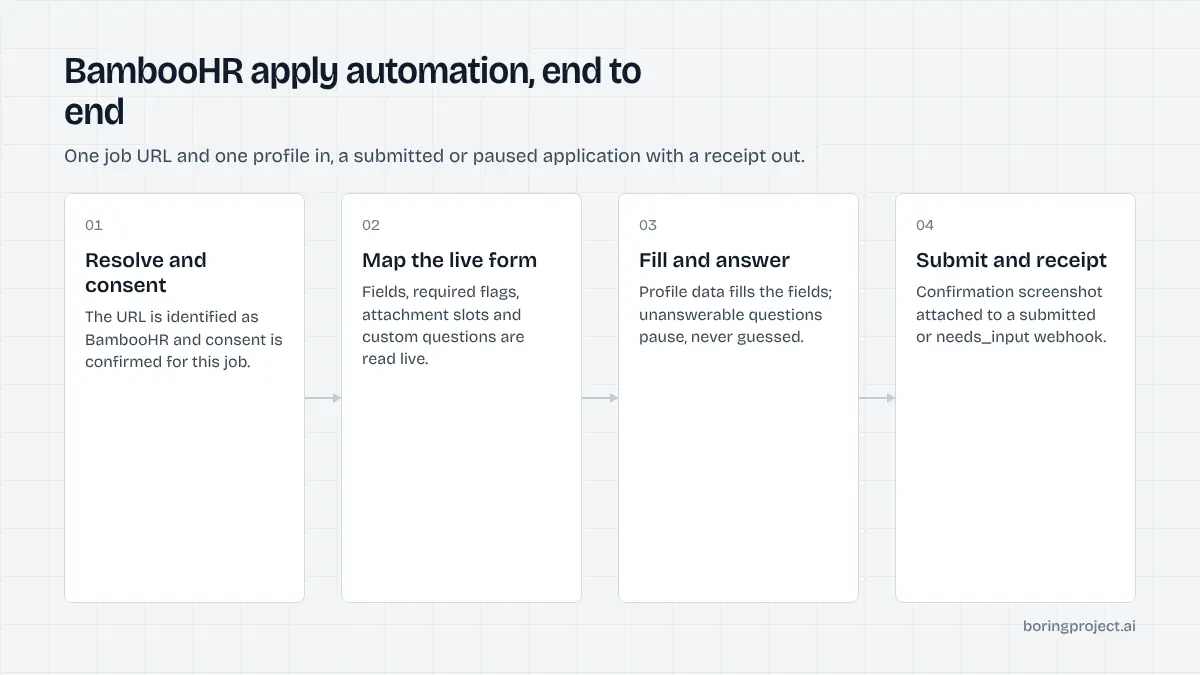
The sequence below is how a job application API handles a BambooHR opening. It is the same whether one application or a thousand are in the queue.
1. Resolve the opening and confirm consent
The job URL is fetched and the ATS is identified as BambooHR from the domain and page structure. The candidate's consent for this specific application is checked before anything else happens. No consent, no submission.
2. Map the form
The agent reads the live form rather than relying on a stored template, because employers change field settings without notice. It records which fields exist, which are required, which attachments are expected, and what custom questions follow.
3. Fill, answer, submit, and capture the receipt
Standard fields are populated from the candidate profile. The resume is uploaded in the format the candidate supplied. Custom questions are answered only when the profile contains a clear answer; the system never guesses at a yes/no that could misrepresent the candidate.
The form is then submitted and the confirmation screen is captured as a screenshot. A webhook fires with a status of submitted, along with the receipt. Median time from request to submit is around three minutes across supported systems, and BambooHR forms tend to sit at the quick end of that.
If validation fails on submit, for example because a phone number format was rejected, the agent reads the inline error, corrects the field, and retries once. Repeated validation failures are reported as failed with the error text so the problem can be traced to a specific field rather than a vague "submission error".
Where BambooHR applications pause, fail, or differ from neighbours
BambooHR is forgiving, but a few situations stop a run short. Knowing them in advance keeps the needs_input rate low. It also helps to see how BambooHR sits next to the other small-business systems you are likely to meet in the same job feed.
| System | Candidate account | Typical length | Pause triggers |
|---|---|---|---|
| BambooHR | None | One page | Required attachments, open-text questions |
| Breezy HR | None | One page plus questionnaire | Video responses, file questions |
| JazzHR | None | One page plus questionnaire | Knockout questions, essays |
| Workable | None | One page | Open-text questions |
BambooHR and Breezy HR are structurally similar, but Breezy's questionnaire feature introduces question types that cannot be automated at all. Our Breezy HR auto apply guide covers those cases. The three situations below account for most BambooHR pauses.
Required attachments the candidate did not provide
If an employer marks a cover letter file as required and the candidate profile has none, the run pauses with needs_input rather than uploading a blank document. The webhook names the missing item so the candidate or the platform operator can supply it and resume.
Custom questions with no profile answer
Questions like "Are you authorized to work in this country?" or "What is your expected salary?" are answered from stored profile fields. Open questions such as "Why do you want to work here?" need a candidate-approved answer. For a deeper look at how these get classified, see our guide to screening questions automation.
Closed or unpublished openings
BambooHR removes the form when a posting is closed, and the page usually shows a short notice instead. The agent reports failed with a reason of "posting closed" so the job can be dropped from the feed rather than retried. This is a common outcome in older job-board scrapes, where a listing can outlive the opening by days or weeks.
Frequently asked questions
Do candidates need an account to apply on BambooHR?
No. BambooHR careers pages use a single application form per opening and do not ask candidates to register or log in. That makes BambooHR one of the more straightforward systems to automate, since there is no credential step, no email verification loop, and no saved-profile state to reconcile between applications.
How do I know a job is hosted on BambooHR?
Look at the URL. Most BambooHR careers pages live on a company subdomain such as companyname.bamboohr.com/careers, with individual openings at a numbered path under that. Some employers embed the same form in their own site, in which case the page source or network requests will still reference bamboohr.com.
What file types can be attached to a BambooHR application?
The resume field accepts common document formats such as PDF and Word files. Employers can also enable a cover letter upload and additional attachment fields. Automation should send the candidate's resume in the format the candidate approved and skip optional attachments rather than uploading placeholder files.
What happens when a BambooHR opening has custom questions?
Employers can add their own questions to the form, including short text, long text, yes/no, and multiple choice. Automation answers them from the candidate profile when a confident answer exists. If a question has no reliable answer in the profile, the application pauses with a needs_input status so the candidate can respond.
Can I apply to many BambooHR openings in one batch?
Yes. Because each opening is a self-contained form, batch runs are mostly a matter of iterating job URLs. Per-employer rate limits still apply so one company's careers page is not hit with dozens of submissions in a short window, and each application still requires the candidate's consent.
Does BambooHR send a confirmation after submitting?
Most employers have an automatic acknowledgement email enabled, but this is configured per account and is not guaranteed. A screenshot receipt of the confirmation screen, captured at submit time, is a more dependable record than waiting for an email that may never arrive.
Next step
If you run a job board, staffing agency, or career product with BambooHR employers in your feed, the Apply API handles the form mapping, attachment logic, and receipts for you. Read the API documentation to send your first BambooHR application, with per-application pricing.