 The Boring Project
Headless Browser Job Applications: Build or Buy
A technical walkthrough of Playwright job application automation: how a submitter is built, where ATS tenant quirks turn a script into a system, and why teams that build one often stop maintaining it.
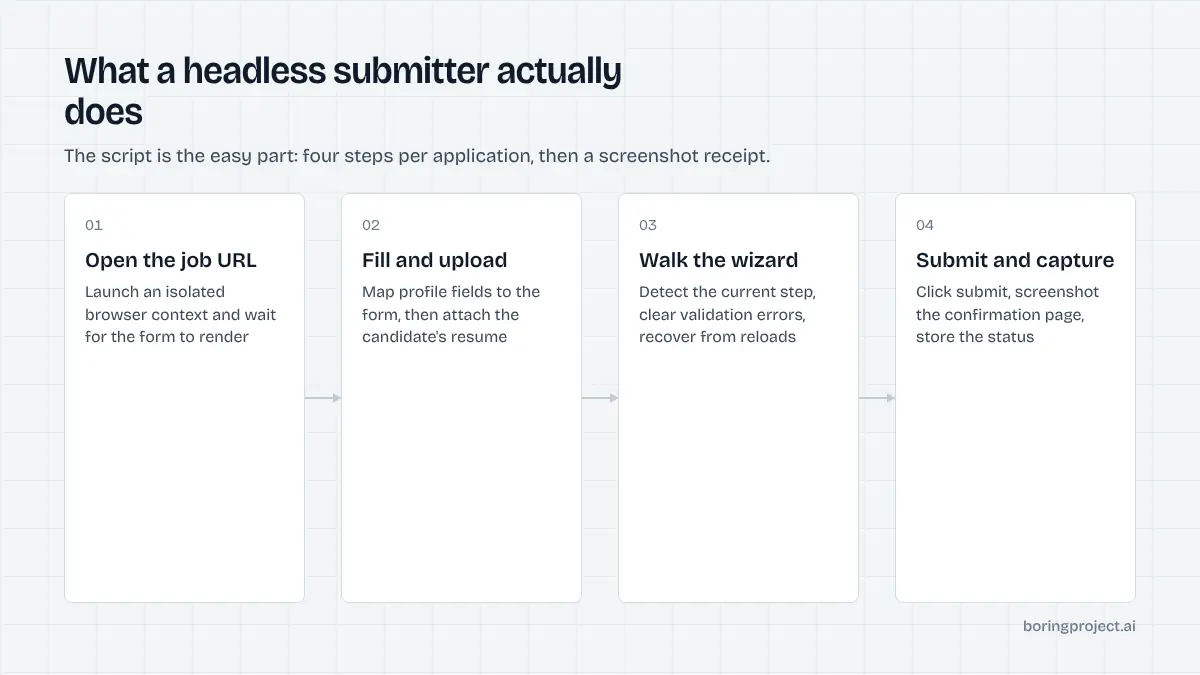
Any engineer who has used a browser automation framework has had the thought: I could write a script that applies to jobs. For one form on one site, it is an afternoon's work. The question this article addresses is what happens after that afternoon.
We walk through how a headless-browser submitter is built, the places where applicant tracking systems resist it, the infrastructure it ends up needing, and the maintenance curve that leads most teams to a build-or-buy decision within months.
How a headless browser submitter works
The happy path
The basic loop is straightforward. Launch a browser context, navigate to the job URL, locate the apply button, fill the fields from a candidate profile, upload the resume, advance through any steps, click submit, and capture a screenshot of the confirmation. Playwright, Puppeteer and Selenium all handle this well, with Playwright being a common current choice for its auto-waiting and multi-browser support.
For a single Greenhouse or Lever form with standard fields, that loop works on the first day. The script is perhaps a hundred lines.
Mapping the profile to the form
The second piece is translation. Your profile stores a phone number; the form wants it in a specific format. Your profile has a degree; the form has a dropdown of education levels with employer-chosen labels. Dates, countries, employment types and yes/no questions all need mapping, and the mapping differs by tenant.
This is where a script becomes a library. Each ATS family gets an adapter; each adapter grows tenant-specific branches as you encounter new configurations.
Evidence and status
Production use demands more than a boolean result. You need a screenshot of the confirmation page as proof, a structured reason when the attempt fails, and a distinct state for when the form asked something you could not answer. That three-state model (submitted, needs input, failed) is what the rest of your product consumes, so build it in early rather than retrofitting it.
Where ATS tenant quirks bite
Multi-step wizards and account creation
Several large ATS families run applications as multi-page wizards. Workday is the best-known example: the flow typically creates a candidate account, may require email verification, and then walks through several pages whose content varies by employer. Each page has its own validation and its own failure modes.
Handling this well means writing a state machine rather than a linear script. The code has to detect which step it is on, read errors rendered on that step, and recover when a page reloads or redirects unexpectedly.
Selector drift and layout variation
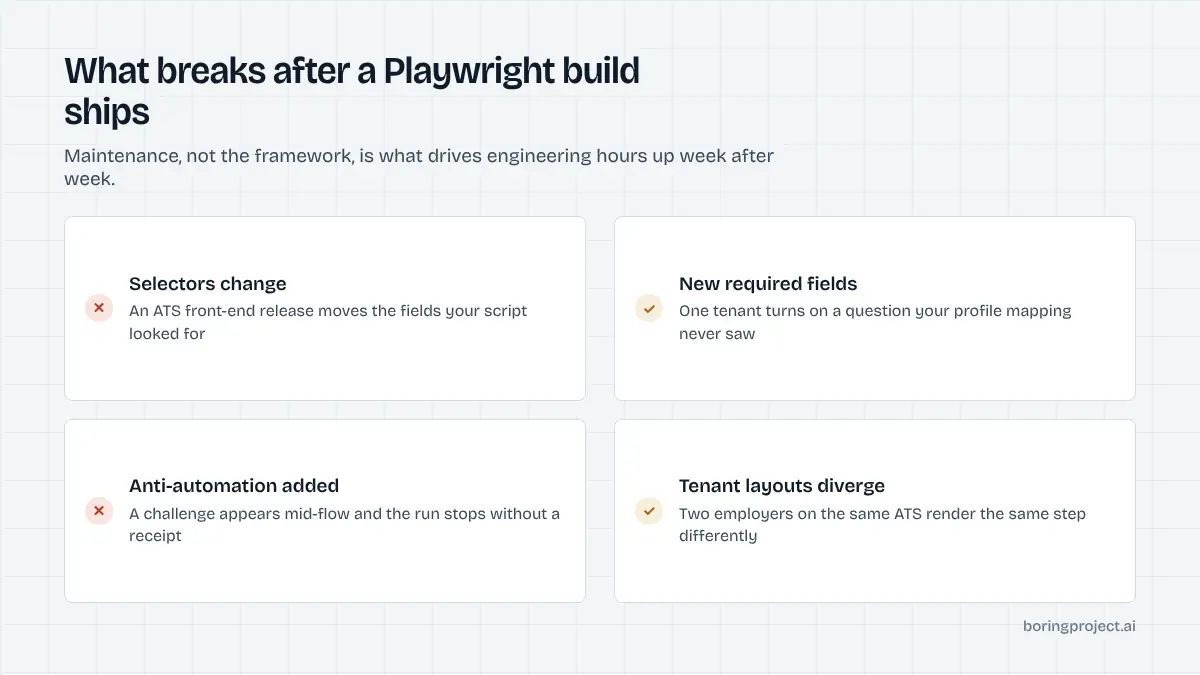
Employers and ATS vendors update their front ends. A selector that worked last week returns nothing this week. Two tenants on the same platform render the same logical field with different markup. A new required custom question appears on one employer's form and nowhere else.
None of these is hard to fix individually. The problem is frequency. Across hundreds of employers, something drifts every day, and each drift is a silent failure until monitoring catches it.
Captchas, bot detection and verification codes
Some sites add captchas or bot-detection services. Some require a one-time code sent to the candidate's email before the form will proceed. The correct approach is to detect these conditions, complete them through legitimate, consented means where possible, and otherwise return a clear failed or needs_input status. Evasion is brittle and, depending on the site's terms, may not be acceptable at all.
Why teams stop maintaining their own stack
The infrastructure nobody planned for
The script was the easy part. Around it you need a queue, a pool of isolated browser instances that scales with load, storage for resumes and screenshots, a database for application state, timeouts and retries that distinguish transient errors from closed postings, structured failure logging, and dashboards by ATS family and tenant.
Our explainer on job search automation infrastructure describes each of these layers. Together they are a product in their own right, and they need an owner.
The maintenance curve
Effort follows a recognisable shape. Weeks one to four produce a working submitter for a few ATSs and a sense that the problem is solved. Months two to six bring a growing stream of tenant-specific breakages, each small, each urgent, each pulling an engineer off the roadmap. By month six most teams are either dedicating someone full time to adapters or quietly letting coverage decay.
| Stage | What you have | What it costs |
|---|---|---|
| Prototype | One or two ATSs, happy path | Days of one engineer |
| Early production | Several adapters, basic monitoring | Weeks, plus on-call attention |
| Sustained coverage | Dozens of ATSs, thousands of tenants | Ongoing dedicated engineering |
Deciding to build or buy
Building makes sense when submission is your core product, when you target a narrow and stable set of forms, or when you have specific requirements no provider meets. Buying makes sense when you need broad coverage across employers you do not control and your engineers have better things to do than chase selector changes. Our build vs buy analysis for job application automation works through the cost side in detail.
Frequently asked questions
Is Playwright a good choice for this kind of automation?
Playwright is a capable, well-maintained browser automation framework and a sensible choice for driving application forms. The framework is rarely the problem. The difficulty lies in the thousands of distinct forms you point it at, the infrastructure around it, and the maintenance load when employers change their pages. The same is true of Puppeteer or Selenium.
How do multi-step ATS wizards complicate things?
Each step can have its own validation, its own required fields and its own loading behaviour. The script has to detect which step it is on, handle errors surfaced on that step, and recover if a page reloads unexpectedly. Account creation and email verification steps add external dependencies. A single-page form is a script; a five-step wizard is a state machine.
What breaks most often in production?
Selector changes after an employer or ATS vendor updates their front end, new required fields appearing in a tenant's configuration, anti-automation measures being introduced, and silent layout differences between tenants on the same ATS. Each is individually small; collectively they produce a steady stream of breakages that someone has to triage and fix.
How should a submitter deal with screening questions it cannot answer?
It should stop and report. Returning a needs_input state with the exact questions lets the consuming product ask the candidate and resume. Writing logic that picks a plausible answer to get past the form is tempting during development and dangerous in production, because it misrepresents candidates to employers.
What infrastructure do we need beyond the script?
A job queue, a scalable pool of browser instances with session isolation, storage for resumes and screenshots, a database for application state, retry and timeout handling, structured logging of failure reasons, and monitoring by ATS and tenant. The script is a small part of the total system, and most of the cost is in everything around it.
When does buying make more sense than building?
When submission is not your core product, when you need coverage beyond a handful of ATSs, or when your engineers' time is better spent on the features that differentiate you. Building is reasonable for a narrow, stable set of forms you control or monitor closely. For broad coverage across employers you do not control, the maintenance curve usually decides it.
Next step
If you want the result of headless browser job applications without running the browsers, the Apply API takes a job URL and a profile and returns submitted, needs_input or failed with a screenshot receipt, across 40+ ATSs. The API documentation shows the request and webhook so you can compare it with your own prototype.