 The Boring Project
How to Auto Apply on Lever Applications
Lever applications are a single page with one quirk: the form wants your resume first and tries to fill everything else from it. This guide explains the Lever ATS apply flow field by field, how automation handles the resume-first design, and how to confirm a submission really went through.
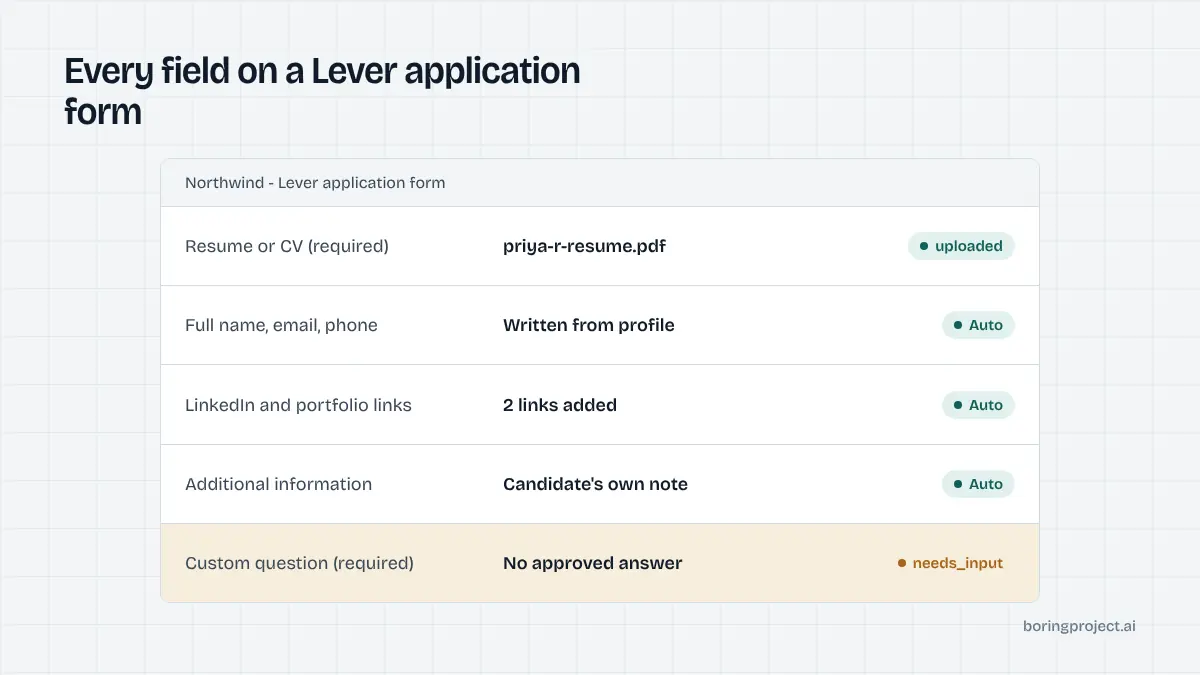
The Lever form, top to bottom
Lever's job site renders at jobs.lever.co/<company>/<posting-id>/apply or inside a company's own careers page. Whichever host you land on, the form is the same. Working out how to auto apply on Lever starts with knowing its six parts in order.
1. Resume upload, placed deliberately at the top
The first element is a resume or CV upload. Lever parses the file as soon as it is attached and pre-fills the contact fields below. Employers can set the resume to required or optional, and most keep it required.
For a person, the autofill saves typing. For an automated system, it is an unreliable source: parsed names pick up middle initials, phone numbers lose country codes, and "current company" is often the most recent employer named anywhere in the document. Automation uploads the file for the recruiter's benefit and then writes each field from structured data.
2. Contact, current-role and link fields
Below the resume sit the identity fields: full name, email, phone, current company and, on many forms, current location with an autocomplete. Employers choose which of these are required, optional or hidden, so two Lever postings from different companies can ask for slightly different sets.
Next comes a dedicated links block: LinkedIn, Twitter or X, GitHub, portfolio and a generic "other" URL. These are plain URL inputs with light validation. A profile with a canonical LinkedIn URL and a portfolio link fills this block completely, and an empty optional link is simply skipped.
3. Additional information, custom questions and EEO
A free-text "additional information" box closes the standard section. After it come any employer-specific questions, which Lever supports as text, dropdown, multiple choice, checkbox, yes/no, date, number, link and file types. Any of them can be required, and some employers mark certain answers as private so only specific team members can see them.
Optionally, a voluntary U.S. EEO survey follows, and a pronouns field may appear. The page ends with a Submit application button, sometimes preceded by a CAPTCHA. That is the whole Lever ATS apply surface: one scroll, one button, no second page.
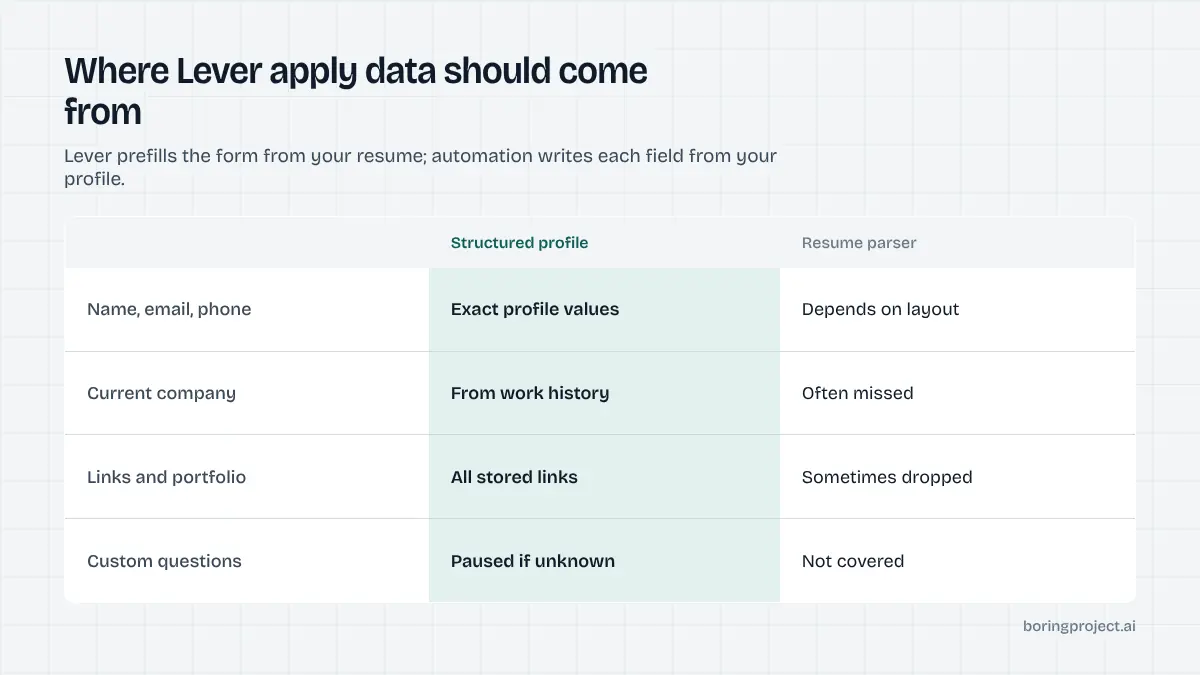
How the automated run handles each part
Structured data beats the parser
The core rule on Lever is simple: never rely on what the parser extracted. The engine attaches the resume, waits for Lever's autofill to finish so it does not race the form, then overwrites name, email, phone, company and location with the candidate's canonical values. Links are written directly. The result is a form that matches the profile exactly, with the original PDF attached for the human reader.
If you have compared this with browser autofill extensions, the difference is that an apply system fills, validates and submits in one unattended pass, while autofill only pre-populates and leaves the rest to you. The distinction is spelled out in auto apply vs autofill.
Custom questions and the "additional information" box
Custom questions are matched against the profile. Work authorisation, sponsorship, start date, salary expectation and relocation are standard attributes and resolve on their own. Select-type questions are matched to the nearest valid option.
The additional information box deserves care. It is optional on most postings, and the right behaviour is to fill it only with text the candidate provided, such as a two-sentence pitch stored on their profile. Generating a motivation statement the candidate never wrote is fabrication, and it reads as such to recruiters. If a required free-text question has no answer in the profile, the run pauses with needs_input and the exact question.
EEO and pronoun fields are filled only with explicit candidate choices. With no recorded preference, the decline option is used where present.
Submit, and how confirmation is verified
Clicking Submit application triggers client-side validation. If a required field is empty or a URL is malformed, Lever highlights it and the engine corrects or pauses. On success, the form is replaced with an on-page confirmation, and the candidate usually receives an acknowledgement email from the employer.
The automation does not report success on the button click. It waits for the confirmation state, screenshots it, and only then emits submitted with the receipt attached. A posting that has been closed between discovery and submission produces failed with the reason, not a silent drop.
Running Lever at volume
Keep profiles complete
Lever forms are short, so a complete profile converts almost every run into a clean submission. The fields that most often trigger pauses are compensation expectations with currency, earliest start date, and authorisation status per country. Collect them once, store them as structured attributes rather than prose, and the same answers carry across every Lever posting the candidate is sent to.
For agencies and product teams, this is the highest-leverage change you can make. A profile with a dozen well-defined attributes turns a question-heavy Lever form from a pause into a pass, and the webhook receipts tell you which questions are still causing stops so you can add those attributes next.
Treat Greenhouse and Lever as a pair
Both are single-page, account-free systems with a standard block plus custom questions, and most startup job boards are a mix of the two. If you have the Lever flow working, the Greenhouse flow is nearly identical with different field names; the specifics are in how to auto apply on Greenhouse. Building for both covers a large share of venture-backed employers.
Respect the employer
No account means no natural brake on duplicates. Deduplicate on candidate plus posting before submission, and hold to per-employer rate limits so one company does not receive a flood from a single source in an hour. Candidate consent must be recorded per application. These habits keep applications from being flagged and keep the candidate's name in good standing.
Frequently asked questions
Do I need a Lever account to apply to a job?
No. Lever job sites, hosted at jobs.lever.co and embedded on company careers pages, accept applications without any registration. The candidate fills a single form and submits. There is no candidate dashboard to log back into, so if you want to track what you applied to, you need your own record or a webhook receipt from the apply system.
What is the "additional information" box on Lever for?
It is a free-text field at the end of the standard section where candidates can add anything the form did not ask for, often used as a short cover note. It is usually optional. Automation should populate it only with content the candidate supplied, for example a short pitch stored on their profile, rather than generating text on their behalf.
Why does Lever ask for my resume before anything else?
The resume field sits at the top because Lever parses the file and pre-fills name, email, phone, current company and links. That autofill is convenient for humans but inconsistent. An auto apply system uploads the file so recruiters see it, then writes every field from structured profile data so nothing depends on the parser.
How do I know an automated Lever application was actually submitted?
Lever replaces the form with an on-page confirmation after a successful submit and generally emails the candidate an acknowledgement. A well-built apply system waits for that confirmation state, captures a screenshot of it as the receipt, and only then reports the application as submitted through its webhook.
When will auto apply on Lever stop and ask for input?
The usual triggers are a required custom question that the profile cannot answer, a CAPTCHA challenge on the form, or a consent checkbox tied to a specific employer policy. The run returns needs_input with the exact prompt. Once answered, the same application resumes and submits rather than starting from an empty form.
Does Lever include EEO or demographic questions?
Employers can enable a voluntary U.S. equal employment opportunity survey that appears below the main form, covering gender, race, veteran and disability status, each with a decline option. Lever also offers an optional pronouns field. Automation should fill these only with explicit candidate choices and never infer or default an answer.
Next step
If Lever postings are part of your pipeline, the Apply API handles the resume-first form, custom questions and confirmation check, and returns a screenshot receipt per application. Read the API documentation to send your first Lever job URL; pricing is per successful application.