 The Boring Project
How to Auto Apply on ADP Workforce Now Career Centers
ADP Workforce Now career centers ask candidates to register before anything else, then run a long per-posting form, so an adp job application is one of the more time-consuming flows to complete by hand and one of the more valuable ones to automate.
Why ADP applications take longer than most
ADP Workforce Now is a payroll and HR platform for mid-sized employers, and its recruitment module publishes jobs to a hosted career center. The career center is functional rather than slick. It also front-loads friction: registration first, then a multi-section form, repeated for every posting.
Where the career center lives
Employers usually link to the career center from their own site with a button along the lines of "View current openings". The destination is a workforcenow.adp.com address with a long path that identifies the employer. Each job opens into its own detail page with an Apply button at the top.
Registration is mandatory
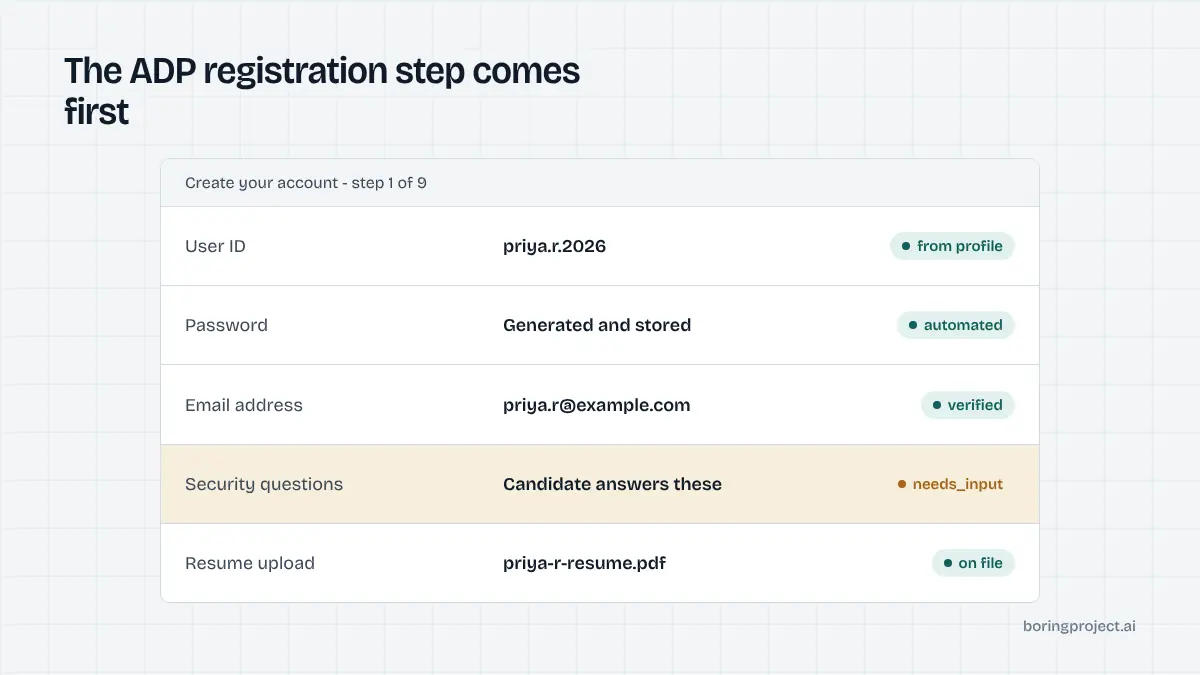
New applicants choose to register, fill in the required fields, and create a user ID and password. Some employers also present security questions.
Returning applicants sign in with the user ID and password they created earlier. Nothing in the application itself is reachable until this is done, and a forgotten user ID is a common reason candidates abandon a second application months later.
The account step is also the one part no tool can skip. The form sits behind a login, so an agent has to create or reuse a real candidate account with that employer before it can read a single field of the application.
One application per posting
Registration does not create a reusable one-click apply. Each posting has its own application that must be worked through, although resume data saved to the account pre-fills the later ones.
That repetition is what candidates find tiring and what automation removes. For a staffing agency submitting one candidate to five roles at the same employer, it is the difference between filling the same long form five times and reviewing five receipts.
How to auto apply on ADP Workforce Now from start to receipt
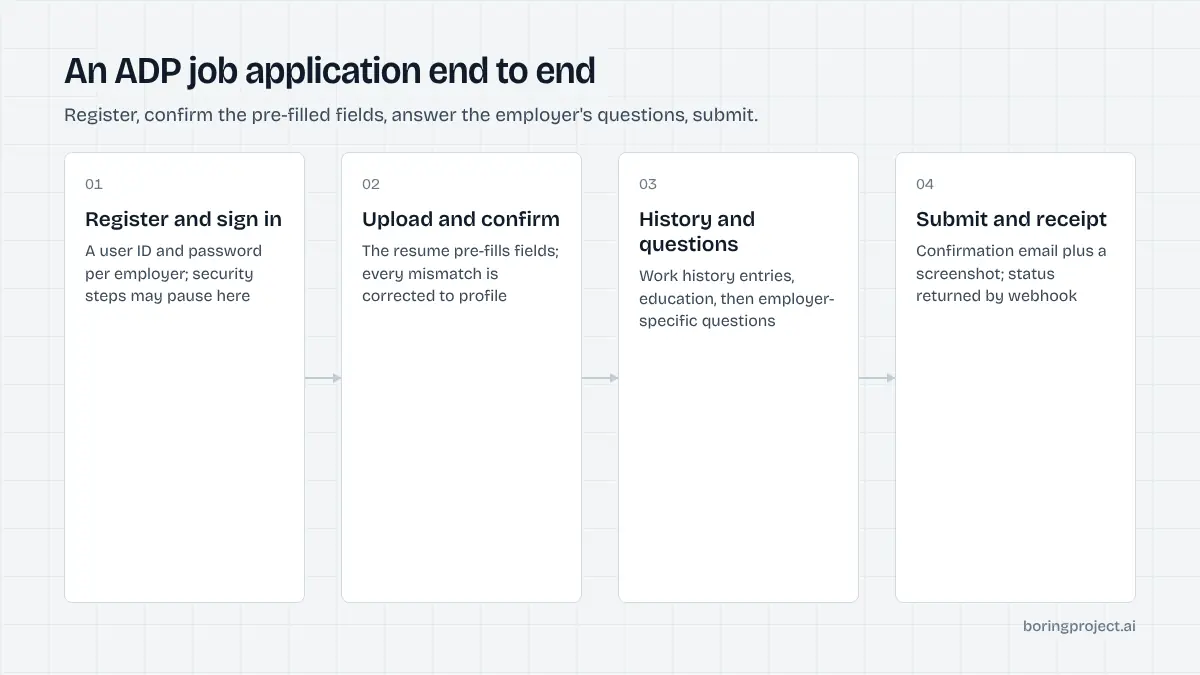
The sequence below reflects how an automated agent moves through a typical ADP career center. The exact sections vary by employer, since each configures its own form.
Clearing the account step
After confirming the candidate consented to this application, the agent handles registration or sign-in. Where the candidate already has an ADP account with the employer, stored credentials are used. Where the portal requires the candidate to complete verification or security questions personally, the run pauses with needs_input and tells the candidate exactly what to do.
Resume upload, pre-fill, and the long middle
Uploading a resume is recommended by ADP because it pre-fills parts of the form, and some employers make it mandatory. The agent uploads the candidate's resume, waits for the pre-fill, then compares every populated field against the confirmed profile. Mismatched dates, titles, and phone formats are corrected before moving on.
ADP forms typically ask for work history as separate entries with employer, title, dates, and duties, followed by education entries. These come straight from the structured profile. Employer-specific questions follow: availability, desired pay, licences, and role requirements, in dropdown, yes/no, and short-text formats.
Open-ended questions without a candidate-approved answer pause the run. Required fields the profile cannot satisfy, such as a missing education end date, also pause it. Nothing is invented to fill a gap.
Some employers add a voluntary self-identification section near the end. Those questions are answered only with values the candidate explicitly chose to share, and the decline option is selected otherwise. An attestation checkbox confirming the information is accurate is ticked on the basis of the candidate's per-application consent.
Submission and confirmation
The agent submits, captures the confirmation screen as a screenshot, and sends a submitted webhook. ADP normally emails a confirmation as well, but recruiters must send later status updates manually, so the screenshot receipt is the record worth keeping. If you are curious how this flow compares on the clock, see how long an automated job application takes.
Practical notes for teams submitting at volume
Knowing how to auto apply on ADP Workforce Now at volume takes a few operational details beyond the form itself, because these career centers behave differently from one-page SMB forms.
Desktop-oriented pages
Several employers advise candidates to use a desktop browser because the career center can misbehave on mobile. Automation runs in a full browser session, which sidesteps the problem, but it is a reminder that the pages depend on scripts loading in order. The agent waits for each section to render before acting, and it checks the page state after each section so a transient error can be retried without starting over.
Account hygiene per candidate
Every candidate gets their own ADP account per employer. Accounts are never shared across candidates, and credentials are stored only with the candidate's consent. Reusing one account to submit different people would both misrepresent the applicants and break the resume-data pre-fill that makes repeat applications quicker.
Credential storage is also what makes resumption work. When a run pauses for the candidate and resumes an hour later, the agent signs back in and picks up at the section where it stopped, rather than asking the candidate to redo registration.
Pacing per employer
An employer with twenty open roles should not receive twenty applications from the same candidate inside a minute. Per-employer rate limits space them out. Spacing also keeps the candidate's history with that employer readable, so a recruiter opening the account sees a considered set of applications rather than a burst. The same principle applies to UKG Pro, which shares the account-first structure; our UKG Pro auto apply guide covers the differences in profile handling.
Frequently asked questions
How do I recognise an ADP Workforce Now career center?
Job lists and applications are typically served from workforcenow.adp.com, with a long path that includes the employer's identifier. Employers link to it from their own careers page under a button such as 'View current openings'. The registration prompt that asks for a user ID and password is another clear signal.
Do I have to register to apply through ADP?
Yes. New applicants create an account with a user ID and password before an application can be submitted; returning applicants sign in. The account keeps resume data for later applications to the same employer. Each posting still has its own separate application, so registration does not mean one-click applies.
Is a resume required on ADP applications?
Employers can make it mandatory, and many do, because the resume pre-fills parts of the form. Where it is optional, candidates may type or paste their details instead. Automation always uploads the candidate's resume when one is on file, then corrects any pre-filled fields that disagree with the confirmed profile.
Why are ADP applications described as lengthy?
Beyond registration, the form usually walks through contact details, work history as individual entries, education, employer-specific questions, voluntary disclosures, and a review page. Each posting repeats most of it. The length is the main reason employers using ADP see drop-off, and the main reason automation is valuable here.
Will the candidate be notified of status changes?
A confirmation email is normally sent on submission. After that, ADP does not automatically notify applicants when a recruiter changes their status; the hiring team has to send a communication template manually. Candidates should rely on the submission receipt rather than expecting ongoing updates.
What stops an automated ADP application?
The account step if the candidate must complete security questions or verification personally, required work history fields the profile does not contain, employer questions with no approved answer, and postings that have closed. Each case is reported through the webhook with a needs_input or failed status and the specific cause.
Next step
Staffing agencies placing candidates with mid-sized employers run into ADP career centers constantly. Managed Applies takes a CSV of candidates and job URLs and returns receipts, with per-application pricing. Talk to sales to set up a pilot.