 The Boring Project
How to Auto Apply on UKG Pro Career Portals
UKG Pro career portals, still widely reached through recruiting.ultipro.com addresses, put a candidate account and a reusable profile in front of every ultipro job application, which changes how automation has to approach them.
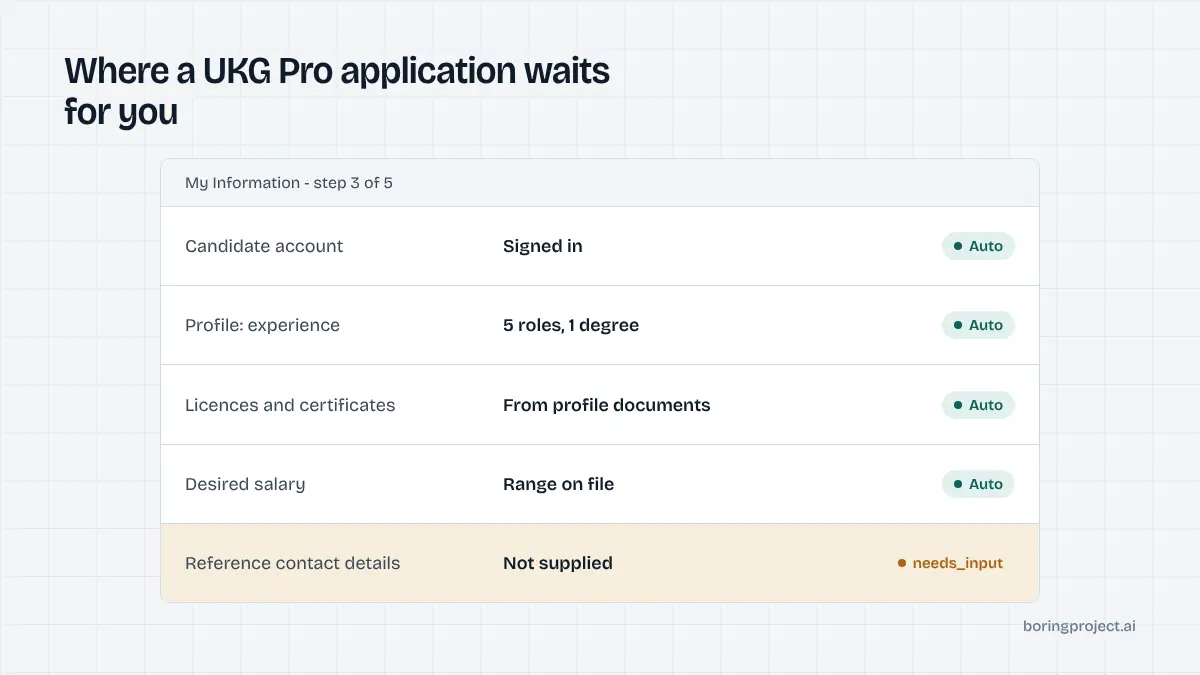
UKG Pro in one paragraph, then the parts that matter
UKG Pro is the enterprise HR suite formerly known as UltiPro. Its recruiting module powers career portals for large employers in healthcare, retail, manufacturing, and services. Those portals share a layout: a job board, a job detail page, and an application that opens only after the candidate signs in or creates an account. That last detail is why how to auto apply on UKG Pro is a different question from automating a public form.
Recognising a UKG Pro portal
Many employers still use addresses under recruiting.ultipro.com, with a company code and a job board identifier in the path. Others serve the same portal from a custom domain. The sign-in prompt before the application, and the candidate profile structure behind it, are the reliable tells.
The account gate
External candidates create a candidate account with an email address and a password, or sign in with an existing one. Some employers also allow third-party sign-in options.
Either way, nothing in the application can be filled until this step is cleared. This is the first place an automated flow may need the candidate directly.
Profile versus application
UKG Pro separates two things. The profile, sometimes referred to internally as the candidate's presence, holds work experience, education, licences and certifications, skills, documents, and references.
The application is per requisition and carries its own question set, such as desired salary and job-specific qualifications. Automation fills the profile once and the application every time.
How to auto apply on UKG Pro, step by step
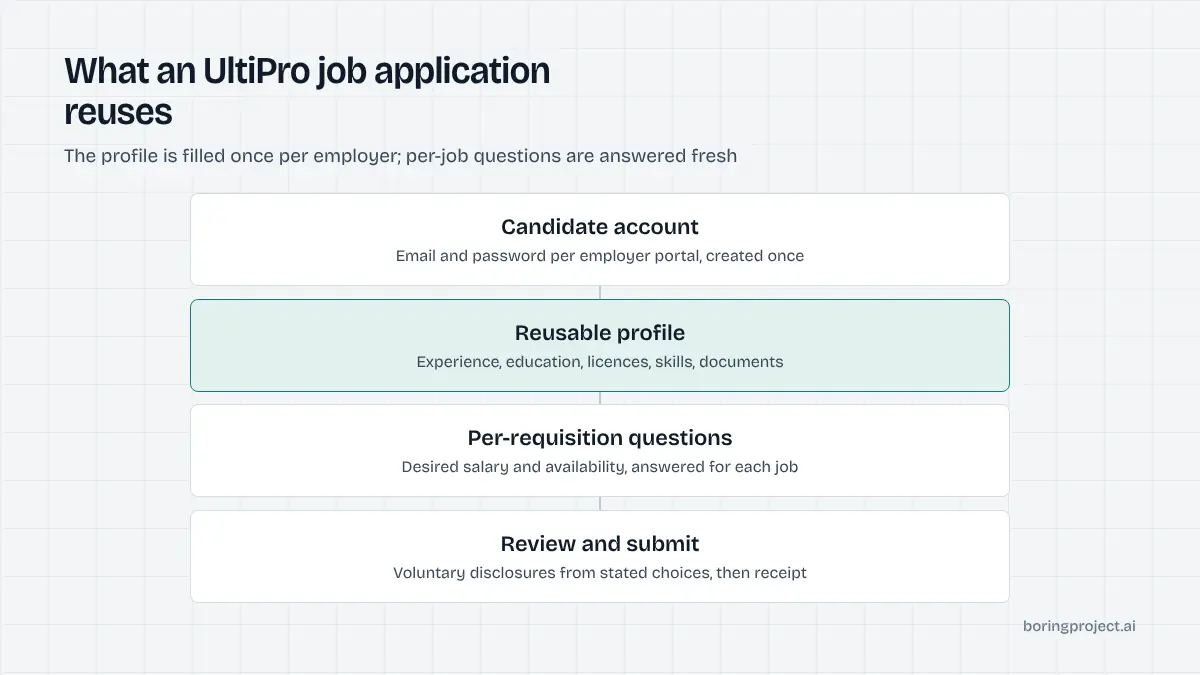
Below is the order an automated agent follows on a UKG Pro posting. Each step has a defined outcome so the webhook can report precisely where a run stands.
Steps 1 and 2: consent, account, and profile build
The candidate's consent for this specific requisition is confirmed. The agent then handles the account step. If the candidate already holds an account with this employer, it signs in with credentials the candidate supplied.
If no account exists, one is created with the candidate's email and credentials the candidate authorised. The run pauses with needs_input if the portal requires the candidate to click an email confirmation link before continuing.
Most UKG Pro portals offer a resume upload that parses into the profile. The agent uploads the candidate's resume, waits for the parse, and then corrects each field against the structured profile it holds.
Parsed job titles and dates are checked, not trusted. Where the portal splits experience into separate entries with start and end dates, each is populated from the structured profile so that gaps and overlaps appear exactly as the candidate recorded them.
Sections the employer marked as required but the candidate left empty are the next pause point. A required licence number, for instance, cannot be invented, so the agent reports exactly which section is missing.
Step 3: application questions
With the profile in place, the per-job questions appear. They are usually a mix of dropdowns, yes/no items, and short text, covering availability, salary, shift preferences, and qualifications specific to the role.
Factual ones are answered from the profile. Open questions without an approved answer trigger a pause, and knockout-style questions, where present, are answered honestly from the candidate's actual circumstances.
Step 4: voluntary disclosures, review, submit
A voluntary self-identification section may follow, each item with a decline option; it is filled only from values the candidate explicitly chose to share. The review page summarises everything entered. The agent submits, captures the confirmation screen as a screenshot, and sends a submitted webhook with the receipt attached.
What makes UKG Pro different from other enterprise portals
Enterprise systems share the account gate, but they differ in where the effort sits. The table compares UKG Pro with two systems it is frequently confused with.
| System | Account required | Where time is spent | Repeat applications |
|---|---|---|---|
| UKG Pro | Usually yes | Profile build, per-job questions | Faster; profile reused |
| ADP Workforce Now | Yes | Registration, long form | Faster; resume data saved |
| Workday | Yes | Account, multi-page form, duplicate checks | Faster; profile reused |
The reusable profile cuts repeat time
Because UKG Pro stores the profile on the account, the second and later applications to the same employer skip most of step 2. For staffing agencies submitting several candidates to one large employer, that compounds quickly. The profile belongs to the candidate, so each candidate still gets their own account.
Per-employer rate limits apply
Large UKG Pro employers may have dozens of open requisitions at once. Submitting to all of them in a burst is a poor experience for the recruiter and can trip abuse controls, so per-employer rate limits space the submissions out.
The ADP equivalent of this flow is described in our ADP Workforce Now auto apply guide, and the Workday version in the Workday auto apply guide.
Session handling
UKG Pro portals expire idle sessions. A run that pauses for candidate input may need to sign in again when it resumes, which is handled automatically.
The candidate never has to redo earlier steps because the portal saves progress to the account. The same saved state means a candidate can also open the portal themselves later to check status, since the application sits in their own account rather than in a system they cannot see.
Frequently asked questions
Is UltiPro the same as UKG Pro?
Yes. UltiPro was Ultimate Software's HR suite; after the merger with Kronos the product was renamed UKG Pro, and its recruiting module is UKG Pro Recruiting. Many career portals still use recruiting.ultipro.com addresses, so both names describe the same application experience.
Does a UKG Pro application require an account?
In most configurations, yes. External candidates create a candidate account with an email and password, or sign in with an existing one, before the application opens. The account stores a reusable profile, so the second application to the same employer is shorter than the first.
What is in the UKG Pro candidate profile?
The profile can hold work experience, education, licences and certifications, skills, documents such as resumes, and references. Candidates fill in only what they choose, but each employer can mark certain sections as required for a given job, which is where most automated runs spend their time.
How are per-job questions different from the profile?
Every application in UKG Pro has its own set of application questions configured on the requisition, covering items such as desired salary, availability, or role-specific qualifications. These are separate from the shared profile and must be answered fresh for each job, even when the profile is already complete.
Why does automation pause on UKG Pro applications?
The common reasons are account creation steps that need the candidate's own credentials or email confirmation, required profile sections the candidate did not supply, open-ended application questions with no approved answer, and document requests beyond the resume. Each pause is reported with a needs_input status and the specific item.
How long does an automated UKG Pro application take?
Longer than a one-page SMB form, because of the account and profile steps, but a first application typically still lands near the three-minute median across supported systems. Repeat applications to the same employer are faster since the profile is already populated and only the per-job questions remain.
Next step
Developers integrating enterprise employers can send a UKG Pro job URL and a candidate profile to the Apply API and receive a webhook with status and screenshot. The API documentation covers account handling, needs_input resumption, and per-application pricing.