 The Boring Project
How to Apply to 100 Jobs a Day the Right Way
Applying to 100 jobs a day is only worth doing if every one of those applications is complete, truthful and aimed at a role you would take, which is the difference between mass job applications and spam.
First, decide whether 100 is the right number
People search for how to apply to 100 jobs a day as a target, not because 100 is a recommendation. The honest version of this guide starts by working out what your own number should be.
Volume helps when your match rate is already decent
More applications only help if a meaningful share of them are to roles where you are a credible candidate. If you are a mid-level backend engineer applying to mid-level backend roles in your market, more volume means more chances. If you are applying to anything with "engineer" in the title, volume multiplies rejections.
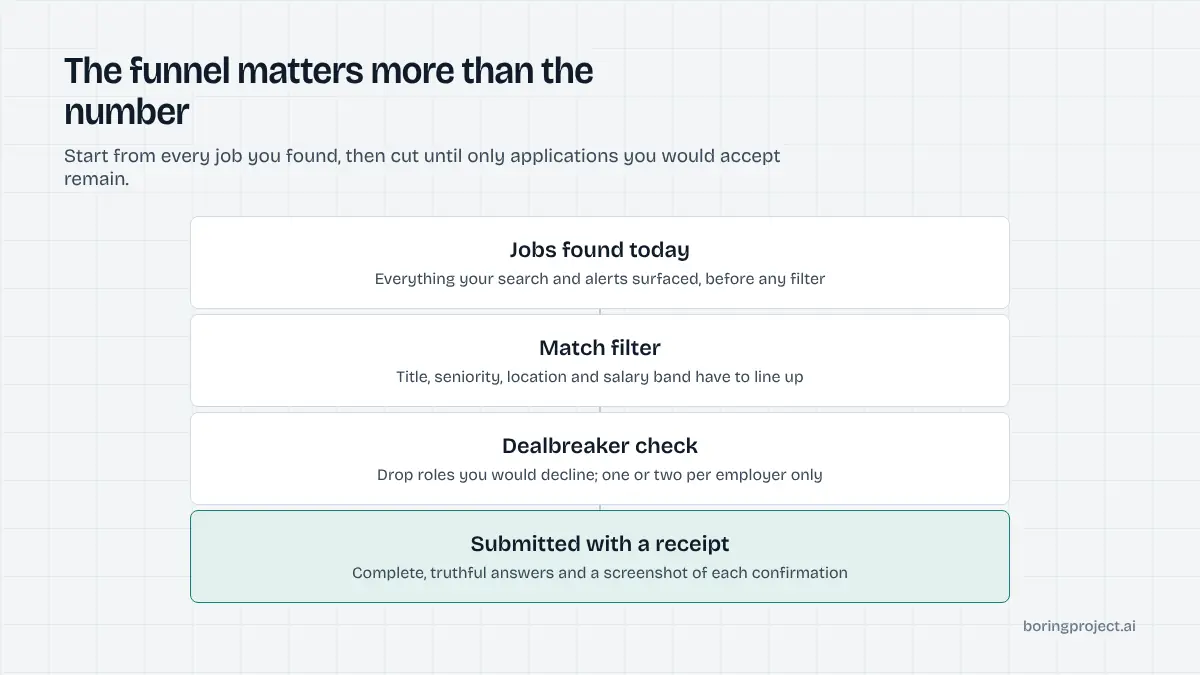
The useful mental model is a funnel. Jobs found, filtered for fit, checked for dealbreakers, filled with real answers, submitted with a receipt. The goal is a healthy funnel, and 100 a day is simply what the top looks like on a good day in a large market.
Where the real ceiling is
The ceiling is rarely the tooling; it is the supply of roles that pass your filters. In a big city for a common role family, 100 new fitting postings a day is plausible. For a niche specialism or a small market, it is not, and padding the list to hit a number is how applications turn into noise.
Set the filters first, see how many roles pass each day, and let that be your number. Some days it will be 100; many days it will be 30.
A sane set of targeting rules
Title family and seniority band, location or remote policy, work authorisation, salary floor, and a short list of hard exclusions. Add one or two positive signals, such as a required technology you actually have. That is enough to cut a raw feed down to roles worth a complete application.
The quality controls that keep volume from becoming spam
Spam is not defined by quantity. It is defined by applications that are incomplete, untruthful or indifferent to the role. These controls prevent that at any volume.
Truthful answers from a single profile
Screening questions are where high-volume applications fail. A bot that answers "yes" to every eligibility question and types a made-up salary produces applications that get rejected and occasionally remembered by the recruiter.
The fix is a complete profile built once: work authorisation by country, notice period, salary range, willingness to relocate, years with each key skill, and your standard answers to common free-text prompts. Fill every form from that profile, and when a question is not covered, the application should pause and ask you rather than guess. Our post on screening questions automation covers how that answer bank should be structured.
Dealbreaker checks before submission
Before any form is filled, check the posting against your exclusions: on-site in a city you will not move to, a clearance you do not hold, a seniority two levels off. These checks are cheap and they remove the applications most likely to be rejected on sight.
Also enforce one rule that people forget at volume: one or two relevant roles per employer, never the whole careers page. Recruiters within a company do see each other's pipelines.
Proof and tracking
At 30 to 100 applications a day you cannot remember what you applied to. Each application needs a record: employer, role, URL, the ATS it ran on, the status, and ideally a screenshot of the confirmation page. When a recruiter calls, you want to find the posting in seconds.
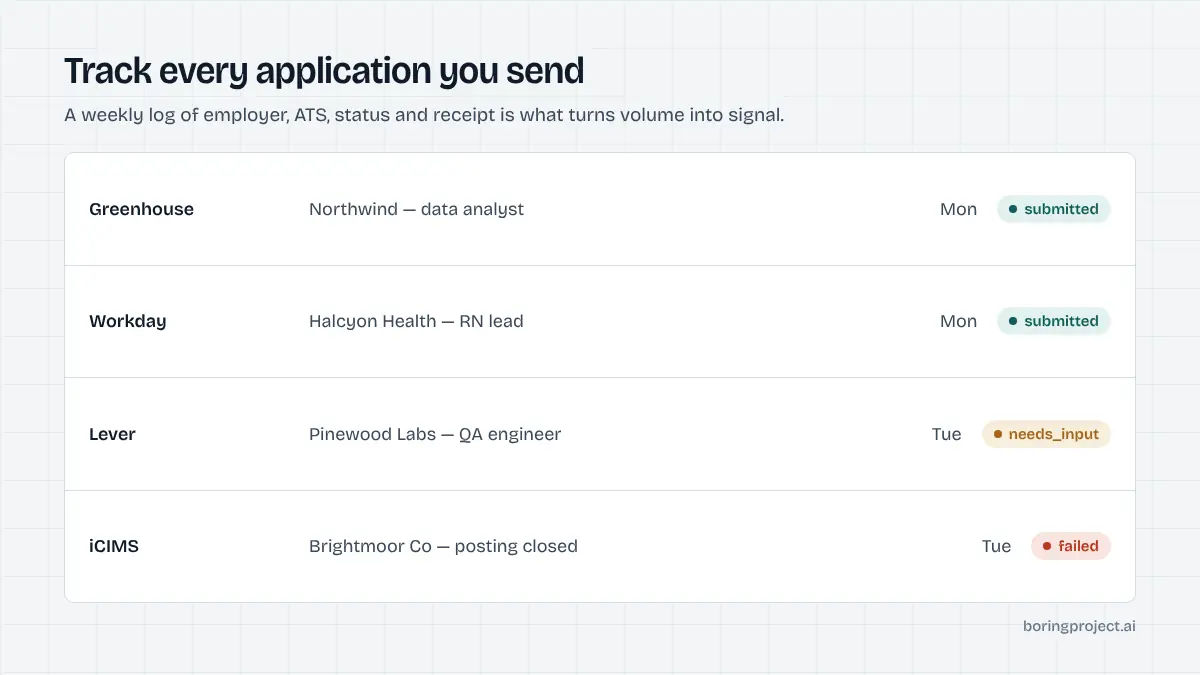
This is also how you learn. If one role family gets callbacks and another gets nothing after fifty applications, the tracker tells you to shift the filters. The post on auto apply not getting interviews walks through that diagnosis.
What tools actually submit, and what they only help with
Searches for how to apply to 100 jobs a day are full of tools that claim to apply for you. Most of them fall into one of three groups, and only one group changes the arithmetic of a day.
Autofill extensions
Browser extensions that fill forms from a saved profile remove typing but not clicking. You still open each posting, trigger the fill, review it, answer the questions it missed, and submit. At three to five minutes each, 100 applications is a full working day of clicking.
They are a good fit for 10 to 20 careful applications a day, not for volume.
Session bots on job platforms
Scripts that run inside your logged-in account on a job platform and click through its in-platform apply flow can hit high numbers quickly. They also violate most platforms' terms and risk your account, and they tend to answer screening questions by guessing. They produce volume in the spam sense, which is the opposite of what this guide is about.
Agents that submit on employer forms
The third group takes a job URL and your profile, opens the employer's own application form on whatever ATS it uses, fills it from your profile, pauses when it hits a question it cannot answer truthfully, and returns a confirmation screenshot. This is the model that makes 100 complete applications in a day possible without a human clicking through each one.
The Boring Project's Apply API works this way, with a median submit time of around three minutes per application and a status of submitted, needs_input or failed per job. For a job seeker, the practical route to that capability is a job-search product built on it. For an overview of the three models and their tradeoffs, see how to automate job applications.
| Model | Realistic daily volume | Answers screening truthfully | Account risk | Proof per application |
|---|---|---|---|---|
| Autofill extension | 10 to 25 | You do, manually | None | None unless you save it |
| Session bot on a job platform | High | Usually guesses | Real | Rarely |
| Agent on employer ATS forms | 30 to 100+ | From your profile, else pauses | None | Screenshot receipt |
Frequently asked questions
Is applying to 100 jobs a day realistic?
Mechanically, yes, with a tool that submits on employer forms. Practically, the constraint is finding 100 roles a day that genuinely fit you. Most people run out of good matches well before 100 and should stop there. A smaller number of well-matched, complete applications beats a round number padded with roles you would not accept.
Will mass applying get me blacklisted by employers?
Applying to several unrelated roles at the same company in one day looks careless and some recruiters notice. Applying to many different employers does not, because they do not share applicant data with each other. Keep it to one or two relevant roles per employer and avoid repeat applications to the same posting.
What callback rate should I expect from high-volume applications?
There is no reliable universal figure, and anyone quoting one is guessing. Callback rates depend on your match to each role, the market, seniority and timing. What you can control is the quality of each application and the targeting. Track your own numbers for two weeks and adjust the filters rather than chasing someone else's benchmark.
Do autofill extensions count as applying to 100 jobs a day?
Not really. An autofill extension speeds up typing but you still open each form, review it, handle the screening questions and click submit. At a few minutes per application, 100 a day is a full working day of clicking. Tools that submit end to end on employer forms are the ones that change the arithmetic.
How do I avoid wrong answers on screening questions at volume?
Build a complete profile once: work authorisation per country, notice period, salary range, relocation, years with each key skill. Use a tool that fills from that profile and pauses to ask when a question is not covered, rather than guessing. Review the pending questions once a day and your answer bank grows while your error rate stays near zero.
Should I customise my resume for every one of 100 applications?
Full rewrites at that volume are not realistic. A better approach is two or three resume variants aimed at the role families you are targeting, selected per application. Keep every claim on them truthful. Spend your remaining effort on the targeting filters, because a strong match with a good general resume beats a weak match with a tailored one.
Next step
If you are building a job-search product or running applications for clients and need complete, consented applications on employer forms at volume, the Apply API returns a receipt for every one. Read the overview linked above, then talk to us about Managed Applies if you would rather send a list than write code.