 The Boring Project
Best Auto Apply Tools for Staffing Agencies
This guide covers how to choose auto apply tools for staffing agencies: what the end-to-end workflow should look like, which evaluation criteria actually matter, and where staffing agency automation tends to fail in practice.
Our standing comparison of specific vendors lives on the best auto apply tools for staffing agencies page and is updated as products change. This article is the companion: the process and the checklist, so you can judge any tool, including ones that appear after this is published.
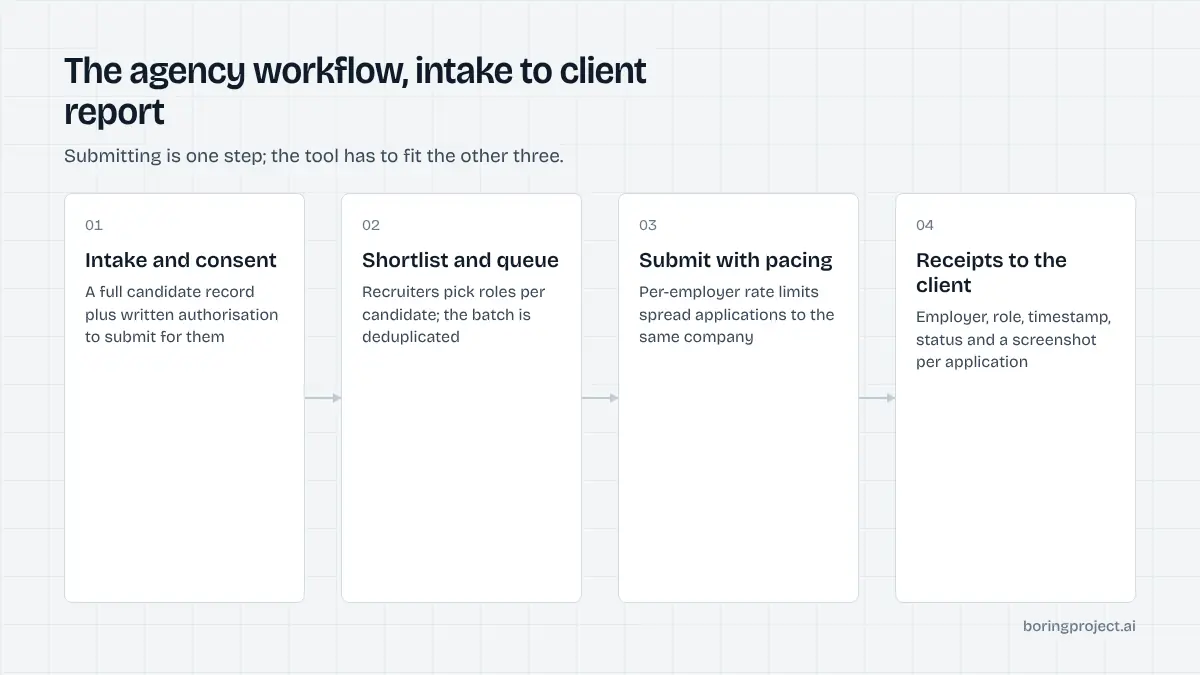
The agency workflow, start to finish
Submitting an application is a small part of the job. The surrounding steps are where agencies lose time, and the tool you pick should fit all of them, not just the click at the end.
Intake and consent
Everything starts with a complete candidate record: resume, contact details, authorisation, salary expectations, locations, and answers to the questions employers ask most. Missing fields here turn into stalled applications later.
Consent is not optional. Each candidate should have a documented authorisation that covers automated submission to roles you select, and each application should be traceable back to it. A tool that does not record this per application is making you carry the risk.
Job selection and queueing
Recruiters shortlist roles per candidate, usually from their own sourcing plus job board searches. A good tool accepts that list as a batch, deduplicates against previous submissions for the same candidate, and queues the work. It should not require someone to sit and watch a browser.
If you run high volumes across many candidates, read how teams structure the batch side in our guide to bulk job application automation. The CSV pattern there is what most agencies end up using.
Receipts and client reporting
The output is not "applied: yes". It is a per-application record with the employer, role, timestamp, status, and a screenshot of the confirmation page.
That record goes into the candidate's file and into the report you send the client or the candidate. Without it you are asking people to trust a counter.
Think about where the receipt lands as well. If your recruiters live in a CRM or ATS of your own, the application record should end up there, not in a separate dashboard someone has to remember to check. Managed services can hand back a results file you import; API options can write straight into your system.
Evaluation criteria that matter at volume
Feature lists blur together. The questions below separate tools built for one job seeker from tools built for an agency.
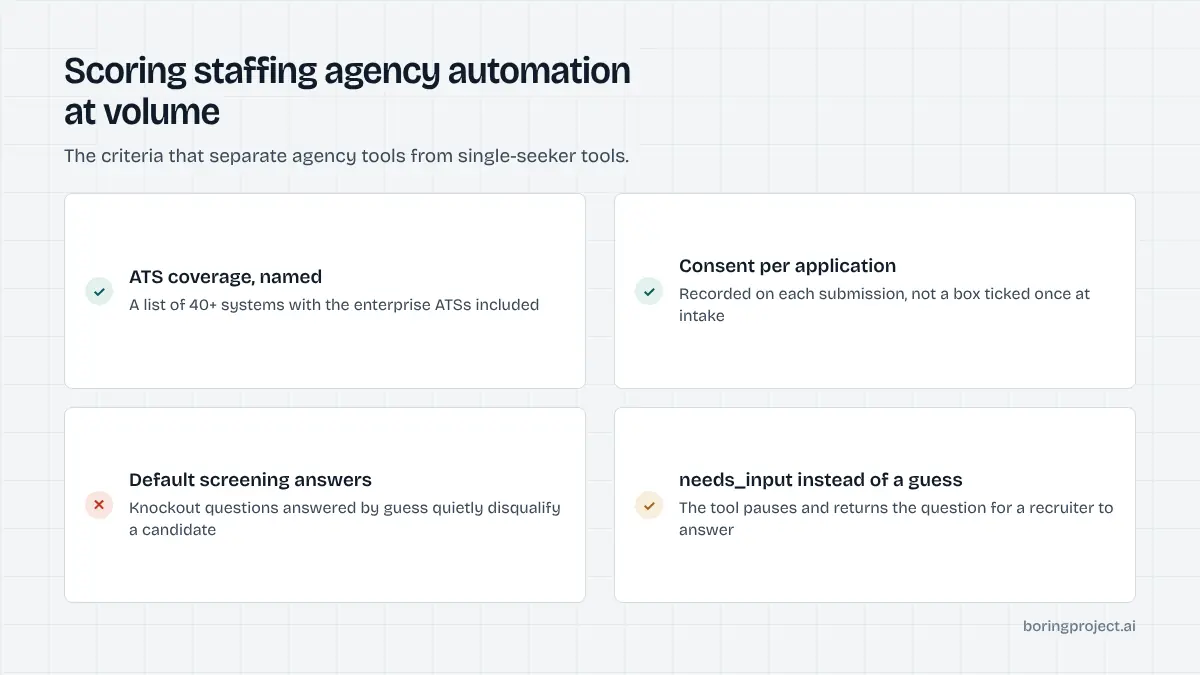
ATS coverage and depth
Ask which applicant tracking systems are supported and how deep the support goes. Filling a Greenhouse form is easy.
Creating a Workday account, passing email verification, and completing a six-page wizard is not. Coverage of Workday, iCIMS, Taleo and SuccessFactors matters more for enterprise roles; Greenhouse, Lever and Ashby matter more for tech. Match the list to where your placements actually happen.
Also ask how failures are reported when a system is not supported. "Silently skipped" is a bad answer. You want a failed status with a reason, and ideally a sense of how often that system shows up in your own job lists so you can judge whether the gap matters.
Honesty on screening questions
Knockout questions decide whether a candidate is seen by a human. A tool that answers them with defaults or best guesses will produce submissions that look complete and quietly disqualify your candidate. The tool should answer only from data you provided and pause with a needs_input request otherwise.
This is also a reputational matter. Employers notice agencies whose candidates arrive with inconsistent answers.
Rate limits, pacing and duplicates
Agencies apply for many candidates to overlapping employers. Without per-employer pacing, that looks like a flood from the employer's side and can get a domain or agency flagged. Look for built-in per-employer rate limits, duplicate detection per candidate and posting, and pacing you do not have to manage by hand.
| Criterion | Weak answer | Strong answer |
|---|---|---|
| ATS coverage | "Most career sites" | Named list, 40+ systems, enterprise ATSs included |
| Screening questions | Auto-fills defaults | Answers only from profile; needs_input otherwise |
| Consent | Not tracked | Recorded per application |
| Receipts | Status counter | Screenshot per submission |
| Pacing | None | Per-employer rate limits, dedupe |
| Pricing | Per seat | Per successful application |
Where staffing agency automation breaks
Most failures are predictable. Knowing them in advance saves a painful first month.
Incomplete profiles
The single biggest source of stalled applications is missing candidate data. Fix it at intake: a structured form that captures the fields employers ask about, not just a resume upload. A tool that tells you which fields are missing before it queues the batch is worth a lot.
Tool maintenance lag
Applicant tracking systems change their forms without notice. When they do, every application into that system fails until the vendor ships a fix. Ask vendors how they detect breakage (continuous canary applications are the right answer), how fast they typically repair it, and whether failed applications are retried automatically once the fix lands.
Unclear ownership between recruiter and tool
Decide who handles needs_input questions, who reviews failures, and who owns the client report. Automation removes the typing; it does not remove the judgement.
Agencies that treat the tool as a junior team member with a clear queue get the most out of it. Agencies that treat it as a black box end up re-checking everything.
A short weekly review helps: how many applications ran, how many needed input, how many failed and why, and which candidate profiles keep generating questions. Fifteen minutes of that keeps the system honest and turns the tool's output into something recruiters trust rather than something they audit.
Frequently asked questions
Are auto apply tools allowed for staffing agencies?
Applying on behalf of a candidate you represent is standard agency practice; automation changes the speed, not the principle. The requirements are the same as manual submission: documented candidate consent, truthful answers, and respect for employer application terms. Choose a tool that logs consent per application and refuses to invent screening answers so your records hold up.
How many applications per candidate per week is reasonable?
It depends on the role market, but quality beats raw count. Most agencies land between a handful and a few dozen targeted applications per candidate per week. Tools with per-employer rate limits keep volume from looking like spam, and receipts let you show the client exactly what was sent rather than a number.
What is the difference between a browser extension and an API-based tool?
Extensions run on a recruiter's own machine and browser session, so throughput is tied to that person and that laptop. API or managed services run in the cloud, in parallel, with their own ATS handling and retries. For an agency applying for many candidates at once, the cloud model scales; the extension does not.
What happens when an application needs information we do not have?
A good tool pauses and returns the specific question rather than guessing. Your recruiter or the candidate answers it, and the application resumes. This is slower than a blind submit but avoids disqualifying answers and protects your relationship with the employer. Look for a clear needs_input state in the product.
Do we need engineers to use one of these tools?
Not necessarily. Managed options take a CSV of candidates and job URLs and return receipts, with no code on your side. API options need a developer but let you embed applications into your own CRM or ATS. Many agencies start managed and move to the API once volume and internal tooling justify it.
How is pricing usually structured?
Common models are per seat, per month with a cap, and per successful application. Per-application pricing aligns cost with outcomes, since you do not pay for failures or closed jobs. Check what counts as a success, whether receipts are included, and whether there are minimums before comparing headline numbers across vendors.
Next step
If you want the workflow above without building anything, Managed Applies takes a CSV of candidates and roles and returns screenshot receipts, with consent checks and per-employer pacing included and per-application pricing. Talk to us about managed applies and bring your typical weekly volume.