 The Boring Project
Auto Apply Software for Reverse Recruiters
Reverse recruiters apply for clients, not for themselves, which changes what good software looks like. This guide covers the requirements that matter in auto apply software for reverse recruiters and how to compare reverse recruiting tools on volume, evidence, consent and cost.
Why consumer auto apply tools do not fit the job
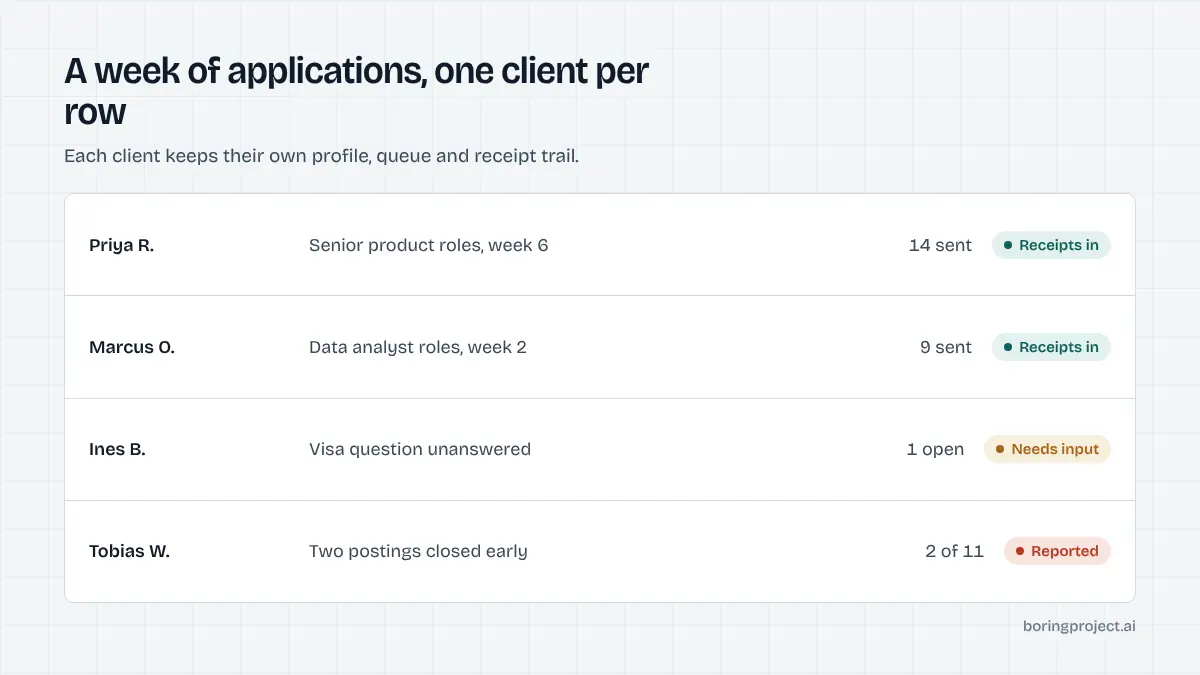
Most auto apply products are designed for one person applying for themselves on one laptop. A reverse recruiter is running several searches in parallel, each with its own profile, target list and reporting cadence, which is why auto apply software for reverse recruiters has to solve a different problem. The mismatch shows up quickly.
One profile versus many
Consumer tools store a single profile and resume. You need separate, complete profiles per client, with their own screening answers, salary expectations, locations and authorisation details, and you need to be certain that client A's answers never leak into client B's application.
Multi-profile support should be a first-class feature, not a workaround with multiple browser windows. The same goes for resumes: many clients have two or three versions tailored to different role types, and the tool should let you choose which one goes with which application rather than overwriting a single upload.
Throughput tied to a person
Extension-based tools run in your browser, so applications happen only while you are at your desk and not on a call. A cloud service queues work per client and runs it in parallel, reporting back when done. For a practice with more than two or three active clients this is the difference between automation and a slightly faster manual process.
Evidence versus a counter
Consumer tools report "applied to 47 jobs". Your clients are paying a retainer and will ask what, specifically, was done.
You need a record per application with the employer, role, time, status and a screenshot of the confirmation page. The staffing version of this problem, with much of the same checklist, is covered in our guide to auto apply tools for staffing agencies.
What a reverse recruiting practice needs
Strip away the marketing and the evaluation of reverse recruiting tools comes down to three questions.
Volume per client without spam
You want to be able to queue a week's worth of applications for each client and have them submitted at a natural pace. Per-employer rate limits matter here: if three of your clients are all applying to the same large employer, the tool should spread those submissions rather than firing them within a minute of each other. Duplicate detection per client and posting prevents the embarrassing double application.
Truthful answers and a needs_input path
Screening questions are where searches are won or lost. A tool that fills defaults will produce completed-looking applications that are disqualified before a human reads them.
The right behaviour is to answer only from the client's profile and to pause with a specific question when something is unknown. You or the client answer it once, and the answer is reused for the next employer that asks the same thing.
Receipts and consent records
Every submitted application should come back with a screenshot of the employer's confirmation page, a timestamp and the detected ATS. Build your weekly client report from those records.
It takes minutes instead of an hour of copying links, and it ends arguments about whether something was sent. Over a full engagement the receipts also become a useful record of which employers and role types produced responses, which sharpens the targeting for the next client in a similar market. The status and receipt model is described in our explainer on how job application webhooks report submission status.
Consent belongs in the same record. Your engagement letter already covers acting on the client's behalf, but the software should still store a consent reference on each application, so that if an employer or the client questions a submission six months later you can show exactly what was authorised and when. Tools that skip this are leaving the liability with you.
Per-application economics
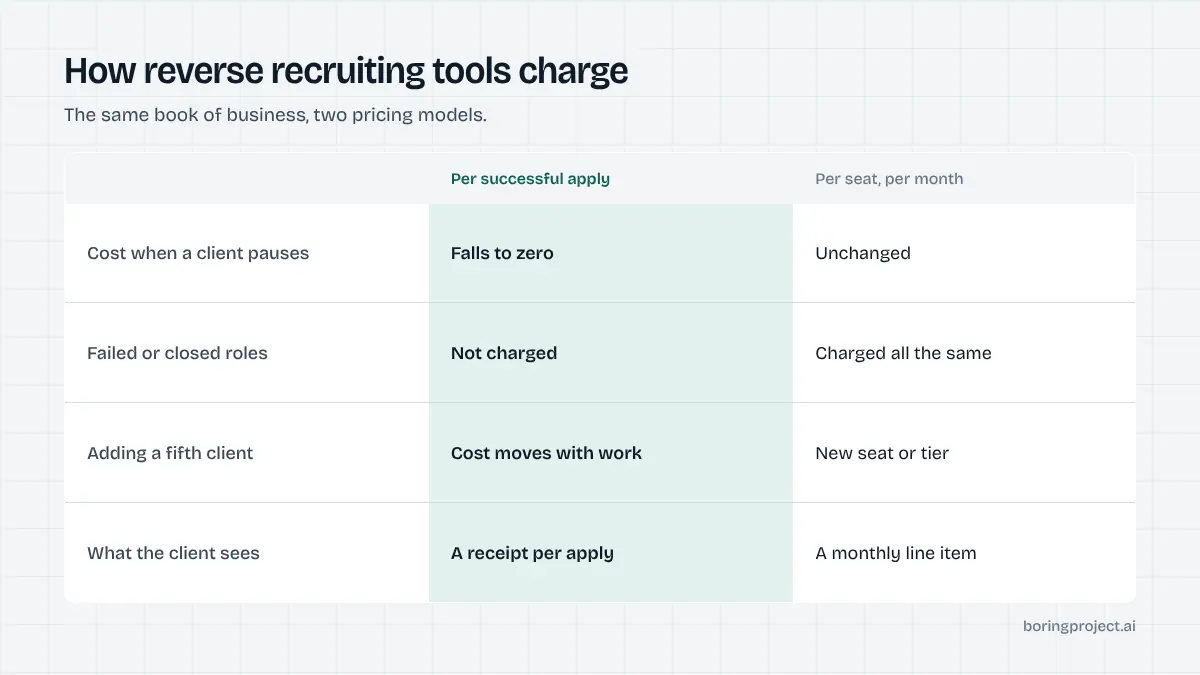
Reverse recruiting is a service business, so tooling cost should be judged against labour time saved and the retainer it supports.
Where the hours go today
A manual application to an enterprise ATS can take fifteen to thirty minutes once account creation, resume re-entry and screening questions are included. Multiply by applications per client per week, then by active clients, and the submission step alone can be most of a working week. That is time not spent on positioning, outreach to hiring managers, or interview preparation, which is the work clients actually value.
Seat pricing versus per-application pricing
Per-seat or flat monthly tools charge the same whether you have two clients or ten, and whether applications succeed or not. Per-successful-application pricing scales with your book of business and does not charge for closed roles or failures. For a practice with uneven monthly volume it is usually the more predictable cost, because it moves with revenue.
Passing cost through
Because per-application pricing produces a clear unit cost, many reverse recruiters either fold it into tiered packages (a set number of tailored applications per month) or itemise it. Either way, the receipt makes the line item defensible.
Clients rarely object to paying for applications they can see. What they object to is a vague monthly fee with nothing attached to it, which is the situation manual submission tends to produce.
Frequently asked questions
What does a reverse recruiter actually need from auto apply software?
Four things: enough throughput to serve several clients at once, honest handling of screening questions so applications are not quietly disqualified, a receipt for every submission to put in client reports, and per-client consent and tracking so nothing is mixed up. Speed matters less than reliability, since clients judge you on outcomes and evidence.
How do receipts help with client reporting?
A screenshot of the employer's confirmation page, with timestamp and role, is proof the application exists. Clients paying a retainer want to see what was done. A weekly report built from receipts replaces 'we applied to 30 roles' with a list they can verify, which protects you when a client asks why they have not heard back.
Is it acceptable to apply on a client's behalf?
Yes, with explicit consent. The client has engaged you to represent them, and you should hold a written authorisation that covers automated submission to roles you select on their behalf. The software should record that consent against each application so you can show it later if an employer or the client asks.
How many applications per client per week should a reverse recruiter target?
There is no universal number. It depends on seniority, market, and how narrow the client's target list is. Senior or specialised searches may be a handful of carefully tailored applications; broader searches may run to dozens. Set the number with the client and let the tool's pacing keep each employer's experience normal.
Browser extension or cloud service for a reverse recruiting practice?
A cloud or API service runs applications in parallel across clients without tying up your laptop or browser session, and keeps working while you are on calls. Extensions are fine for a single job seeker but become the bottleneck once you are managing several clients with separate profiles and queues.
What happens if an application fails?
You should receive a failed status with a reason, such as job closed or unsupported ATS, and a screenshot of where it stopped. Retryable failures can be re-queued; others are logged so you can tell the client why. With per-application pricing you are not charged for failures, which is one reason to prefer that model.
Next step
Managed Applies was designed around this exact workflow: send a CSV of clients and target roles, get back screenshot receipts per application, with consent checks and per-employer pacing handled and per-application pricing. Talk to us about managed applies and tell us how many active clients you run.