 The Boring Project
Auto Apply Jobs Australia: What Actually Works
Searches for seek auto apply usually mean one of two things, a faster way through SEEK's own apply form or a way to handle the employer forms that SEEK links out to; this guide covers both, the ATSs behind Australian careers sites, and the working-rights question every form asks.
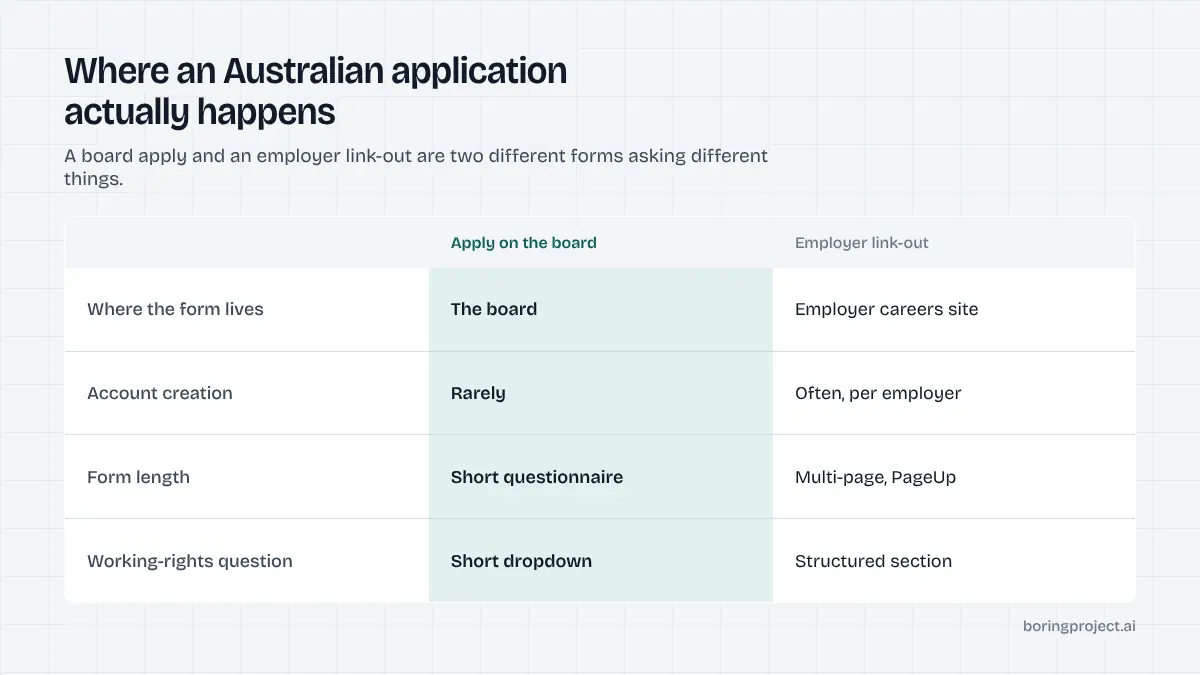
Australia's job market has one dominant board, a strong public sector with its own application conventions, and a working-rights question on nearly every form. Those three facts shape what is worth automating. Clicking faster on the board is not it. Handling the employer forms behind link-outs, with the right answers stored once, is.
This guide explains where applications actually happen when you auto apply jobs australia wide, what the forms ask, and how to keep a tool from doing anything you would not do yourself.
SEEK, the other boards, and where the form lives
SEEK's two application paths
According to SEEK's own developer documentation, advertisers choose between SEEK's Apply Form and a link-out to an external form. On the Apply Form, you stay on SEEK, reuse your SEEK Profile and documents, and may answer the advertiser's questionnaire there. With a link-out, you are sent to the employer's recruitment system; an optional "Apply with SEEK" step can pre-fill parts of that external form from your profile, but you still complete it on the employer's site.
Practically, on-board applies are quick and need no automation. Link-outs are where the work is, and the external form is whatever ATS the employer runs.
Indeed, LinkedIn, Jora and government boards
Indeed and LinkedIn are widely used alongside SEEK, with Jora aggregating broadly and CareerOne still active. Government roles are posted on APSJobs (federal) and each state's careers portal, and universities post on their own PageUp-based sites. Most of these also link out to an employer system for the actual application.
Agencies and duplicates
A large share of Australian private-sector postings come from recruitment agencies, and the same role often appears under several agency ads and the employer's own ad. Apply once, directly where possible. Duplicate submissions via multiple agencies are a known cause of silent rejection because the employer has to settle who introduced you.
Agency ads are also easy to spot: the employer is unnamed, the location is broad, and the salary is a wide band. Keep them in a separate list from direct employer postings so you can judge each channel's reply rate on its own, and so a tool never submits the same resume to the same role twice.
The ATSs and the questions behind Australian forms
The platform mix
| Employer type | Commonly seen systems | Form character |
|---|---|---|
| Universities, government, large non-profits | PageUp, SuccessFactors, state portals | Long, often with criteria or pitch statements |
| Banks, insurers, telcos, large corporates | Workday, SuccessFactors, Oracle Recruiting, PageUp | Account required, multi-page |
| Tech and scale-ups | Greenhouse, Lever, Workable, Ashby | Short, single page |
| SMEs and recruitment agencies | JobAdder, Employment Hero, Bullhorn-style agency systems | Short, resume-led |
PageUp deserves a note: it is common in Australia in a way it is not elsewhere, and its forms often include a structured work-rights section and document uploads. Workday and SuccessFactors behave as they do globally: registration, resume parsing, several pages.
Working rights and visa questions
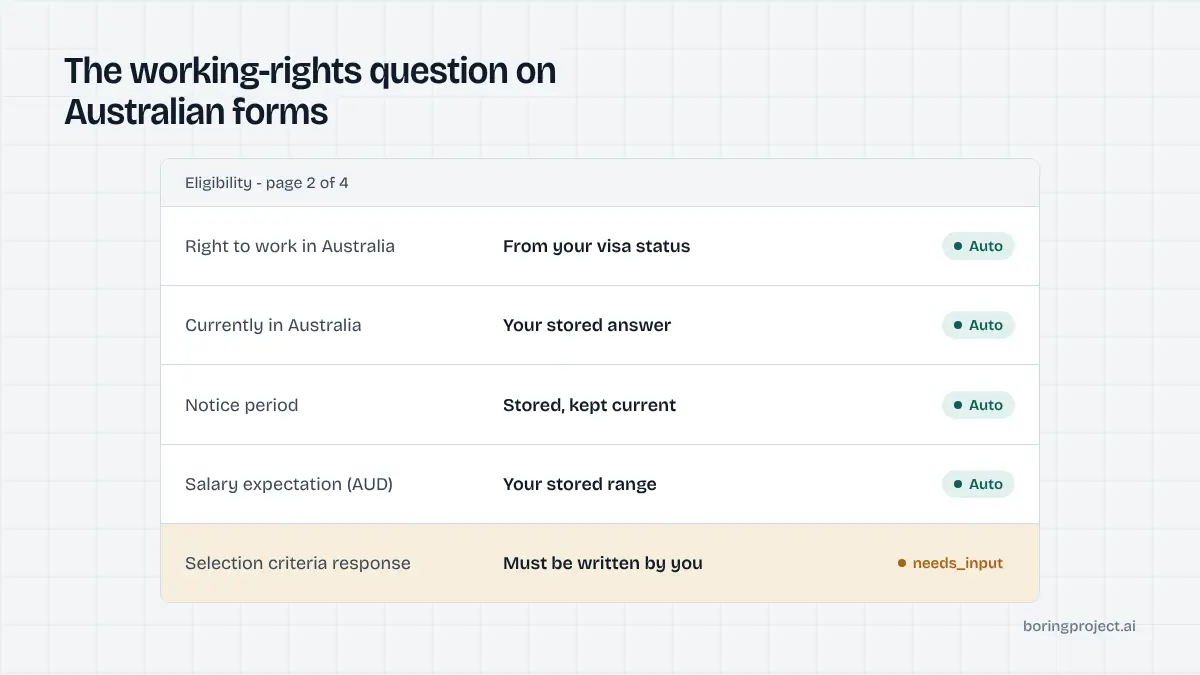
Almost every Australian form asks about your right to work, typically as a choice between citizen or permanent resident, temporary visa with unrestricted work rights, temporary visa with restricted hours (student visas, for example), and requiring sponsorship. Many also ask whether you are currently in Australia.
This is a factual field tied to your visa. Store the correct option once and use a tool that treats it as fixed. Employers verify working rights before hire, so a wrong answer is caught, and roles that will not sponsor often filter the "require sponsorship" answer automatically. Filtering those roles out of your list is better than applying anyway.
Selection criteria, pitch statements and screening questions
Public-sector and university roles frequently ask for written responses to selection criteria or a one-page pitch. These are read by a panel and must be yours; a tool should return them as "needs input". Private-sector screening questions are more mechanical: years of experience, licences (driver's, Working with Children, security), notice period and salary expectation in AUD. Our post on how ATS screening questions are structured explains which are knockouts and which are read by a person.
Choosing and running a tool for Australian applications
Avoid tools that act on your SEEK account
Browser extensions that automate clicks on SEEK or LinkedIn operate on your logged-in account, against those sites' terms, and are the usual cause of restricted accounts. Tools that submit directly to the employer's form after a link-out never touch your board account. The difference is explained in our comparison of Chrome extensions versus cloud application agents.
Prepare the Australian profile once
Resume (two to three pages is normal in Australia, no photo), working-rights option, current location, notice period, AUD salary expectation, relevant licences and checks, and two or three short examples for common behavioural questions. That profile is what the tool fills forms from and what it must not deviate from.
Set realistic expectations by form type
Greenhouse and Lever forms submit in minutes. PageUp, Workday and SuccessFactors take longer, may need account creation, and will stop for criteria or pitch statements. A per-application status with a screenshot lets you confirm what went through. Track acknowledgements and interview invitations per list; Australian recruiters often acknowledge quickly and decide slowly, especially in government.
A reasonable weekly rhythm, if you want to auto apply jobs australia wide without losing control of it, is to apply by hand to on-board SEEK postings that fit, hand the link-out postings to the tool as a list, and reserve a block of your own time for any criteria or pitch statements it returns as needs input. Review receipts at the end of each day and drop employers that have already declined you from the next batch. Volume for its own sake does little in a market this concentrated; a short, accurate list does more.
Frequently asked questions
Is there a seek auto apply tool I can use?
SEEK's own apply form lets you reuse your SEEK Profile and answer the advertiser's questionnaire in a few clicks, and its "Apply with SEEK" option can pre-fill some employer forms. Third-party tools that script the SEEK interface itself operate against the site's terms and can put your account at risk. The safer place for automation is the employer's careers site after a link-out.
What is the difference between applying on SEEK and a link-out?
On-board applies keep you on SEEK, use your profile and documents, and may include the advertiser's screening questionnaire. A link-out sends you to the employer's own recruitment system, where you complete that system's form, sometimes with your SEEK profile pre-filled. Link-outs are where most of the manual effort sits and where form automation helps.
Which ATSs do Australian employers use?
PageUp is widely used by universities, government and large Australian organisations. Workday, SuccessFactors and Oracle appear at large corporates and banks. Tech companies and startups use Greenhouse, Lever and Workable, and Employment Hero and JobAdder are common in SMEs and recruitment agencies. Expect PageUp and Workday forms to be the longest.
How should I answer the working rights question?
Accurately, from your actual visa status. Australian forms usually offer options such as citizen or permanent resident, temporary visa with full work rights, temporary visa with restricted hours, or requiring sponsorship. Pick the one that matches your visa, store it once, and refuse any tool that would change it. Employers verify working rights before hire.
Do Australian applications still use selection criteria?
Government and university roles often do, requiring written responses to each criterion, though many have moved to shorter pitch-style statements. Private-sector roles rarely ask for them. A tool should stop and hand these to you rather than generate them; a generic criteria response is spotted immediately by a selection panel.
Can I use an auto-apply tool from overseas for Australian jobs?
You can, but filter for roles that state they consider sponsorship or overseas candidates, and answer the working-rights question truthfully as "require sponsorship". Many Australian employers filter out that answer automatically for roles they will not sponsor. Applying to those roles is wasted volume whatever tool you use.
Next step
If the link-out forms are what you want handled, Search + Apply submits them from a profile you control, treats working-rights answers as fixed, and returns a receipt with a screenshot per application. It runs on the same job application API used by job boards and staffing platforms; pricing is per successful application.