 The Boring Project
How to Auto Apply for Remote Jobs Effectively
To auto apply for remote jobs well, you need filters that understand what "remote" actually means on each posting, a profile that answers time zone and eligibility questions truthfully, and a clear rule about applying on boards versus the employer's own system. This guide covers the remote job automation tactics that prevent wasted applications.
"Remote" is not one thing
The single biggest cause of wasted remote applications is treating the remote tag as a location. It is a work arrangement, and the location rules sit underneath it.
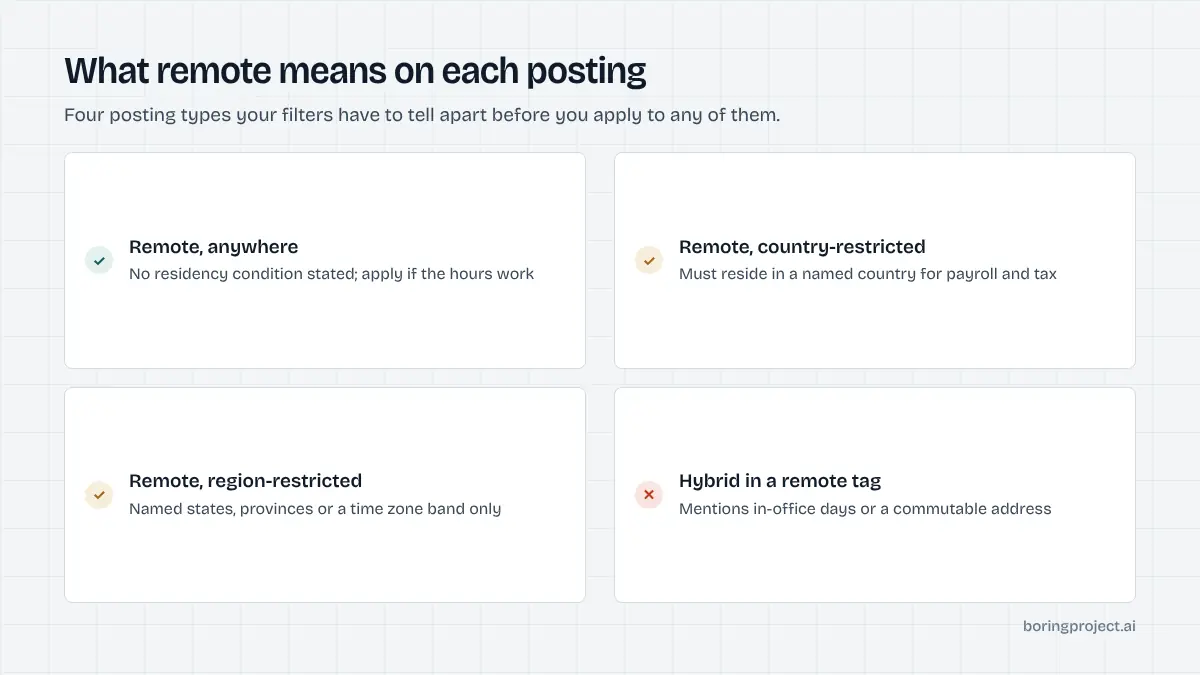
The four kinds of remote posting
Postings cluster into recognisable types, and your filters need to tell them apart.
| Label on posting | What it usually means | Who can apply |
|---|---|---|
| Remote, anywhere | Employer hires globally, often via contractor or EOR arrangements | Most people, subject to authorisation questions |
| Remote, country-restricted | Must reside in a named country for payroll and tax | Residents of that country only |
| Remote, region or state-restricted | Named states, provinces or time zone band | Residents of those areas |
| Hybrid labelled remote | Occasional or regular office days | People within commuting distance |
Aggregators frequently strip the qualifier and leave only "remote". Resolving the listing to the employer's own page recovers the detail.
Reading the eligibility line
Almost every genuinely restricted posting states it somewhere: "must be based in the UK", "open to candidates in EST or CST", "this role is remote within the United States". A good tool extracts those phrases and filters on them. If yours does not, add them as keyword exclusions, which is cruder but better than nothing.
Hybrid hiding as remote
A posting that mentions an office address, "in-office days", or "commutable to" is hybrid regardless of its tag. Automation that ignores those phrases produces a steady stream of applications to roles an hour's flight away, each one a near-certain rejection.
Setting up filters and profile for remote automation
Once you can classify postings, configuring a tool to auto apply for remote jobs is straightforward. The aim is a feed that contains only roles you are eligible for and could actually do.
Location filters that work
Set your residence country and, where relevant, state or province as hard facts in your profile. Then allow three posting types: remote anywhere, remote restricted to your country, and remote restricted to a region that includes you.
Exclude everything else, including hybrid. If you are open to relocating, say so explicitly in the profile rather than widening the filters, so the tool answers relocation questions correctly instead of implying you already live elsewhere.
Time zones as a filter and an answer
Record the hours you can reliably work and the overlap you are willing to commit to. Use that in two ways. First, exclude postings whose stated hours fall outside it.
Second, let the tool answer screening questions about availability from the stored fact. "Can you work 9 to 5 Pacific?" has a true answer for you, and a guessed "yes" is exactly the kind of fabricated screening answer that gets applications withdrawn later.
Authorisation per country
For roles open to several countries, employers ask about work authorisation and sponsorship for the specific location. Store your status per country in the profile. The tool should answer truthfully and, ideally, skip postings whose requirements you cannot meet rather than submit an application that will be rejected on receipt.
Boards versus the employer's ATS
Remote roles are heavily aggregated, which means the same posting appears on several boards and on the employer's careers site. Where you apply affects duplicates, freshness and how your application is routed.
Use boards for discovery
Job boards and aggregators are good at surfacing remote roles across many employers, and board-level filters for remote are a useful first pass. Their weaknesses are stale listings, stripped eligibility details and, in some cases, an apply flow that collects your details and forwards them rather than submitting to the employer directly. The specifics of applying inside a board's own flow are covered in our note on Indeed auto apply.
Submit on the employer's system
The posting almost always lives on an applicant tracking system such as Greenhouse, Lever, Ashby or Workday. Applying there means the full form, the real screening questions, and a confirmation you can keep.
It also removes the duplicate problem: one canonical URL per role, regardless of how many boards listed it. Greenhouse in particular is common among remote-first employers, and the form patterns are described in how to auto apply on Greenhouse.
Deduplicate across every source
Keep one list of canonical job URLs. Before any application, automated or manual, check it. Remote roles are where duplicates happen most, because the same posting is syndicated widely and tools pulling from several boards see it several times under different links.
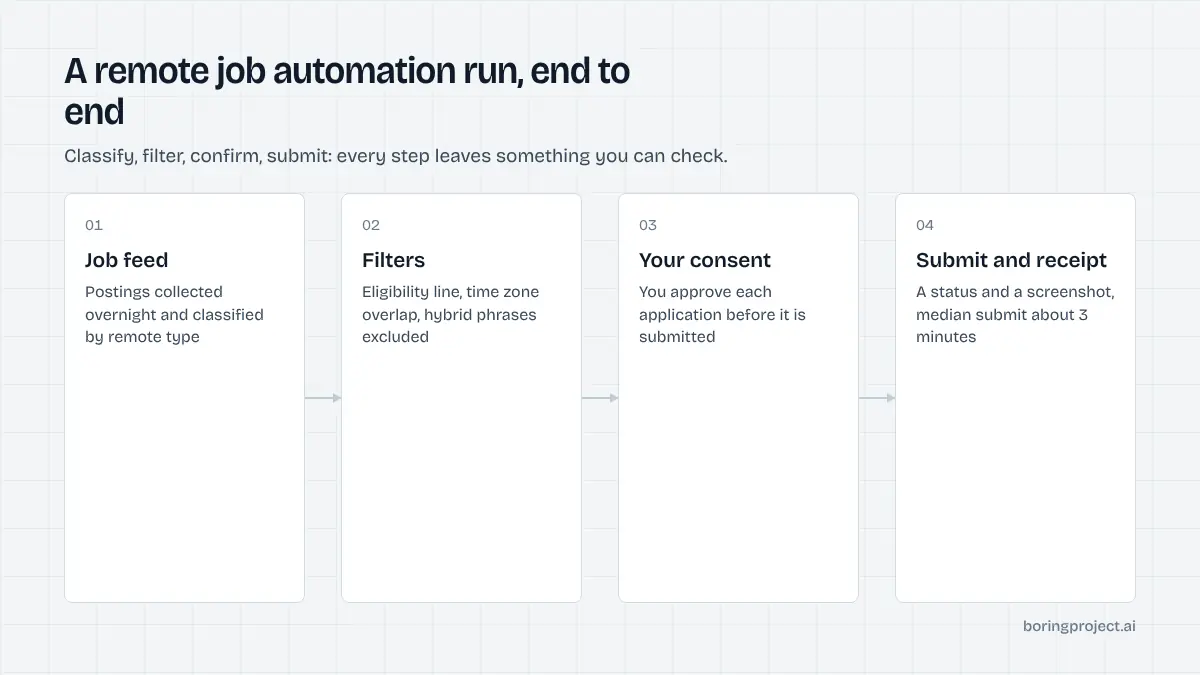
A workable routine for remote job automation looks like this: let the tool collect and classify postings overnight, review the filtered list each morning and approve or reject each one, and check receipts and replies once a week. The review step is where you catch the hybrid role mislabelled as remote and the posting restricted to a country you are not in. Skipping it in favour of volume is how a remote search turns into a long list of same-day rejections.
Frequently asked questions
Why do so many remote postings reject me on location?
Because 'remote' on a listing often means remote within a country, a set of states, or a time zone band, for tax, payroll and employment-law reasons. The posting text or screening questions usually say so. Tools that treat every remote tag as worldwide send applications the employer cannot legally consider, and those are rejected automatically.
Should I apply through job boards or directly on the employer's careers page?
Directly where possible. Board listings are often copies of the employer's own posting, sometimes stale, and applying through the board can route you into a different queue. A tool that resolves the board link to the employer's ATS page and applies there avoids duplicates and stale listings. Use boards for discovery, the ATS for submission.
How do I handle time zone requirements with automation?
Put your working hours and the overlap you can commit to in your profile, then filter postings by the hours they require. A screening question like 'Can you work 9 to 5 Eastern?' should be answered from that stored fact, not guessed. If the tool cannot read time zone requirements from postings, add them as exclusion keywords manually.
Are remote roles more competitive, and does volume help?
Remote postings typically draw applicants from a much wider area, so the pool is larger. Volume alone does not help if the applications fail eligibility or location rules, because they are filtered before anyone reads them. Precise targeting of roles you are legally and practically eligible for matters more than sending more.
Can automation apply to international remote roles that need sponsorship?
It can submit them, but it should answer the sponsorship and authorisation questions truthfully. If you need sponsorship and the posting excludes it, the application will be rejected and the tool should ideally skip it. Keep your authorisation status per country in your profile so the tool can answer accurately wherever the employer is based.
What is the biggest mistake people make with remote auto apply?
Trusting the remote tag. Listings use it inconsistently, aggregators strip the qualifiers, and tools then apply to roles restricted to a region the candidate is not in. Reading the posting's eligibility line, or using a tool that extracts it and filters on it, prevents most wasted applications and most of the fast rejections that follow.
Next step
The job application API that powers Search + Apply resolves board listings to the employer's ATS, answers location, time zone and authorisation questions only from a candidate's confirmed profile, deduplicates by canonical URL, and returns a screenshot receipt with every status. It is a direct fit for a remote search where eligibility, not volume, decides outcomes.