 The Boring Project
What an AI Job Application Bot Actually Does
An ai job application bot is software that opens a posting, fills the employer's form from your profile, and submits it. This guide explains what a job application bot can and cannot do, where it tends to fail, and how to evaluate one before you hand it your job search.
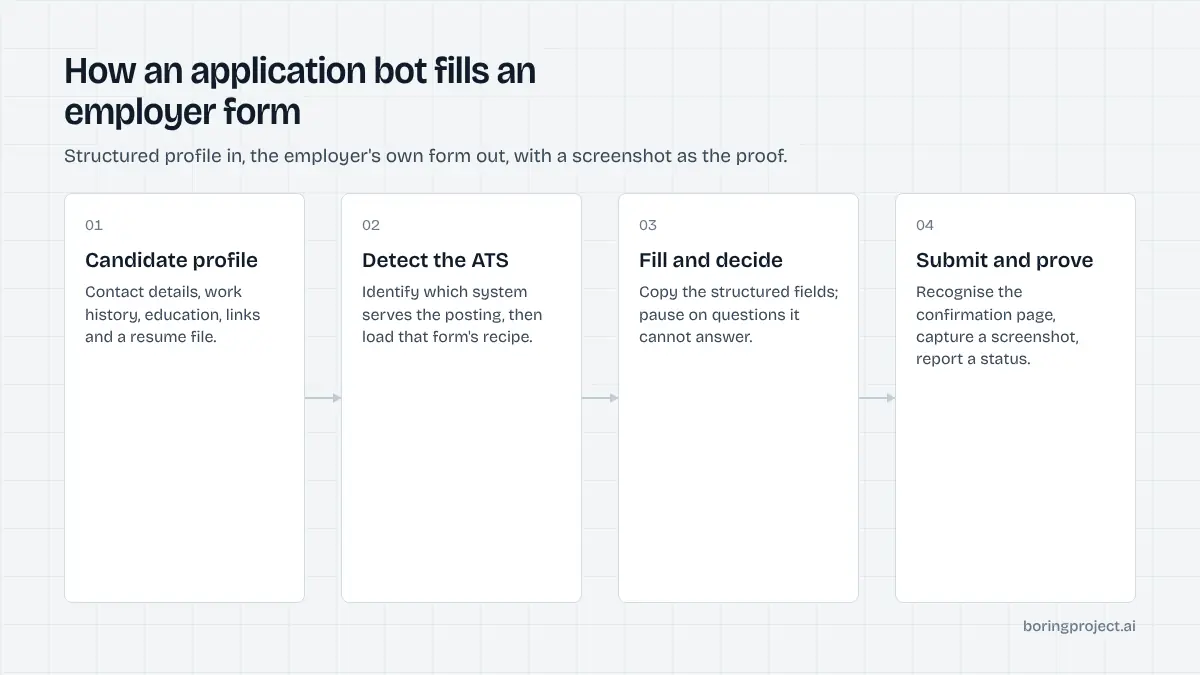
What the bot is really doing under the hood
The phrase "AI" hides a fairly mechanical process. Most of the work is form handling, and only a small part is language modelling.
Step one: reading the posting and the form
The bot loads the job URL and identifies which applicant tracking system is serving it. Greenhouse, Lever, Workday, iCIMS and the rest each lay out their forms differently, so the bot needs a recipe per system or a general approach that can inspect any page.
It then maps each field to something it knows about you. Name, email, phone and resume upload are simple. "Describe a time you handled conflict" is not, and how the tool treats that field is the first real quality signal.
Step two: deciding what to type
For structured fields the bot copies from your profile. For free-text and screening questions, it either uses stored answers you wrote earlier, drafts something from your resume, or stops and asks you.
The honest version is the last two combined: draft from real material, and pause when it does not have grounds for an answer. The dishonest version makes something up so the submission goes through. That is the single biggest difference between tools that look identical in a demo.
Step three: submitting and proving it
After pressing submit, a good bot captures the confirmation page, records the time and the job URL, and reports a status. The three outcomes that matter are submitted, needs your input, and failed. Anything that reports only "applied" with no evidence is asking you to take it on trust.
Where bots break, and what it costs you
Automation fails in predictable places. Knowing them lets you judge a tool from its error handling rather than its homepage.
Knockout questions answered wrongly
Many forms contain questions with a correct answer for the employer: authorisation to work, required certification, minimum years in a role. A bot that guesses "yes" to get past the gate can get you auto-rejected, or worse, advanced on a false premise. The mechanics are covered in our guide to how ATS screening questions and knockouts work.
Duplicates and wrong-fit submissions
Bots that pull from several boards often see the same job three times under different URLs. Without deduplication by employer and title, you apply three times and look careless. The same goes for location: an on-site role in a city you have never lived in is a wasted application and a mild annoyance to the recruiter who opens it.
Account risk and silent failures
Some tools operate inside your LinkedIn or Indeed session. That gives them access to Easy Apply style flows but also puts your account in the path of any rate limit or terms enforcement.
Tools that apply on the employer's own careers site avoid that exposure. We go deeper on the trade-offs in is auto apply safe.
The most expensive failure is the one you never see: a form that timed out, a CAPTCHA that was never solved, a required field left blank. If the tool marks these as success, you spend weeks waiting on applications that do not exist.
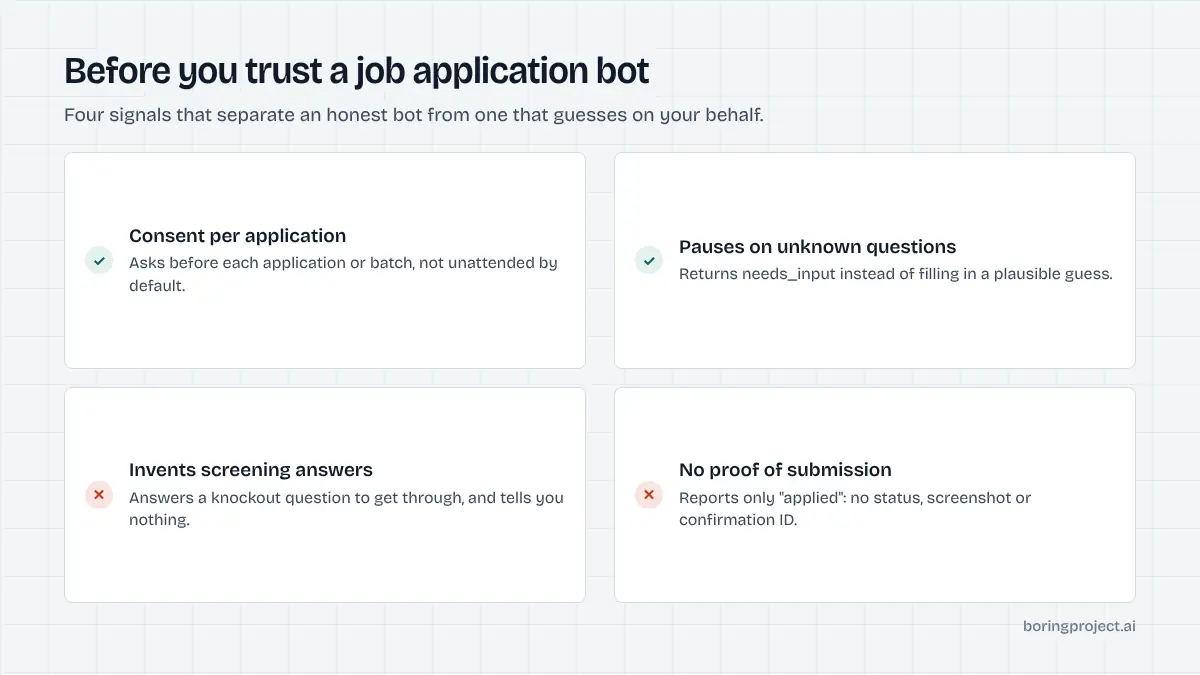
A checklist for picking one
You do not need to read source code to judge an ai job application bot. Ten minutes with a trial account and these questions will sort most tools.
Questions about honesty
- Does it ask before each application, or run unattended on a schedule you cannot inspect?
- When a screening question has no answer in your profile, does it stop or does it guess?
- Can you see and edit the stored answers it reuses?
If the answers are "unattended", "guess" and "no", keep looking. The bot will represent you in writing to employers, and you cannot correct what you cannot see.
Questions about evidence
- Is there a status per application beyond "applied"?
- Is there a screenshot or confirmation ID?
- Can you export the log to a spreadsheet?
Evidence is what turns a bot from a black box into a tool you can manage. It also lets you follow up accurately, because you know what was submitted and when.
Questions about targeting
- Can you filter by location type, seniority, salary floor and employer?
- Does it deduplicate across boards?
- Is there a daily cap you control?
A smaller, better-targeted stream beats a large undifferentiated one. The tool should make narrowing easy, not treat volume as the only metric.
Here is the short version as a table.
| Signal | Acceptable | Walk away |
|---|---|---|
| Consent | Per-application or per-batch approval | Fully unattended by default |
| Unknown questions | Pauses and asks you | Fills with a plausible guess |
| Proof of submission | Status + screenshot or ID | "Applied" only |
| Account use | Applies on employer site | Requires your LinkedIn login |
| Targeting | Filters you set, dedup built in | Applies to every match |
Treat the table as a floor, not a ranking. Two tools can pass every row and still differ in which ATS platforms they handle well, which is worth testing with the actual postings you care about.
Frequently asked questions
Is an application bot the same as an autofill extension?
No. An autofill extension pastes your saved details into fields while you watch, and you still press submit. A bot goes further: it opens the job, reads the form, answers the questions it can, uploads your resume, and submits on your behalf. Autofill saves typing; a bot replaces the whole session, which is why the quality of its decisions matters far more.
Will employers know a bot submitted my application?
Usually not from the form itself, because the submission arrives through the same ATS page a human would use. Employers notice indirectly: duplicate applications, answers that contradict the resume, or a location that does not match the role. A well-built bot avoids those signals by deduplicating, answering from your real profile, and declining jobs that fail your filters.
Can a job application bot answer screening questions for me?
It can answer questions whose answers exist in your profile, such as work authorisation, years of experience, or willingness to relocate. It should not guess the rest. Good tools pause and ask you when a question is new or ambiguous rather than inventing a response, because a fabricated knockout answer gets you rejected later or disqualified at offer stage.
How many applications should I let a bot send per day?
Fewer than the marketing suggests. The constraint is not the bot's speed but your ability to follow up and the fit of each role. A reasonable pattern is a tightly filtered feed, a daily cap you can review, and a weekly check of which postings produced replies. Volume without targeting mostly produces a longer rejection list.
What should I look for in a bot's reporting?
At minimum, a per-application status (submitted, needs your input, or failed), the exact job URL, the timestamp, and some proof of submission such as a screenshot of the confirmation page. Without those four things you cannot tell whether a silence means rejection or means the application never went through.
Are these bots safe to use with my accounts?
It depends on how they run. Tools that log into your personal LinkedIn or Indeed account and act inside it carry the most account risk. Tools that apply directly on the employer's careers page using your details, without touching your social accounts, carry less. Read how the tool stores your resume and credentials before you connect anything.
Next step
If you are evaluating how application automation works at the infrastructure level, or building a product that needs it, the simplest reference is the job application API that powers Search + Apply and Managed Applies. It requires candidate consent on every application, never fabricates screening answers, and returns a screenshot receipt with each status.