 The Boring Project
White Label Auto Apply for Career Platforms
White label auto apply lets a career platform offer one-click applications under its own brand while a third party does the ATS submission behind the scenes. This article explains what that means in practice, the choice between API and embed, how branding is handled, and the data ownership questions to settle before you sign white label job application software.
What white label means here
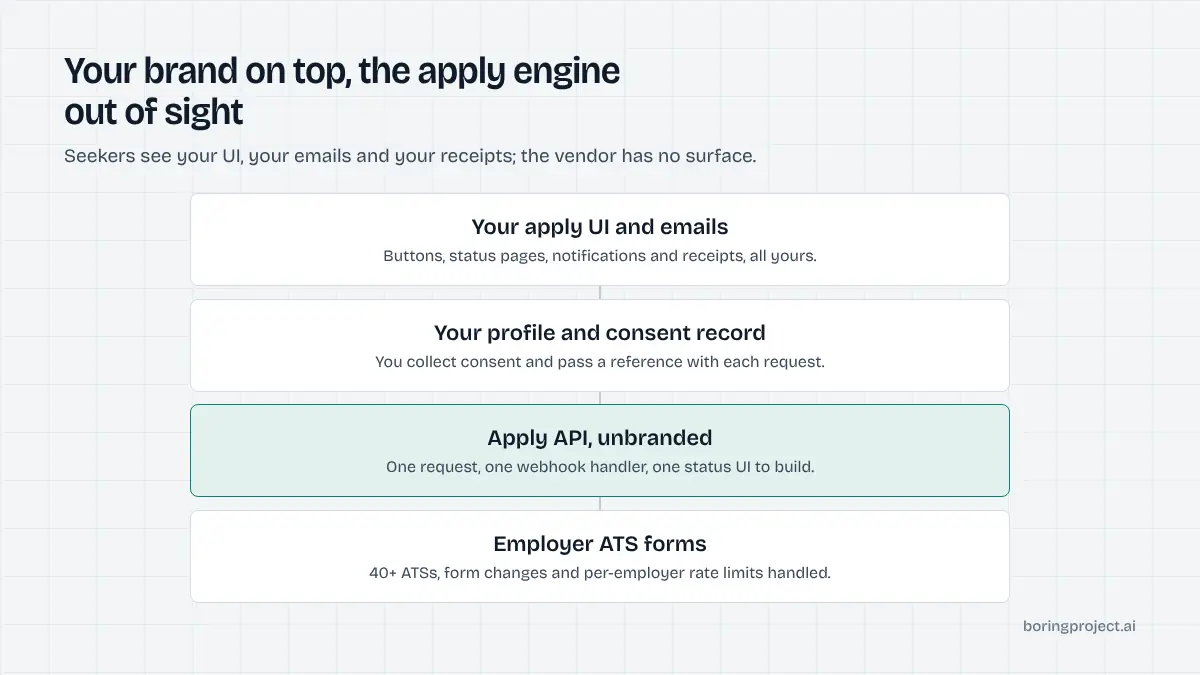
The term gets used loosely. For an apply capability it has a specific shape: your users never encounter the vendor. Everything in front of them is yours, and the vendor's work is visible only in your logs and your receipts.
The user's experience
A seeker on your platform clicks Apply on a listing. They see your form, your consent wording, your status screen and your notification when the application is submitted.
If the employer's form asks a question the profile cannot answer, they see that question in your UI. The receipt, a screenshot of the employer's confirmation page, appears in your tracker under your brand.
Nothing in that flow mentions a vendor. There is no redirect to a vendor domain, no vendor logo in the corner, no vendor email.
Where the vendor sits
Behind your server. Your backend sends a job URL, a candidate profile and a consent reference to the vendor's API.
The vendor detects the employer's applicant tracking system, fills and submits the form, and sends a webhook back with status and screenshot. From the employer's perspective the application came from the candidate, through their own form, because it did.
What is not white label
A tool that opens its own branded page in a new tab, or sends the candidate emails from its own domain, is not white label however it is marketed. Neither is a product that requires your users to create an account with the vendor.
If your users can name the vendor, you do not have a white label product. The test is simple: walk through the apply flow as a seeker and note every domain, logo and sender address you encounter.
API versus embedded widget
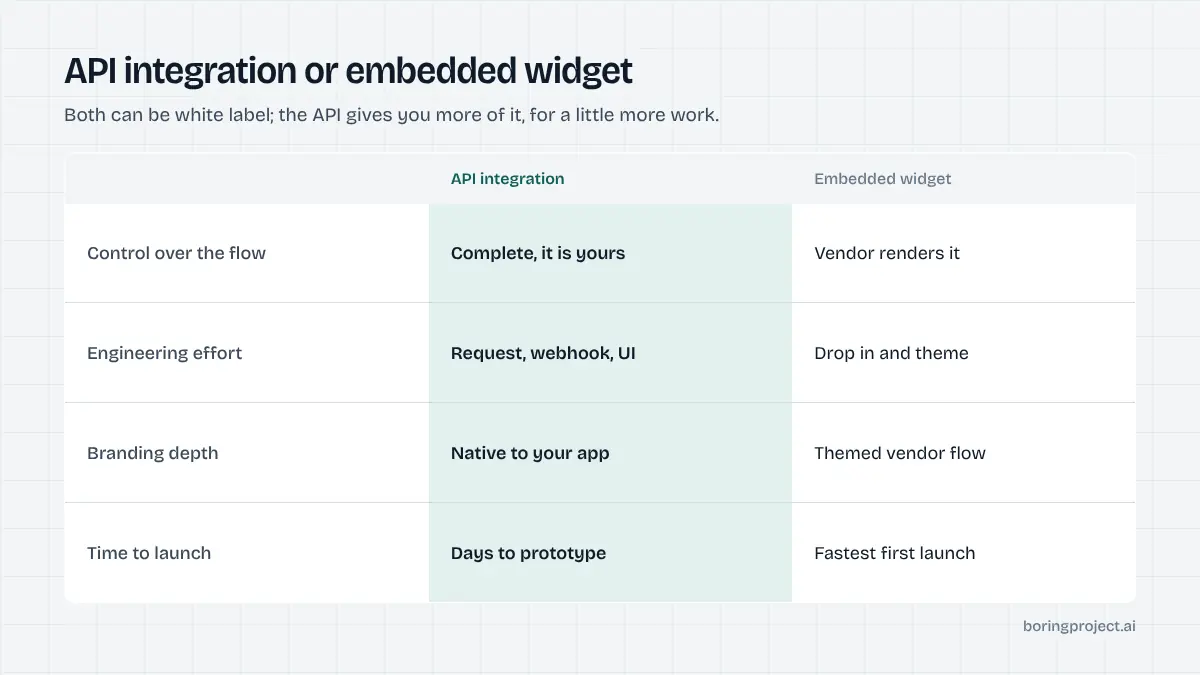
There are two common ways to deliver white label auto apply. They differ mainly in how much you build and how much you control.
The API route
You build the apply UI yourself and call the API from your backend. This gives complete control over design, profile collection, consent flow, and how statuses and receipts are presented.
It also means the integration lives in your codebase and evolves with your product. The engineering is small: one request, one webhook handler, one status UI. The technical walkthrough is in our developer guide to applying on jobs programmatically.
Choose this if you have engineers and you consider the apply experience part of your product rather than a feature you are renting.
The embedded route
Some vendors offer a themeable widget or hosted flow you drop into your pages. You set colours and logo; the vendor renders the form.
It is faster to first launch and needs less engineering. The cost is control: you cannot easily change the flow, the fields, or how needs_input is handled, and the look will always be "themed vendor" rather than native.
Choose this for a quick pilot or when you have no engineering capacity. Many platforms start here and move to the API once the feature proves itself. If you go this way, confirm that the widget can be swapped for a direct API integration later without migrating candidate records or receipts.
What both share
In either model the operational pieces are identical: the vendor handles ATS coverage, maintenance when employer forms change, per-employer rate limits, and receipt generation. Your responsibilities are the same too: candidate consent, profile quality, and deciding how to present outcomes.
The choice is about the surface, not the engine. For a worked example of the surface on a board, see how job boards add auto apply without building it.
Branding, data ownership and the contract
The product decisions are easy compared with the agreement for white label job application software. Settle these before launch rather than after the first dispute.
Branding scope
Define what carries your brand: the apply UI, notification emails, receipts shown to the seeker, and any reports. Confirm the vendor has no seeker-facing surface and no outbound communication to your users. If you will offer the feature to partners (employer clients, affiliate boards, coaching businesses), confirm that sub-branding is allowed and how it is metered.
Data ownership and use
Candidate profiles, application records, screenshots and consent logs should belong to your platform and your users. The vendor should process them only to perform applications you request, retain them only as long as you need for audit, and never use them to serve other customers or to train products that compete with you. Ask for this in writing and ask how deletion requests are handled end to end.
Metering and economics
Per-successful-application pricing is the natural fit for white label, because it produces a clean unit cost you can pass through to partners or fold into your own plans. Confirm what counts as a success (reaching the employer's confirmation page), that failures and closed jobs are not billed, and how needs_input resubmissions are treated. Avoid per-seat models; they do not map to how a platform's usage grows.
Frequently asked questions
What does white label mean for auto apply?
It means your users apply to jobs through your product, under your brand, and never see the vendor that performs the submission. The apply button, forms, status pages, emails and receipts are yours. The vendor supplies the engine that fills and submits employer ATS forms and reports results back to you programmatically.
Is an API the same as white label?
An API is the most complete form of it. Because there is no vendor-facing UI at all, everything the user sees is built by you. Some vendors also offer embeddable widgets that can be themed; those are quicker to launch but give you less control over the experience. Both can be white label; the API gives you more of it.
Who owns the application data?
You and your user should. Confirm contractually that candidate profiles, application records and receipts belong to your platform and the candidate, that the vendor processes them only to perform the applications you request, and that the data is not used to serve other customers or to build products that compete with you.
Can we resell the apply capability to our own partners?
Usually yes under a white label arrangement, since the brand on the experience is yours. Clarify in the agreement whether sub-licensing to partner boards, employers or affiliates is permitted, how their usage is metered, and whether their users' consent records are handled the same way as yours. Per-application pricing makes resale accounting simple.
How does consent work when the brand is ours?
Your product collects consent from the candidate in your own words and UI, and passes a consent reference with each application request. The vendor requires that reference and will not submit without it. You should store the consent text and timestamp on your side so you can produce it if asked.
How long does it take to launch a white label apply flow?
With an API, the core integration is a request, a webhook handler and a status UI, which a small team can prototype in days. Most of the calendar time goes into your own product decisions: profile depth, consent wording, how needs_input questions are shown, and reporting. An embedded widget is faster to first launch but has the same product decisions.
Next step
The Apply API is white label by construction: no seeker-facing vendor surface, webhooks and receipts into your system, per-application pricing you can pass through. Start with the API documentation to see the request and webhook shapes, then talk to us about branding and partner terms.