 The Boring Project
How to Auto Apply on Eightfold Job Applications
How to auto apply on Eightfold is a two-system problem: the platform puts an AI matching layer in front of the employer's real application form, so eightfold apply automation has to cover both the matching site and the ATS it redirects to.
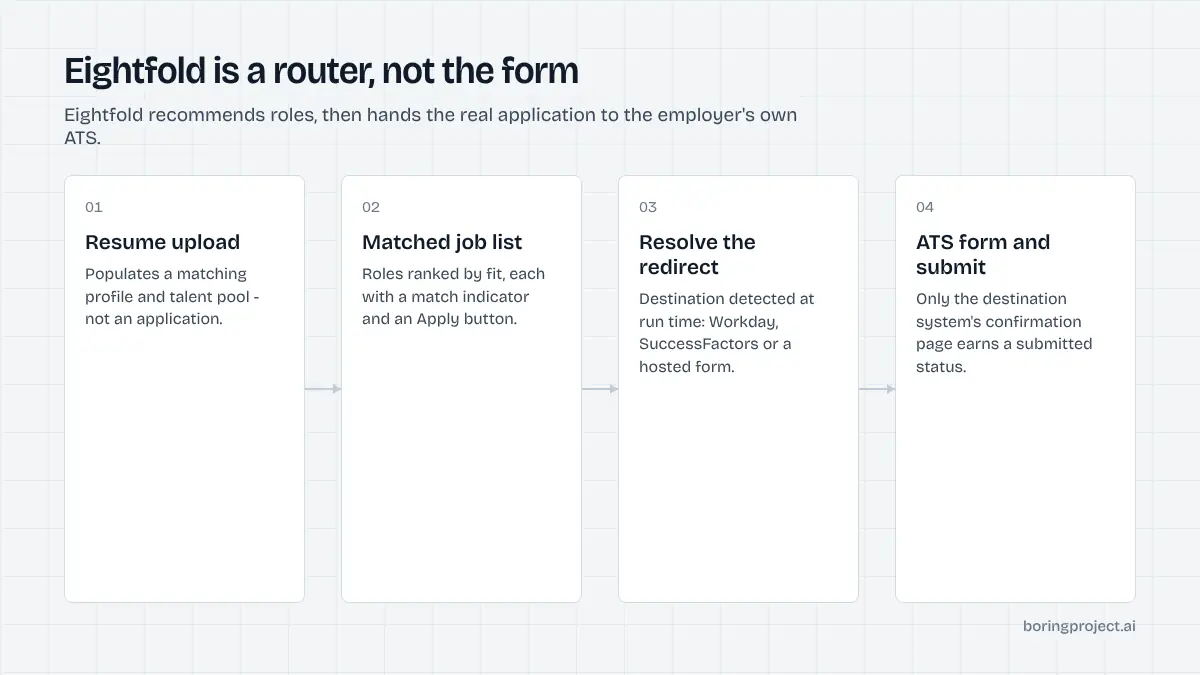
What an Eightfold career site actually is
If you have landed on a careers page that asks for your resume before it shows you jobs, and then ranks roles by how well you "match", you are probably on Eightfold. Large employers license it to personalise their careers site. It is a layer, not the system of record.
The matching layer
Eightfold's public positioning is around skills-based matching: you upload a resume or paste a bio, and the site recommends roles it thinks fit. The company describes this as looking beyond resume keywords to infer potential. For a job seeker, the practical effect is a personalised job list and a match indicator on each role.
None of this is an application. The upload populates a profile that the matching engine uses, and it may add you to the employer's talent community if you tick that option. The employer's recruiters can see and contact profiles in that pool, which is useful, but it is a sourcing feature rather than a submitted candidacy.
The redirect to the underlying ATS
When you click Apply on an Eightfold job card, one of two things happens. Some deployments keep you on an Eightfold-hosted form that posts the application into the ATS behind the scenes. Many redirect you to the employer's actual applicant tracking system, most often Workday or SAP SuccessFactors, where you complete the standard application for that system.
Eightfold has published material about augmenting Workday Recruiting with its career site, which is a strong hint about how common that pairing is. The point for automation: the form you need to fill is defined by the ATS, not by Eightfold. If the destination is Workday, you inherit everything described in our guide to auto applying on Workday, including account creation and multi-page forms.
What the candidate sees end to end
A typical path looks like this: careers home, resume upload prompt (optional), matched job list, job detail page with a match score, Apply button, redirect, ATS account step if required, form pages, confirmation. Some employers skip the upload prompt and show it as an optional side panel.
The visible confirmation at the end comes from the ATS. That is the artifact worth keeping, whether you apply by hand or through a tool.
Where automation breaks, and how to design around it
The hard part of how to auto apply on Eightfold is not CAPTCHAs or hostile markup. It is that the handoff between systems is inconsistent across employers, and a script written for one company's deployment will fail silently on the next.
Three failure points
First, the redirect target varies. One employer sends you to a Workday tenant, another to SuccessFactors, a third stays on an Eightfold-hosted form. Automation has to detect the destination at runtime rather than assume it.
Second, the profile upload creates false confidence. A naive bot uploads a resume, sees a success toast, and reports "applied" when nothing was submitted.
Status should be tied to the final confirmation page of the destination system, not to any intermediate step.
Third, screening questions live downstream. Eightfold rarely asks anything beyond contact details, but the ATS form behind it may ask about work authorisation, relocation, salary expectations or role-specific experience. Those answers must come from the candidate, not from a guess.
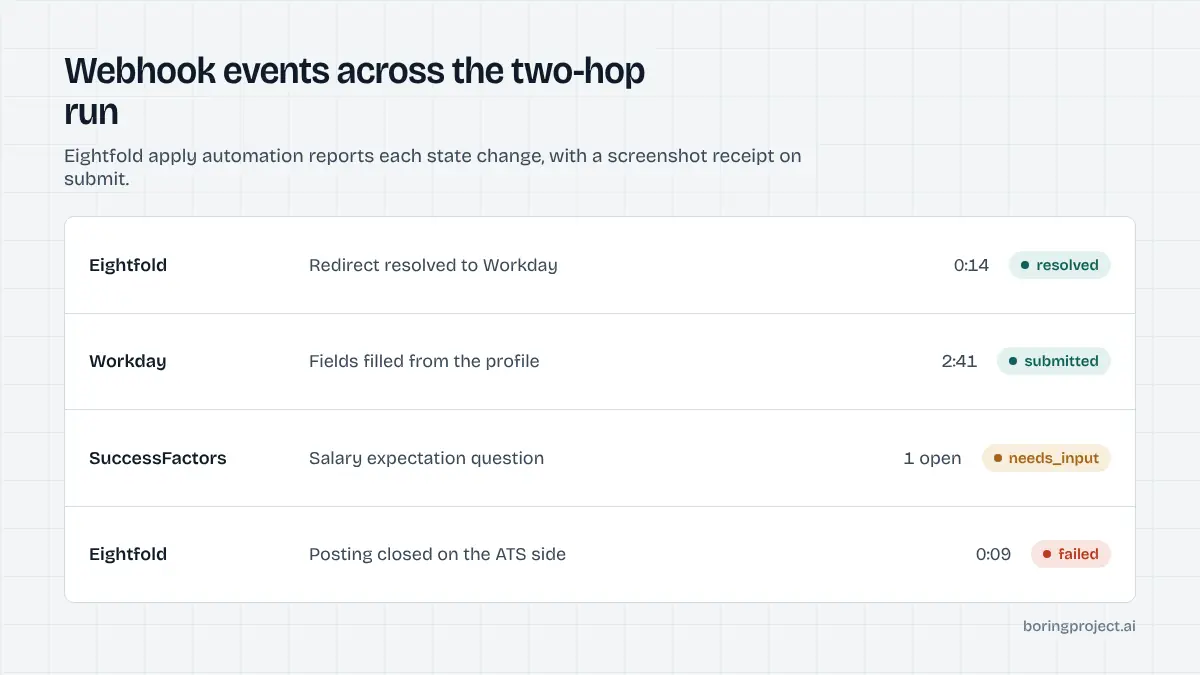
A sane architecture for the two-hop flow
The approach that holds up in production treats Eightfold as a router. The agent opens the job URL, resolves the real apply destination, then hands off to the integration for whichever ATS it finds. For a Workday tenant, that means the Workday flow; for SuccessFactors, the SuccessFactors flow; for an Eightfold-hosted form, a lighter single-page fill.
Each hop gets its own checkpoint: redirect resolved, account or guest path accepted, every required field filled from the candidate profile, confirmation page rendered. Only the last checkpoint earns a submitted status.
Anything the agent cannot answer from the profile should pause the application and ask, rather than fabricate. In The Boring Project's Apply API, that pause surfaces as a needs_input webhook with the specific question attached, and the application resumes once the answer arrives.
What a receipt should contain
For Eightfold specifically, a useful receipt includes the original Eightfold job URL, the resolved ATS URL, the ATS the agent detected, and a screenshot of the confirmation page. The combination lets a job seeker or an ops team verify in seconds that the application landed in the right place.
Rate limits matter here too. Large Eightfold customers are large employers with many open roles, and firing fifty applications at one tenant in an hour is a good way to get every one of them flagged. Per-employer throttles are not optional.
Applying by hand versus with a tool
For most people, Eightfold sites are pleasant to use manually. The matching is genuinely helpful for discovering roles inside a large company, and the final ATS form is the same one you would fill anyway.
When manual makes sense
If you are targeting one or two large employers, apply by hand. Upload your resume, review the matched roles, complete the ATS form carefully, and save the confirmation email.
You will also learn which ATS the company uses, which helps if you apply to other roles there later.
When automation makes sense
Automation earns its place when the volume is high or when you are building a product. A reverse recruiter handling twenty clients, a staffing agency pushing candidates into enterprise pipelines, or a job-search app that promises one-click apply all hit Eightfold sites regularly, because large employers are exactly who buys it.
In those cases, the two-hop design above is the difference between a reliable integration and a support queue. If you are evaluating a build, the API documentation describes how a job URL plus a candidate profile becomes a tracked submission with a webhook per state change.
A short comparison
| Approach | Handles redirect to ATS | Confirms submission | Risk of false "applied" |
|---|---|---|---|
| Manual | Yes, you follow it | You see the page | Low |
| Autofill extension | Partly, only if you click through | No | Medium |
| Cloud agent with ATS detection | Yes, automatically | Screenshot receipt | Low |
Frequently asked questions
Is Eightfold an applicant tracking system?
Not in the traditional sense. Eightfold is a talent intelligence platform that sits on top of a career site and often on top of an existing ATS such as Workday, SuccessFactors or Oracle. It handles matching, personalisation and talent networks. The record of your application usually ends up in the underlying ATS, which is why the final form can look different from the Eightfold pages you started on.
Do I need an account to apply on an Eightfold career site?
Usually not for the Eightfold layer itself. You can upload a resume and browse matched roles without logging in. Whether you need an account depends on the underlying ATS the employer uses. Workday, for example, asks you to create or sign in to a candidate account before you can submit, while some other systems accept a guest application.
Why does the job page redirect me to a different site when I click apply?
Because Eightfold typically presents the job and the match score, but the employer's system of record collects the application. The redirect takes you to that system, often on a different subdomain or domain. Any automation that stops at the Eightfold job page has not applied; it needs to follow the redirect and complete the destination form.
Does uploading my resume to Eightfold count as applying?
No. Uploading a resume feeds the matching engine and may add you to a talent network if you opt in, but it does not create an application for a specific job. You still need to click through to a role and complete the employer's form. Treat the upload as a search aid, not a submission.
Can an auto apply tool answer Eightfold screening questions for me?
Only with answers you have provided or that can be derived from your profile. Eightfold itself asks few questions; the screening questions come from the ATS behind it. A responsible tool uses your stored answers, flags anything it cannot answer as needs_input, and never guesses on eligibility, visa or salary fields.
How do I know an automated Eightfold application was actually submitted?
Look for evidence from the destination ATS, not the Eightfold page: a confirmation screen or email from the employer's system. A good automation service returns a screenshot of that confirmation and a status per application, so you can check without logging into every portal.
Next step
If you need Eightfold-fronted employers covered alongside the 40+ ATS platforms behind them, the Apply API resolves the redirect, fills the destination form, and returns a receipt per application. Start with the API documentation, or ask us about Managed Applies if you would rather send a CSV and get receipts back.